AI Chief of Staff: What It Does and How to Build Your Own


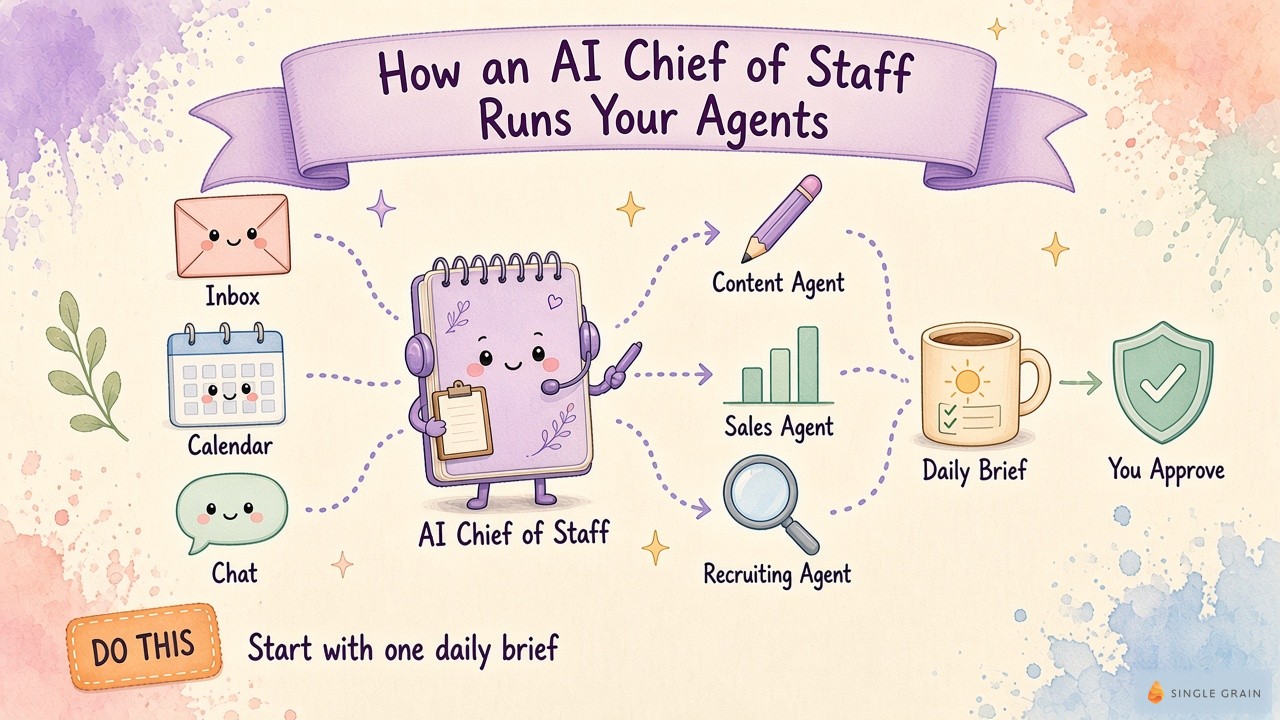
An AI chief of staff reads your inbox, calendar, and team chat, keeps every agent pointed at your goals, and hands you a short list of decisions each morning. It never forgets a commitment, and it keeps working while you sleep. Sounds like a dream come true, right?
For me, this dream became a reality. Get this: my AI chief of staff actually fixed a problem I accidently created myself! As I added more agents to my business, each one still needed my context, my approval, or my answer before it could move. More automation was supposed to free up my day, yet I had become the bottleneck for every decision. Whoops.
My fix was one manager agent (yes, you guessed it… my chief of staff) whose whole job is to coordinate the rest.
The best part? Building an AI chief of staff is simpler than it sounds. You start with one agent, give it your goals and a short rulebook, and let it coordinate a few narrow jobs. Over time, it becomes the manager layer of your AI operating system, the set of roles, rules, and daily rhythms your agents follow.
Below, I’ll walk through the seven-step build, the first routines to copy, and the numbers to watch before you give an agent more trust.
TL;DR
- An AI chief of staff is a manager agent. It holds your goals and context, hands work to specialist bots, checks their output, and brings you only the decisions that need a person.
- It covers coordination, and people keep judgment. The AI version tracks commitments, routes work, and drafts at any hour, while humans keep relationships and high-stakes calls.
- You can build one in seven steps. Pick one job, write the context, connect only the tools it needs, set approval gates, schedule it, add specialists, and turn every correction into a rule.
- Measure it like a new hire. Track each agent against a daily target, watch how often you repeat the same feedback, and ask whether your team would fight you if you took it away.
TABLE OF CONTENTS:
- What Is an AI Chief of Staff?
- Why Founders Need One Now
- How It Fits Into an AI Operating System
- Lessons From 4 Real Builds
- How to Build an AI Chief of Staff in 7 Steps
- How to Measure Results Like a New Hire
- The Cost of an AI Chief of Staff
- Best AI Chief of Staff Tools for Founders
- Common Mistakes When You Build a Chief of Staff AI Agent
- One Bot, One Brief, One Yes
What Is an AI Chief of Staff?
An AI chief of staff is an AI agent that works as your operating partner. It holds your goals, priorities, and decision history, runs scheduled routines in the background, assigns work to other bots or tools, checks the results, and stops for your approval before anything leaves the building. You get a daily brief and a short list of decisions.
A regular chatbot waits for you to type. A chief of staff agent keeps working while you’re in meetings, at the gym, or asleep. I once described this kind of agent as “a worker you run rather than a chat window you open,” and the definition still holds.

In my own setup, a person sits at the top, and the chief of staff is the main bot that hands out the work to every team bot below it.
The role borrows from a human chief of staff, the senior operator who turns an executive’s priorities into assignments and follow-through. The AI version does the routing, tracking, and reminding at machine speed. It also remembers every rule you give it, which a busy human never fully can.
Most of the confusion around the term comes from how close it sits to other AI helpers. A side-by-side view clears it up fast.
AI Chief of Staff vs. AI Executive Assistant vs. Chatbot
Each of these tools solves a different problem, and founders often buy the wrong one first. Here’s how they compare, plus the human role behind the AI version.
| Chatbot | AI executive assistant | AI chief of staff | Human chief of staff | |
|---|---|---|---|---|
| Main job | Answers the question you type | Manages your inbox, calendar, and meeting notes | Coordinates agents and workflows toward your goals | Turns your priorities into team assignments |
| Works when you’re away | No | Partly, on scheduled tasks | Yes, on routines and checks | Yes, during working hours |
| Memory of your business | Short chat history | Your schedule and contacts | Goals, decisions, rules, and feedback logs | Learned over months |
| Manages other agents | No | Rarely | Yes, by design | Manages people |
| Best for | Quick drafts and research | One person’s admin load | A leader running many workflows | Judgment calls and politics |
An AI executive assistant helps one person manage their day. By comparison, an AI chief of staff helps a leader run a company, because it manages the work of other agents and keeps every workflow pointed at the same goals.
AI Chief of Staff vs. a Human Chief of Staff
The difference shows up in how each one learns. A human chief of staff reads the room and adjusts without being told, while an AI agent needs every workflow, rule, and edge case written down. I’ve hired great human executive assistants and chiefs of staff, and both roles still earn their place.
The upside of the AI version is scale. Humans scale linearly, with one brain, one salary, and one set of working hours. Once the foundation exists, giving the next workflow or teammate a fully configured agent costs little, although my own team needed two hard months to build that foundation.
Use the AI version for coordination, tracking, and first drafts. Keep people on judgment, relationships, and anything with real downside.
With the definition settled, here’s why a founder should care right now.
Why Founders Need One Now
Founders hit the same wall once they start using agents. When I spun up separate bots for content, sales, and other jobs, I quickly became the bottleneck for every decision. If one person has to route every output, more bots only create more waiting.
An AI chief of staff fixes the routing problem. It reads the outputs, decides what runs next, flags what needs a follow-up, and saves your attention for the few calls only you can make.
A Second Set of Eyes on Every Commitment
The value shows up in small, expensive moments. A good daily review reads your email, Slack, calendar, and automation handoffs, then lists open commitments with a link to each source. Mine once flagged a contract I wasn’t even on, which reused a template from another deal. A mistake like this can cost a client’s trust on day one.
In my AI operating system walkthrough, the review splits into three tabs for the daily review, content, and sales calls. Every open item ends with an owner and a next action, so I can hand it off in seconds.
It Spreads Context Across Your Team
The second payoff comes when your chief of staff moves into the tools your team already uses. Let me explain with a personal example.
When I added my chief of staff bot (I call him Alfred) to Slack, one of our executives immediately asked it where the biggest drop-off sat in the funnel for ClickFlow, our AI search engine optimization (SEO) product. Because the bot was connected to our Mixpanel data through a Model Context Protocol (MCP) connection, it pulled the numbers and pointed to the problem.

Other teammates then joined the thread and started working with the bot directly. A smart agent who knows your goals turns into a shared resource, and your team learns to train it instead of waiting on you.
Ask yourself one question. “How many decisions this week waited on me only because nobody else had the context?” That number is the work a chief of staff can take back.
So where does this agent sit in the rest of a company’s AI setup?
How It Fits Into an AI Operating System
A chief of staff is one role inside a larger AI operating system. One person approves, the chief of staff assigns and reviews the work, and specialist agents each own one narrow job. Approval rules, daily checks, and the rest of the operating system sit around this role, so this guide stays on the chief of staff itself.
The role carries the same weight on any platform. I posted this list of my top ten favorite Grok Bots on X, and the chief of staff sat at number one. The full set of Grok Bot use cases I run every week shows the kinds of specialists a chief of staff can manage, and clear rules on which bots can read, draft, or send keep the setup safe.
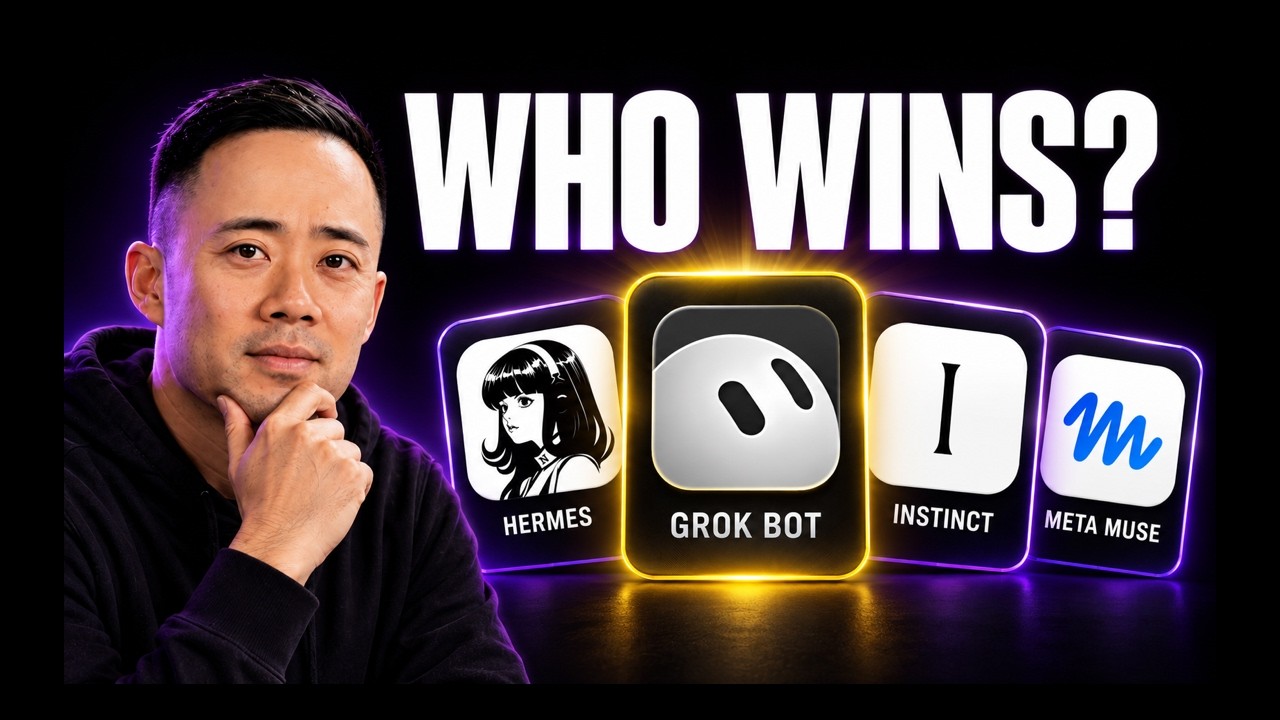
After testing four of the hottest agents side by side, my conclusion was simple. You ultimately want a platform with its own chief of staff bot, one able to manage every bot inside it and even other tools like Codex.
Real builds show what works faster than any diagram, so here are four lessons to borrow.
Lessons From 4 Real Builds
My own chief of staff went through four versions in one year. Each version taught a lesson you can apply on day one.
Lesson 1: Give Every Agent One Shared Source of Truth
Agents that work alone drift apart. When I ran three agents on OpenClaw, with Oracle on SEO, Flash on content, and Alfred as chief of staff, each one was excellent alone and clueless as a group. The fix was one shared folder of markdown files every agent read before each run, with Alfred curating it and updating priorities from a short morning voice note.
Lesson 2: Put the Chief of Staff Where Your Team Works
A chief of staff locked in your personal chat helps only you. Moving Alfred into Slack turned it into a resource my leadership team could question and train, which I describe on Marketing School. Give every agent a visible trust level, too, because trust decays as your product, buyers, and priorities change.
Lesson 3: Connect Memory, Tasks, and Call Data
An operator needs more than chat history. I posted this Hermes chief of staff playbook with twelve jobs, built on Slack threads, Linear tickets, Obsidian memory, and connections into Granola, Gong, and HubSpot. Specialist agents sat underneath, so one briefing reached every agent.
Lesson 4: Pick a Platform Built for Routines
A chief of staff saves the most time when it runs on a schedule. Grok Bot is my daily driver for this reason, and the Grok Bot templates I share let anyone import a working setup instead of starting blank. Other agents fit other jobs, which my comparison of OpenAI Dots, Grok Bot, and Meta Muse breaks down.
Those lessons shape the build order below, which works on any platform.
How to Build an AI Chief of Staff in 7 Steps
You can build a working AI chief of staff in seven steps. First pick one job, then write the context, connect the tools, and set the gates. After that, schedule it, add specialists, and turn every correction into a rule. Let’s start with the job.
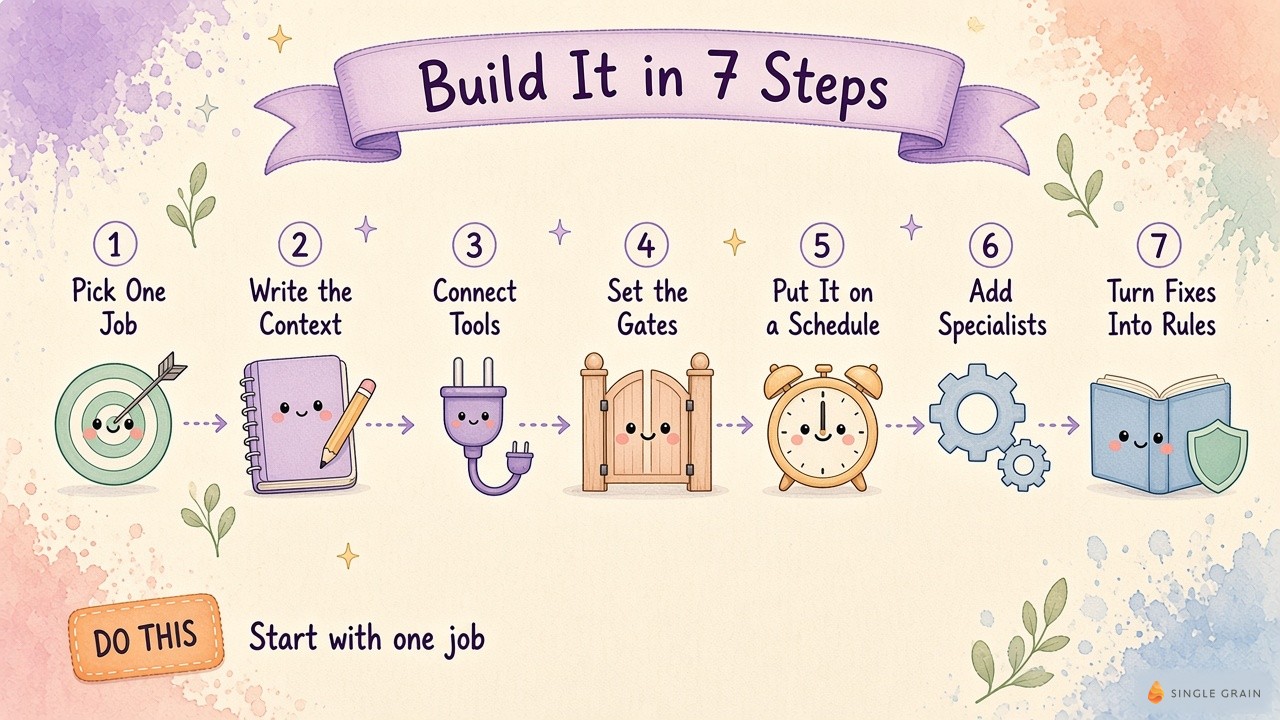
1. Pick One Job Close to Revenue
Start with one high-value workflow, such as weekly reporting, content production, SEO, sales calls, or ad creative. Pick the one closest to revenue, because improvement shows up in numbers you already track. Resist the urge to wire up everything at once.
A good first chief-of-staff job for most founders is a daily brief. It touches your inbox, calendar, and team chat without sending anything. You’ll learn what context the bot lacks before you trust it with anything external.
2. Write the Context Files
Your bot needs a written version of how you think. Give it a short set of files covering your goals, current priorities, decisions with the reasons behind them, voice, and examples of great output. I log my decisions in Obsidian so the system can see how my thinking changed over time.
Recency carries as much weight as content. A decision from last month should beat one from three years ago, so give old facts an expiry date, the same way you’d expire stale customer relationship management (CRM) facts before an agent acts on them.
| Pro-Tip |
|---|
| Keep your priorities in one plain file the chief of staff rewrites for you. Send it a short voice note each morning, and every bot reading the file shifts its next run toward your top priorities. |
Once the context exists, the bot needs a way to see your real work.
3. Connect the Minimum Set of Tools
Ask one question. What does the agent need to see to do this one workflow well? A daily brief needs your email, calendar, and Slack. A sales workflow needs your CRM system and call recordings, such as HubSpot, Gong, or Granola, and skips your design files.
Call data pays off twice, because my team also uses Grok Bot to turn sales calls into timestamped article briefs. Every connector you add is context the agent gains and surface area you have to secure. Most agent platforms connect tools through MCP, an open standard for connecting AI assistants to the systems where your data lives. My team connects ours through SingleBrain Gateway, so one key works across Claude, Cursor, and Codex.
4. Set Approval Gates and the 1-3-1 Rule
Decide where the bot stops and waits for you. An agent can draft an email freely, while sending one needs a human gate. Client contracts and compensation data need tighter walls than blog drafts.
Run two modes. With the first mode, the bot drafts, you approve, and you send. The second mode lets the bot send on its own and improve through the feedback loop, which I only allow for low-risk work like sponsorship replies after it earns trust. For big changes, use a 1-3-1 rule, where the bot sends one change, three options, one recommended pick, and a risk level, then waits for your yes.
| Pay Attention |
|---|
| Every external action should require your approval until the bot earns trust on a narrow, low-risk job. The more confident an agent sounds, the more you should verify its work. |
With gates in place, you can let the bot run without hovering.
5. Put It on a Schedule
A chief of staff saves you the most time when it works before you ask. Set a morning brief, a midday or afternoon check, and a weekly review as scheduled routines. A check twice every weekday catches drift early, and moving from one-off chats to recurring agent jobs on a real schedule is the shift where it starts saving you time.
| Starter prompt for an AI chief of staff morning brief |
|---|
| You are my chief of staff. Every weekday at 7:30 a.m., read my email, calendar, and Slack from the last day. List my open commitments, such as unanswered requests, pending approvals, and blocked work, and link each one to its source. Then list today’s three decisions only I can make, with your recommended pick and a risk level for each. Suggest an owner for every follow-up. Draft only. Never send, accept, or change anything without my exact yes. |
If your team already works in Claude, Claude Duet handles morning briefs on a similar pattern. Run the brief for a week before you add anything new. You’ll see quickly which sources it misreads and which context files need more detail.
6. Add Specialist Bots Under Your Chief of Staff
Once the brief works, give the chief of staff a team. Build narrow specialists, each with one job and a written daily target, then let the chief of staff assign work and review receipts. A daily target works as a definition of done, so write agent job cards before you hand out autonomy.
Move each proven specialist into Slack so your team can use it. For example, my Talent bot screens AI-native hires, a pre-call agent preps sales call briefs, and a visibility routine checks whether AI assistants recommend us. The chief of staff keeps them all pointed at the same priorities.
7. Turn Every Correction Into a Rule
Your bots will repeat mistakes until each fix becomes a written rule they read before they work. Log every correction the same day with the exact words, the asset involved, and the matching rule. Give every rule an ID, a reason, and a tag naming the bots it covers.
I posted this correction-to-rule loop on X after one hundred ninety corrections in three weeks turned into ninety-nine rules. A Bot Improver checks the rules daily. Every Monday, my chief of staff fills a thirty-minute review from the logs, and we confirm, add, or retire rules.
| Starter prompt for a weekly rules review |
|---|
| You are my chief of staff. Read this week’s correction log and the current rules file. Group the corrections by rule. Mark each one new, repeat, or already covered. For every repeat, rewrite the rule so it’s more concrete. Propose rules to add or retire, and give me a short table I can approve in thirty minutes. Change nothing until I say yes. |
Start with the last three corrections you gave your AI and turn each one into a rule. Next comes the part most guides skip, which is proving the system works.
How to Measure Results Like a New Hire
Measure an AI chief of staff the way you’d measure a new hire. Each bot needs a daily target, a weekly number, and a clear record of how often you had to step in. If those numbers improve while your approval time drops, trust can grow.
These are the checks to watch, along with what a healthy result looks like.
| Metric | How to track it | What good looks like |
|---|---|---|
| Daily target hit | Twice-a-weekday check per agent | Most agents hit target without help |
| Repeat feedback | Correction log, marked new or repeat | Trending toward zero |
| Weekly number | One business metric per agent | Moves in the right direction |
| Decisions waiting on you | Items flagged for you in the daily brief | A short list you clear in minutes |
| Cost per week | Token and subscription spend by workflow | Known and justified by results |
Repeat feedback deserves the closest watch. Aim for zero, because a repeat means a rule failed to stick.
Before you expand past your first team, ask three questions. Which workflow got measurably better, what does it cost per week to run, and would the team fight you if you took it away? If you can’t answer all three, you’re not ready to scale yet.
Founders ask me about cost more than anything else, so here are the numbers.
The Cost of an AI Chief of Staff
An AI chief of staff costs whatever its models, tools, and setup time add up to, and the biggest lever is how you pay for models.
When I ran everything through metered application programming interface (API) tokens, my bill climbed into the thousands a month. Subscription access through OpenAI sign-in and the Claude command-line tool brought it to around $200 a month for the same work.
Model routing is the second lever. Send 80% to 90% of the work, like summaries, tagging, first drafts, and internal lookups, to cheaper open-source models. Save frontier models for the 10% to 20% that needs them, like client-facing output and complex reasoning.
The third cost is your time. The first stretch is messy, and you’ll babysit the bot more than it saves you at the start. Set token budgets per team, log which workflows get used, and review spend weekly so one department can’t burn a month of budget in a week.
| Action Step |
|---|
| Before you buy anything, write down what you spend on the work your chief of staff would take over, such as hours on weekly reports or follow-ups. Compare it with your monthly model and tool bill after thirty days. |
Now for the tools themselves.
Best AI Chief of Staff Tools for Founders
The best AI chief of staff tool for a founder is the one where you can run scheduled routines, connect your real systems, and manage other bots from a single place. In practice, you’ll combine an agent platform with a memory layer, a task tracker, and your call and CRM data.
Here’s a proven stack by layer, using the tools my team runs today.
| Layer | Tools I use | Role in my setup |
|---|---|---|
| Agent platform | Grok Bot | Chief of staff bot plus team bots in Slack on scheduled routines |
| Daily review | ChatGPT with Dots | Open commitments across Gmail, Slack, calendar, and Codex chats |
| Earlier operators | OpenClaw, Hermes | Alfred in Telegram and Slack, then the Hermes chief of staff playbook |
| Builds | Claude Code, Codex | Deeper builds the chief of staff can hand off |
| Memory | Obsidian, shared markdown files | Decisions, priorities, and rules every bot reads |
| Tasks | Linear | Tickets the agent opens and routes back for review |
| Calls and CRM | Granola, Gong, HubSpot | Meeting notes, call history, and deal context |
| Connections | SingleBrain Gateway | One secure key for tools across agents |
Pick the agent platform first, because it decides how scheduling, approvals, and team access work. My breakdown of how top marketers run AI agents daily shows how I split jobs across platforms.
Memory deserves extra care. My team’s memory files once ate about 40% of the context window, and agents pulled the wrong notes at the wrong time. The fix is one shared brain for every AI agent with strong retrieval, because memory is raw material and retrieval is the operating layer.
Even with a great stack, a few mistakes show up in almost every build.
Common Mistakes When You Build a Chief of Staff AI Agent
The same five mistakes show up again and again in chief of staff AI agent builds, mine included. Each one has a simple fix.
- Agents built in silos. Smart bots that never share context work like employees in soundproof rooms. Give them one shared source of priorities and feedback.
- Overstuffed memory. More context can make output worse when it crowds the window. Curate long-term memory and let retrieval pick what each job needs.
- Blind trust in confident output. One of our agents once “improved” a live website by swapping its call-to-action links to a different URL. Verify after every change with automated checks.
- Fixed-answer work sent through a model. Let models handle judgment, synthesis, and drafting, and let scripts handle anything with a fixed answer.
- A company-wide launch on day one. Launch with one or two teams, fix what breaks, then expand once they can’t live without it.
Security belongs on this list too. Agents that browse the web and touch your CRM face real attack risks, and the National Institute of Standards and Technology (NIST) AI Risk Management Framework is a solid outside reference when your security team asks how you manage them. Anthropic’s guide to building effective agents also backs the simple-first approach, with complexity added only when it pays off.
Avoid these five, and the rest of the build gets much easier.
One Bot, One Brief, One Yes
An AI chief of staff works best when it starts small. Give it one daily brief, one clear set of priorities, and one approval gate, then let it earn more responsibility week by week as the numbers improve.
If you want help building this for your team, my team at Single Grain designs agent workflows, approval gates, and guardrails through our AI transformation services. Reach out, and we’ll help you pick the first job your chief of staff should own.
Frequently Asked Questions About AI Chiefs of Staff
-
What is an AI chief of staff?
An AI chief of staff is a manager-level AI agent for founders and executives. It keeps your goals and decisions in memory, runs routines like a morning brief on a schedule, assigns work to specialist bots, reviews what they produce, and asks for your approval before anything external goes out.
-
How do you build an AI chief of staff?
Start with one daily job, like a morning brief. Write short context files with your goals, priorities, and past decisions, then connect only the tools the job needs. Add approval gates, put the routine on a schedule, add specialist bots once it works, and turn every correction into a written rule.
-
What is the best AI chief of staff for a founder?
Choose an agent platform that runs scheduled routines, connects to your real tools, and can manage other bots. I use Grok Bot as my daily driver for my chief of staff and team bots, with ChatGPT and Dots for my daily review. Test any platform on one recurring job first.
-
How do you build a chief of staff AI agent that manages other agents?
Give one agent the manager role and keep every other agent narrow. Each specialist gets one job, a daily target, and a receipt for finished work. The manager reads shared priorities, assigns work, checks results twice a day, and sends you big changes with three options and one recommended pick.
-
Can an AI chief of staff replace a human chief of staff?
Only in part. An AI chief of staff handles routing, tracking, reminders, and first drafts at any hour, and it scales across workflows at little extra cost. A human still reads the room, handles relationships, and makes judgment calls. Most founders get the best result when the AI version supports the human role.
-
How much does an AI chief of staff cost?
Cost depends mostly on how you pay for models. My bill climbed into the thousands a month on metered API tokens, then fell to around $200 a month on subscription access for the same work. Routing routine tasks to cheaper models and setting team token budgets keeps spending predictable.
-
Is an AI chief of staff the same as an AI executive assistant?
The two overlap in scope. An AI executive assistant manages one person’s inbox, calendar, and meeting notes. An AI chief of staff coordinates work across many bots and workflows, tracks commitments, and keeps everything tied to company goals. Many founders start with assistant tasks and grow into the chief of staff role.

