

What an AI Sales Assistant Should Do Before Every Sales Call


Your very own AI sales assistant promises to give you the kind of support that used to belong only to top performers with a great sales ops team behind them… or so you heard. Does it really pull together what’s happening in a deal, flag what matters, and get your team ready for the conversations that move revenue? If so, then you’re probably wondering, “How do I get my hands on one of these bots?!”
Right now, sales and marketing leaders are flocking to AI sales assistants, because better prep means sharper calls, faster deals and less time lost to admin. But, how legit are they? Should you invest in one?
My team uses a bot called Pre-Call Intelligence that reads our calendar invites, CRM, email thread conversations, Slack mentions, and past call notes, then hands the rep a short decision card. Reps walk in knowing where the deal stands and what needs deciding, and managers stop chasing updates. It’s read-only too, so it was easy to roll out.
In this ultimate guide, I’ll explain what an AI sales assistant is, what it should do before every sales call, exactly how my read-only setup works, and what to look for in AI sales assistant software before you buy.
TL;DR
- An AI sales assistant handles the prep and admin around selling. Research, call briefs, CRM context and follow-up drafts are its sweet spot.
- Call prep is the safest place to start. A read-only assistant can see everything and change nothing, so connecting it to your CRM and inbox is an easy call.
- The output should be a short decision card. It tells the rep where the deal stands and what needs to be decided on the call.
- Buy for permissions before features. Look for read-only access, linked sources, a short brief format and follow-ups that land in drafts.
TABLE OF CONTENTS:
- What Is an AI Sales Assistant?
- Why Call Prep Is the Best First Job for an AI Sales Assistant
- How AI Sales Call Prep Works Before a Big Meeting
- What Goes on a Decision Card
- Pre Call Planning With an AI Sales Assistant
- AI Meeting Prep Beyond Sales Calls
- What to Look for in AI Sales Assistant Software
- How My Team Runs Pre-Call Intelligence at Single Grain
- Give Your Reps a Read-Only Assistant First
What Is an AI Sales Assistant?
An AI sales assistant is software that supports your sellers by doing the research, preparation and admin work around each deal. It pulls context from the tools your team already uses, summarizes it and prepares the next piece of work for a human to finish.
People often use “assistant” and “agent” interchangeably, but the difference matters when you’re deciding what to buy.
- AI sales assistant works alongside a rep, preparing briefs, notes and drafts while the rep makes the calls and sends the emails.
- AI sales agent acts on its own, often sending outreach or booking meetings with little review, which raises the stakes on every mistake.
My team learned this lesson on the outbound side, where an AI SDR can break in expensive ways. An assistant keeps the human in charge of every customer-facing move, and the AI does the legwork.
What Jobs Does an AI Sales Assistant Handle?
The most common jobs for an AI sales assistant include:
- Account research. Company news, open roles and context pulled from company intelligence sources.
- Call prep. A brief on the deal, the attendees and the open questions before a meeting.
- CRM context. A summary of past activity so nobody has to scroll through months of notes.
- Follow-up drafts. A recap email written after the call and left for a person to review.
Of all those jobs, one stands out as the place to begin: Call prep. Let me explain.
Why Call Prep Is the Best First Job for an AI Sales Assistant
Call prep is high value and low risk. The meetings that matter most get better, and the assistant never needs permission to change a record or email a customer.
If you run marketing and sales together, call prep is one of the easiest places to start with AI, because nobody has to hand it a send button. Since the bot can read everything and change nothing, hooking it up to the CRM and inbox was an easy decision for my team.
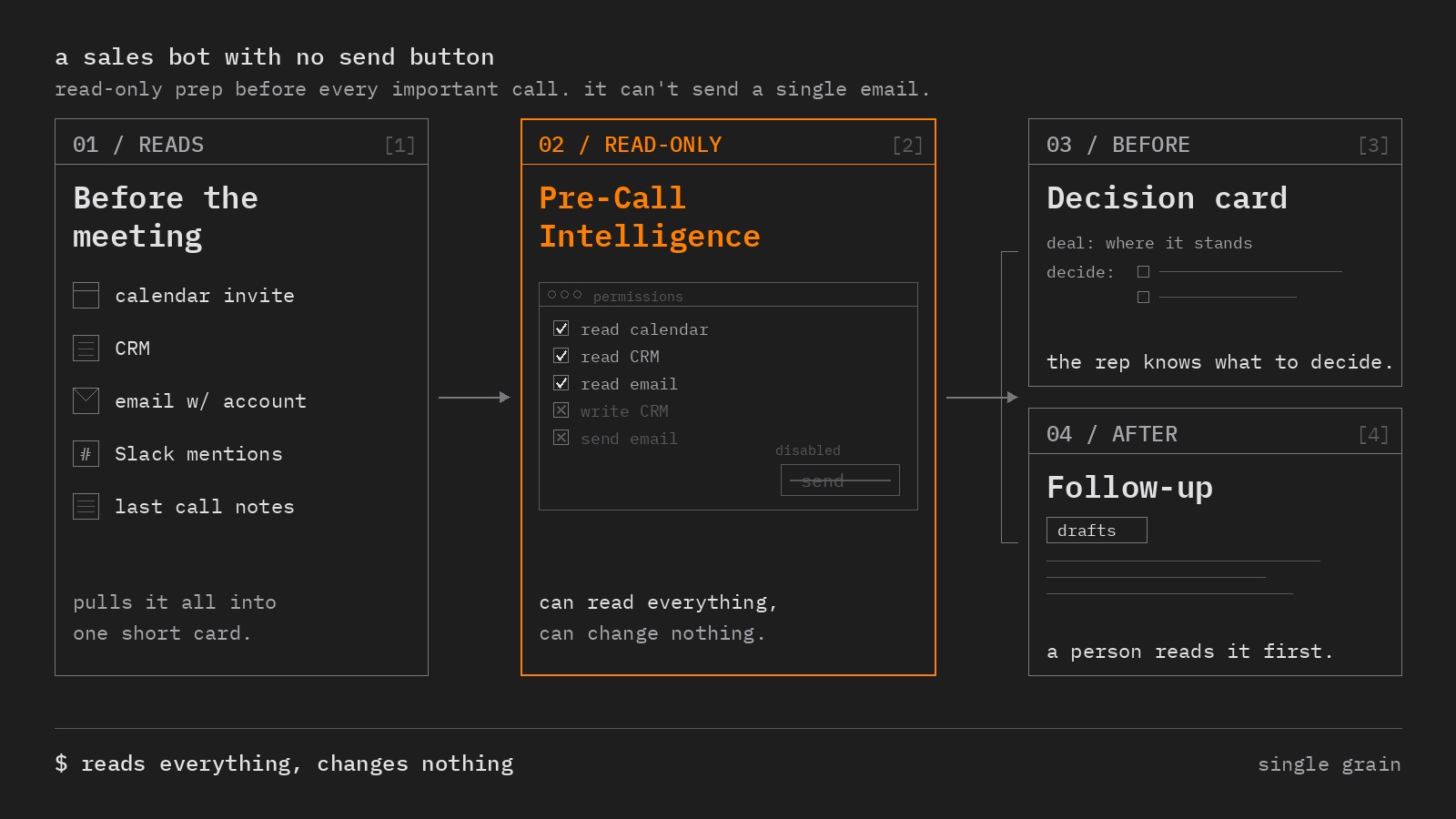
Most of my bots start read-only like this. A bot earns more access only after it shows a track record, which is a habit I’d recommend to any team rolling out its first assistant.
There’s also a cost to bad prep that rarely shows up in a dashboard. A rep who walks in cold asks questions the buyer already answered, misses who actually signs, and leaves without a clear decision.
Here’s how my assistant prevents this, one step at a time.
How AI Sales Call Prep Works Before a Big Meeting
Five steps run around every important call. The assistant reads the invite, pulls CRM and email history, checks Slack and past call notes, writes the decision card, and drafts the follow-up afterward.
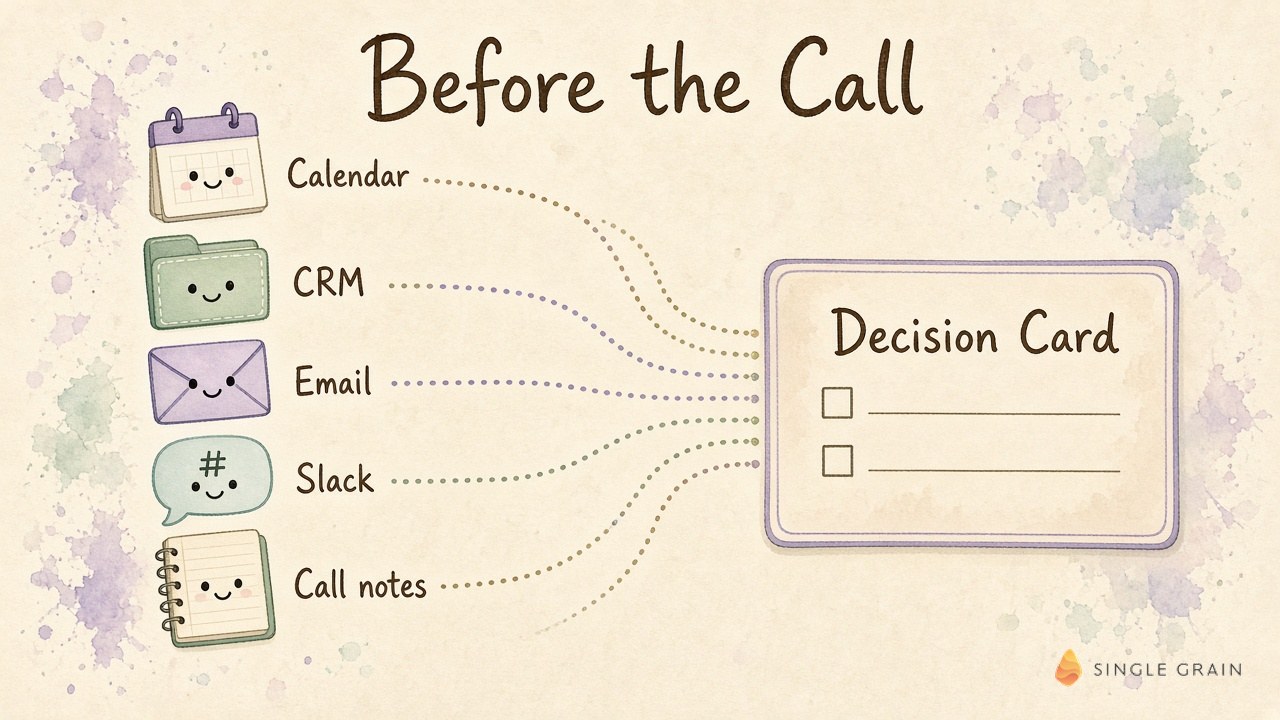
Each step feeds the card, so the rep gets one short page instead of five open tabs.
1. Read the Calendar Invite
The invite tells the assistant who is attending, how long the meeting runs and what the buyer called it. This alone often reveals whether this is a first discovery call, a pricing conversation or a renewal.
2. Pull CRM and Email History
Next, it reads the account record and the email thread with the company. Deal stage, past objections, pricing already shared and promises your team made all come into view.
3. Check Slack and Past Call Notes
Internal chatter often holds the most useful context. A teammate’s note about a champion leaving or a competitor in the deal can change the whole plan for the call.
Past call notes close the loop, so the rep picks up exactly where the last conversation ended.
4. Write the Decision Card
Then the assistant writes a short card showing where the deal stands and what needs to get decided. It also suggests questions to ask and angles to take, based on your products and services, the buyer’s industry and their goals.
| Starter prompt for a decision card |
|---|
| Read the calendar invite, CRM record, email thread, Slack mentions and last call notes for this account. Write a decision card under 200 words with where the deal stands, who is attending, open questions, risks and the one decision this call needs. Link every fact to its source. |
Notice the length limit. A brief nobody has time to read before the call is worth nothing.
5. Draft the Follow-Up After the Call
After the meeting, the assistant writes the follow-up and leaves it in drafts. Somebody reads it before anything goes out, so the recap matches what was actually agreed.
So what belongs on the card itself?
What Goes on a Decision Card
A decision card is a one-page brief built around the decision a meeting needs to produce. My team keeps it short on purpose, and these are the fields it always includes.
- Where the deal stands. Stage, last touch and anything promised on either side.
- Who is in the room. Each attendee’s role and their history with your company.
- Open questions. Questions the buyer asked that still have no answer.
- Risks. A competitor, a budget freeze or a champion who just changed jobs.
- Suggested questions. Questions tied to the buyer’s goals and your services.
- The decision. The one outcome this call should leave with.
My team’s view at Single Grain is simple. The last field matters most. If the rep can’t name the decision before the call starts, the meeting usually drifts.
This card replaces a lot of manual work, which brings up the classic sales habit it builds on.
Pre Call Planning With an AI Sales Assistant
Pre call planning is the practice of researching a buyer and preparing questions before a sales meeting. Good reps have done it by hand for decades, and the steps still hold up.
An assistant changes who does which part. Here’s how I split the work.
- Assistant work. Gathering context from every system, summarizing history, flagging risks and drafting the card.
- Rep work. Choosing the objective, reading the room, building trust and deciding what to commit to.
This split protects the part of selling that depends on human judgment. It also frees reps from the tab-hopping behind so much of their prep time.
If your team hands accounts between marketing and sales, the same card helps with an ABM account handoff. The context travels with the account instead of living in one person’s head.
Sales calls are only the start, though.
AI Meeting Prep Beyond Sales Calls
AI meeting prep works for any meeting where context is scattered across tools. Renewals, partner calls, executive reviews and board prep all benefit from the same read-only pattern.
My own daily review works this way. Every day it looks at Gmail, Slack, open commitments, pending approvals and blocked work, each linked to its source, and tells me what needs me today.
The rule stays the same across all of them. Let the assistant read widely, keep the brief short and leave every outbound action to a person.
Now for the buying side.
What to Look for in AI Sales Assistant Software
Feature lists in this category blur together quickly. I’d rather judge AI sales assistant software on what it can touch, how it shows its work and what it refuses to do on its own.
These six checks come first, in order.
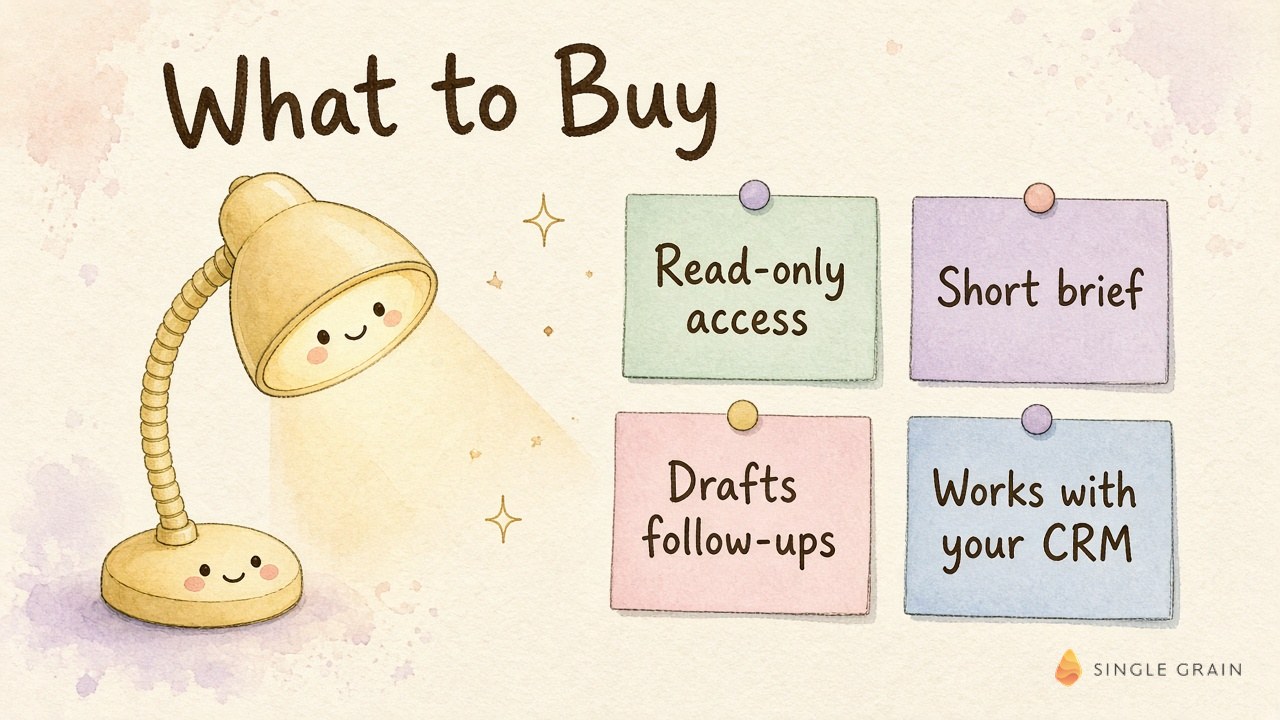
- Read-only access by default. Calendar, CRM and email connections should start with read-only scopes, like the read-only Gmail scope Google offers.
- Sources on every fact. Each line in a brief should link back to the record, email or note it came from.
- A short brief format. The output should fit on one screen and lead with the decision the call needs.
- Follow-ups saved as drafts. Nothing should go to a customer until a person reads it.
- Works with your CRM. Native connections to the systems your team already lives in beat another tab to check.
- Clear permission controls. An admin should be able to see and change exactly what the assistant can read and do.
Security teams will ask about the last check, and they should. Guidance on excessive agency in AI apps recommends read-only scopes and human approval for high-impact actions, which lines up neatly with a read-only assistant.
Put these questions to any vendor before you sign.
- What can the assistant change in our CRM, and can we turn it off?
- Where does each fact in the brief come from?
- Can it send any email without a person clicking send?
- How do admins see what it accessed for a given meeting?
| Pro-Tip |
|---|
| Run a two-week pilot on your five most important upcoming calls. Ask each rep whether the card changed a question they asked or a decision they pushed for, and keep the tool only if the answer is yes. |
With a shortlist in hand, it helps to see the whole setup running.
How My Team Runs Pre-Call Intelligence at Single Grain
Pre-Call Intelligence runs as a Grok Bot, and I shared it as a free Pre-Call Intelligence template on Skills Dojo. It’s a read-only sales-prep agent that turns calendar, CRM, email, Slack and prior call notes into a decision card, then drafts follow-ups without sending them.

Post-call work is a separate job. My team mines finished calls for content through a timestamped sales call analysis, which is a different assistant with a different permission set.
CRMs are also getting smarter on their own, as the new wave of agentic CRM tools shows. My advice holds either way. Decide where the human step in your AI workflow sits before you turn on any new access.
Give Your Reps a Read-Only Assistant First
As you learned from this article, an AI sales assistant pays off fastest when it starts with call prep, stays read-only and hands every customer-facing action back to a person. Start with your most important upcoming calls, measure whether the decision card changes the conversation, and expand access only when the assistant earns it.
If you want help designing AI workflows like this across marketing and sales, my team at Single Grain can help. Explore Single Grain’s AI transformation services or see how my team runs ABM for SaaS companies.
AI Sales Assistant FAQs
-
What does an AI sales assistant do?
An AI sales assistant handles research, call prep, CRM context and follow-up drafts so sellers can focus on the conversation. Mine reads the calendar, CRM, email, Slack and past call notes, then writes a short decision card before each important call.
-
Is it safe to connect an AI sales assistant to my CRM and inbox?
It’s much safer when the assistant starts read-only. A read-only assistant can see everything and change nothing, and follow-ups stay in drafts until a person reviews them.
-
What should a pre-call brief include?
Keep it to one screen with where the deal stands, who is attending, open questions, risks, suggested questions and the one decision the call needs to produce.
-
How is AI sales call prep different from call recording tools?
Call prep happens before the meeting and pulls context from many systems. Recording and analysis tools work after the call, which is a separate job my team handles with timestamped sales call analysis.
-
Can an AI sales assistant send follow-up emails?
Some can, but I keep mine on drafts only. The assistant writes the follow-up after the call and a person reads it before anything goes to the customer.


