How to Build a GTM Team With AI Agents + 6 Examples


Are GTM AI agents the fastest way to fill the seats you can’t afford to hire yet? A full go-to-market team takes months to build, and every new hire adds cost before it adds pipeline. That’s why I’ve been so fired up about agents lately. At my company, Single Grain, agents now work inside our ad accounts, build creative, prep outreach, and pull objections from sales calls.
From the trends I’m seeing, I bet GTM teams are about to get rebuilt from the ground up. When an agent can do the research, the data pulls, and the first drafts, you stop asking “who do we hire next?” and start asking “which seat needs a person, and which seat needs an agent?”
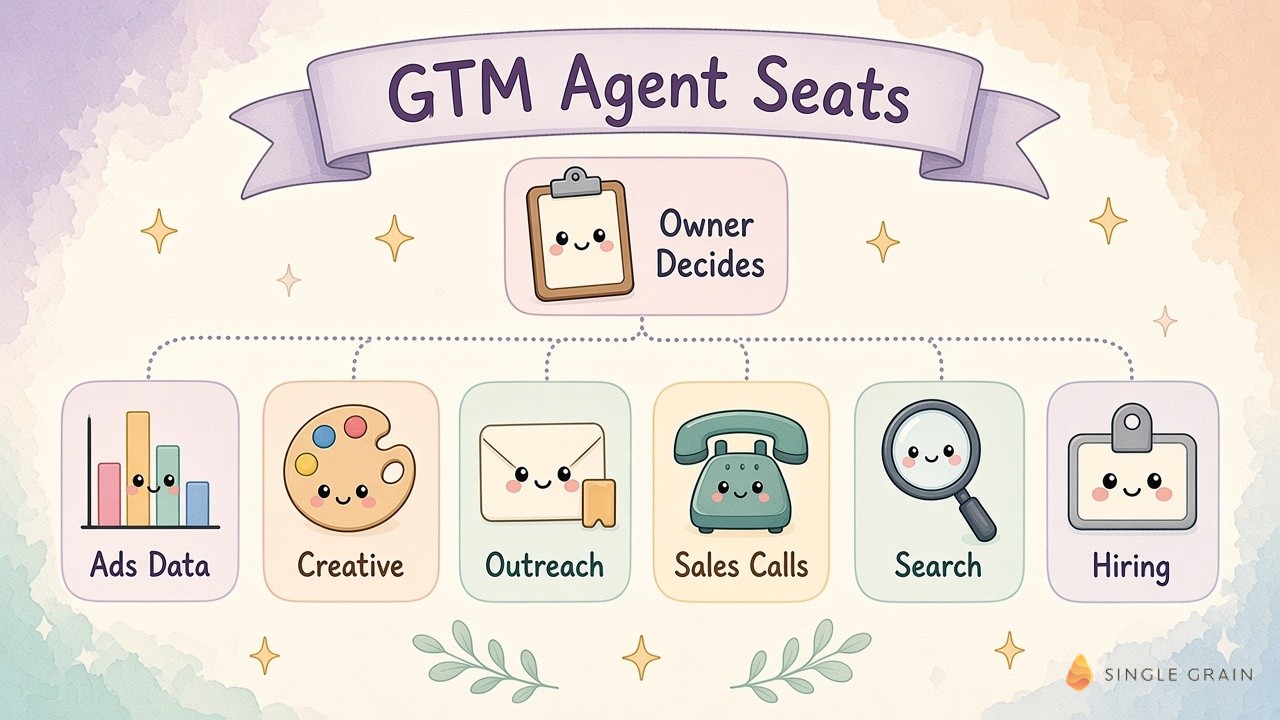
If you’re wondering how to build a go to market team with AI agents, this blog is for you. Below, you’ll get the six agent seats we run, how they connect to the business, and the one workflow I’d start with this week.
TL;DR
- Treat agents like hires, with a job, an owner, and a scorecard. Each agent fills one seat on the GTM team, and a person still decides what ships.
- Connect the business before you add agents. Our Gateway gives agents scoped access to Google Ads, HubSpot, Gong, ClickFlow, DataForSEO, and Google Docs.
- Start every play from a real signal. Outreach begins with companies hiring for marketing roles or with commenters on a creator’s post, never with a cold list.
- Begin with a sales-call objection digest. One week of call transcripts grouped by objection gives marketing a clear brief for the next page or ad.
TABLE OF CONTENTS:
- What Are GTM AI Agents?
- AI Go to Market: Map the Seats Before the Agents
- 6 AI Agents for GTM We Run at Single Grain
- How to Roll Out AI Agents for Go to Market Team Workflows
- Connect the Agents So They Learn From Each Other
- Where to Start With GTM AI Agents This Week
- Build Your GTM Team Around Agents and Owners
What Are GTM AI Agents?
GTM AI agents are software agents assigned to go-to-market jobs, such as reporting, creative, outreach, and research. They work inside your tools through scoped connections. A person still owns the target, the offer, and the final call.
How They Differ From AI Tools
A tool waits for you to open it, while an agent has a standing job. Our go to market agents compare lead performance across periods, produce weekly SEO reports, and prepare outreach drafts on a schedule, then hand the result to the person who owns that seat.
Why GTM Teams Are Adopting Them Fast
Adoption is moving quickly. Salesforce’s 2026 State of Sales report, based on 4,050 sales professionals, found 54% of sales teams already use AI agents, and nine in ten use them or expect to within two years. The gap is readiness. LeanData’s 2026 GTM readiness report found 79% of teams deploying agents, while 30% lacked an audit trail for what those agents did.
Those numbers tell me most teams are adding agents faster than they’re building the structure around them. Here’s the structure we use.
AI Go to Market: Map the Seats Before the Agents
I start with the org chart. Software comes later. List every recurring GTM job, then mark which ones need human judgment and which ones are mostly gathering, sorting, and drafting.
For each seat, write down three things:
- The job. One sentence on what the agent produces and how often.
- The owner. The person who checks the work and makes the decision.
- The scorecard. The number you’ll judge the agent on after 7, 14, 28, and 60 days.
This takes an afternoon, and it saves you from buying agents for problems you don’t have.
6 AI Agents for GTM We Run at Single Grain
Every one of these started as an experiment on our own team before it touched a client. Here’s what each seat does.
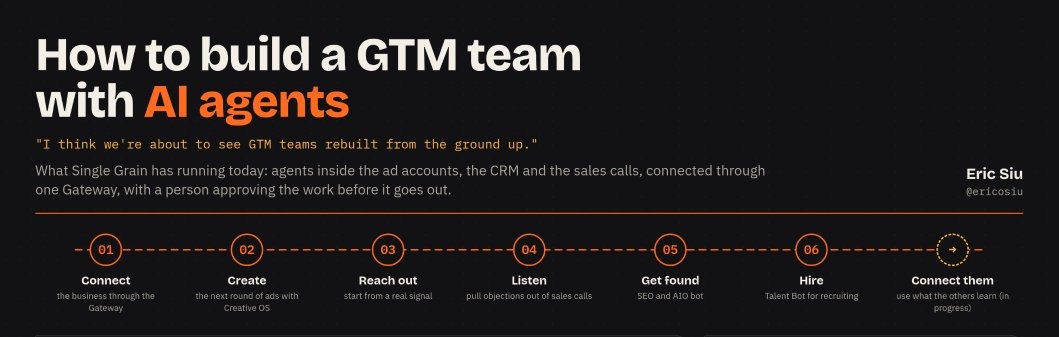
1. The Gateway Connects Agents to the Business
We built the Gateway so agents can reach the tools our team uses, including ad performance across Google and Meta. You enable services in a portal, such as Google Ads, HubSpot, Gong, ClickFlow, DataForSEO, and Google Docs and Sheets. Each connection works inside the permissions behind that service.
Say leads drop. You can ask an agent to compare lead performance over the last two periods across the ad accounts and HubSpot, then show where the change is concentrated. The marketer still checks the explanation against what’s happening in the business.
2. Creative OS Builds the Next Round of Ads
Creative OS connects Codex to ad performance and existing creatives. It generates new static ads and motion videos based on what already worked in the account. I always want to see the reason behind each change, such as a new opening or a different product demo, so the next batch learns from the last.
3. Outreach Starts From a Real Signal
We look for companies hiring for marketing roles and offer an audit before they hire. A second play starts with people commenting on a creator’s LinkedIn posts. Apify pulls the commenters, the workflow checks fit, Apollo enriches the prospect, and Instantly holds the draft until a person approves it.
4. A Gong Digest Pulls Objections From Sales Calls
A weekly digest groups the objections buyers raise on calls, with call references attached. A sales lead checks the patterns, then picks with marketing which objections deserve a page, an ad, or a follow-up. If prospects keep asking who manages the agents after launch, that might belong on a services page.
5. A Dedicated SEO and AIO Bot Finds Content
Our search bot scores roughly forty content candidates a week. I pick twenty, and only those go to writers. WordPress stays in unpublished draft until a person publishes, because an editor still checks claims and positioning.
6. A Talent Bot Screens Candidates
The Talent Bot screens inbound candidates against a defined role pack and holds outreach for approval. The hiring manager sets the requirements and chooses who to interview. For marketing roles, I want to see what someone has built with AI.
| Pro-Tip |
|---|
| Give every agent a human owner by name before it goes live. If nobody owns the output, nobody catches the mistakes, and the agent quietly drifts. |
Six seats sounds like a lot, so the rollout order matters as much as the agents themselves.
How to Roll Out AI Agents for Go to Market Team Workflows
Nothing at Single Grain goes to everyone on day one. Every bot climbs the same ladder, and it keeps our risk small.
The Rollout Ladder
- Me first. I test the bot until I’m happy with it.
- My team. It moves to the team once it’s 60 to 70% there.
- Our own sites. We check results at 7, 14, 28, and 60 days.
- Some clients. Only after it works on us.
- All in. Full rollout once the numbers hold.
I hand a bot off at 60 to 70% because the team works in it every day and ends up with more context than I have. Clear AI agent guardrails decide which bots can read, draft, or send at each rung.
Keep a Person on Every Send
Both outreach plays start from a real signal and end with a person deciding. The agent researches and drafts. The owner checks fit and tone before anything goes out. A weekly agent monitoring report shows where each bot is drifting.
With the ladder in place, the fun part is getting the agents to share what they learn.
Connect the Agents So They Learn From Each Other
Right now, most of our agents run side by side. The next phase connects them, and it’s the part I’m most excited about.
A question from a sales call could become a brief for the SEO bot. Creative OS could use the same objection to build a creative test, with ad performance shaping the approach. Shared context also needs AI agent memory, so a correction made once sticks everywhere.
This is also where marketing to AI agents starts to matter, since buyers’ agents will read the pages your agents help create.
| What You Should Do |
|---|
| Pick one handoff between two seats, such as sales calls to content briefs, and write down exactly what moves between them. Automate that single handoff before you connect anything else. |
Once one handoff works, the next one gets much easier to wire up.
Where to Start With GTM AI Agents This Week
If you’re trying this with your own team, start with the sales-call objection digest. It needs one data source, it’s low risk, and it gives marketing something useful in week one.
- Give the agent one week of call transcripts.
- Ask it to group recurring objections, with a reference to each call.
- Have a sales lead check the patterns and pick one for marketing to address.
An AI sales assistant for call prep pairs nicely with this, since the same transcripts power both. Your go-to-market strategy then gets a weekly feed of what buyers actually push back on.
Build Your GTM Team Around Agents and Owners
GTM AI agents work best when you treat them like hires. Give each one a seat, an owner, and a scorecard, connect them to your tools with scoped access, and roll them out one rung at a time. Start with a single low-risk workflow and expand once the numbers hold.
Single Grain’s AI transformation services help marketing and sales teams design and roll out agents like these. Contact Single Grain to map which GTM seats are ready for agents.
Frequently Asked Questions About GTM AI Agents
-
What are GTM AI agents?
GTM AI agents are software agents assigned to go-to-market jobs such as reporting, creative, outreach, and research. They work inside your tools through scoped connections, while a person owns the target, the offer, and the final decision.
-
Which GTM workflow should I automate first?
Start with a sales-call objection digest. Give an agent one week of call transcripts, ask it to group recurring objections with call references, and have a sales lead pick one objection for marketing to address.
-
Do AI agents replace a go-to-market team?
No. Agents take on research, data pulls, and first drafts. People still own strategy, approve outreach, and decide what ships. Each agent should have a named human owner.
-
How do you roll out AI agents safely?
Test each agent on yourself first, hand it to the team at 60 to 70% quality, check results on your own sites at 7, 14, 28, and 60 days, and only then expand. Clear AI agent guardrails decide which bots can send.
-
What tools do GTM AI agents need access to?
Most need your ad accounts, CRM, call recordings, analytics, and documents. Connect them with scoped permissions so each agent only sees the accounts its job requires.