How to Run a Weekly AI Agent Monitoring Report


Are your bots running a gazillion tasks but you’re having trouble knowing which ones are actually moving the needle? If so, then it’s time to face the music: You need to learn how to monitor AI agents the moment you realize you have more bots running than you can name.
Try a simple test: imagine paying each bot a salary, then decide which ones you’d keep. One bot drafts posts, one scores leads, one cleans the CRM, and a chief of staff bot hands out the work. Each one looks busy. The problem? You still can’t say which ones actually move a number!
My easy fix is a Bot Improver, a bot whose only job is checking my other bots once a week. It sorts every bot into three buckets (working, fixed, or needs you), so I only spend time on the last one. A weekly report beats a real-time dashboard for most marketing teams, because most teams need a decision more than a stream of alerts.
The rest of this post walks through my weekly check and the exact prompt behind it. It also covers the rules that decide when a bot gets fixed or shut down.
TL;DR
- To monitor AI agents, check results first. Uptime and token logs matter, but the real test is whether each bot moved the number it was built to move.
- A weekly health check gives every bot one verdict. Each bot lands in one of three buckets (working, fixed, or needs you), and you only read the last bucket.
- Two missed weeks trigger a decision. A bot that misses its number two weeks in a row gets fixed or shut down, so dead bots stop eating budget and attention.
- One prompt can run the whole review. Connect your tools, tell a bot what each agent should move, and have it report only real counts and only the calls that need you.
TABLE OF CONTENTS:
- What Is AI Agent Monitoring?
- Why a Weekly Health Check Beats Real-Time Alerts
- How to Monitor AI Agents in Five Steps
- The Bot Improver Prompt I Use
- How to Map Where Your Agents Break
- AI Agent Evaluation vs. Weekly Monitoring
- Guardrails to Set Before the Review Runs
- Start Your Weekly AI Agent Monitoring Report
What Is AI Agent Monitoring?
AI agent monitoring is the habit of checking what your agents did, whether they did it well, and whether the work paid off. Engineers usually call this observability. They track traces, errors, latency, and cost per run, and these signals help when a bot breaks in a technical way.
Marketers need a second layer on top. A content bot can run flawlessly for a month and still publish posts nobody reads. A lead scoring bot can score every record on time while sending sales the wrong accounts. Technical health and business health are two separate questions, and most dashboards only answer the first one.
So the operator version of monitoring asks three plain questions about every bot:
- Is it doing useful work?
- Is it focused on what matters?
- Is it moving its number?
These three questions became the backbone of my weekly review.

A review this simple works because it forces you to write down what each bot is for. Once every bot has a target, the rest of the check almost runs itself.
Why a Weekly Health Check Beats Real-Time Alerts
Real-time alerts are great for outages. They’re terrible for judgment. If every bot pings you whenever a run fails, you end up babysitting software, which defeats the reason you built the bots in the first place.
A weekly cadence matches how marketing results actually show up. Rankings, pipeline, and reply rates move over days, so a seven-day window gives each bot enough time to show a trend. It also gives you one predictable moment to make calls, instead of a drip of interruptions.
My team’s bots already follow five rules for reliable marketing bots, and the weekly check is the layer that proves these rules are working. It also catches problems a bot can’t see on its own, like a chief of staff bot that keeps assigning work to a job nobody needs anymore.
| Pro-Tip |
|---|
| Give your Bot Improver permission to audit your chief of staff bot too. The coordinator is the bot most likely to look productive while quietly routing work in circles. |
Weekly beats real time for most teams, but only when the report lands in one place and asks for very few decisions.
How to Monitor AI Agents in Five Steps
The review I run has five steps. Each one is simple, and together they turn a pile of bots into a short list of decisions. You set the targets first, then pull real counts, then assign verdicts, then act, then log what changed.
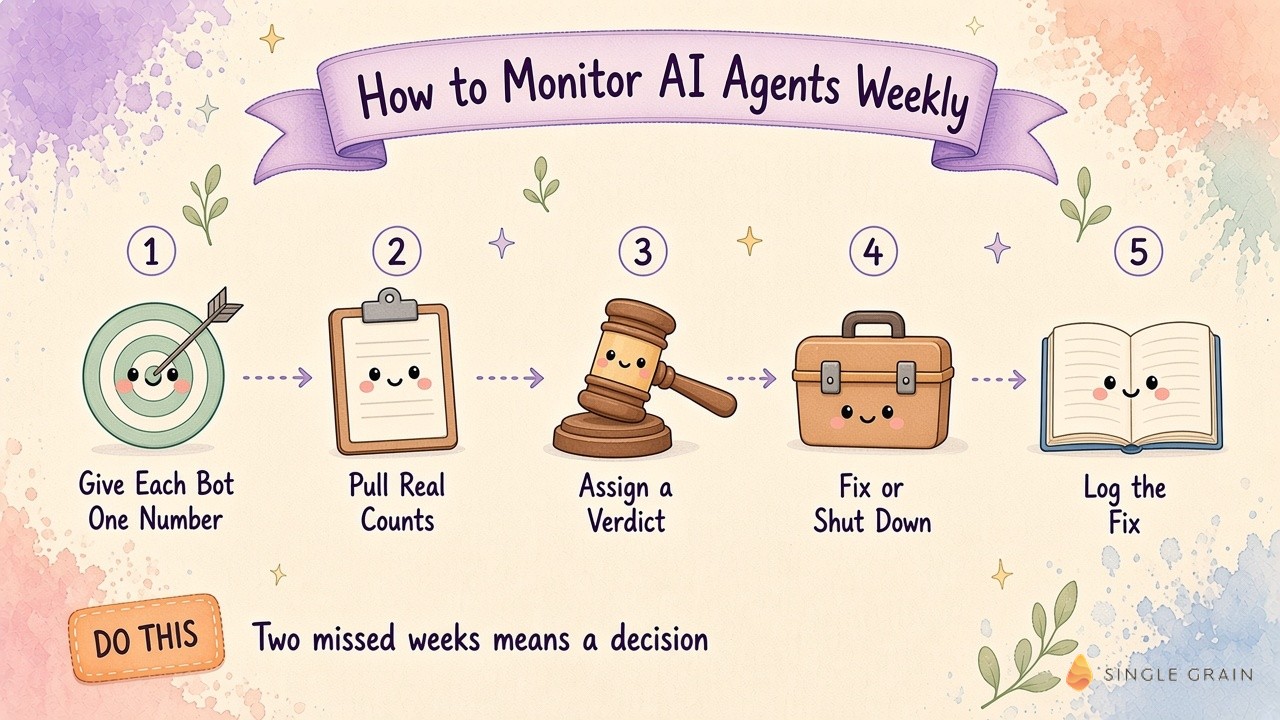
1. Give Every Bot One Number
Write down the single metric each bot exists to move. A content bot might own indexed pages or clicks from new posts. A lead scoring bot might own the share of scored leads sales accepts. A recruiting bot might own booked first interviews.
One number per bot keeps the review honest. If you can’t name the number, you’ve found your first bot to retire, and my team’s guide on when to decommission a marketing agent job walks through this call.
2. Pull Real Counts From Your Tools
The check only uses counts pulled straight from your tools, like your analytics platform, CRM, ad accounts, or Search Console. Self-reported bot summaries don’t count, because a bot grading its own homework will usually give itself an A.
This is also why each bot needs clear job cards with a definition of done. When the job and the finish line are written down, the Bot Improver can compare the real count against the target without guessing.
3. Assign One Verdict per Bot
Every bot gets exactly one of three verdicts each week:
- It’s working. The bot hit or beat its number, and nobody needs to look at it.
- It got fixed. The bot slipped, and the Bot Improver already corrected a prompt, a schedule, or a broken connection.
- It needs you. The bot slipped in a way only a person can resolve, like a strategy change or a budget call.
Most weeks, the first two buckets hold nearly every bot. You read the third bucket, make your calls, and move on.
4. Fix or Shut Down After Two Missed Weeks
One bad week can be noise. Two bad weeks in a row is a pattern. My rule is simple. If a bot misses its number two weeks running, the Bot Improver either fixes it or tells me to shut it down.
This rule keeps zombie bots from piling up. Every bot you keep costs tokens, review time, and attention, so retiring the weak ones is part of the job.
5. Log Every Fix as a Rule
When the Bot Improver fixes a broken step, it writes the fix down as a rule the bot follows next time. Over a few months, this log becomes your playbook for what breaks and why. It also keeps your bots from repeating the same mistake, which is the core idea behind AI agent memory.
These five steps cover the routine. The prompt below is how I hand the routine to a bot.
The Bot Improver Prompt I Use
The full Bot Improver setup is laid out in my original post on X. The idea is to add one bot to your Grok Bots, connect your tools through SingleBrain Gateway, and give it a single standing instruction.
| Starter prompt for a weekly AI agent health check |
|---|
| “Every Monday, check each of my bots and automations against the number it’s supposed to move. Give each one a verdict: working, fixed or needs you. Only use counts from my tools. If one is missing its number two weeks in a row, fix it or tell me to shut it down. Bring me only the fixes that need my call.” |
Notice what the prompt leaves out. It never asks for a summary of every action each bot took. It asks for verdicts and decisions, which keeps the Monday report short enough to read in a few minutes.

You can borrow a ready-made version from my team’s Grok Bot templates and adjust the numbers to match your own bots.
How to Map Where Your Agents Break
A verdict tells you which bot slipped. A map tells you where. Each week, my Bot Improver also draws a simple state chart of my most important bots. It marks each step in the flow, like intake, draft, review, and handoff, and flags the step where work stalls.
I explained the chart in a separate post on X. The useful part is the second opinion. The Bot Improver has Claude and Codex review the code and outputs behind the broken step, so I get two independent reads before anyone changes anything.
Maps like this show patterns that single verdicts hide. If three different bots stall at the same handoff, the problem usually sits in the handoff itself. An exception queue for marketing agents is often the cleanest fix for these shared jams.
AI Agent Evaluation vs. Weekly Monitoring
People often mix up evaluation and monitoring, so it helps to separate them:
- AI agent evaluation happens before and during a launch. You test a bot against known examples, score its outputs, and decide whether it’s ready for real work.
- AI agent monitoring happens after launch. You check live results on a schedule and decide whether the bot keeps its job.
Both matter. Evaluation keeps bad bots out of production, and monitoring catches good bots going stale. A practical way to start evaluation is the AI Risk Management Framework from NIST, which pushes teams to define what “good” means before a system goes live. On the build side, Anthropic’s guide to building effective agents makes a similar case for simple, testable designs.
Good evaluation also makes monitoring easier. If you already scored a bot against clear examples before launch, you know exactly what a healthy week should look like.
Guardrails to Set Before the Review Runs
A Bot Improver that can fix bots is powerful, so give it limits. My setup lets it edit prompts, schedules, and connections on its own. Any action that sends, publishes, or spends money stays behind a human yes, the same line I draw in my post on which AI agents can hit send.
Three guardrails cover most of the risk:
- Read access first. Start the Bot Improver with read-only access to your tools, then widen access one job at a time.
- Real counts only. Tell it to mark any estimate as an estimate, so a guess never shows up as a fact in your report.
- Approval for shutdowns. Let it recommend a shutdown, and keep the final call with a person.
These limits keep the review safe while it earns your trust. After a few clean weeks, you can hand it more of the routine fixes.
Start Your Weekly AI Agent Monitoring Report
AI agent monitoring gets easy once every bot has one number and one weekly verdict. Set the targets, pull real counts, sort each bot into working, fixed, or needs you, and act on the last bucket. Two missed weeks means fix it or shut it down.
If you’d like help building agents that report real results, my team at Single Grain runs AI transformation services for marketing teams. Contact Single Grain and we’ll map which of your bots are earning their keep.
Frequently Asked Questions About How to Monitor AI Agents
-
How do you monitor AI agents?
Give each agent one number it should move, pull real counts from your tools once a week, and assign each agent a verdict of working, fixed, or needs you. Only the needs you bucket takes your time.
-
What is the difference between AI agent monitoring and observability?
Observability tracks technical signals like errors, latency, and cost per run. Monitoring for marketing teams adds a business layer that checks whether each agent moved its target metric.
-
How often should you review AI agents?
Weekly works for most marketing bots, because results like pipeline and rankings move over days. Keep real-time alerts for outages and use the weekly review for judgment calls.
-
When should you shut down an AI agent?
A good rule is two missed weeks in a row on the agent’s main number. At that point, fix the agent or retire it, and read when to decommission a marketing agent job for the full call.
-
What is AI agent evaluation?
AI agent evaluation tests an agent against known examples before or during launch to decide whether it’s ready for real work. Monitoring takes over after launch.