My Lead List Workflow: From Claude Prompt to Sales Review


A new lead list can fill an entire spreadsheet without turning up one person your sales team wants to call.
My original Claude prospecting prompt asked for marketing leaders at software companies. A request this broad returns names fast, so I added a fit check, a source for every pass, and a review before any rep sees the list.
Inside, you’ll find the Claude prompt, a fit check that runs before paid enrichment, the cost receipt, and the checks to require before any list lands with a rep.
TL;DR
- Define the fit before buying more data. Give the assistant explicit company and role requirements, plus a way to flag missing evidence.
- Keep the source beside each decision. A reviewer needs to inspect the company evidence and contact record behind a pass.
- Ask for an itemized receipt. Compare the actual spend with the contacts approved after review.
- Check existing relationships before outreach. Match the list against your CRM and suppression records, then assign a human approver.
TABLE OF CONTENTS:
- What a Lead List Built in Claude Should Contain
- A Lead List Prompt With Evidence Built In
- Screen Prospects Before Paid Enrichment
- Separate Discovery, Enrichment, and Email Verification
- Read the Receipt Before You Repeat the Run
- Use HubSpot History Before Writing the First Email
- Draft Outreach From Approved Evidence
- Make the Sales Handoff Worth Reviewing
What a Lead List Built in Claude Should Contain
A useful lead list lets a sales rep answer why a person fits, where the information came from and whether outreach is appropriate. Ask Claude for a reviewable table with evidence beside each contact. An email address alone leaves too much work for the person receiving the export.
Source Evidence and Contact Fit
My original Claude prospecting post used a request for marketing leaders at software companies. The useful artifact is the prompt and its requested output. I’d strengthen it by adding source links, unresolved fields and a review status before using the result in an outbound program.
Separate company fit from contact fit in the table. A software company can match your segment while the person returned works in an unrelated function. Give each decision its own explanation so a reviewer can reject the contact without losing the account research.
Tool Access and Prospecting Costs
Tools enter after you define this output. Single Brain Gateway is the connection I discuss in the walkthrough; access and cost depend on your configured tools. Check the available actions in your own account before asking Claude to retrieve or verify addresses.
Once the table has a clear purpose, the prompt becomes easier to write. Here’s how I’d revise the request from the original draft.
A Lead List Prompt With Evidence Built In
The original request targeted Heads of Marketing and VPs of Marketing at U.S. business-to-business software companies with twenty to two hundred employees. These are selection criteria, rather than a claim about the result. Keep the criteria separate from any assertions the assistant makes after searching.
| Starter prompt for a lead list |
|---|
| Find Heads of Marketing or VPs of Marketing at U.S. B2B SaaS companies with twenty to two hundred employees. Use only tools available through my configured connection. Return name, current title, company, company domain, source URL, and the evidence for each company fit decision. Ask before paid enrichment and show the expected cost if available. Retrieve work emails only for approved company fits. Preserve the email verifier’s exact status and check date. Flag missing evidence for review. Include an itemized cost receipt. Do not send messages or enroll contacts in a sequence. |
This is a revised starter prompt, so test its instructions against the tools your account exposes. If a tool cannot return a source URL or an estimated charge, have the assistant mark the field unavailable. A blank with an explanation gives a reviewer a specific task.
Resolve Company Fit Before Contact Fit
Company fit starts with how the business earns revenue and where the headcount evidence came from. A directory category can be a starting point, but a company’s product page may reveal a services business outside your segment. Preserve both sources if they disagree, and hold the row until a person resolves the conflict.
Job titles need similar care. Head of Marketing can describe a broad owner, while a vice president may oversee one region or product line. Write down which remit your offer serves, then inspect the current role evidence before accepting the title match.
This extra review gives the prompt a useful stopping point. It also creates a chance to avoid paying for details on accounts you would reject anyway.
Screen Prospects Before Paid Enrichment
In my October 2026 marketing stack walkthrough, I described putting Jev screening ahead of more expensive prospecting calls. The recommendation was to classify ideal customer profile fit before spending further credits. For your run, compare the screening decision with the evidence already available before authorizing enrichment.
For a marketing operations manager, the practical artifact is a fit decision beside the source evidence. Keep separate fields for company fit and missing information. A firm rejection needs a reason; an uncertain result needs a review path.
Apply this early screen only to information you already have. If headcount requires another lookup, the assistant cannot honestly approve the size rule yet. Mark it unresolved and decide whether buying the missing data is worth the potential contact.

Keep Uncertainty Visible
A yes or no column can hide an incomplete record. Add a review status for cases where evidence is missing or contradictory. Ask the assistant to explain which criterion remains open, rather than turning an absent field into a confident rejection.
Review rejected rows as well as approved rows. If a company clearly fits but the assistant rejected an unfamiliar product description, revise the instruction and rerun the affected records. Keep the earlier decision so you can see whether the revision fixed the actual error.
With company fit reviewed, the next job is contact enrichment. Keep each stage visible so a failure in one field cannot disappear inside a polished summary.
Separate Discovery, Enrichment, and Email Verification
The prospecting sequence covers finding people, reviewing records, retrieving work emails, and checking addresses. Use these as separate review stages. Your provider may combine actions or require extra lookups, so avoid assuming every lead uses an identical number of calls.
Discovery should return potential people and the company match. Record review checks the current role and supporting evidence. Email retrieval adds the address only after the account passes your criteria.
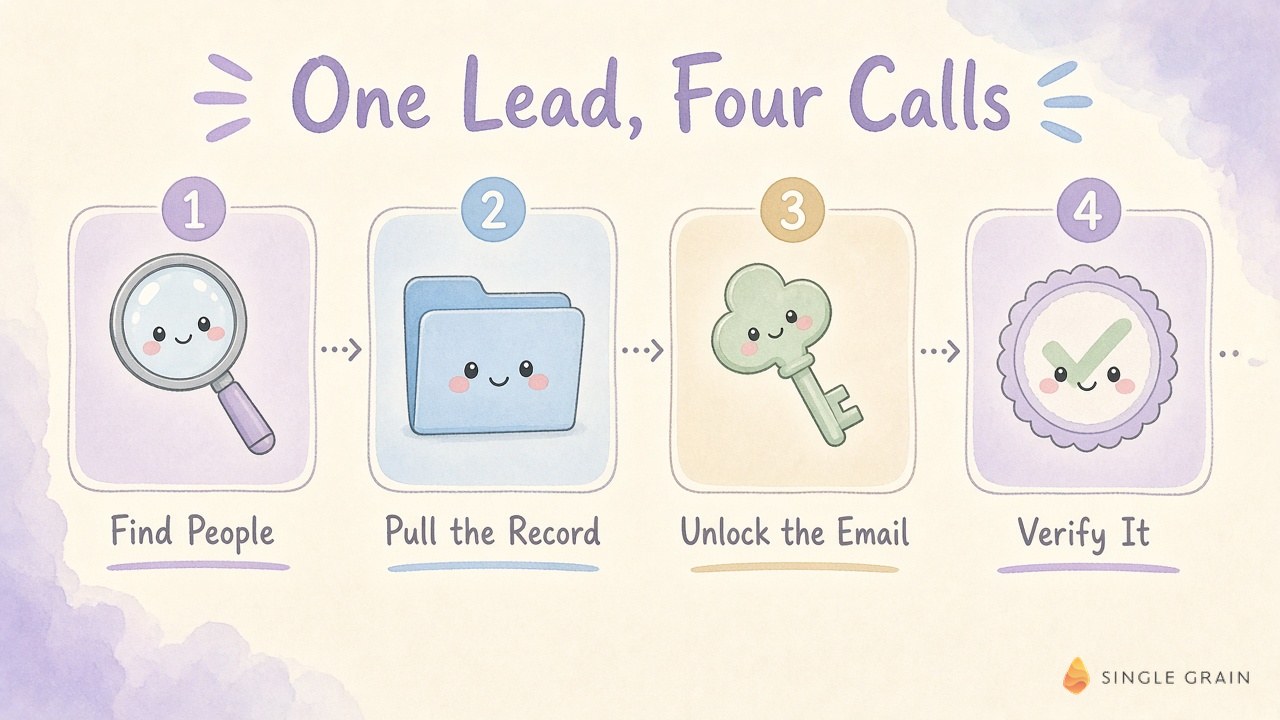
Verification deserves its own field because an address check answers a narrower question than account fit. Preserve the provider’s exact label and the time of the check. Avoid translating every ambiguous result into a simple yes.
Decide What Each Verification Status Allows
Write your treatment of unknown results before the export reaches sales. A marketing operations manager can hold uncertain addresses for manual review and exclude addresses the provider marks invalid. The reviewer should be able to trace each decision back to the returned status.
A deliverability result also leaves relationship questions open. The address may belong to a current customer or someone who already opted out. Keep email verification alongside the CRM review, which I’ll cover after the cost check.
If you’re choosing the underlying services, compare the required fields and actions in these lead generation tools. Check whether your chosen setup can return the evidence your review requires before expanding the batch. After the tools, the next question is what the run actually cost.
Read the Receipt Before You Repeat the Run
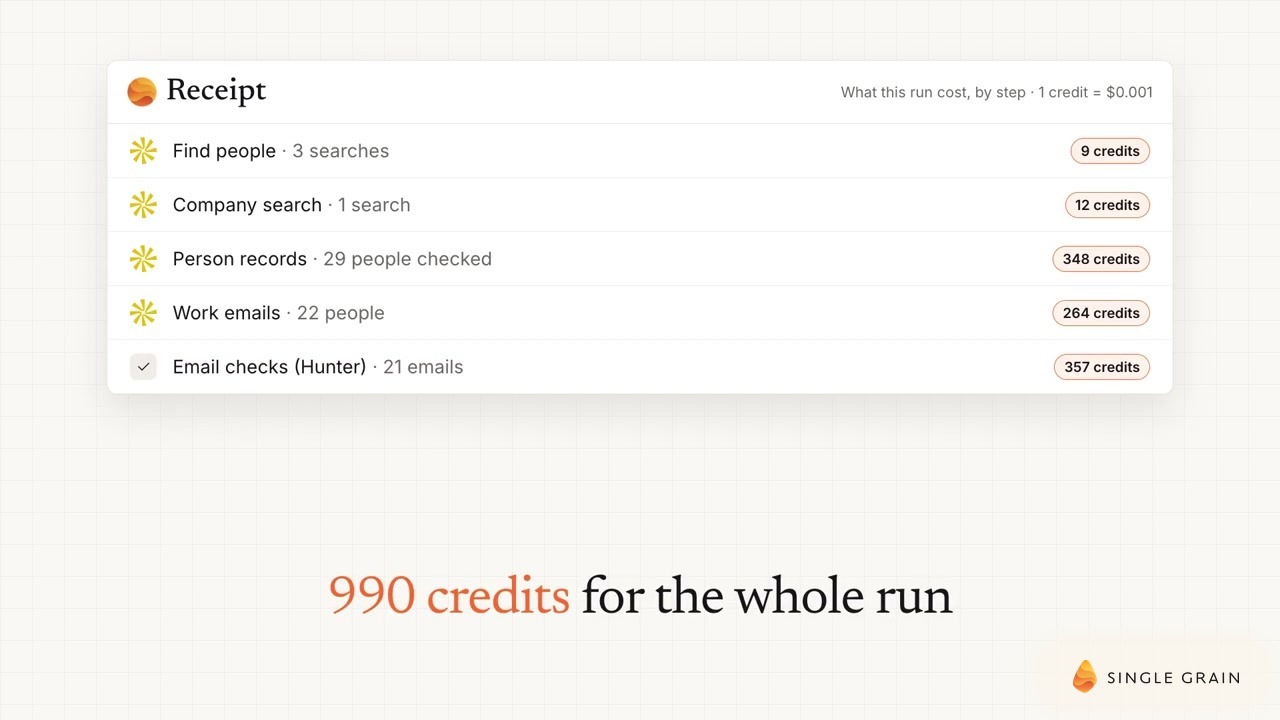
A clear receipt splits discovery, record lookups, email retrieval and verification into separate lines. Include unsuccessful attempts wherever the activity log exposes them. A summary of successful contacts can hide charges incurred on rejected companies.
Treat the receipt as a claim you can reconcile with the provider activity log. You should compare the underlying charges before quoting a per-contact cost or repeating a run with a larger budget. If the totals disagree, pause the repeat request and identify the missing activity.
Reconcile Charges With the Export
For each charge, compare the action name and quantity with the returned records. If the assistant reports more enriched people than appear in the export, ask it to identify the missing rows. Some may be rejected records; others may represent retries or incomplete output.
Cost per Approved Contact
Calculate cost per approved contact only after the review. Divide the actual list-building spend by the contacts eligible for the intended sales handoff, and label what the spend includes. Keep human review time separate if your receipt covers only tool charges.
| Pro-Tip |
|---|
| Save the prompt, raw export, and receipt together. If you change a fit rule, record the revision beside the next run so the cost comparison has context. |
A low lookup bill can still leave sales with a long cleanup task. The next check uses the relationship history already sitting in the CRM.
Use HubSpot History Before Writing the First Email
In my November 2026 follower intelligence walkthrough, I described cross-referencing people with HubSpot to see whether there had been earlier contact. I pointed to a vice president of growth marketing associated with a past Carrot lead and discussed checking recent posting activity for a possible outreach angle. The example connects a real role with CRM history and a current activity record.
For your list review, look for an existing contact and company record before drafting a new introduction. An account owner may already have a conversation underway. Preserve the owner and last relevant interaction in the handoff so sales can choose the next move with context.
A well-organized B2B CRM keeps these records easy to find. For this workflow, you need enough history to distinguish a new prospect from an existing relationship. Keep the match evidence when similar company names make the lookup ambiguous.
Give Held Contacts a Reason and an Owner
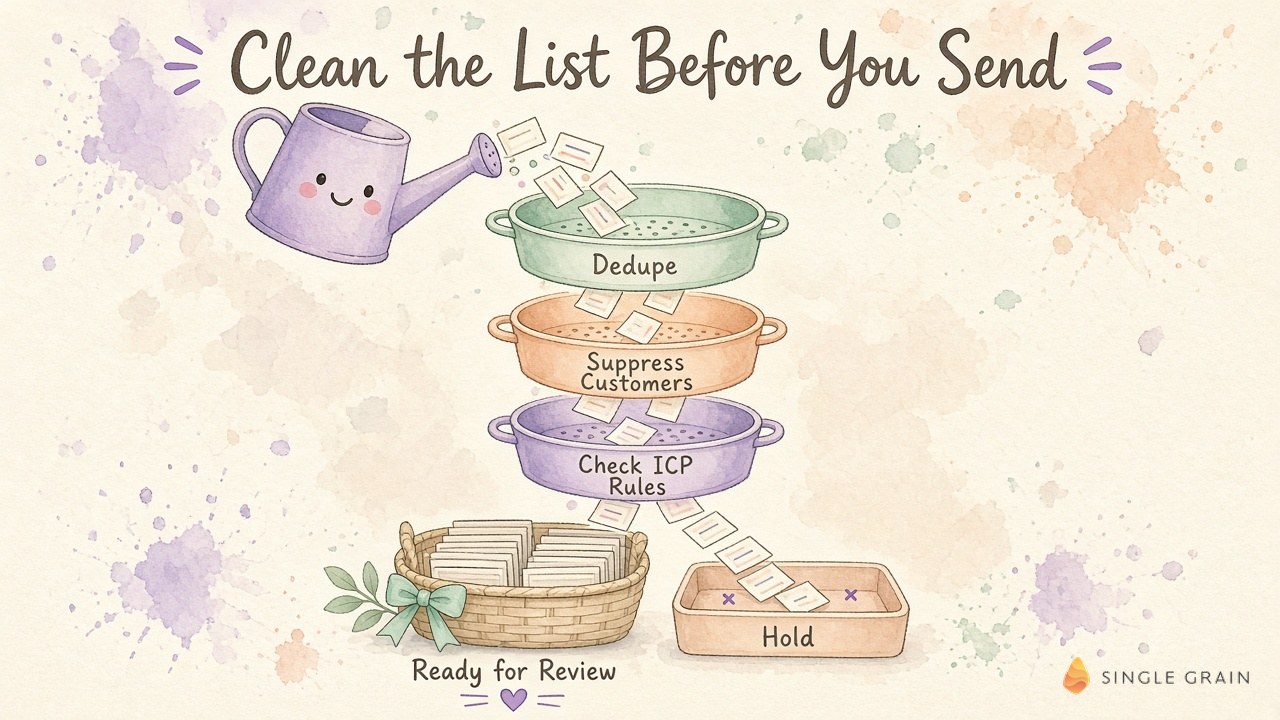
Every held contact needs a reason beside it, such as missing role evidence or an unresolved CRM match. Assign the review to a named owner in your own team. This makes the export actionable without pretending every row is ready for outreach.
Apply customer, open-deal and unsubscribe suppression rules before any sequence enrollment. Deduplicate by the identifiers your CRM supports, then inspect uncertain matches manually. Keep suppression records available for future runs so a new export cannot reintroduce an excluded address.
The wider handoff has its own risks, and it helps to know where AI sales development reps break. The AI lead qualification workflow and the SDR queue filtering example show the same care applied at a larger scale. Bring that care to a small list before sales receives the file.
Once the relationship check clears, use current account evidence to decide whether outreach has a credible purpose. A verified address gives you a destination; the account research supplies the reason to write.
Draft Outreach From Approved Evidence
Outreach drafts work best when the assistant gets the approved role evidence and a specific business reason for the message. Ask it to cite the source internally beside the draft. A reviewer can then check whether the opening relies on a real company event or an unsupported inference.
Honest Personalization and Intent Signals
Personal details need a business purpose beyond decorating an opening line. If the available evidence supports only a general role-based introduction, keep it honest and brief. Review each draft for invented familiarity and promises your offer cannot support.
Useful buyer intent signals can help prioritize approved accounts, provided you can explain their source and relevance. Treat inferred interest as a hypothesis during review. An account follow or a published post provides limited evidence of purchasing plans.
Email Compliance and the Sales Handoff
Before sending U.S. commercial email, check the FTC’s CAN-SPAM business guide. It covers accurate headers, subject lines, sender identification, and opt-out requirements, including business email. The U.S. Code chapter on CAN-SPAM provides the statutory text; have your compliance owner review the applicable rules for the markets you contact.
Carry the review decision into the handoff file. Give sales the source evidence, approval status and relationship context for each eligible contact. The next person should understand why it passed.
Make the Sales Handoff Worth Reviewing
Judge this workflow by whether a sales rep can inspect an approved contact and explain the next action. Start with a manageable batch, resolve the unclear rows and compare the receipt with the approved output. Expand only when the handoff works for the people receiving it.
If you want help turning reviewed accounts into pipeline, explore Single Grain’s demand generation agency. For SaaS teams, account-based marketing for SaaS companies and the SaaS marketing agency turn reviewed accounts into a coordinated campaign.
Claude Lead List FAQ
-
Can Claude build a lead list on its own?
Claude needs a connection to data tools to build a lead list. With a custom connector such as Single Brain Gateway, Claude can search Apollo for people, pull their records, unlock work emails, and verify each address with Hunter, then return everything in one table.
-
How much does a lead list in Claude cost?
My run cost 990 credits, or $0.99, for 20 verified work emails, about five cents per verified email. Gateway is free to start with $5 in credits, then you pay per call with no subscription.
-
Do I need an Apollo or Clay subscription for this?
No. The Gateway handles the Apollo lookups and Hunter checks through one key and charges per call, so you only pay for the searches, records, emails, and checks you use.
-
How do I keep an AI-built lead list clean?
Write hard ideal customer profile rules as pass or fail checks before you run the prompt. Then dedupe against your CRM, suppress customers, open deals, and unsubscribes, hold rows with missing fields, and audit a sample of passed and failed contacts every week.
-
Is it legal to email contacts from an AI-built lead list?
In the U.S., commercial email falls under the CAN-SPAM Act, which requires honest headers and subject lines, a working opt-out, a postal address, and opt-outs honored within 10 business days. Rules elsewhere can be stricter, so have your legal or compliance lead approve your process first.