Follow Up Email After Networking Event: Automate with Free Templates + AI Bot


Are you staring at a stack of business cards right now, dreading the follow up email after networking event chats you swore you would send yesterday? Half the names already blur together. The person who said “let’s grab a call next week” is starting to feel like a missed chance, and you can’t even remember which company they run.
A follow-up email after a networking event is a short, personal note that reminds someone where you met, mentions one detail from your conversation, and suggests one easy way to keep talking. Oftentimes, these can take time to draft and send out manually. Luckily, AI agents like Grok Bot are especially useful in these situations and can automate this process for you!
So, did that conversation turn into a client, a partner, or a name you’ll never place again? Most of the answer depends on what you send in the next few days. Keep reading for the timing, a simple structure, copy-ready templates, and a way to build an event networking follow-up bot that captures your notes, drafts each email, and waits for your approval before anything goes out.
TL;DR
- Send the first follow-up within a day. The conversation is still fresh for both of you, so a short note lands as a natural continuation.
- Keep every email to one detail and one ask. A subject line that names the event, a line about what you discussed, and a single request beat a long pitch.
- Plan two more touches before you give up. A gentle nudge after five to seven days and a useful share after three to four weeks keep the door open without pressure.
- Let a bot handle the busywork while you approve. An AI follow-up bot can capture contacts, enrich them, draft each email, log it in your customer relationship management (CRM) system, and remind you, while you approve every draft or one low-risk batch.
TABLE OF CONTENTS:
- What Is a Follow Up Email After a Networking Event?
- How Soon to Follow Up After Networking Event Conversations
- How to Write a Follow Up Email After Networking Event Introductions in 4 Steps
- Follow Up Email Templates for Common Networking Situations
- How to Build an AI Bot for Your Networking Follow-Ups
- Follow Up Bot Example: How I Followed Up With 55 Leads From One Event
- 6 Networking Follow-Up Bot Use Cases
- How to Set Up a Simple Follow-Up Bot in 5 Steps
- How to Follow Up After a Networking Event and Avoid Common Mistakes
- Turn Your Next Event Into Real Conversations
What Is a Follow Up Email After a Networking Event?
A follow-up email after a networking event turns a quick conversation into a working relationship. It reminds the other person who you are, proves you listened, and gives them a simple reason to reply. Think of it as the second half of the conversation you started in person.
Why the Follow-Up Decides What the Event Was Worth
Most of the value from an event shows up after you leave. In a 2025 survey of consulting professionals, 69% said they had lost leads because they forgot to follow up. Another 2025 report on event networking found 34% of attendees said their follow-up after networking often led to no meaningful outcome.
Those two numbers point at the same gap. People either skip the email or send one so generic it goes nowhere. Both problems are fixable with timing, a tight structure, and a light system behind you.
Why Personal Connections Still Carry Weight
Your network is also where people go for answers. Global research from LinkedIn in 2025 found 43% of professionals name their personal network as their top source of advice at work, ahead of search engines and AI tools. A good follow-up is how a new contact moves into this trusted circle.
With the stakes clear, timing is the first lever to get right.
How Soon to Follow Up After Networking Event Conversations
A quick note matters most here. A short note sent the next morning usually beats a perfect email sent ten days later, because the other person still remembers your face and your conversation.
The First Email Within 24 Hours
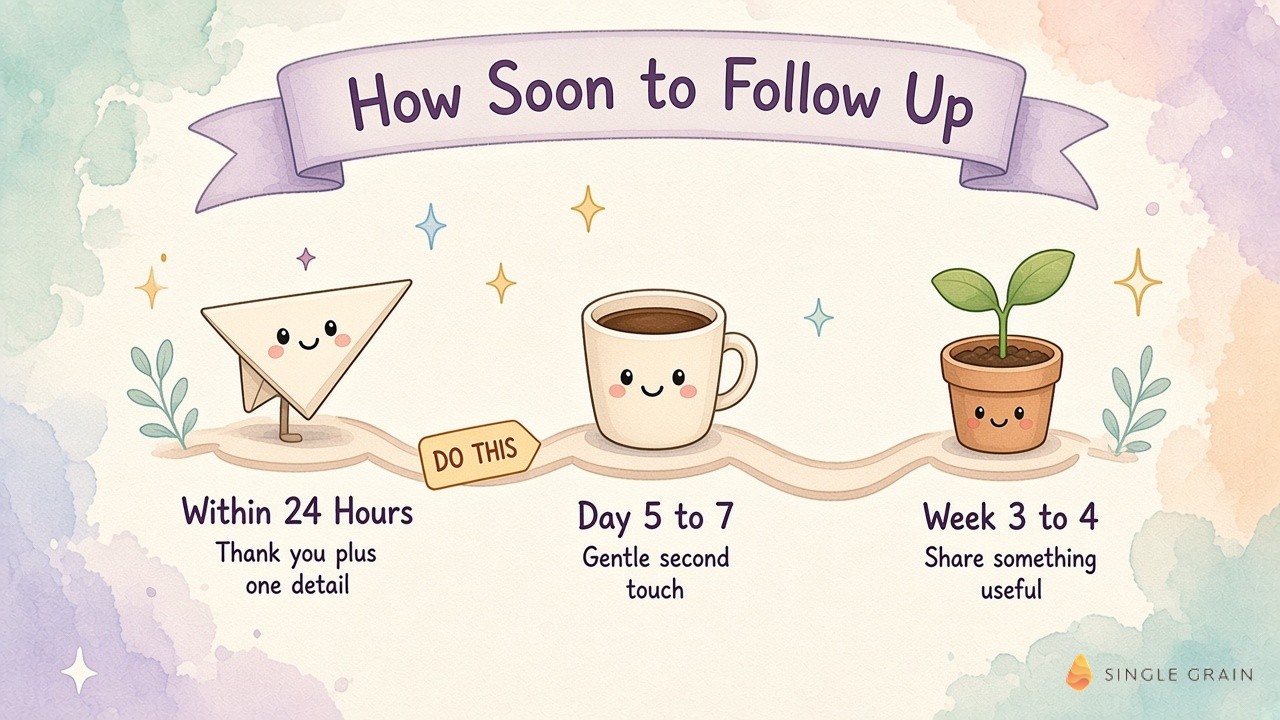
Aim to send your first note within a day of the event. The same 2025 consulting survey found 29% of respondents follow up within a day, while about half wait two to three days. A note in the faster group helps you stand out while the room is still fresh in everyone’s mind.
If the event ran late or you met dozens of people, prioritize the handful of conversations with a clear follow-on plan. Everyone else can get a lighter note within two days.
The Second Touch on Day 5 to 7
Silence after one email is normal. People travel home, catch up on work, and lose track of their inbox. A brief nudge five to seven days later, written as a reply on the same thread, gives them an easy way back in.
The Value Touch in Week 3 to 4
If you still haven’t heard back after three to four weeks, send something useful with no ask attached. A relevant article, an introduction, or a quick idea tied to your conversation shows you were listening. After this third touch, move the contact to a longer nurture cadence and stop chasing.
Once the timing is set, the next question is what to actually write.
How to Write a Follow Up Email After Networking Event Introductions in 4 Steps
Strong networking follow-ups share the same simple shape. Each part has one job, and the whole email should take less than a minute to read. If you want broader inspiration for other situations, these follow-up email examples cover sales and client scenarios too.
1. A Subject Line Tied to the Event
Name the event or the topic you discussed, so the reader places you instantly. “Great meeting you at the Growth Marketing Summit” or “Your question about attribution at the mixer” both work. Skip clever wordplay and anything resembling a sales blast.
A subject line gets even stronger when it carries one specific finding about the reader’s company.
| Action Step |
|---|
| If you looked into a contact’s company after the event, put one concrete finding in the subject line. My team builds a short audit before sales calls, and a single gap from it, such as “[Competitor] is running three times more ads than you,” works as a subject line on its own. The email body then offers to walk through what you found. |
Once the subject line earns the open, the first sentence has to earn the read.
2. An Opening Line About Your Conversation
Start with the moment you met and one detail only the two of you would know. A line like “I enjoyed hearing how your team rebuilt its onboarding flow” proves you paid attention. This detail does more for your reply rate than any template trick.
| Pro-Tip |
|---|
| Before you leave the venue, open your notes app and write one line per person, covering who they are, what you discussed, and what you promised. Those few words become the personal detail in each email and save you from guessing the next morning. |
With your notes in hand, the closing line comes next.
3. One Clear Ask
Close with a single request the other person can say yes to quickly. Offer a fifteen-minute call, share a resource you mentioned, or suggest an introduction. Two or three asks in one email make replying feel like homework.
The ask also lands better when it matches a need the person already shared. At one table during a recent business summit, someone pitched a general marketing audit, and almost nobody raised a hand. When I offered a pilot of our talent bot, tied to the hiring need the table had just described, the entire table raised their hands. The service behind both offers was close, and the framing around their need made the difference.
4. A Short Sign-Off With Your Details
End with your name, role, company, and one way to reach you. Add your LinkedIn profile if you didn’t connect at the event. Keep the signature clean so the email still reads like a personal note.
These four parts snap together quickly, so here is how they look in real emails.
Follow Up Email Templates for Common Networking Situations
Each template below follows the same structure. Swap in your own details and keep the length close to what you see here.
Template for a Potential Client
Subject: Great meeting you at [Event Name]
Hi [Name],
It was great meeting you at [Event Name] last night. I keep thinking about what you said about [specific challenge], especially the part about [detail].
My team has worked through a similar problem with a few companies your size. Would a fifteen-minute call next week be useful to swap notes?
Best,
[Your Name], [Role] at [Company]
This version works because the challenge belongs to them. The offer is small, so saying yes costs very little.
Template for a Potential Partner or Peer
Subject: Your idea about [topic] at [Event Name]
Hi [Name],
Thanks for the conversation at [Event Name]. Your idea about [topic] stuck with me, and I think our audiences overlap more than either of us mentioned.
Here’s the [article, deck, or tool] I brought up. If it sparks anything, I’d love to explore a co-hosted session or a simple referral swap.
Talk soon,
[Your Name]
Template for a Brief Introduction
Subject: Quick hello from [Event Name]
Hi [Name],
We only spoke for a minute near the coffee table at [Event Name], but I wanted to say hello properly. I’m [Your Name], and I help [type of company] with [what you do].
If [topic they mentioned] is on your plate this quarter, I’m happy to share what’s working for us. Either way, it was nice to meet you.
Cheers,
[Your Name]
A LinkedIn Message After a Networking Event
Hi [Name], great meeting you at [Event Name]. I enjoyed our chat about [topic] and would love to stay connected here. I’ll send over the [resource] we discussed by email.
A LinkedIn note works best as a companion to your email, especially when you didn’t swap email addresses at the event.
Template for the Second Touch
Subject: Re: Great meeting you at [Event Name]
Hi [Name],
Bumping this up in case it got buried after the event. Still happy to [repeat your one ask] whenever the timing works for you.
Best,
[Your Name]
Three contacts are easy to handle by hand. Forty contacts after a big conference is where a bot earns its place.
How to Build an AI Bot for Your Networking Follow-Ups
An AI follow-up bot is an agent that turns your raw event notes into ready-to-send drafts, then keeps track of who needs the next touch. It handles the typing, sorting, and reminders. You keep the judgment and the final approval.
This part of the workflow is where most of the time savings live. After a busy conference, the slow work is sorting forty cards, recalling who said what, matching each person to a template, and checking back a week later.
Here’s how this played out after a recent event of my own.
Follow Up Bot Example: How I Followed Up With 55 Leads From One Event
At a business summit I attended, every round table ran a simple exercise called needs and leads. Each person shared what they needed, such as more customers or investment, and everyone else held up a 3, 4, or 5 to show how much they could help. A 3 meant maybe, a 4 meant pretty sure, and a 5 meant a strong yes. The idea was to snap a picture of the table and follow up afterward.
I sat at sixteen tables and met about one hundred sixty people. Fifty-five of them became leads, and twenty have already replied. A quick score for each contact made the follow-up easy to prioritize.
For the follow-up itself, I had Codex, OpenAI’s coding agent, and Jev, our in-house AI classifier, scan the table photos, check each company’s size, and pull out everyone who scored a 4 or a 5. From there, the bot reached out by email and WhatsApp, and it keeps following up on a schedule. As I told my team afterward, “the name of the game here is also follow up.”
You can copy the idea at any event, even without a formal exercise. Give each contact a quick 3, 4, or 5 in your notes right after you talk, and let the bot work from those scores.
The same flow runs on tools many teams already have.
The AI Tools Behind Each Step
A few common tool types cover the whole flow, and many teams already pay for at least one of them.
- Contact capture tools. Business card scanners turn a photo into a contact record. The HubSpot mobile app includes a free business card scanner, and general AI assistants such as ChatGPT and Claude can read a card photo or a typed voice-memo transcript and pull out each field.
- Drafting assistants. An AI assistant or agent writes a personalized first draft for each contact from your notes and your past emails.
- Agent builders with app connections. Tools such as Zapier Agents or Grok Bot connect to your inbox and CRM, so the bot can save drafts, create records, and run on a trigger.
- CRM and reminder tools. Your CRM stores the conversation history and holds tasks for the second touch and the value touch.
Most people start with the assistant they already use, then connect it to email and CRM once the drafts look right.
Those tools add up to a handful of small bots, each with one job and one point where you step in.
6 Networking Follow-Up Bot Use Cases
Each bot below handles one narrow job, and every one hands control back to you at a clear point.
- Card Photo Reader. Turns photos of business cards, badges, or table cards into contact records with name, company, and email. You spot-check spelling before the records reach your CRM.
- Fit Scorer. Checks company size and role, then gives each contact a 3, 4, or 5 so the strongest fits get the first emails. You confirm the top tier.
- Draft Writer. Writes a short, personal email for each contact from your notes and sample emails. You edit and approve every draft, or approve one template for a low-risk batch.
- Multichannel Nudger. Prepares the same follow-up for email and a messaging app like WhatsApp or LinkedIn, so contacts hear from you where they reply. You choose the channel for each contact.
- Second-Touch Scheduler. Creates CRM tasks for the nudge on day five to seven and the value touch in week three to four. You decide when a contact moves to a slower cadence.
- Overnight Reply Drafter. Drafts answers to incoming replies overnight, so they wait for you in the morning. One teammate set up Grok Bot this way so he would “never send a client response later than one day,” and he still edits every output before it goes out.
Start with one or two of these bots, then add the rest once the drafts look right. The setup below shows how the pieces connect.
How to Set Up a Simple Follow-Up Bot in 5 Steps
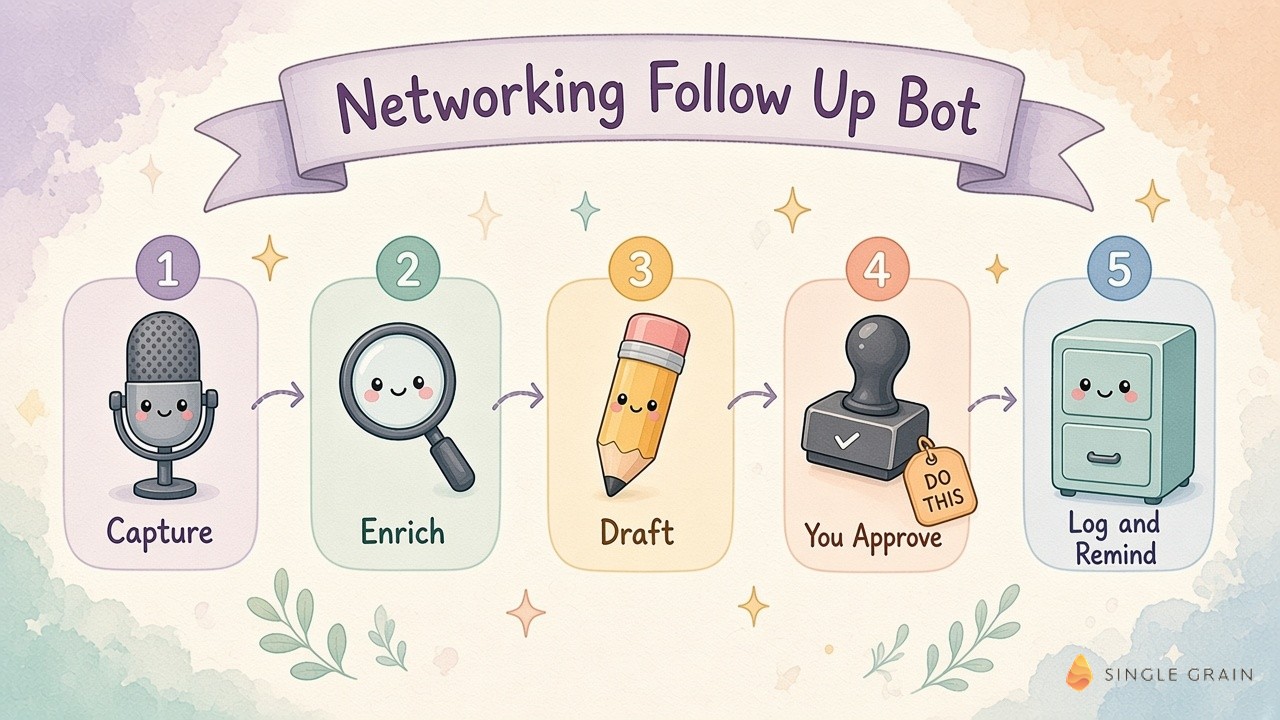
The setup takes five steps, and the fourth one, your approval, is the step you never skip. Start with capture, then enrichment, drafting, approval, and finally logging with reminders.
Step 1: Capture Contacts and Notes
The bot needs raw material first. After the event, scan business cards, record a quick voice memo, or paste the one-line notes from your phone. The bot pulls out each name, company, email, and the detail you want to mention.
Step 2: Enrich and Score Each Contact
Next, the bot fills gaps such as job title, company size, and LinkedIn profile. This step is called lead enrichment, and it helps the bot sort a likely buyer from a friendly peer. The bot then gives each contact a fit score of 3, 4, or 5 from your notes and the company size, so the 4s and 5s get the first emails. Keep enrichment light so each note still sounds personal.
Step 3: Draft Personalized Emails
With notes and context in hand, the bot writes a first draft for each contact using the structure from earlier. Give it a few of your own past emails as examples, so the drafts sound like you. Your corrections can become standing rules through AI agent memory, so the bot stops repeating the same mistakes next time.
Step 4: Human Approval in One of Two Modes
Every setup needs a human yes before anything reaches a new contact. You can give it in one of two modes.
- Approve each draft (recommended). You review every email, edit what feels off, and send it yourself. Use this mode by default, especially for your 4s and 5s.
- Approve the batch once. For a low-risk group, such as a short thank-you to everyone at one table, you approve the contact list and the message once, and the bot sends from there.
Most email-connected agent tools can save drafts without sending them, so start in draft-only mode. Clear AI agent guardrails decide which bots can read, which can draft, and which, if any, can hit send.
| Pay Attention |
|---|
| Keep sending permission with a human for networking emails. A wrong name or an awkward detail in a first impression is hard to undo, and a two-minute review catches nearly all of it. |
Once you approve, the bot moves on to the record keeping.
Step 5: CRM Logging and Reminders
After each email goes out, the bot logs it in your CRM and creates tasks for the second touch on day five to seven and the value touch in week three to four. When a contact replies, an AI sales assistant for call prep can brief you before the call. Contacts who go quiet for months can later move to an AI re-engagement bot.
A Starter Prompt for Your Follow-Up Bot
A single, clear prompt is enough to run your first version. Paste it into your assistant along with your notes and two or three sample emails.
| Starter prompt for a networking follow-up bot |
|---|
| You help me follow up after networking events. For each contact in my notes or photos, pull out the name, company, and email, then check the company size. Give each contact a fit score of 3, 4, or 5, and list the 4s and 5s first. For each contact, write a follow-up email under 120 words with a subject line naming the event or one specific finding, one opening line with the detail I noted, one ask tied to the need they shared, and my signature. If I mark a contact for WhatsApp, also write a two-sentence message version. Match the tone of my sample emails, and flag any contact where my notes are too thin to personalize. Save everything as drafts and never send anything. After I send, create CRM tasks to follow up in six days and again in 25 days. |
This prompt keeps the bot in drafting mode, so every email still passes through you. I run my own bots in Grok Bot, and these Grok Bot templates are a quick place to start. If you want one assistant to coordinate this bot with the rest of your week, an AI chief of staff can hand it the work after every event.
Even with a bot drafting the emails, a few habits still decide whether people reply.
How to Follow Up After a Networking Event and Avoid Common Mistakes
Small slips can quietly cancel out a great conversation. Watch for these before you hit send.
- Slow timing. After a week, the other person may need a long reminder of who you are.
- A pitch in the first email. A sales deck in the first email turns a warm chat into a cold lead.
- A generic template. A note with no personal detail looks mass-produced, even when it isn’t.
- An oversized ask. A one-hour meeting request is a bigger yes than a quick call or a shared link.
- No record in your CRM. Without a logged note, the second touch rarely happens.
Each of these fixes takes seconds, and a bot with good rules can flag most of them in its drafts. Fold these checks into an AI operating system for your business and every event gets the same follow-through.
Turn Your Next Event Into Real Conversations
A great follow up email after networking event conversations is short, specific, and fast. Send the first note within a day, keep it to one detail and one ask, and plan two more touches. A follow-up bot can carry the capture, drafting, and reminders, while the final approval stays with you.
Single Grain helps marketing teams build AI agents for workflows like this through its AI transformation services. Contact Single Grain to map where agents can save your team time after every event.
Frequently Asked Questions About Follow Up Emails After Networking Events
-
How long after an event should you follow up?
Send your first follow-up within a day if you can, and no later than two days after the event. If you met a lot of people, start with the contacts who had a clear follow-on plan and reach everyone else within two days.
-
What should a follow up email after a networking event say?
Name the event in the subject line, open with one detail from your conversation, make one clear ask, and sign off with your role and contact details. Keep the whole email short enough to read in under a minute.
-
Should you follow up on LinkedIn or by email?
Email works best for a specific request, such as a call or a shared resource. A LinkedIn connection request with a short personal note is a good companion, especially if you didn’t swap email addresses at the event.
-
What if they don't reply to your follow-up email?
Reply on the same thread after five to seven days with a short nudge. If there’s still no answer after three to four weeks, send something useful with no ask, then move them to a slower nurture cadence.
-
Is 3 days too soon to follow up on an email?
No. If your first networking email gets no reply, waiting five to seven days before a short nudge on the same thread gives the other person time to catch up after the event. Three days is fine when you promised something time-sensitive.
-
Can AI write networking follow-up emails for you?
Yes. An AI bot can turn your event notes into personalized drafts, log them in your CRM, and set reminders. Review and send each email yourself, and use clear AI agent guardrails so no bot sends a first impression on its own.