Anthropic S-1: What It Means Your AI Budget


Have you seen the recent headlines from the Anthropic S-1 and feel pressured to raise your AI budget before you know which work deserves more money? According to recent stats, roughly 12,000 customers each generate $100,000 or more in yearly revenue for Anthropic. This is big! I get excited about building with AI, but a vendor’s customer count can’t approve my next expense.
In my marketing-stack walkthrough, I showed Media OS putting together a Meta campaign with HubSpot connected. I care about following the campaign into a sales-qualified lead. With that being said, a larger token allowance needs a reason tied to work like this.
Should you increase your AI budget, repair an existing workflow, or keep testing? To help you pick the AI workflow that deserves the next budget increase, I’ll use the filing, my team’s actual work at Single Grain, and a practical review sheet.
TL;DR
- Read the spending threshold carefully. Anthropic reports revenue from customers over a trailing twelve-month period; the count doesn’t measure marketing results.
- Follow a workflow into its business record. A campaign and its CRM outcome give you evidence for a budget decision.
- Include the cost of review. Model usage, connected services, and human corrections all belong in your calculation.
- Expand after the output earns it. Keep funding tied to accepted work and document the conditions for pausing a workflow.
TABLE OF CONTENTS:
- What Anthropic S-1 Reveals About AI Spending
- Follow Media OS From Campaign to CRM
- Price the Checks Inside an Outbound Workflow
- Screen Before Paying for Deeper Research
- Build an AI Budget Review Sheet
- Decide When to Expand or Repair
- Use the Anthropic IPO to Review Vendor Dependence
- Give the Next AI Expense a Job
What Anthropic S-1 Reveals About AI Spending
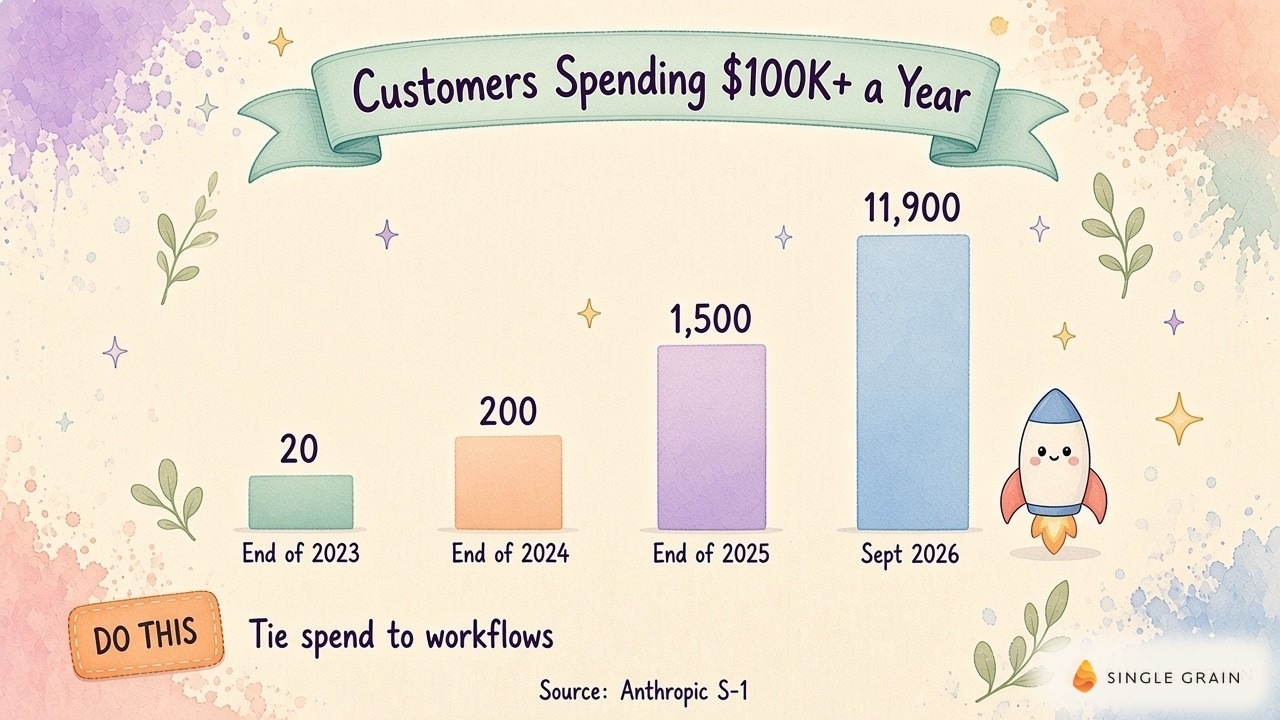
Anthropic’s S-1 filing reports more than eleven thousand nine hundred customers generating $100,000 or more of revenue on a trailing twelve-month basis. Its count grew from approximately twenty at the end of 2023, two hundred at the end of 2024, and fifteen hundred at the end of 2025.
This is a vendor revenue measure. It doesn’t tell you how much a customer’s marketing department spent, which work produced an acceptable result, or whether the customer recovered its investment. Use the filing to understand adoption, then open your own records to evaluate an expense.
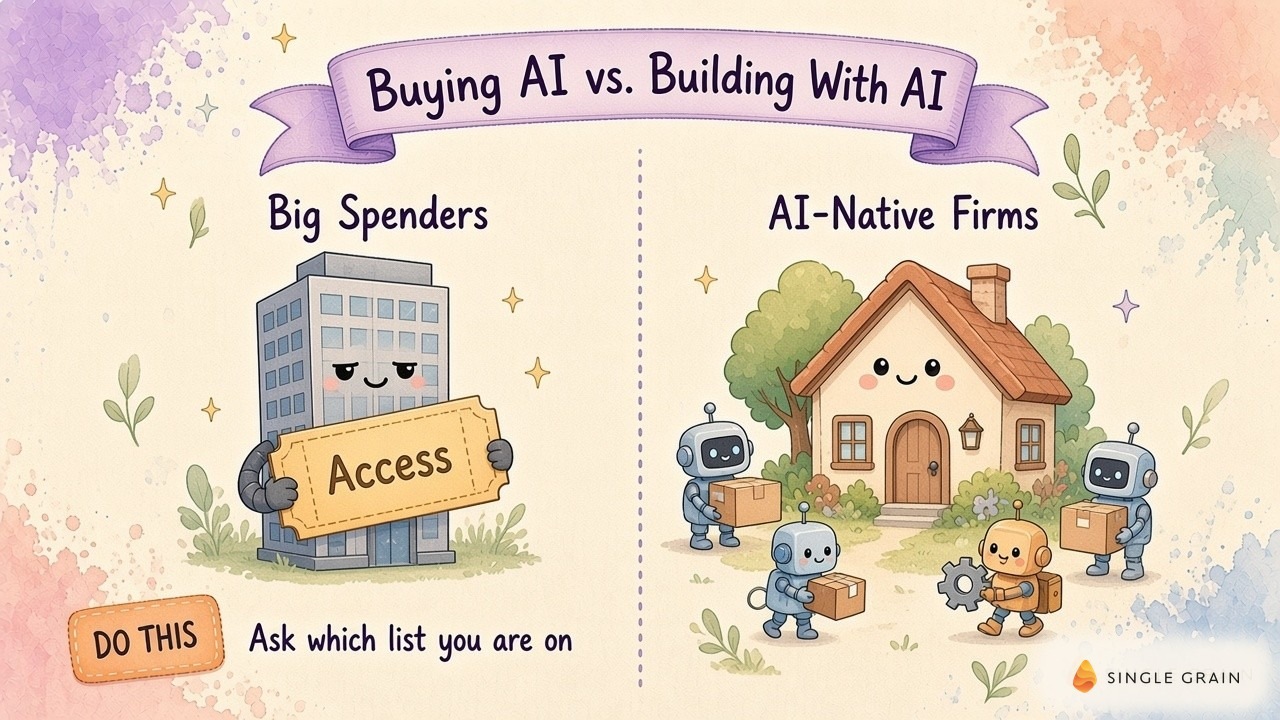
I would also separate a company’s spending level from its operating habits. The original discussion linked these ideas in my Anthropic spending post and my follow-up about AI-native firms.
A company count also can’t tell you how far ahead a competitor is. For your budget review, the useful question is whether another funded run will produce an output your team can use. My campaign walkthrough gives you a concrete place to start.
Follow Media OS From Campaign to CRM
In my Media OS walkthrough, I described a new funnel my team at Single Grain was testing. Media OS, my paid media bot, put together a Meta campaign with HubSpot connected. I reported a sales-qualified lead during the first week and described sending traffic to AI visibility and citation-map offers.
As the agency operator reviewing this test, I treat it as an early funnel result. One qualified lead says nothing yet about a campaign-wide return, an average acquisition cost, or a repeatable forecast.

Inspect the Handoff
For a budget decision, trace the campaign into the lead record and inspect its qualification evidence. Can the person responsible for sales follow-up explain why the lead qualifies? Can the marketing owner identify the campaign and offer responsible for the inquiry?
Record the qualification rule before judging the result. Otherwise, changing the definition of a good lead can make a weak campaign appear healthier.
If you already track AI spend per employee, add a workflow view alongside it. An employee average can help you see the total expense, but the campaign record tells you where to investigate. Once the handoff is visible, check the work the system should refuse.
Price the Checks Inside an Outbound Workflow
My outbound workflow demonstration shows another budget question. I described a queue of prospects, email confirmation through Clay, and Jev scoring. The workflow checks HubSpot ownership and suppression information before drafting a sequence, with unusual cases coming back to me.
Here, my role is the operator handling exceptions. A successful run depends on whether the prospect may be contacted and whether the final copy passes review.
Count Accepted Work
Suppression checks consume resources even when they prevent a message from going out. Include this work in your cost review. A workflow may spend money correctly by stopping a duplicate contact or sending an uncertain case to a human.
For your own review sheet, distinguish a draft, an approved sequence, and a permitted send. Keep rejected outputs visible so your cost calculation includes the work you paid for but couldn’t use.
Consider the failure path before adding more volume. If ownership information is missing, decide who resolves it and whether sending pauses. If the suppression check fails, the budget shouldn’t buy a larger queue until the check works again.
This changes how I would evaluate a request for more AI spend. I want to see where extra capacity helps and where a broken connection creates rework. The next decision is how much processing each eligible prospect actually needs.
Screen Before Paying for Deeper Research
In my people-search example, I described using Apollo through the Single Brain gateway and asking for the cost. I also recommended a Jev screening pass for ideal-customer-profile fit before spending on more expensive credits. This is a routing idea you can test against your own prospect pool.
The economic question is whether screening avoids enough unnecessary research while retaining suitable prospects. You need a comparison using your own inputs before assigning a savings target.
Review Rejected Inputs
Save examples of prospects the screen accepts and rejects. Have the person accountable for prospect quality review both groups. A cheap screen can create a costly problem if it repeatedly removes qualified buyers.
Write down the fit rule in language a reviewer can challenge. “Good company” leaves too much room for interpretation; an explicit service need and supported buying territory are easier to inspect. Use criteria appropriate to your business and keep uncertain cases available for review.
My recommendation is to compare the full research path with the screened path on comparable work. Include human review time and the price of enrichment in both calculations. If the cheaper route misses suitable prospects, revise its instructions before increasing the budget.
Screening is only one part of the decision. You also need a record you can bring into a budget meeting without replaying an entire demonstration.
Build an AI Budget Review Sheet
Create a spreadsheet row for each workflow under review. Begin with its job and the person accountable for the output. Add a link to an actual artifact, such as the campaign record, approved sequence, or completed research report.
Keep model charges separate from connected-service expenses. Enrichment credits, automation software, and subscriptions may sit on different invoices even when they serve the same job. Allocate shared charges consistently and label estimates so a reviewer can distinguish them from billed usage.
Calculate Cost per Accepted Output
Add columns for accepted outputs and human correction time. Divide the total allocated expense by the accepted output count to calculate cost per accepted output. If there are no accepted outputs, leave the result undefined and investigate the failure.
The sheet’s purpose is to make a funding request inspectable. A finance partner should be able to open the artifact and understand why it qualified for the denominator.
| Pro-Tip |
|---|
| Record the reason for each rejection beside the output link. Repeated missing evidence calls for better inputs; repeated formatting errors point toward instructions or validation. This record gives the operator a specific problem to fix. |
Keep elapsed time separate from active human effort. A background run may take a while without requiring attention, while a fast answer may need extensive corrections. Claim time savings only after comparing comparable work, including setup and review.
Check AI Operating Skills in New Hires
The same distinction matters when you assess people. My team’s questions for AI-native hires and daily habits for an AI-native marketer give you related angles on operating capability. Use a real work sample to see whether someone can diagnose a failed run.
A populated sheet can still support the wrong decision if every improvement automatically earns more spending. Give the reviewer explicit choices before the next approval.
Decide When to Expand or Repair
Expand a workflow when accepted output meets the business requirement and more eligible work is waiting. Confirm whether the constraint is model capacity, access to data, or a human approval queue. Paying for more model usage won’t clear an unattended approval queue.
Repair the workflow when recurring mistakes consume its apparent benefit. Missing source records, duplicate prospects, and unsupported claims each require a different fix. Name the failure in the budget request so the money funds a specific correction.
When to Continue or Pause an AI Workflow
Continue a limited test when the result looks useful but the evidence is incomplete. The early Media OS lead belongs in this discussion. It supplies a reason to inspect the funnel further, while revenue and repeatability still require follow-up.
Pause a workflow when you can’t inspect its outputs or verify whether its actions were permitted. Save its records before changing the configuration. You may need them to understand the fault or compare a repaired version.
Set the Next Review Condition
I would write the decision beside the next review condition. For an outbound workflow, this could mean checking whether suppressed contacts remain excluded after a connector change. For a campaign, it could mean inspecting qualification evidence after enough leads arrive to assess the funnel.
Each decision also depends on your ability to change vendors. The filing offers a useful reason to review this dependency without predicting where model prices will go.
Use the Anthropic IPO to Review Vendor Dependence
In its amended S-1, Anthropic reports approximately 25% of revenue came from its top five customers for the nine months ended September thirtieth. It also says many top customers have no long-term contracts or have contracts approaching expiration. This describes Anthropic’s customer relationships; your own contract may provide different rights.
Check Your Workflow’s Provider Dependence
For a marketing leader, my recommendation is to inspect the workflow’s dependence on a provider. Save prompts and evaluation examples somewhere your team controls. Document the expected output and the connections required to produce it.
My team’s vendor portability checklist for managed marketing agents provides questions for this review. Ask whether you can export the records needed to rerun a job elsewhere. Verify how a replacement would handle required CRM fields and permission checks.
Test a Replacement Model Before Switching
Test a replacement against saved, permitted examples before assigning live work. Compare whether the outputs pass the same acceptance rule. Include the cost of migration and corrections when evaluating a lower advertised model price.
Your review sheet should show these dependencies beside the funding decision. This gives you a reasoned way to spend more, reduce waste, or change a provider as your needs develop.
Give the Next AI Expense a Job
Anthropic’s customer growth is useful context for a budget conversation. I still want the campaign record, the qualification evidence, and an account of the review effort before approving more capacity. Start with a workflow you can inspect and connect its next expense to an observable result.
If you need help connecting AI spending to marketing work, my team at Single Grain offers AI transformation services. Contact Single Grain to discuss your marketing workflows and implementation needs.
Frequently Asked Questions About Anthropic's S-1
-
What is Anthropic's S-1?
It’s the registration statement Anthropic filed with the Securities and Exchange Commission on October 26, 2026, ahead of a proposed initial public offering.
-
How many Anthropic customers spend $100,000 a year?
The S-1 filing reports more than 11,900 customers spending $100,000 or more on a trailing twelve-month basis.
-
How much revenue did Anthropic report?
The filing reports $16.3 billion in revenue for the first half of 2026, up from about $1.2 billion in the first half of 2025.
-
Are big AI spenders the same as AI-native companies?
No. Many big spenders are large enterprises buying access, while many AI-native firms are smaller teams that design roles and workflows around agents.
-
What should marketers take from the Anthropic IPO filing?
AI budgets are moving into core operations fast, so tie your spending to specific workflows and invest in AI-native habits on your team.