How to Run Facebook Ads for B2B That Bring In Qualified Pipeline


Facebook ads for B2B can fill your CRM fast, which feels great UNTIL your sales team starts calling the leads. Cost per lead looks healthy in Ads Manager, and then the follow-up calls reach voicemail or people who don’t remember the form. Obviously, this is very frustrating! How do you run Facebook ads for B2B that actually pulls qualified prospects?!
If this sounds familiar to you, here’s a quick tip that works for me: First look at what you asked Meta to find. When you optimize for form fills, the algorithm gets very good at finding people who fill out forms.
At this point, you might be wondering if Meta can bring in qualified pipeline for a B2B company. It absolutely can! In this guide, discover my playbook for sending CRM stages back through the Conversions API, adding the right friction, targeting without job titles, and comparing Meta with LinkedIn on cost per lead.
TL;DR
- Train Meta on pipeline instead of form fills. Raw-lead optimization teaches the algorithm to find people who submit forms, which rarely matches the people who buy.
- Meta’s qualified-leads goal now depends on CRM data. Since April 2026, new campaigns need a Conversions API integration to use the “Maximize number of qualified leads” goal, according to Meta.
- Friction works as a filter. Higher intent forms, a qualifying question, or a landing page cut volume and raise quality.
- Meta usually wins on cost per lead, so judge it on pipeline. In Metadata’s 2025 B2B data, a Facebook lead cost $145 versus $202 on LinkedIn, while LinkedIn turned more clicks into leads.
TABLE OF CONTENTS:
- Do Facebook Ads Work for B2B?
- Why B2B Facebook Ads Fill Your CRM With Junk Leads
- Feed CRM Stages Back to Meta With the Conversions API
- Lead Forms vs Landing Pages: How Much Friction Should You Add?
- B2B Targeting on Meta: Audiences, Exclusions, and Advantage+
- B2B Facebook Ad Examples: Creative That Pre-Qualifies
- Meta Ads for B2B vs LinkedIn: Which Costs Less per Lead?
- How to Measure B2B Facebook Ads by Pipeline
- Turn Meta Into a Source of Qualified Pipeline
Do Facebook Ads Work for B2B?
Yes, with conditions. Facebook and Instagram can reach the people on your buying committee, but they see you while scrolling a personal feed. Your ad has to earn attention and then screen the person who responds.
Meta tends to fit B2B when these conditions hold.
- Your buyer is a broad role. Founders, marketers, finance leads, and HR teams work at companies of every size, so broad delivery still finds them.
- Your offer is easy to say yes to. A benchmark report, a tool, a webinar, or a free plan earns a click from a feed more easily than a sales call.
- Your deal size can absorb some screening. Cheaper leads leave room for an SDR or an automated step to qualify them.
- You can send CRM outcomes back to Meta. This matters most, and it gets its own section below.
It tends to struggle when your buyer is a narrow title at named accounts, since Meta doesn’t offer LinkedIn’s depth of company and job-title targeting. It also struggles when follow-up is slow, because feed leads didn’t come looking for you. If you only measure cost per lead, you’ll end up scaling whatever produces the cheapest form fills.
If more of your situation matches the second list, don’t write Meta off yet. Junk lead problems often trace back to a handful of settings you can change.
Why B2B Facebook Ads Fill Your CRM With Junk Leads
When your sales team calls Meta leads garbage, they’re usually describing one of three causes.
- The wrong optimization event. Meta’s “Maximize number of leads” goal shows your ad to people most likely to share their contact information, per Meta’s Business Help Center article on lead ad performance goals. People willing to share an email and people likely to buy are two different groups.
- Too little friction. The default “More volume” instant form is built for quick submission on a phone, so accidental and low-intent submissions get through.
- An offer that attracts the wrong crowd. A generic giveaway draws people who want the freebie and nothing else.
Broad targeting gets blamed a lot. With Meta’s automated audiences, though, your creative and the conversion event you optimize for do much of the targeting work, which is why the event comes first.
Feed CRM Stages Back to Meta With the Conversions API
This is the fix with the biggest upside. Instead of telling Meta this person filled out a form, you tell it this lead became a sales-qualified lead, then an opportunity. Meta then looks for more people like the ones who moved forward.
Meta calls this conversion leads optimization, and it runs through the Conversions API for CRM. Meta’s help article on lead ad performance goals says the “Maximize number of qualified leads” goal stopped being available for new campaigns without this integration in April 2026, and existing campaigns are affected starting August 2026.
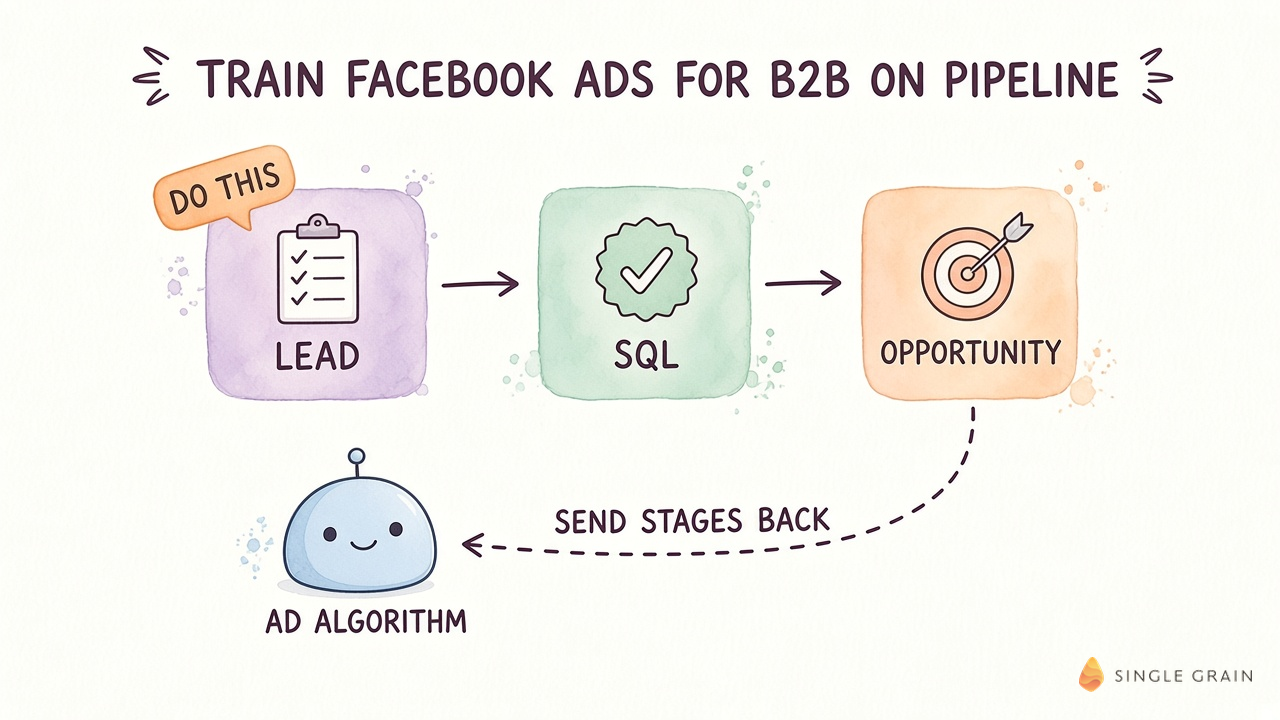
Meta also reports a result worth knowing. Lead ads using the Conversions API for CRM with the qualified-leads goal on instant forms saw 21% lower cost per quality lead than lead ads optimized for volume, by Meta’s own measure.
What Meta Looks For Before It Optimizes
Meta’s developer FAQ for the conversion leads integration describes a good fit. You run native lead ads through Instant Forms or website forms, and your CRM can send updates at least once a day.
The stage you optimize for should happen within 28 days of the lead, and roughly 1% to 40% of leads should reach it.
The same FAQ mentions a training period of one to two months after setup before you see the full effect. Plan your test window around it, and don’t judge the change in week one.
Which CRM Stage Should You Send?
Pick the deepest stage your leads reach often enough and within 28 days. For a long sales cycle, that’s usually a sales-accepted or sales-qualified lead, because closed-won takes too long to count. Meta’s FAQ still recommends sending every stage as it updates, including the raw lead.
Messy lead stages make a weak signal, so tighten those definitions first. A lead scoring model that predicts revenue gives you a cleaner stage to send, and server-side tracking covers website form events the browser Pixel can miss.
| Pay Attention |
|---|
| Once the CRM integration is live, don’t switch it to a different Pixel or dataset. Meta’s FAQ warns this starts a new integration and restarts the training period. |
With a better signal in place, the form itself is your next lever.
Lead Forms vs Landing Pages: How Much Friction Should You Add?
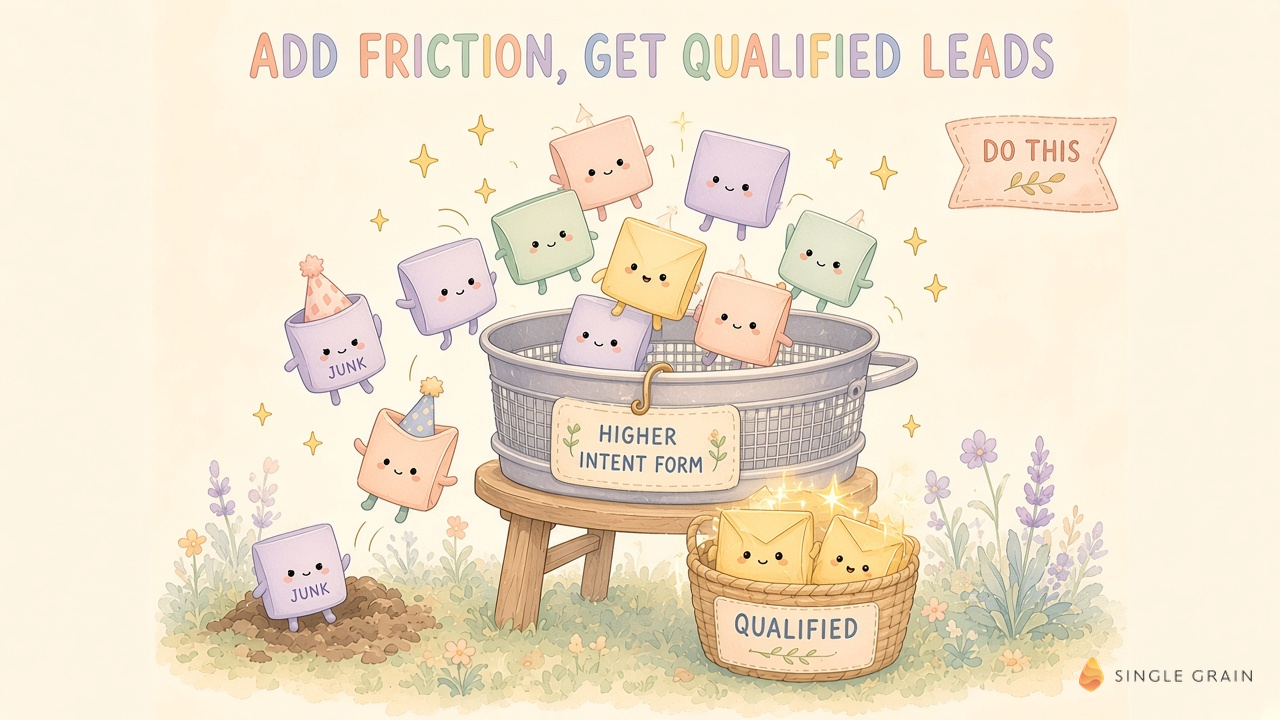
Should I use Meta’s instant forms or send people to my site? Both can work. What matters is how much effort you ask for, since a little effort screens out people who were never going to buy.
Meta offers three instant form types, per its help article on instant form types. “More volume” is the default, built for quick mobile submissions. “Higher intent” adds a review screen where people confirm their details before sending.
One catch from the same page is easy to miss. Higher intent forms only deliver in Facebook and Instagram feeds on mobile devices, so check your placements before you switch.
Ways to Add the Right Friction
- Switch to Higher intent. The review screen is a cheap first filter.
- Ask one qualifying question. Company size, role, or current tool tells your team who to call first. Multiple choice keeps it quick on a phone.
- Ask for a work email. Prefilled contact details come from the person’s Meta account, which is often a personal address.
- Send high-consideration offers to a landing page. A demo request deserves a page that explains what happens after the click, and a dedicated landing page gives you room to qualify.
Expect fewer leads. In Metadata’s Meta ads cost data for B2B, Facebook turned 2.6% of clicks into leads, below LinkedIn’s 5.9%, and a tighter form will push the rate lower still. A lower rate is fine if the leads that come through are the ones your sales team wants.
B2B Targeting on Meta: Audiences, Exclusions, and Advantage+
Since Meta can’t match LinkedIn’s firmographic targeting, your audience work shifts toward first-party data and exclusions. Here’s where to spend your setup time.
- Customer list audiences. Upload current customers and strong opportunities as seed audiences for Meta to model.
- Exclusions. Exclude current customers, employees, recent leads, and closed-lost contacts you don’t want to pay for again.
- Warm audiences. Site visitors, video viewers, and people who opened your form give Meta warmer audiences. In Metadata’s 2025 data, Facebook retargeting cost $120 per lead against $166 for prospecting.
- Advantage+ audience. Meta’s automated targeting treats your inputs as suggestions, so it works best once your conversion event reflects real pipeline.
Exclusions are easy to skip and cheap to set up, so do them first. For the automated side, my rundown of Meta Advantage+ AI tools covers what’s live and where you still need control.
B2B Facebook Ad Examples: Creative That Pre-Qualifies
On Meta, the ad itself does a lot of your targeting. When it names a specific role, problem, and offer, the wrong people scroll past, which is exactly what you want.
- Call out the buyer in the first line. A hook like “For RevOps leaders running Salesforce” tells everyone else to keep scrolling.
- Show the product. A screen recording or a real dashboard signals a business tool at a glance.
- State the commitment. A line noting the plan is paid, or the call takes thirty minutes, screens out people looking for something free.
- Put a founder or customer on camera. A real person describing a real problem often reads as more credible than polished stock footage.
I run a version of this check on Single Grain’s own Meta ads. Before a set of ad drafts goes live, an AI gate scores the copy for buyer fit, hook, and voice, as I showed in this short video on X.
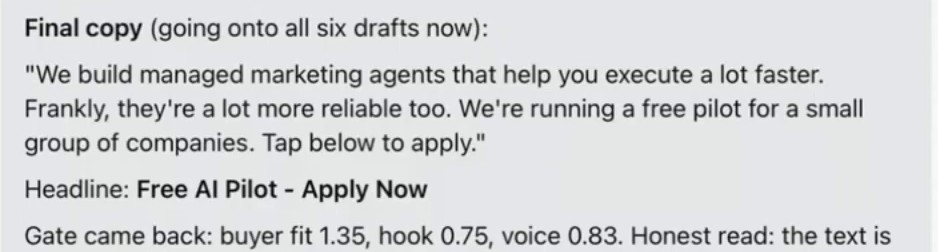
In this run, the copy pitched managed marketing agents to companies, and it went onto six ad drafts only after the gate cleared it, with the drafts still paused. Whatever tool you use, check every ad against your buyer before Meta starts learning from the clicks. The same buyer-fit idea helps you find the best Instagram hooks before you spend.
Meta Ads for B2B vs LinkedIn: Which Costs Less per Lead?
Meta usually wins on cost per lead. In Metadata’s 2026 B2B advertising benchmarks, built from 153 B2B advertisers and $57.6M of 2025 spend, a Facebook lead cost $145 and an Instagram lead cost $138, against $202 on LinkedIn.
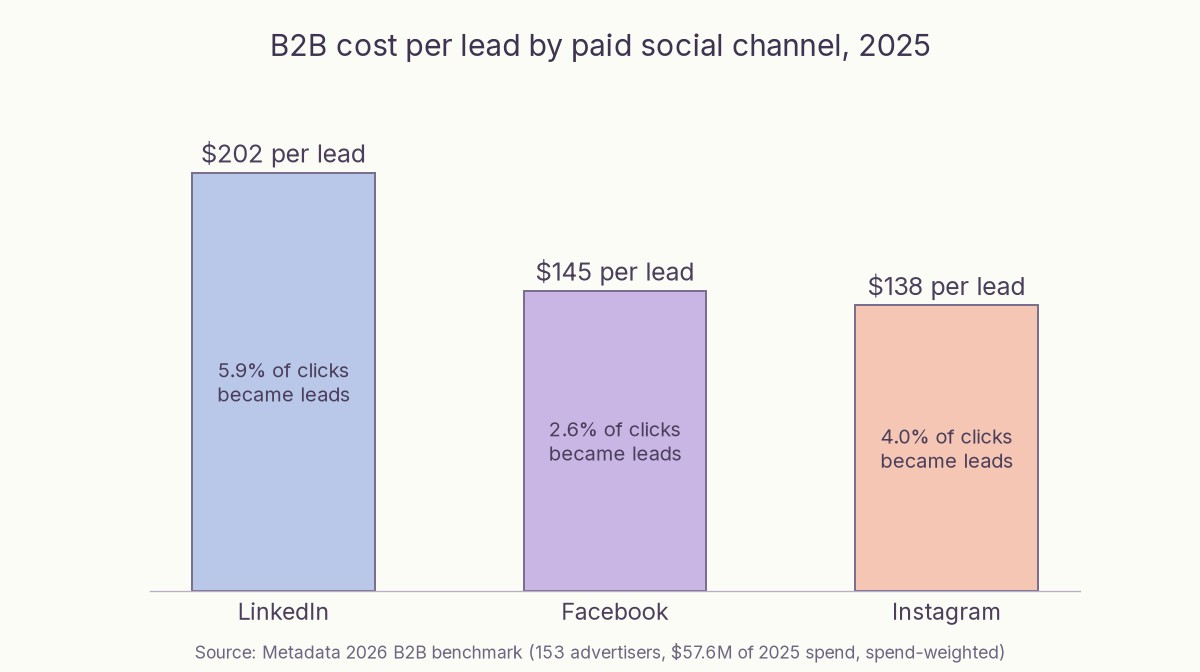
Clicks tell a similar story. Facebook clicks averaged $1.95 against $9.39 on LinkedIn, while LinkedIn turned 5.9% of clicks into leads compared with 2.6% on Facebook.
Two caveats keep the comparison honest. The $202 LinkedIn figure is spend-weighted, and in Metadata’s per-advertiser view the middle LinkedIn advertiser paid $376. Metadata also notes cost per lead and cost per customer are different numbers, and 42 of the 132 advertisers running lead-gen spend in its data had no CRM opportunity signal at all.
When Meta Wins
Meta tends to win when your buyer is a broad role found at companies of every size, and when your offer is a report, tool, or webinar suited to a feed. It also wins on warm audiences. Facebook retargeting was cheaper than prospecting in Metadata’s data, while LinkedIn retargeting cost more ($234 against $194).
When LinkedIn Wins
- Named accounts and narrow titles. Company and job-title targeting is where LinkedIn advertising earns its higher click price.
- High deal values. A $376 lead is still cheap if it closes into a six-figure contract.
- Account-based programs. Formats built for ABM, such as single image and carousel ads, reach the exact buying committee.
In practice, plenty of B2B teams run both, with LinkedIn for named accounts and Meta for reach and retargeting. The split only works if you measure both channels the same way.
How to Measure B2B Facebook Ads by Pipeline
Cost per lead is the first number Ads Manager shows you, and for B2B it’s the least useful. Track these in order, from the CRM side.
- Lead-to-SQL rate by campaign and ad. Tag every Meta lead with its campaign and ad so sales outcomes trace back to the creative.
- Cost per SQL and per opportunity. Divide spend by the leads sales accepts and by the opportunities they create.
- Pipeline and revenue per dollar. Compare channels with the same attribution window.
- Incremental lift. Once spend is meaningful, run a holdout or incrementality test, since platform attribution tends to credit itself generously.
Give the channel a fair window. Between Meta’s one-to-two-month training period for CRM optimization and a sales cycle that often runs longer than a month, a two-week test tells you very little.
| Action Step |
|---|
| Export the last ninety days of Meta leads from your CRM with their current stage, grouped by campaign and ad. Keep the ads whose leads reach a sales-accepted stage, pause the rest, and set up the Conversions API for CRM before you scale. |
Once this baseline exists, every creative and targeting test has a pipeline number to beat.
Turn Meta Into a Source of Qualified Pipeline
Facebook ads for B2B work when Meta learns from your CRM, your forms ask for a little effort, and you judge results by sales-accepted leads and opportunities. Cheap leads only matter when they turn into pipeline.
If you’d like help setting this up, my team at Single Grain runs Facebook advertising and paid social programs for growth-stage companies, and its demand generation team connects paid leads to the rest of your funnel.
Talk to my team about your Meta lead quality, and I’ll show you where your setup is leaking budget.
Frequently Asked Questions About Facebook Ads for B2B
-
Do Facebook ads work for B2B?
Yes, when your buyer is a broad role, your offer is easy to say yes to, and you send CRM outcomes back to Meta. They struggle when you need narrow job-title targeting at named accounts.
-
How do I improve lead quality from Facebook lead ads?
Optimize for qualified leads with the Conversions API for CRM, switch to a Higher intent instant form, add one qualifying question, and exclude customers and recent leads. Then judge campaigns by sales-accepted leads.
-
What is the Conversions API for CRM?
It’s Meta’s way to receive lead stage updates from your CRM, such as qualified or opportunity, so its delivery system can find more people like your best leads. Since April 2026, new campaigns need it for the qualified-leads goal.
-
Are Meta ads cheaper than LinkedIn ads for B2B?
Usually per lead. Metadata’s 2026 benchmark put a Facebook lead at $145 and a LinkedIn lead at $202 for 2025, but LinkedIn converted more clicks into leads, so compare cost per opportunity too.
-
Should B2B companies use Facebook lead forms or landing pages?
Use instant forms for lighter offers like reports and webinars, ideally the Higher intent type. Send demo requests and other high-commitment offers to a landing page that explains what happens next.
-
How long does Meta take to optimize for qualified leads?
Meta’s FAQ describes a training period of one to two months after your CRM integration passes its funnel check. Plan tests longer than a few weeks before judging results.

