What Makes a SaaS Landing Page Convert? Lessons From Real Pages


Are you in the software as a service industry and struggling to see results with your landing pages? If so, you’re not alone. A SaaS landing page gets a few seconds to tell a visitor what you sell, who it’s for, and what to do about it, and most of that answer has to sit above the fold. You already know your product is good, but the hard part is proving it before someone scrolls, bounces, or opens a competitor’s tab.
Design galleries are full of beautiful screenshots, but they rarely tell you why a page works. So I opened six live SaaS homepages, captured exactly what loads in the first screen, and marked what each one does with its headline, call to action (CTA), proof, and product visuals.
Keep reading to see the six annotated SaaS landing page examples, how each one handles the demo versus free trial question, and a checklist you can run against your own first screen this week.
TL;DR
- The first screen does most of the selling. In a Nielsen Norman Group eyetracking study, people spent about 57% of their viewing time above the fold, so your headline, CTA, and proof belong there.
- Every page I reviewed pairs a self-serve path with a sales path. Five of the six show a demo or sales button next to the signup option, and Linear keeps a plain Contact link in its menu.
- Proof shows up before the scroll. Customer logos, a Fortune 500 claim, or usage counters appear in the first screen on four of the six pages.
- Show the product, then test one change at a time. All six put the product interface or product-style visuals in the first screen, and the checklist below turns these patterns into tests.
What Is a SaaS Landing Page?
A SaaS landing page is any page built to turn a visitor into a signup, a trial, or a sales conversation for software. Your homepage is one. So is the page behind a paid campaign, a webinar ad, or a comparison search.
The difference is focus. A homepage serves every visitor, from a curious founder to a procurement lead, while a campaign page can narrow to one offer and one audience. The above-the-fold lessons below apply to both, and for the full build from copy to forms, see how to create a high-converting landing page.
Why Above the Fold Gets the Most Attention
Why obsess over the first screen? In a 2018 eyetracking study on scrolling and attention from Nielsen Norman Group, people spent about 57% of their page-viewing time above the fold and 74% in the first two screens. Attention dropped sharply after the fold.
That gives your first screen four jobs. It has to say what the product is and who it helps, give the visitor one obvious way to act, show proof that companies like theirs already use it, and let them see the product itself.
Each example below handles those four jobs a little differently, and the differences are where you’ll find ideas worth testing.
6 SaaS Landing Page Examples, Annotated
I captured each page at 1440 pixels wide, in a fresh browser with no login, then added numbered callouts. The numbers in each image match the list under it. Live pages change often, so treat these as snapshots of what each team runs right now.
1. Notion: Two Buttons for Two Kinds of Buyers
Notion is a useful model if you sell to individuals and to larger teams at the same time.
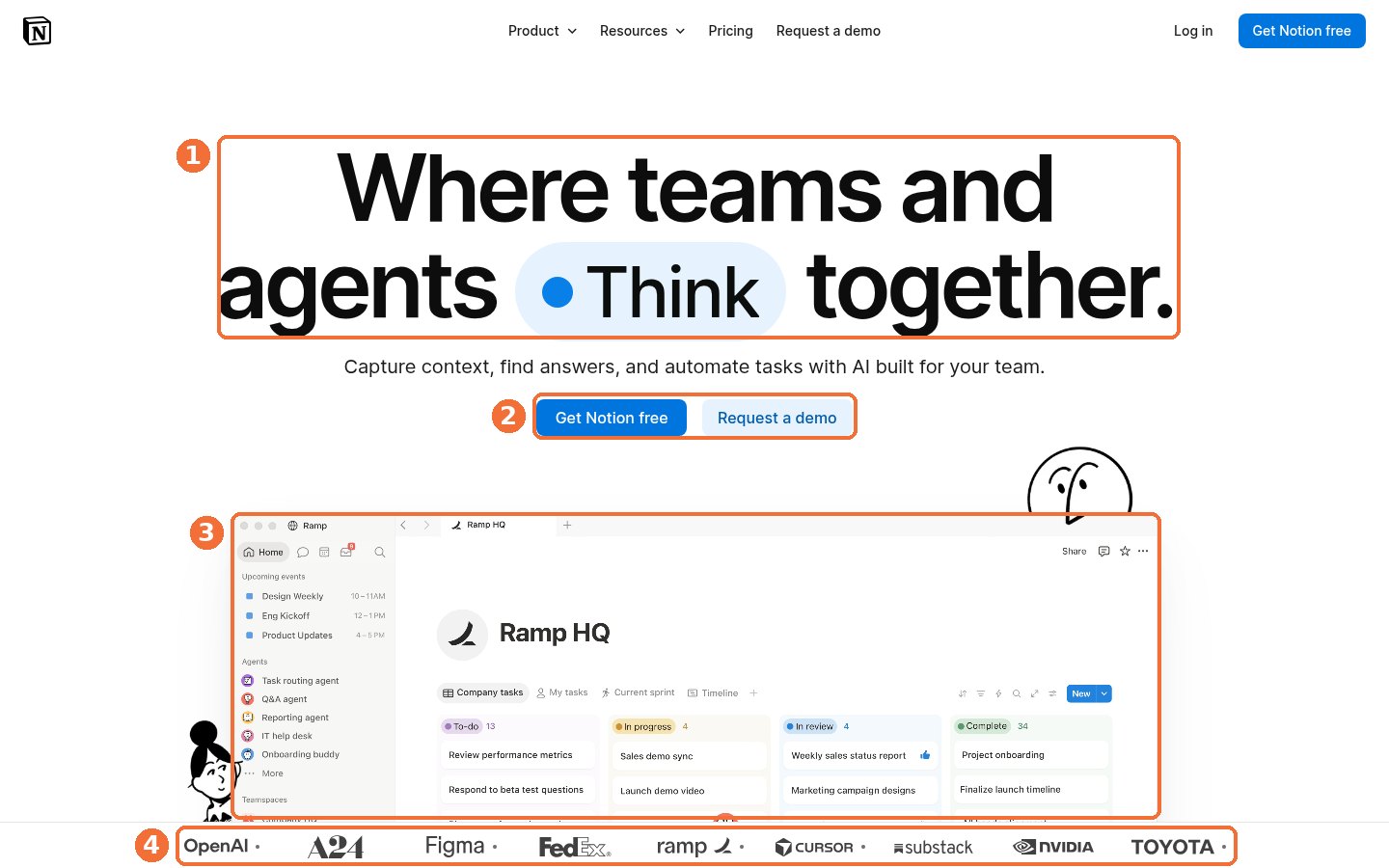
Here’s what Notion’s homepage shows before any scroll, matched to the callouts.
- A short headline built around one idea. “Where teams and agents Think together” fits on two lines, with a one-line subhead about capturing context, finding answers, and automating tasks.
- A primary and a secondary CTA. The filled “Get Notion free” button sits beside a lighter “Request a demo” button, so a solo user and a buying committee each get a door. “Request a demo” also appears in the top menu.
- The product at near full size. The hero shows a real workspace with agents listed in the sidebar, so you see what using Notion looks like before you click.
- Logos at the fold line. OpenAI, Figma, FedEx, Ramp, Cursor, NVIDIA, and Toyota sit right where the first screen ends, which also hints there’s more below.
What can you borrow? If you sell both self-serve and sales-led, give each path its own button, and make the louder one the path where most of your revenue starts.
2. Asana: The Signup Form Is the Hero
Asana skips the hero button entirely and puts the signup itself in the middle of the page.
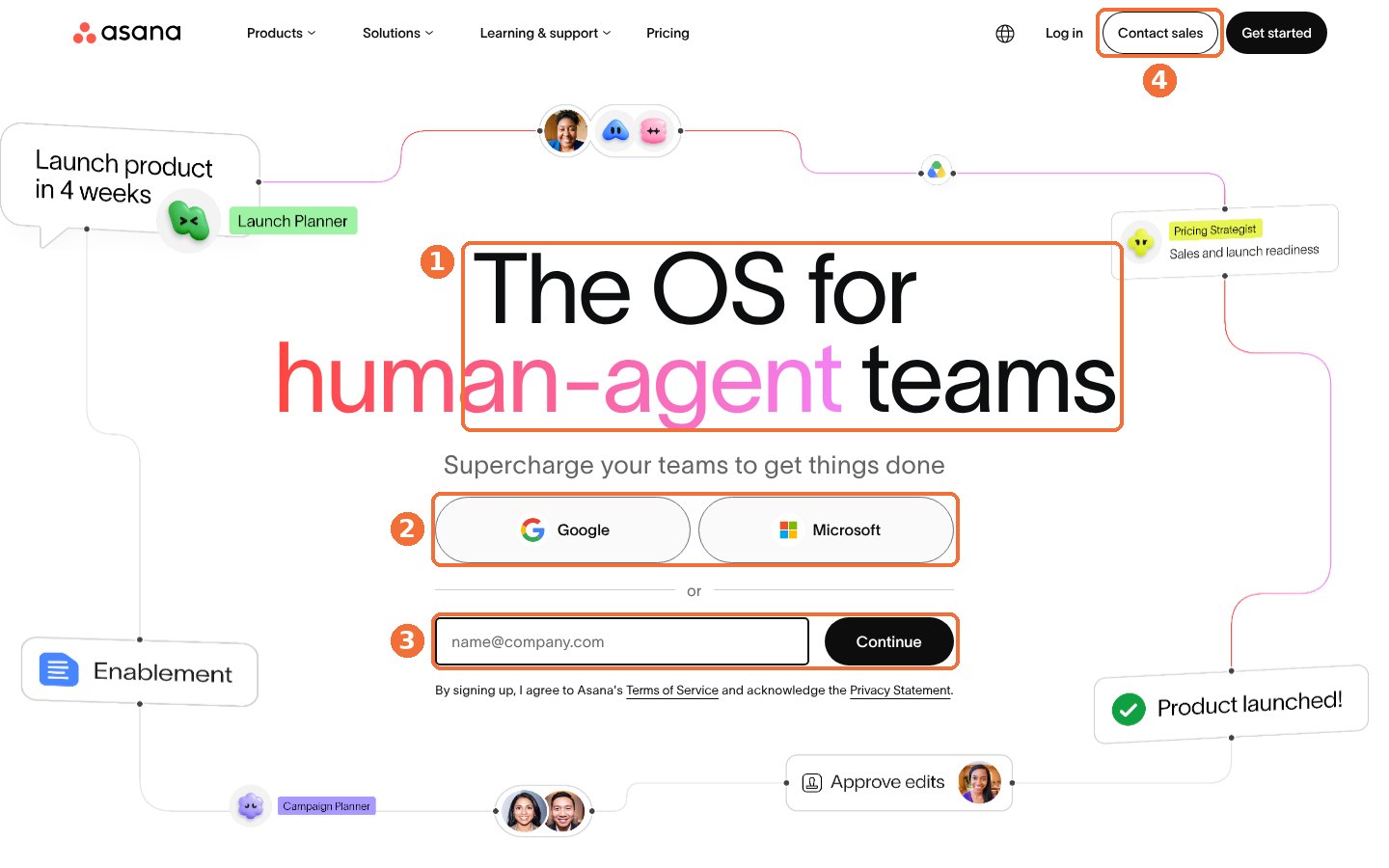
In the first screen of Asana’s homepage, four choices stand out.
- One big positioning line. “The OS for human-agent teams” is the largest text on the screen, with a short subhead under it.
- Signup with Google or Microsoft. Work-account buttons remove the password step for anyone already signed in to either one.
- An email field with a Continue button. It’s the fallback for everyone else, and the placeholder reads [email protected], a quiet hint that the page wants work emails.
- A low-key sales path. “Contact sales” sits in the top right beside “Get started,” so enterprise buyers don’t have to hunt for it.
This pattern fits a product people can try on their own, where value shows up soon after the first login. If your setup needs a guided demo, a signup form in the hero may bring in accounts your team can’t activate.
3. Slack: Proof Sits Right Under the Button
Slack stacks its hero in one tight column, so your eye moves from promise to action to proof in a single pass.
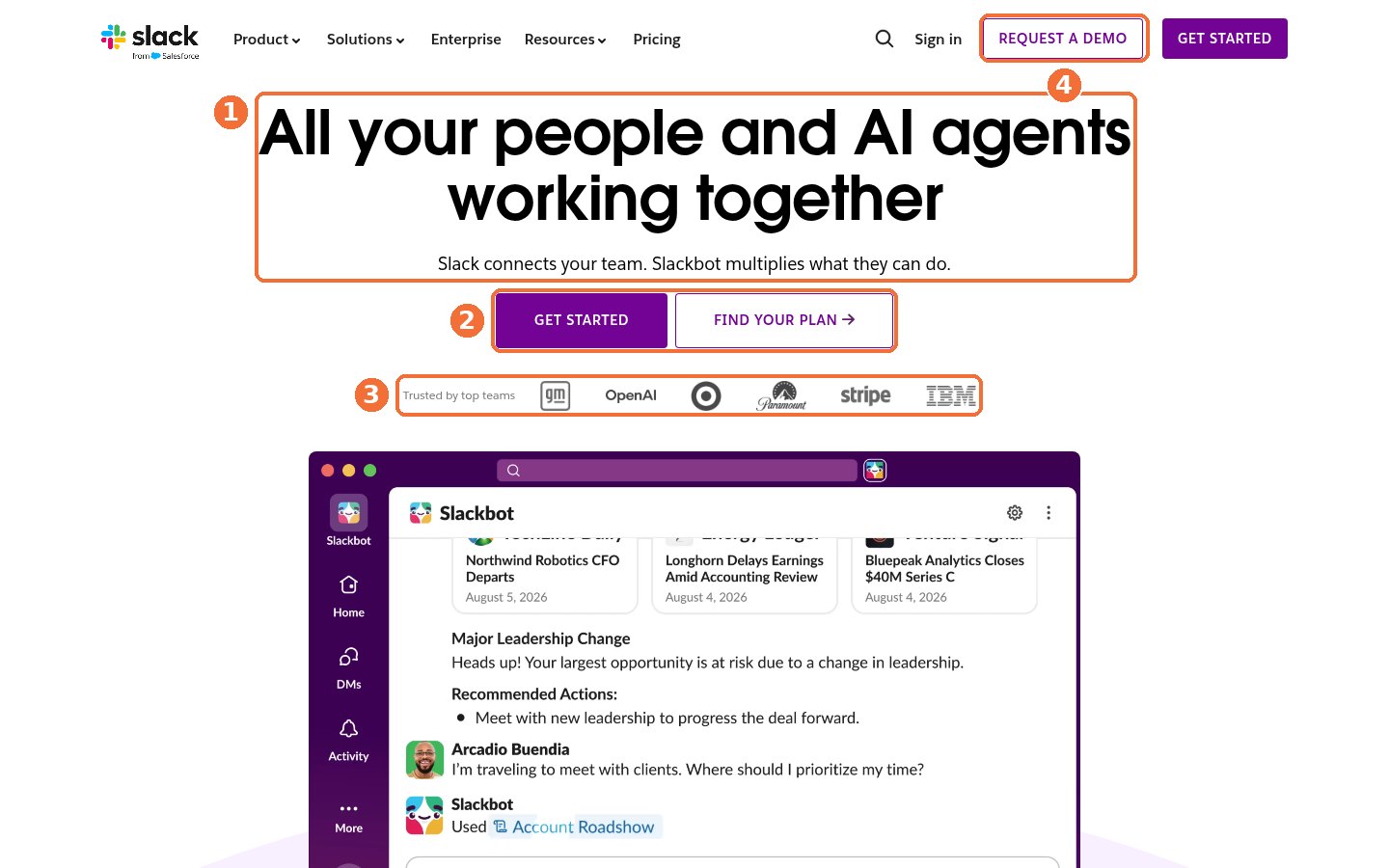
Slack’s homepage packs four moves into the first screen.
- A headline plus a one-line explanation. “All your people and AI agents working together” is followed by “Slack connects your team. Slackbot multiplies what they can do.”
- “Get started” next to “Find your plan.” The second button sends cost-conscious visitors straight to plans, which answers the price question early.
- A logo strip directly under the CTAs. “Trusted by top teams” runs into six brand logos, including OpenAI, Stripe, and IBM.
- “Request a demo” in the header. Sales-led buyers get their own outlined button, styled so it doesn’t compete with “Get started.”
Notice the order. Proof lands right after the ask, at the moment a visitor wonders whether a company like theirs uses this.
4. monday.com: Let Visitors Pick Their Team
monday.com speaks to several departments at once without falling back on a vague headline.
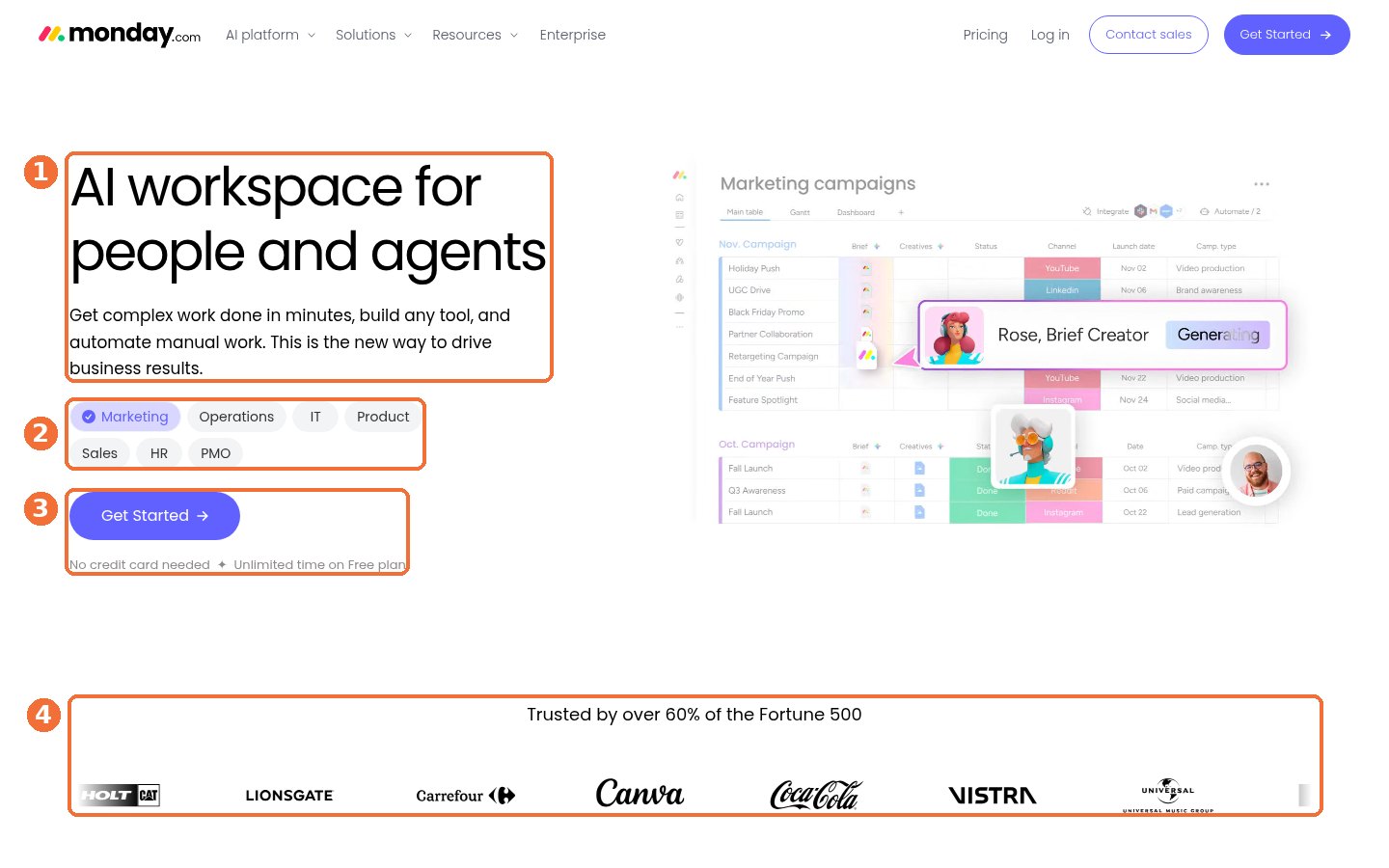
Here’s what monday.com puts in front of you in the first screen.
- A headline with a concrete subhead. “AI workspace for people and agents” sits above a promise to get complex work done in minutes, build any tool, and automate manual work.
- Team chips. Chips for Marketing, Operations, IT, Product, Sales, HR, and PMO sit under the subhead, with Marketing selected and a marketing campaigns board shown beside it.
- Risk reducers under the CTA. “No credit card needed” and “Unlimited time on Free plan” answer two common worries before a free signup.
- A big proof claim. “Trusted by over 60% of the Fortune 500” heads a row of customer logos.
If one product serves several teams, chips like these let each visitor find their own use case on one page. You’ll still want dedicated pages for paid campaigns, where the ad already told you who’s clicking.
5. Ramp: One Field, One Promise
Ramp’s hero is the most direct of the six.
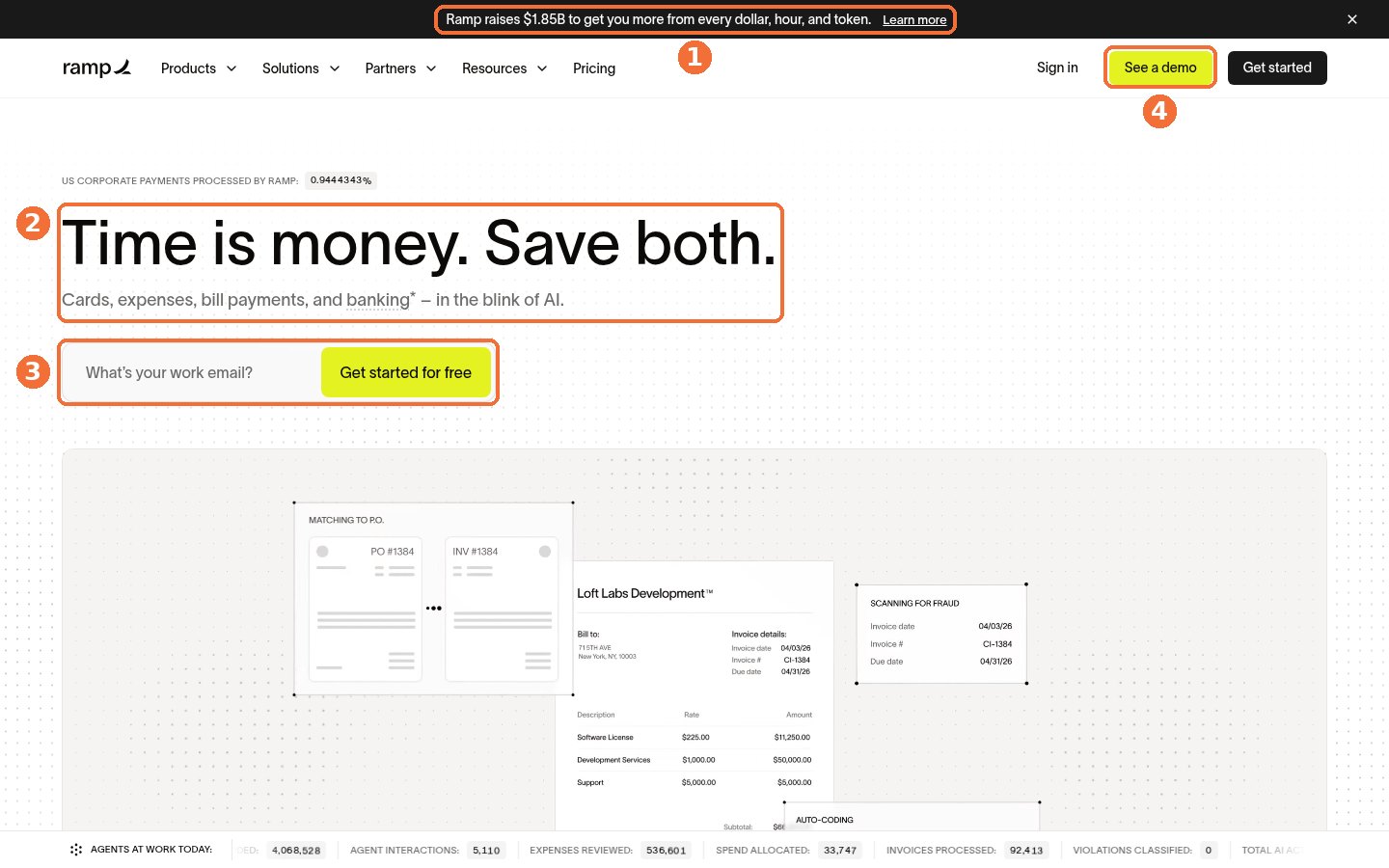
Look at what Ramp chose to keep in its first screen.
- A news bar on top. The banner announces Ramp’s latest funding round, a credibility signal for anyone trusting a company with their spend.
- A benefit headline. “Time is money. Save both.” is followed by a plain list of what the product covers: cards, expenses, bill payments, and banking.
- A work email field fused to the CTA. “What’s your work email?” and “Get started for free” share one bar, so the first action is also the first form field.
- A bright “See a demo” button. The header demo button is colored as boldly as anything on the page, which suggests sales conversations matter a lot to Ramp.
Ramp also runs a strip along the bottom of the screen labeled “Agents at work today,” with counts such as expenses reviewed and invoices processed. Usage numbers like these work as proof, as long as they’re real.
6. Linear: Let the Product Do the Talking
Linear breaks a rule most pages follow, and it’s worth seeing why.
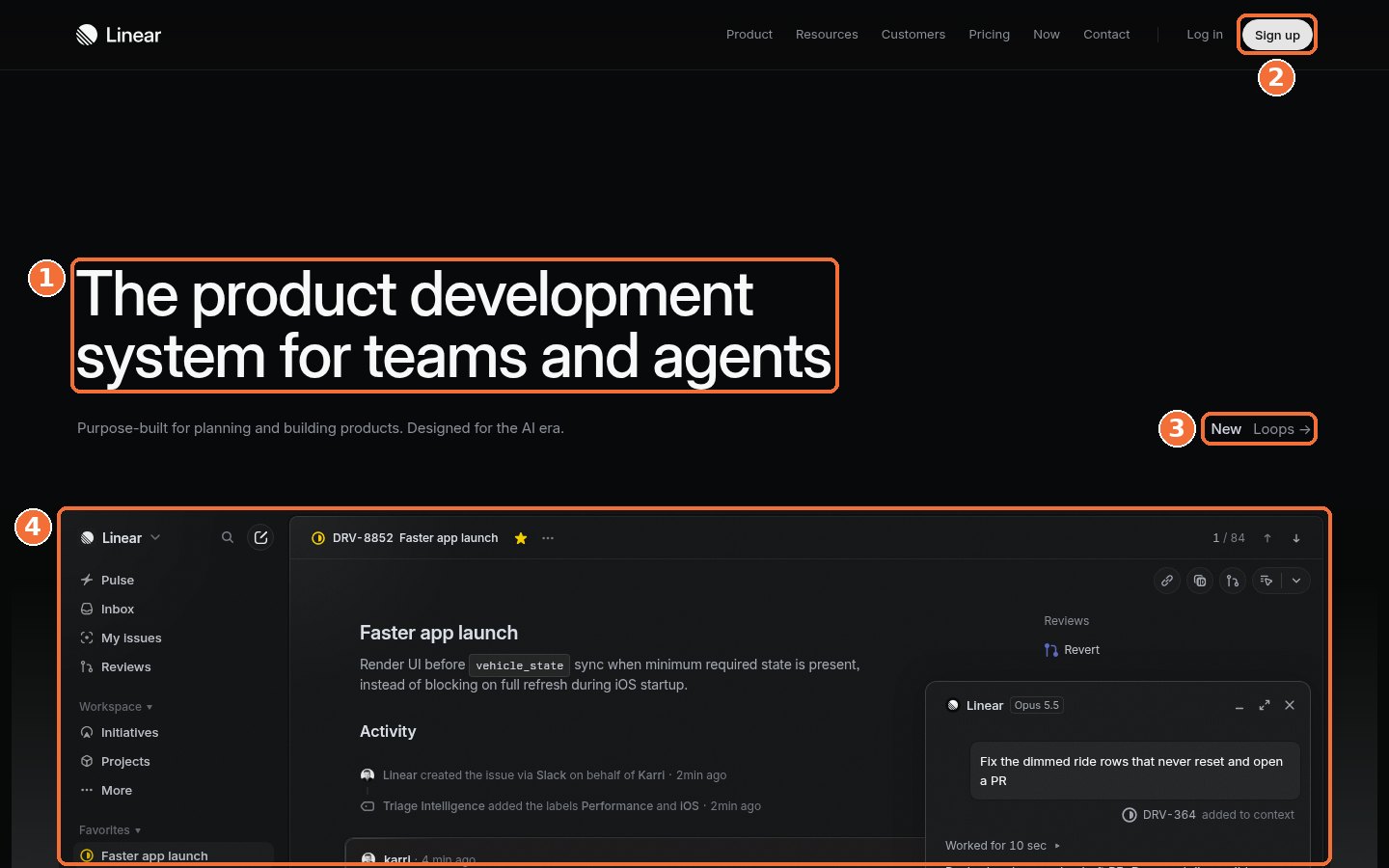
Linear’s homepage keeps the first screen almost bare.
- A category headline. “The product development system for teams and agents” names the category and the audience in one line.
- No CTA button in the hero. The only signup button is “Sign up” in the top right, next to “Log in.”
- A small “New” link. A pointer to its Loops feature gives returning visitors something fresh to click.
- Product UI fills the rest. An issue view with an AI agent panel takes up most of the first screen.
This can suit a well-known product whose visitors arrive ready to sign up. If most of your visitors are meeting you for the first time, test a hero CTA before you copy the empty space.
Line the six up side by side, and a clear pattern shows up around the call to action.
Demo or Free Trial? What These Pages Put Above the Fold
You’ve probably had this debate. Should the main button say “Start free” or “Book a demo”? The six pages above don’t pick one. They rank them.
| Page | Main action in the hero | Sales path in the first screen | Proof in the first screen |
|---|---|---|---|
| Notion | Get Notion free | Request a demo (hero and menu) | Customer logos |
| Asana | Google, Microsoft, or email signup | Contact sales (menu) | None |
| Slack | Get started | Request a demo (menu) | Customer logos |
| monday.com | Get Started | Contact sales (menu) | Fortune 500 claim and logos |
| Ramp | Work email plus Get started for free | See a demo (menu) | Funding news and usage counters |
| Linear | Sign up (menu only) | Contact (menu) | Product interface only |
Every page leads with a self-serve action and keeps a sales action one click away. The visual weight tells you which path each company leans on, and Notion’s hero demo button and Ramp’s bright header button both point toward sales-led deals.
For your own page, match the main CTA to how your buyers actually buy.
- Lead with a free trial or free plan when someone can reach value alone in their first session.
- Lead with a demo when setup needs your team, pricing needs a quote, or several stakeholders have to agree.
- Offer both when you sell to individuals and committees, and give the filled button to the path that drives more revenue.
Not sure which path drives more revenue? Your CRM can tell you. Compare closed revenue from signups against demo requests over the last two quarters, and check your product-led growth fit before you make self-serve the louder button.
How Proof and Pricing Work Above the Fold
A visitor who likes your headline still has two quiet questions. Do companies like mine use this? And can I afford it? The best first screens answer both without adding clutter.
Proof: Pick the Kind Your Buyer Trusts
Proof appears in the first screen on most of these pages, and each company picks its own type. Notion and Slack use logo strips right under or beside the CTA, while monday.com leads its logo row with a Fortune 500 claim.
Ramp mixes two kinds. Its bottom strip counts work its agents handled, and its funding banner tells finance buyers the company has backing.
Choose proof your buyer recognizes. A row of startup logos may not reassure a bank, while a named peer in their own industry can. If you sell to target accounts, account-based web personalization lets you swap the logo row by industry or account.
Pricing: Keep It One Click Away
All six pages put a Pricing link in the top menu. None of them puts prices in the hero, and none hides the link either. Slack goes further with its “Find your plan” button right beside the main CTA.
If your pricing needs a quote, say so on the pricing page and keep the link. Buyers who can’t find it tend to go looking on review sites, where you don’t control the answer.
| Pro-Tip |
|---|
| Screenshot your first screen at desktop and phone widths, then hide everything except the headline and subhead. If a colleague outside marketing can’t say what you sell and who it’s for, rewrite the words before you touch the design. |
Put the headline, CTA, proof, product view, and pricing link together, and you have the outline of a page you can build from scratch or use to rework the one you have.
How to Build a SaaS Landing Page
To build a SaaS landing page, start with one audience and one offer. Write a headline naming your category or outcome, plus a subhead saying who it’s for. Then put one primary CTA, a visible sales path, proof your buyer recognizes, and a real product view in the first screen, with pricing one click away.
Draft the copy first, then pick a layout to hold it. A template saves design time once you know your headline, your main CTA, and the proof you plan to show.
What Are the Best SaaS Landing Page Templates?
The best SaaS landing page templates are the ones built around how your buyers buy. The six pages above use four reusable layouts, and each one suits a different sales motion. Pick the layout closest to yours, then fill it with your own headline, proof, and product screenshots.
- Self-serve signup hero. The signup form or a work email field sits in the hero, as on Asana and Ramp. It suits products people can try alone, with value soon after the first login.
- Dual-CTA hero. A filled free signup button sits beside a lighter demo button, as on Notion. Use it when you sell to solo users and buying committees at once.
- Use-case selector. Visitors pick their team from chips or tabs, the way they do on monday.com, so one page can serve several departments.
- Product-first hero. A short category headline and a large product view fill the screen, as on Linear. It fits well-known products whose visitors arrive ready to sign up.
Whichever layout you start from, you still have to fill it with copy and proof your buyer believes, and the first-screen checklist below shows where to tighten both.
How to Improve SaaS Landing Page Conversion
To improve SaaS landing page conversion, fix the first screen before anything else. Name your category or outcome in the headline, make one CTA visually louder than the rest, keep a sales path and recognizable proof visible, show the real product, and make the hero load fast. Then test one change at a time and judge it on pipeline.
Run this list against your homepage or a paid campaign page before your next redesign meeting. Each line comes from something at least one of the six pages does well.
- Your headline names the category or the outcome, and the subhead says who it’s for.
- One button is visually louder than everything else on the screen.
- A demo or contact sales path is visible without scrolling.
- Risk reducers such as “no credit card needed” sit under a free signup button, if they’re true.
- Proof your buyer recognizes appears in the first screen or right at its edge.
- A real product view shows what using your software looks like.
- Pricing is one click away in the menu.
- The hero loads fast. Google’s guidance for Largest Contentful Paint is 2.5 seconds or less.
- The CTA is still visible on the first phone screen.
You don’t need to fix all nine at once. Pick the biggest gap and run it as a clean A/B test, using this checklist for continuous experimentation without breaking tracking so your results hold up.
If the first screen looks fine and leads still stall, the problem may sit lower in the funnel. A website lead leak audit checks the form, the thank-you page, and the follow-up.
Test variants are much faster to draft than they used to be. When my team needed a new careers page, I pasted our planning conversation into AI and had a first version in about fifteen minutes, as I shared on X. The same approach works for hero variants, and AI design agents can help, as long as a person checks every claim before it ships.
Make Your First Screen Do More of the Selling
The strongest SaaS landing page examples above give the first screen four clear jobs. They say what the product is, offer one obvious action, show proof, and let you see the software. Everything after that is testing.
If you’d like experienced eyes on your own page, my team at Single Grain designs and tests landing pages, runs conversion rate optimization programs, and supports software companies through its SaaS marketing team. Want to compare partners first? The AI-powered CRO agency buying guide lays out what to ask.
Talk to my team about your SaaS landing page, and I’ll show you where your first screen is losing people.
Frequently Asked Questions About SaaS Landing Pages
-
What is a SaaS landing page?
A SaaS landing page is any page built to turn a visitor into a signup, trial, or sales conversation for software. Your homepage counts, and so do campaign pages built for one offer and one audience.
-
How do you build a SaaS landing page?
Decide who the page is for and what single action you want, then write the headline and subhead before you pick a layout. Fill the first screen with one main button, a sales option, proof, and a product view, and launch it with tracking on signups and demo requests.
-
What should be above the fold on a SaaS landing page?
Put a clear headline and subhead, one standout call to action, a visible sales or demo path, proof your buyer recognizes, and a real view of the product in the first screen. Keep a Pricing link in the menu.
-
Should a SaaS landing page use a free trial or a demo CTA?
Lead with a free trial or free plan when people can reach value on their own, and lead with a demo when setup, pricing, or group approval needs your team. Many SaaS pages offer both and make one button visually louder.
-
How many CTAs should a SaaS landing page have?
Give the first screen one primary CTA and, if you sell to both individuals and teams, one secondary sales action. The six pages reviewed here keep extra options in the top menu.
-
Where can I find good SaaS landing page examples?
Design galleries are useful for inspiration, but study live pages from companies close to your market. Capture the first screen, list what it does with its headline, CTA, proof, and product, then test one change at a time.
-
What are the best SaaS landing page templates?
Look for a layout matching your sales motion. Products people can try alone fit a signup form in the hero, mixed self-serve and sales models fit a free button beside a demo button, and products serving several departments fit a team selector. A product-first layout suits well-known brands.
-
How do I test changes to my SaaS landing page?
Change one element at a time, such as the headline or the main CTA, and run an A/B test long enough to reach a reliable sample. Track signups or demo requests through to pipeline so you judge the change on revenue.

