YouTube Skippable Ads: Marketer’s Guide to YouTube’s New Skip Button


YouTube skippable ads may be getting a quiet redesign, because the familiar “Skip” button has been spotted reading “Next” on some video ads. Marketer Anthony Higman shared the example, and neither YouTube nor Google has announced it.
My first thought leaned towards curiosity rather than alarm. Why? Because now one word on a button can change how long viewers stay in an ad break, and that’s where your media budget lives.
If you buy video on YouTube, you’ve built plans around a simple deal. Viewers can leave after a few seconds, and you only pay for the ones who stay. A new label raises a fair question. Does “Next” still mean “back to my video”?
You might be asking yourself, “Will this change what I pay for?” That is a great question that shouldn’t be ignored! Below you’ll find what was spotted, how skipping is still counted and billed, and what to watch in your own account.
TL;DR
- Some skip buttons now say “Next.” One shared example shows the label with a forward-to-end icon, under a “Fewer interruptions after this break” tag.
- Nothing is confirmed. YouTube hasn’t said whether it’s a test or a rollout, or what a tap does.
- Billing rules haven’t changed on paper. Google’s help page still describes a skip after five seconds and a cost-per-view charge at 30 seconds or on interaction.
- Watch your data. If “Next” leads to another ad, ad breaks run longer and view rates could shift.
What Was Spotted on YouTube Ads
PPC Land reported that the example shows a vertical video ad on a phone-sized screen. Where the skip control normally sits, a translucent button reads “Next,” followed by the forward-to-end symbol music players use for the next track.
The Label That Offers a Clue
In the top left, a label reads “Fewer interruptions after this break.” PPC Land notes that this implies a break with more than one ad. Within a multi-ad break, “Next” would most naturally mean the next ad rather than the video. Still, that’s only a reading of the image. YouTube hasn’t confirmed the behavior.
What the Example Doesn’t Show
It’s a single frame. Nobody has shared a recording. It doesn’t reveal what happens after a tap, and it doesn’t show whether the ad ran before a video, mid-video, or in Shorts.
| Pay Attention |
|---|
| One newsletter described this as the end of skipping ads. PPC Land points out the image shows only a relabelled button, and no source has shown what a tap does. |
Treat bold claims carefully until YouTube explains the change or your own data shows a shift.
How YouTube Skippable Ads Are Still Counted and Billed
Google’s About video ad formats page still describes a skip. It doesn’t mention a “Next” button.
The Five-Second Rule
Viewers can skip a skippable in-stream ad after five seconds. Non-skippable in-stream ads, which offer no skip at all, run for up to 60 seconds.
When You Pay
Under cost-per-view bidding, you pay when a viewer watches 30 seconds of the ad, the whole ad if it’s shorter, or interacts with it. For Shorts, a TrueView view counts at ten seconds, at the end of the ad, or on a click, like, comment, or share.
Why the Skip Works as a Filter
PPC Land frames the skip as a filter for cost-per-view buyers. A viewer who leaves at five seconds without interacting costs nothing. One who stays past 30 seconds triggers a charge.
The label matters less than where the tap leads.
What “Next” Could Mean for Your YouTube Ads
There are two plausible outcomes, and they affect advertisers differently.
If “Next” Goes to the Video
The change is cosmetic. Your exposure, counting, and billing likely work exactly as before, and the only effect may be a brief adjustment while viewers get used to the new word.
If “Next” Loads Another Ad
The first advertiser’s exposure ends where a skip would have ended it. The break as a whole runs longer before the video resumes, which means a heavier ad load per break. PPC Land notes Google has published nothing on whether a press of “Next” is recorded the same way as a skip in reporting.
Viewers may already be seeing that version. One viewer on X claimed the swap leads straight into a longer ad they can’t skip:
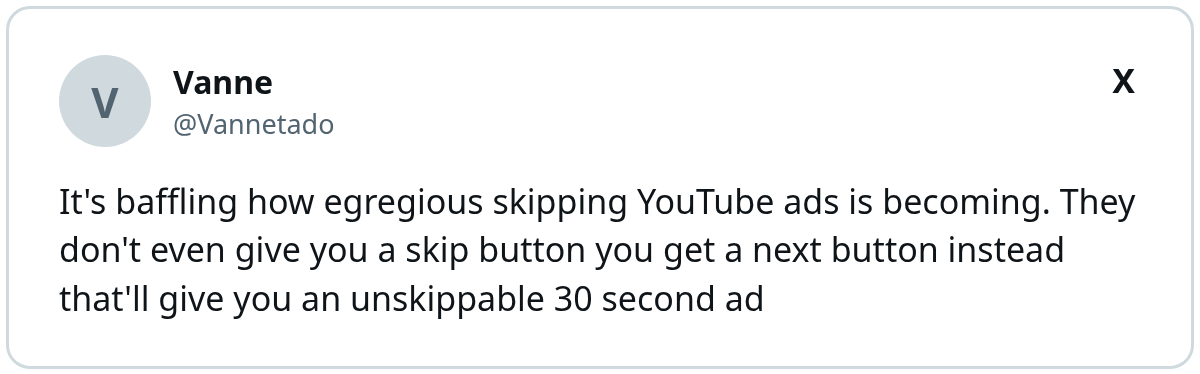
I can’t confirm that from Google’s side, and the example PPC Land shared doesn’t show what plays after “Next.” But if that’s the experience, the advertiser in the second slot is paying for a viewer who’s already annoyed.
Multi-Ad Breaks Aren’t New
YouTube tested ad pods years ago, stacking two ads back to back. Google claimed the format could mean up to 40% fewer ad interruptions per session, and viewers kept the option to skip straight to content. The open question is whether that option still exists in the same form.
3 Questions Advertisers Should Ask Google
PPC Land lists several gaps in what YouTube has shared. Your Google rep may lack answers today. A question still puts the issue on record, and reps often share updates with accounts that raised a question first.
1. Is It a Test or a Rollout?
YouTube hasn’t said whether the label is a test or a wider change. It also hasn’t named the devices, surfaces, or countries involved. The scope tells you which campaigns to watch. If only vertical mobile placements are affected, your connected TV and desktop campaigns can stay on their current plans.
2. Does a Tap Count as a Skip?
There’s no information on whether pressing “Next” counts as a skip in reporting. If the two are recorded differently, skip-rate benchmarks you’ve built over years may stop being comparable.
3. Does Billing Change?
Google hasn’t said whether “Next” changes when you’re charged. Under the current rules, billing follows watch time and interaction. Confirm nothing about that logic moves for ads shown inside multi-ad breaks.
How Viewers May React
Viewers learned the skip button’s meaning over many years. A new label could change behavior even if the mechanics stay the same. Here are a couple ways I foresee viewers reacting to this change.
Hesitation Can Add Watch Time
Some viewers may pause before tapping an unfamiliar button. A few extra seconds of attention could help ads with a strong opening. It could also annoy viewers who feel tricked into staying longer.
Frustration Can Hurt Brands
If “Next” leads to another ad, viewers who expected their video may feel misled. Brands in the second slot might inherit that frustration. Watch comment sentiment and brand lift studies for signs of a backlash.
A Pattern of Changes Around the Skip Button
PPC Land notes Higman has documented several changes around YouTube’s skip button this year. Each one touches the moment a viewer leaves an ad.
1. Smaller Buttons and Banners
Reported tests include a smaller, more transparent skip button with rounded corners. Others put a banner partially covering the “Skip Ad” button and a related banner that stays on the video after a skip until dismissed.
2. Longer Waits on TV Screens
TV viewers reported ads of up to 90 seconds before a skip became available, though Google said on X it has no 90-second ad format. With YouTube taking a record 15.8% of US TV time in Nielsen’s August Gauge, connected TV deserves its own plan. Our guide to YouTube connected TV advertising covers the basics.
3. Why YouTube Might Care
YouTube ad revenue grew 9.2% to $11.21 billion in the third quarter, its slowest growth rate of the year. None of this proves why the label changed. It does explain why every second of ad time is worth watching.
What to Do With Your YouTube Ads Now
My team’s view at Single Grain is to watch the data and strengthen creative.
Front-Load the Message
If viewers can leave at five seconds, those seconds carry the ad. Put your brand, hook, and offer up front. Our post on YouTube ad creative that stops skips walks through the structure, and these YouTube ad best practices cover the fundamentals.
Segment Your Reporting
Break results out by format, device, and surface. If view rates or TrueView views move without a creative or targeting change, a button change may be the cause. Annotate the date you first notice it, and share the note with anyone who reports on video results.
Test Shorts and Vertical Creative
The example was a vertical ad. If you run Shorts, check whether vertical placements behave differently. Ideas from shoppable Shorts ads can help you design for that format.
| Metric | What to watch | Possible signal |
|---|---|---|
| View rate | Sudden drop or rise | Viewers moving through breaks differently |
| TrueView views | Change with flat spend | Counting or behavior shift |
| Average watch time | Shorter on vertical ads | Faster exits on mobile |
| Cost per view | Unexplained movement | Billing or auction change |
Check these metrics weekly until YouTube clarifies the change. Compare each week against the same period last year as well, since seasonal swings in video inventory can look like a product change.
Keep Your Video Plan Flexible
YouTube’s “Next” label may be cosmetic, or it may change how ad breaks flow. Either way, the rules you pay under still center on the five-second skip and the 30-second view. Front-load your creative, segment your reporting, and watch for shifts so your budget follows real behavior. For broader context, our roundup of video advertising trends shows where the format is heading.
If you want help adapting your YouTube ads to format changes, Single Grain’s paid advertising team can audit your video campaigns. Contact Single Grain to get started.
Frequently Asked Questions About YouTube Skippable Ads
-
Did YouTube remove the skip button?
No source shows that. Some ads have been seen with the skip control labelled Next instead of Skip. YouTube and Google haven’t announced the change or explained what a tap does.
-
What does the Next button on YouTube ads do?
It isn’t confirmed. A Fewer interruptions after this break label in the shared example suggests a break with more than one ad, so Next may move to the next ad. That’s only a reading of one image, and YouTube hasn’t confirmed it.
-
When can viewers skip a YouTube skippable ad?
Google’s help page says viewers can skip a skippable in-stream ad after five seconds.
-
When do advertisers pay for YouTube skippable ads?
Under cost-per-view bidding, Google says you pay when a viewer watches 30 seconds, the whole ad if it’s shorter, or interacts with it.
-
How should advertisers respond to the Next button?
Watch view rates and TrueView view counts for unexplained shifts, front-load your message in the first five seconds, and segment results by format and device.