

Why Every AI Pitch Deck Looks the Same, and How to Fix Yours


“Everything looks the same.” This line came from a leading AI presentation company talking about its own category, and it may be the most honest product announcement I’ve read in a while. AI pitch decks became so common many now share the same gradients, icon grids, and three-column layouts.
I’ve sat through enough sales and investor meetings to spot the pattern instantly. Slide two is always a dramatic problem statement. Then comes a rocket ship somewhere around slide three, and by slide five everyone in the room is quietly checking email. I’ve built a few of those decks myself, so no judgment here.
Has your last deck felt a little too familiar? You’re in good company. The fix is easier than switching tools every quarter, and it starts with what you hand the AI before it designs a single slide.
In this article, I’ll explain why AI decks blur together, what to feed the AI before it builds anything, and how to keep your brand and story intact from the first slide to the export button.
TL;DR
- Generic AI decks come from generic inputs. A one-line prompt produces an average deck, while a real brief with goal, audience, and proof produces a specific one.
- Brand rules beat clever prompts. Load your fonts, colors, logo, and example slides first so every slide starts from your identity.
- Editability decides whether a deck survives. Check whether slides export cleanly and stay consistent when you regenerate a single slide.
- Your story is the part AI can’t supply. Customer results, original data, and a clear point of view are what make a deck memorable.
Why Do AI Pitch Decks All Look the Same?
Most AI presentation tools work from templates, which are pre-built slide layouts the model fills with your text. When millions of people use the same handful of layouts, the results blur together.
A second cause is the prompt itself. Type “make a pitch deck for my startup,” and the model has nothing to work with except averages. This is how you get the standard problem, solution, market, team, and ask slides with stock visuals.
Is the fix a better model or better design constraints? My view is that both matter, but constraints win. A model given your brand system, your real numbers, and a sharp audience will produce something distinct. Hand a stronger model a vague prompt, and you only get a more polished version of average.
What Should You Give the AI Before It Builds Anything?
Treat the AI like a new designer on day one. It needs a brief. Some tools now ask clarifying questions first; per one tool’s help center, its planning mode asks about your goal, your audience, and what matters most before building.
Skip those questions and you get the average deck; answer them like a client brief and the plan changes.
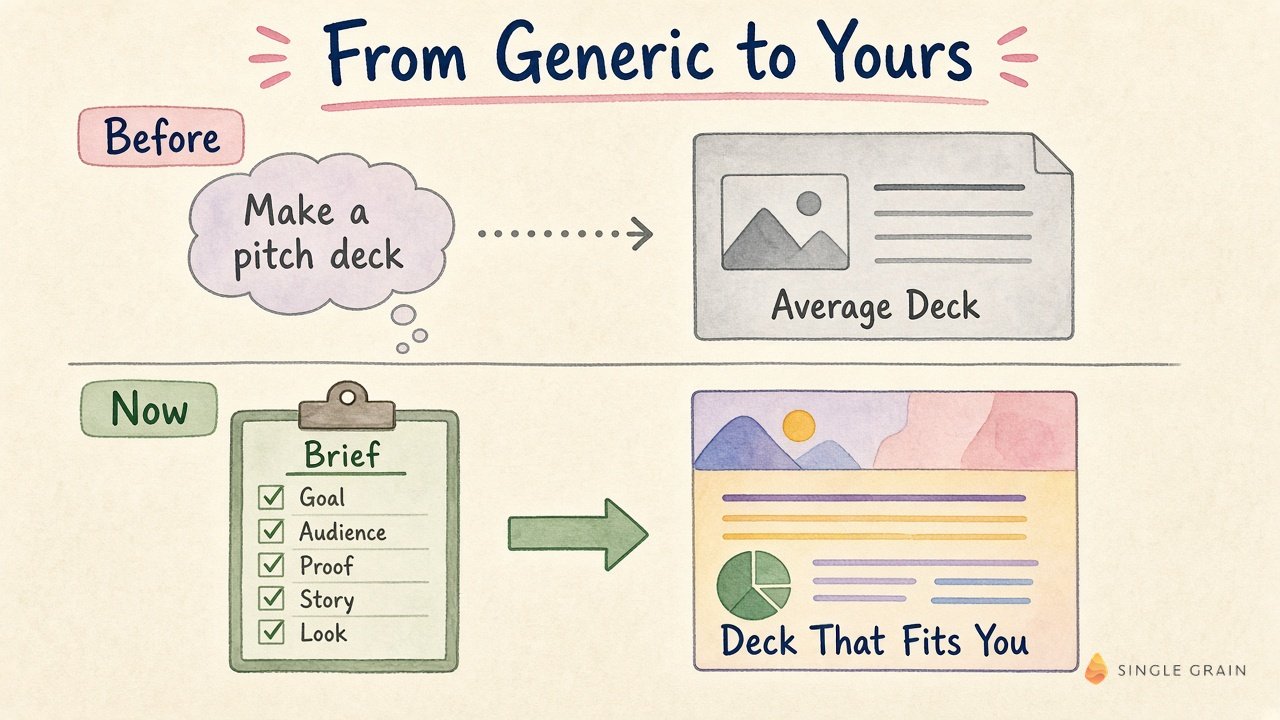
A strong brief covers five things:
- Goal. Say exactly what the deck should achieve, such as a second meeting, a signed pilot, or a funding commitment.
- Audience. Name who is in the room and what they already believe.
- Proof. List the customer results, metrics, and quotes you can back up.
- Story. Write one sentence on why now and why you, which becomes the spine of the deck.
- Look. Attach brand assets and two or three slides you love as style references.
For investor decks, Y Combinator’s guide to seed round pitch decks is a solid outline to feed into this brief.
Here is the difference in one view. Before, a vague request like “make a pitch deck” led straight to an average deck. Now, a brief that covers goal, audience, proof, story, and look leads to a deck that actually fits you.
| Starter prompt for a deck brief |
|---|
| Before you design anything, ask me five questions about this deck’s goal, audience, proof points, core story, and visual style. Then show me a slide-by-slide outline with one headline per slide. Wait for my approval before building. |
Can AI Keep Your Brand Style From Slide to Slide?
It’s a common frustration. Teams worried about losing the look of a deck after one small change.
I recommend you run this test yourself before committing to any tool. Build a ten-slide deck, then regenerate slide six with a new instruction. A good result keeps the fonts, colors, spacing, and tone of the other nine slides.
Brand consistency also affects how AI systems describe you later. Clear, repeated messaging helps, as covered in this look at how LLMs interpret positioning statements.
| Pro-Tip |
|---|
| Save your approved deck as a reusable theme or template inside the tool. Starting every new deck from this file keeps your brand locked in far better than describing your style in a prompt each time. |
Will the Deck Survive Export and Editing?
A beautiful deck that breaks in PowerPoint is a liability. Agencies and sales teams feel this most, since clients and colleagues need to edit the file after handoff.
Check three things before you send a deck anywhere. Fonts should carry over, tables should stay editable, and layouts should hold when someone opens the file elsewhere. Some tools now document known limits, such as gradient headings rendering differently in exported files, so read the export notes first.
How Do You Make an AI Deck Feel Like Yours?
Design variety helps, yet the deepest fix is content. Several replies argued taste and brand character are what will separate good decks from the pile.
This matches what we see in client work. Decks that win meetings share a few traits:
- One specific customer story with a named result, in place of a generic benefits slide.
- Original data, even a small survey or internal benchmark, nobody else can show.
- A clear point of view about the market, stated in plain words on one slide.
- Headlines that make a claim, so a reader skimming only titles still gets the argument.
Copy matters as much as design. This guide to AI copy testing without breaking brand voice applies the same discipline to messaging.
| Action Step |
|---|
| Open your current sales deck and read only the slide titles. Rewrite any title that states a topic into one that makes a claim, then feed the new outline to your AI tool. |
Build AI Pitch Decks That People Remember
AI pitch decks save hours, and the tools are getting better at variety. The decks that stand out will still come from a sharp brief, locked-in brand rules, and proof only you can provide.
Want your story to stand out from the generic AI pack? Single Grain’s content marketing and creative strategy teams help brands sharpen their message across every channel. Let’s talk.
Frequently Asked Questions About AI Pitch Decks
-
Why do AI-generated pitch decks look generic?
Most tools fill shared templates, and short prompts give the model nothing specific to work with. The result is the same layouts and visuals many other people get.
-
How do I make an AI pitch deck match my brand?
Upload your fonts, colors, logo, and a few example slides before generating, then save an approved deck as a reusable theme so every new deck starts from your identity.
-
What should I include in a prompt for an AI pitch deck?
Give the goal, audience, proof points, core story, and visual references. Ask the tool to propose an outline with one headline per slide before it designs anything.
-
Can I edit an AI pitch deck in PowerPoint?
Many tools export to PowerPoint, but quality varies. Test whether fonts carry over, tables stay editable, and layouts hold before you hand a deck to a client or colleague.
-
Are AI pitch decks good enough for investors?
They are a fast starting point. Investors respond to clear stories, real traction, and original insight, so the content you add matters more than the tool you use.


