How to Do a Time Audit: Find the Team Jobs to Hand to AI First


Ever wish you knew how to do a time audit before your team signed up for yet another AI subscription? Tools keep piling up, and the workload looks exactly the same.
Think of a time audit as a record of where a recurring job consumes human effort, and which part of it could change. I run this audit on my own work with one prompt, and I hold one rule. No job gets handed to AI until its records back up the time estimate.
So, should you hand off the job that eats the most hours, the one stuck waiting on approvals, or a bot that already runs but needs constant cleanup? If you want a handoff you can actually measure, the answer starts with your work records.
Below is my process for picking one candidate, checking its time estimate, and defining a handoff someone can review. You’ll also get the audit prompt and a way to compare results with your starting point.
TL;DR
- Start with a recurring job. Choose a marketing workflow with a visible output and a human reviewer.
- Separate activity from time spent. Tool records can show repetition and waiting; ask the owner to verify hands-on time.
- Keep the evidence beside the recommendation. Require source links, coverage gaps, and clearly labeled estimates.
- Test a bounded handoff. Compare human effort and accepted output before expanding the bot’s responsibility.
What Is a Business Time Audit?
A business time audit shows where a recurring job uses human effort and where a handoff could help. You need a documented workflow and a credible time estimate. AI assistants can collect records; the person doing the work should check their interpretation.
Hands-On Work vs. Waiting Time
Hands-on work and elapsed time need separate entries. Atlassian’s guide to value stream mapping makes the same point, noting how much knowledge-work waste hides in the wait time between handoffs. A draft sitting in an approval queue may wait overnight while requiring only a short review. Counting the whole gap as labor inflates projected savings and risks choosing the wrong automation.
Source Records for a Time Audit
The best source is a workflow you can inspect from request to accepted output. For a reporting task, you’ll need the source data and the finished report. Content work needs its brief, draft history, and approval record. If the records are incomplete, narrow the audit until you can follow the work.
This guide focuses on choosing the first handoff. For the wider implementation, Single Grain’s AI transformation services cover turning defined marketing jobs into working systems. The first step is evidence of where the effort goes.
How to Do a Time Audit With a Checkable Prompt
My time audit prompt looks for repeat work, approvals waiting on me, and existing bots missing their purpose. I’d add an explicit evidence requirement before using its recommendations to change a team’s workload. An assistant needs access to the relevant records; a prompt alone doesn’t provide access or complete coverage.
Pick the Time Audit Window and Sources
Choose a period containing a complete cycle of the job. Thirty days is a useful starting window for recurring marketing work, but a monthly close may require an earlier handoff record. Tell the assistant exactly which sources and dates it can inspect.
| Starter prompt for a marketing time audit |
|---|
| Review the last thirty days of the work records I provide or authorize you to read. State the exact date range and sources you inspected. Find recurring marketing jobs and link to the underlying requests and finished outputs. For each job, identify the owner when the record names one, count distinct completed outputs, and separate hands-on work from waiting for approval. Deduplicate copied updates about the same task. Use recorded durations when available. Otherwise mark hands-on time as unknown and ask the owner for an estimate. For existing automations, compare their stated goal with the available results and identify human cleanup. Recommend one bounded job for an AI drafting trial. Explain the input, output, reviewer, acceptance criteria, and failure cases. Show evidence beside every recommendation. Do not infer missing hours or treat a message timestamp as a work timer. Do not send, publish, or change records. |
If you’re starting from Grok Bot templates, treat the audit as a separate review of the job’s suitability. A template can help you start, and only your own records show how much time your team spends today. Keep the prompt’s response available for the owner to correct.
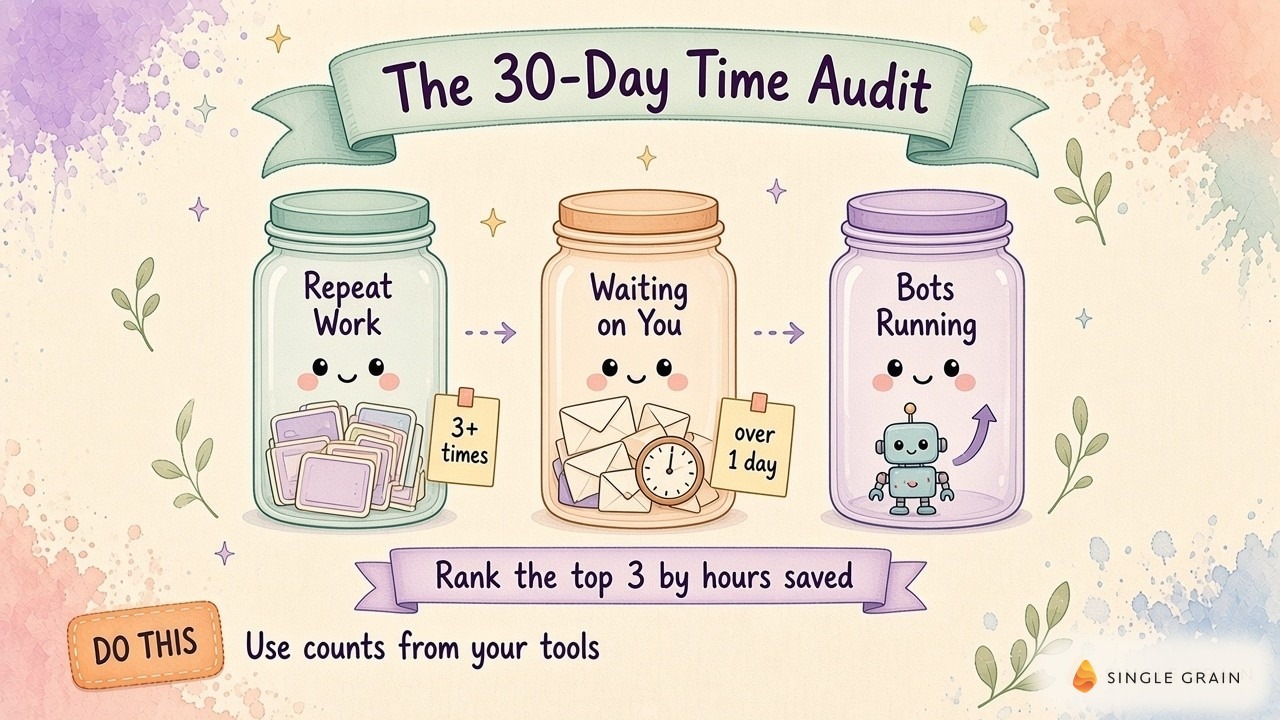
Once the response arrives, resist the urge to automate its first recommendation. Check whether the records support the job description before you trust the ranking.
Check the Evidence Behind the Time Estimate
The leading candidate’s source records come first. You should be able to follow a request through its handoff and see the finished artifact. A summary with no links leaves you guessing whether the assistant found repeated work or repeated discussion.
Count Completed Outputs Once
Slack updates, calendar events, and emails can all refer to the same report. Ask the assistant to group these records under the finished report’s link. Count the completed artifact once, then use the surrounding messages to understand the steps and delays.
Keep canceled work separate. A request abandoned before production may reveal an intake problem, but it doesn’t prove the time required to finish a report. This distinction makes the owner’s review easier because each count points to an identifiable piece of work.
Verify Hands-On Time With the Owner
The person doing the job knows where they actively worked, so ask them to describe it. Was the time spent retrieving data, correcting the draft, or resolving an unclear request? If no duration was recorded, keep the estimate labeled and observe a future run before claiming savings.
A useful audit spreadsheet has separate columns for the artifact link, completed date, hands-on time, waiting time, and evidence status. These columns give the reviewer somewhere to mark unknowns without forcing a guessed number into the calculation. Google Calendar’s Time Insights can also show how much of the owner’s week goes to meetings, which helps explain the waiting time.
Find the Decision Behind an Approval Delay
If a task waited for you, look at the decision it needed. Unclear briefs call for better intake, and routine approvals may just need a delegated reviewer. But calls about positioning or client commitments may still belong with you.
| Pro-Tip |
|---|
| Ask the assistant to quote the unresolved approval question beside the artifact link. You can then decide whether the fix belongs in the brief, the review schedule, or the job’s permissions. |
These checks turn a plausible summary into a usable starting point. My own content workflow shows why the difference matters.
What a Content Workflow Audit Looks Like
In my October 2026 content workflow walkthrough, I explain how source material feeds candidate posts. The workflow checks overlap with published content and applies quality checks before human review. As Single Grain’s founder and a marketer reviewing the output, I still have a decision about what ships.
The concrete artifact here is the workflow diagram connecting source material to a draft and publication review. If you audit a similar process, track effort at each handoff. Time spent collecting source material and time spent fixing a weak argument need separate entries, because an automation may help one step while adding effort elsewhere.

Keep Publication Approval With the Editor
A related November 2026 walkthrough of the draft-to-site handoff describes a human reviewing the work before it reaches the site. I also explain testing bots personally before extending them to the team. For your audit, this suggests a clear trial boundary: let the assistant prepare the draft while the editor retains publication approval.
Keep the initial draft and the accepted version together. Review comments reveal whether the editor spent time improving the argument or repairing avoidable errors. If the assistant makes collection faster but leaves the editor with more correction work, include the correction time in the result.
This is why I want an agent job card and definition of done before expanding a handoff. The audit needs to measure delivery of an acceptable draft, including the review effort required to get there. The same discipline applies to bots already running.
Audit the Bots Already Running
In my November 2026 bot improver walkthrough, I describe a weekly review of the state charts for important bots. Each workflow gets a verdict, and fixes requiring my decision return to me. My role as the founder reviewing exceptions has a concrete artifact: the workflow state chart and its review verdict.
Use this scene to examine an automation’s hidden workload. Open its stated goal, recent outputs, and review history together. Check whether someone repeatedly corrects the same error or has to explain the same missing context. A bot can finish its run while leaving the owner with substantial cleanup.
Record Bot Maintenance in the Time Audit
Your audit should record maintenance beside the task it supports. Include time spent investigating failed runs and repairing outputs. Keep any proposed improvement separate from a demonstrated result until someone verifies a later run.
I wouldn’t turn a missed result into an automatic retirement rule. A broken connection may need repair, while a poorly defined job may need a different scope. A clear rule for when to decommission a marketing agent job helps you decide whether to keep investing in an existing automation.
After checking current bots, you can judge a new candidate against the actual effort of operating one. A recurring task earns a closer look when its inputs and acceptance criteria are clear.
Choose the First Job to Hand Off
A strong first job has output a reviewer can inspect before it affects a client or goes live. The owner should recognize a successful result and be able to explain a failed one. If success depends on information nobody has documented, capture the missing context before asking a bot to perform the work.
Compare candidates using verified human effort, the cost of review, and the consequences of an error. Recurrence helps establish whether a trial is worth maintaining, but frequency alone doesn’t settle the decision. A repeated task involving sensitive judgment may require more supervision than a less frequent reporting draft.
Write the Handoff Spec for the First Job
For the selected job, write the input location and name the expected output. Identify the reviewer and describe the checks required for acceptance. Specify what happens when data is missing so the assistant can pause with an explanation.
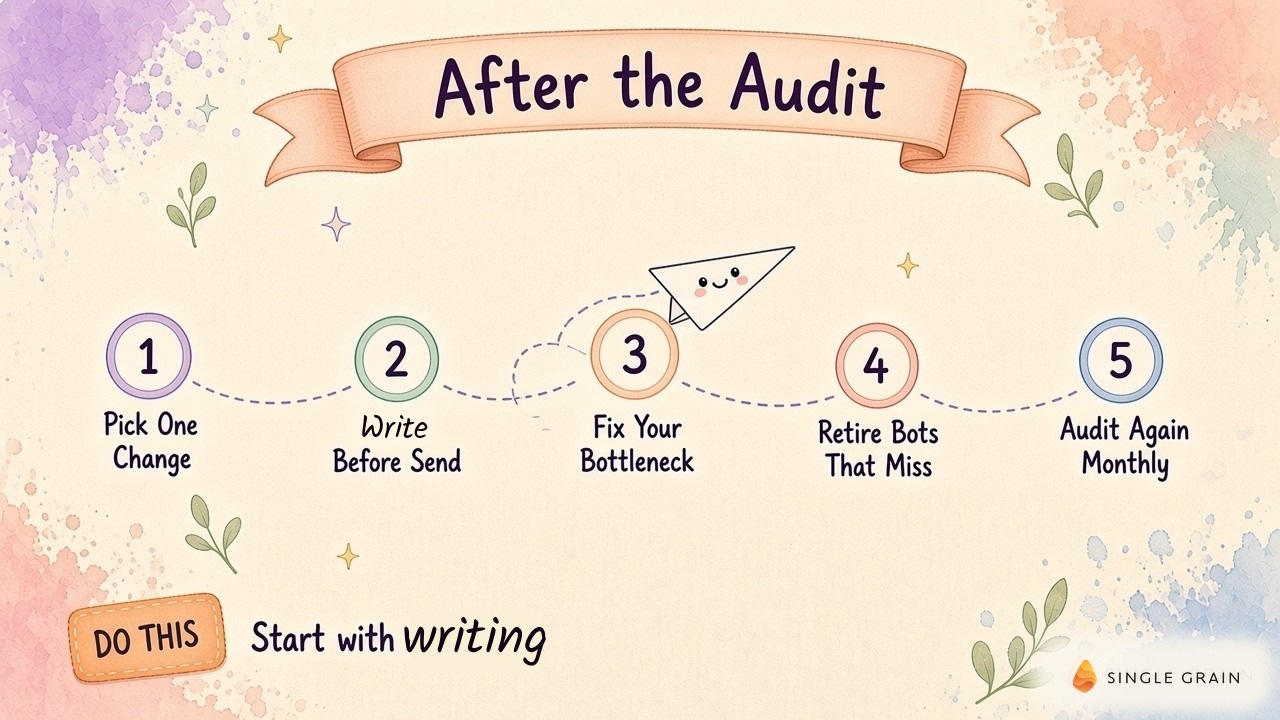
Keep exceptions visible in a review queue. Well-run exception queues for marketing agents make unresolved work inspectable. Your audit can then include the effort spent clearing this queue instead of treating every attempted run as completed work.
With the job defined, the trial becomes easier to assess. You have a starting record, a named reviewer, and an artifact to compare.
Repeat the Audit After the Handoff
A fair follow-up uses comparable completed work. Compare a report cycle with another report cycle and record any changes in scope. A shorter output or missing analysis can reduce production time while failing the original job.
Count the human effort remaining after automation. Include preparation, review, and any corrections. Record setup separately so you can see both the initial investment and the recurring workload without mixing them into an unsupported savings claim.
Check Output Quality Before Expanding Access
The reviewer should confirm whether the output met the same acceptance criteria. If quality fell, document the failure before expanding access. When the result held up and the human effort decreased, you have evidence for continuing the handoff and a basis for auditing the next job.
Keep the audit record small enough to revisit. A source-linked row per completed artifact will be easier to maintain than a narrative nobody checks. This review habit fits into the daily habits of an AI-native marketer, with each correction feeding the next run.
Once you can explain where time went and what changed, you can make the next implementation decision with fewer guesses.
Find the Hours, Then Hand Them Off
A good time audit ends with a job you can explain and an output you can check. Start with the records, verify the owner’s effort, and trial a bounded handoff. Revisit the result before assigning the bot more responsibility.
If you need help turning the findings into a working marketing workflow, explore Single Grain’s AI transformation services.
Frequently Asked Questions About Time Audits
-
What is a time audit?
A time audit is a structured review of how time gets spent over a set period. For a business, it focuses on finding repeat work, bottlenecks, and jobs ready for automation.
-
How long should a business time audit cover?
Thirty days is a good window. It’s long enough to catch weekly and monthly patterns without overwhelming you with data.
-
Can AI do a time audit for my team?
Yes, if it’s connected to your work tools. An AI assistant can read Slack, email, calendar, docs, and project tools, then summarize repeat work and delays.
-
What should I automate first after a time audit?
Pick the job that saves the most hours with the lowest risk if a bot makes a mistake, and start with drafting rather than sending.
-
How often should I run a time audit?
Monthly works well. Comparing each audit against the last one shows whether your changes actually gave hours back.