

Keyword Cannibalization: The Beginner’s Guide to Finding, Fixing and Preventing It


Keyword cannibalization is one of the quietest ways to lose organic traffic you already earned. If you’ve ever published more content to own a topic and watched rankings slip anyway, overlap (aka cannibalization) is a likely culprit.
Cannibalization happens when two or three of your own pages end up chasing the same search term. When this happens, Google keeps swapping which one it shows, so none of them settles near the top.
Fast-growing sites are especially exposed. More writers, more campaigns, and years of legacy posts make overlap likely. This leaves a mess for you to try to untangle and clean up! (Trust me, I would know haha).
I found a clear example on my own site while writing this guide. For the query “ai seo services,” Google Search Console (GSC) showed 16 Single Grain pages earning impressions over three months, and none of them earned a single click. I’m going to show you exactly what this looks like so you can identify keyword cannibalization yourself and have the step-by-step solution.
Keep reading to learn what keyword cannibalization is, how to spot it in Search Console with a few filters, how to fix it with 301 redirects, canonical tags, and cleaner internal links, and how a keyword map keeps it from coming back.
TL;DR
- Keyword cannibalization happens when two or more of your pages compete for the same query and intent. Impressions, clicks and links get split between them, so neither page ranks as well as one strong page would.
- Google Search Console is the fastest free way to find it. Filter the Performance report by query, open the Pages tab, and look for several pages trading impressions and positions.
- Every fix starts with one winning page. Merge and 301 redirect, add a canonical tag, retarget the weaker page, or noindex thin utility pages, depending on intent and value.
- A keyword map stops it before it starts. Give every keyword one owner page, check the map before anyone publishes, and organize content into topic clusters with clear hub pages.
TABLE OF CONTENTS:
- What Is Keyword Cannibalization?
- Why Competing Pages Hurt Your Rankings
- When Multiple Ranking Pages Aren't a Problem
- How to Find Keyword Cannibalization in Google Search Console
- Other Ways to Spot Competing Pages
- How to Fix Keyword Cannibalization
- Which Fix Should You Use?
- How to Avoid Keyword Cannibalization
- How to Measure the Results of Your Fix
- Turn Competing Pages Into One Strong Result
What Is Keyword Cannibalization?
Keyword cannibalization happens when two or more pages on your site target the same keyword and satisfy the same search intent. Each page has its own address (URL) so search engines see several candidates for one result and have to pick one.
The result is usually a stalemate. Your pages trade places on page two, or one of them climbs while the other drops, and the combined traffic ends up lower than what a single focused page would earn.
When it comes to keywords, search intent also plays a huge factor in which page Google decides to display. Two pages can share a keyword and still serve different searchers, such as a beginner’s guide and a pricing page. Cannibalization happens when both pages try to answer the same question for the same person. Other issues arise when none of the pages truly match the search intent. This adds even more chaos to the mess!
Keyword Cannibalization vs. Content Cannibalization
You’ll see both terms used, and they overlap heavily. Keyword cannibalization usually describes the ranking symptom, where several pages show up for one query. On the other hand, content cannibalization describes the cause. It hones in on where your content library contains pages so similar that they compete by design.
P.S. Paid search has its own version too. When several ad groups bid on the same terms, your own ads compete in the same auction, and you can identify pay-per-click (PPC) keyword cannibalization with a similar audit. Just for clarification, this guide focuses on organic search.
Common Causes of SEO Cannibalization
SEO cannibalization rarely comes from one bad decision. It builds up over time as more people publish to the same site, and it usually traces back to a handful of patterns.
- Refreshes published as new posts. Someone writes an updated version of an older article and never redirects the original.
- Campaign and blog overlap. A landing page and a blog post both chase the same commercial keyword.
- Near-identical listicles. Several “best of” or comparison posts target slightly reworded versions of one query.
- Technical duplicates. Faceted navigation, tag archives, tracking parameters and printer versions create extra URLs for the same content, a common issue covered in this enterprise site architecture blueprint.
- Inconsistent internal links. The same anchor text points to two different pages, so your own site sends mixed signals.
Once you know where overlap comes from, the damage it causes is easier to see.
Why Competing Pages Hurt Your Rankings
Search engines want to show the single best page for a query. When your site offers several similar options, you make Google do extra work to choose, and it doesn’t always choose the page you’d pick.
1. Split Clicks, Links and Signals
Every URL earns its own backlinks, internal links and engagement. When two cover the same topic, those signals get divided, and each looks weaker than one combined article would.
Your reporting suffers as well. Traffic for one topic is spread across several URLs, so it’s harder to see whether the topic is growing or shrinking.
2. Google Ranking the Wrong Page
Sometimes the page Google prefers is the one you’d rather hide, such as an old post with outdated advice or a blog article ranking where your service page should be. A visitor who lands on the wrong page is less likely to convert, even when the ranking looks fine on paper.
3. Volatile Rankings and Swapped URLs
A classic symptom is URL swapping. One week page A ranks for the query, the next week page B takes its place, and both sit a few spots lower than either would on its own.
Here’s an example from my team’s site. Two posts, one about luxury ads and one about the benefits of luxury ads, both earned impressions for the query “luxury ads” over the same three months.
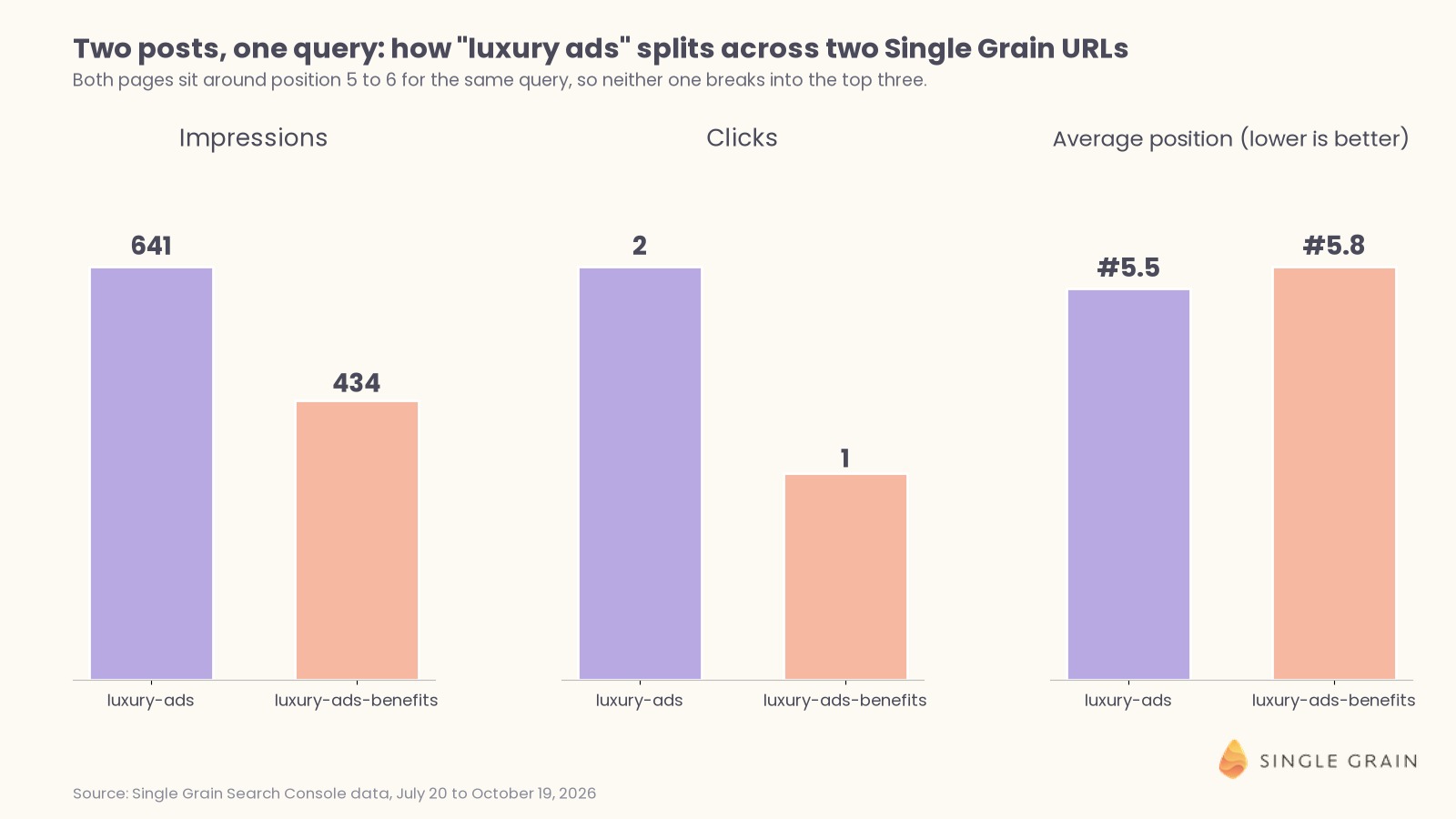
The main post earned 641 impressions and two clicks at an average position of 5.5, while the benefits post earned 434 impressions and one click at 5.8. Neither page reached the top three, and the near-identical positions suggest Google sees them as interchangeable answers to one question.
What Cannibalization Means for Answer Engine Optimization
Answer engine optimization (AEO) adds a newer reason to care. Artificial intelligence (AI) search tools such as Google’s AI Overviews pull passages from the pages they trust most, and two overlapping pages with slightly different claims make your brand look less certain.
Merged content gives AI systems one clear source to cite, which is the idea behind using content consolidation to improve AI answer accuracy. The same logic applies to how canonical tags affect AI content selection.
When you’re ready for the advanced version of this audit, the AEO and SEO cannibalization audit for legacy content shows how old posts can end up helping competitors in AI answers.
Not every overlap deserves a fix, though, and knowing the difference saves you from deleting pages that work.
When Multiple Ranking Pages Aren’t a Problem
Two of your URLs appearing for one query isn’t automatically cannibalization. Search Console only records a result when it was actually shown, so a stray impression far down the results doesn’t prove the two compete.
Leave the pages alone in these situations:
- They serve different intents (commercial, transactional, informational). A how-to guide (informational) and a product page (commercial / transactional) can both rank for a broad term because they answer different questions.
- You hold two strong positions. If your pages sit at positions one and two, you own more of the results page, and merging them could drop you to a single listing.
- Each page ranks for many other queries. A page with its own long tail of keywords earns traffic the other page never would, so a merge could shrink your total reach.
- The overlap is tiny. One page gets nearly all the impressions and the second appears once in a while far down the results.
It also helps to separate cannibalization from simple decline. A page losing rankings on its own is often a case of high-value content decay, which calls for a refresh rather than a merge.
With that filter in place, you’re ready to look at your own data.
How to Find Keyword Cannibalization in Google Search Console
Google Search Console is free, it uses Google’s own data, and it shows exactly which of your pages appeared for each query. If you already use a few Search Console shortcuts, these steps will feel familiar.
Everything below happens inside the Search Console Performance report. Set the date range to the last three to six months so daily swings even out.
Step 1. Filter the Performance Report by Query
Open Performance, then Search results. Click Add filter, choose Query, and enter the keyword you want to check. Use the Exact query option for one keyword, or Queries containing when you want every variation.
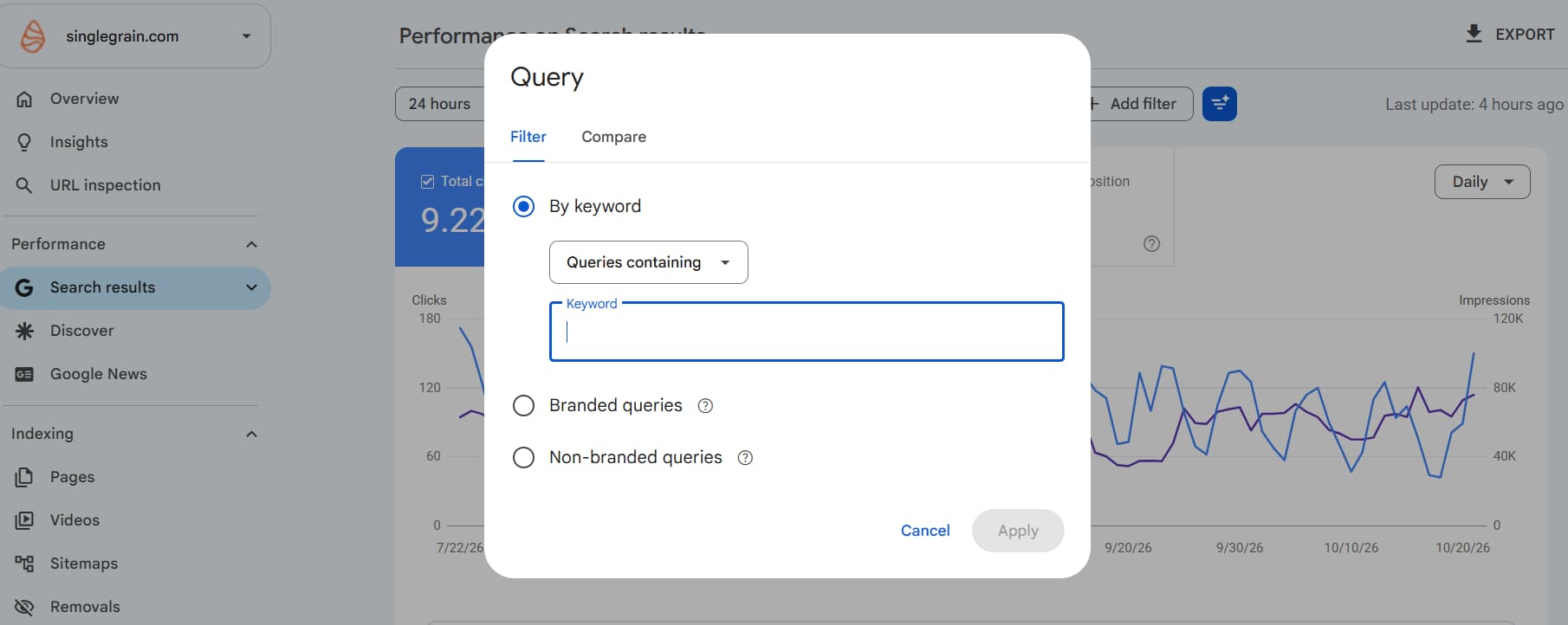
Click the Average position box so it shows next to clicks and impressions. You’ll need all three shortly.
Step 2. Open the Pages Tab
With the query filter applied, click the Pages tab below the chart. Search Console now lists every URL on your site that appeared for that query during your date range.
One page with almost all the impressions is healthy. Two or more pages with sizable impressions, similar positions and weak clicks is the warning sign.
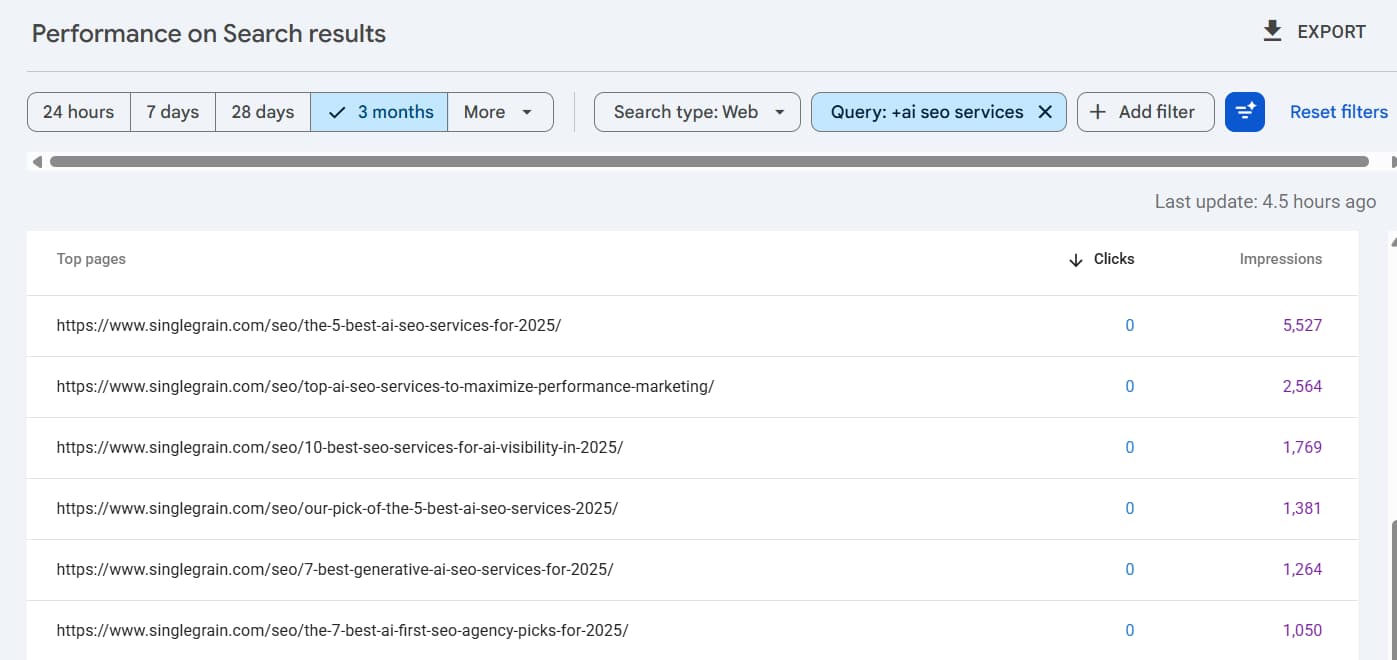
This is what that pattern looked like for one query on my team’s site. The chart below uses three monthly exports for “ai seo services” and stacks impressions by page.
In the first window, one listicle collected most of the impressions. By the second window a different listicle had taken over, and by the third, five different pages each pulled in at least a few hundred impressions. Across all three months the query earned 11,439 impressions, zero clicks and a best average position of 17.2.
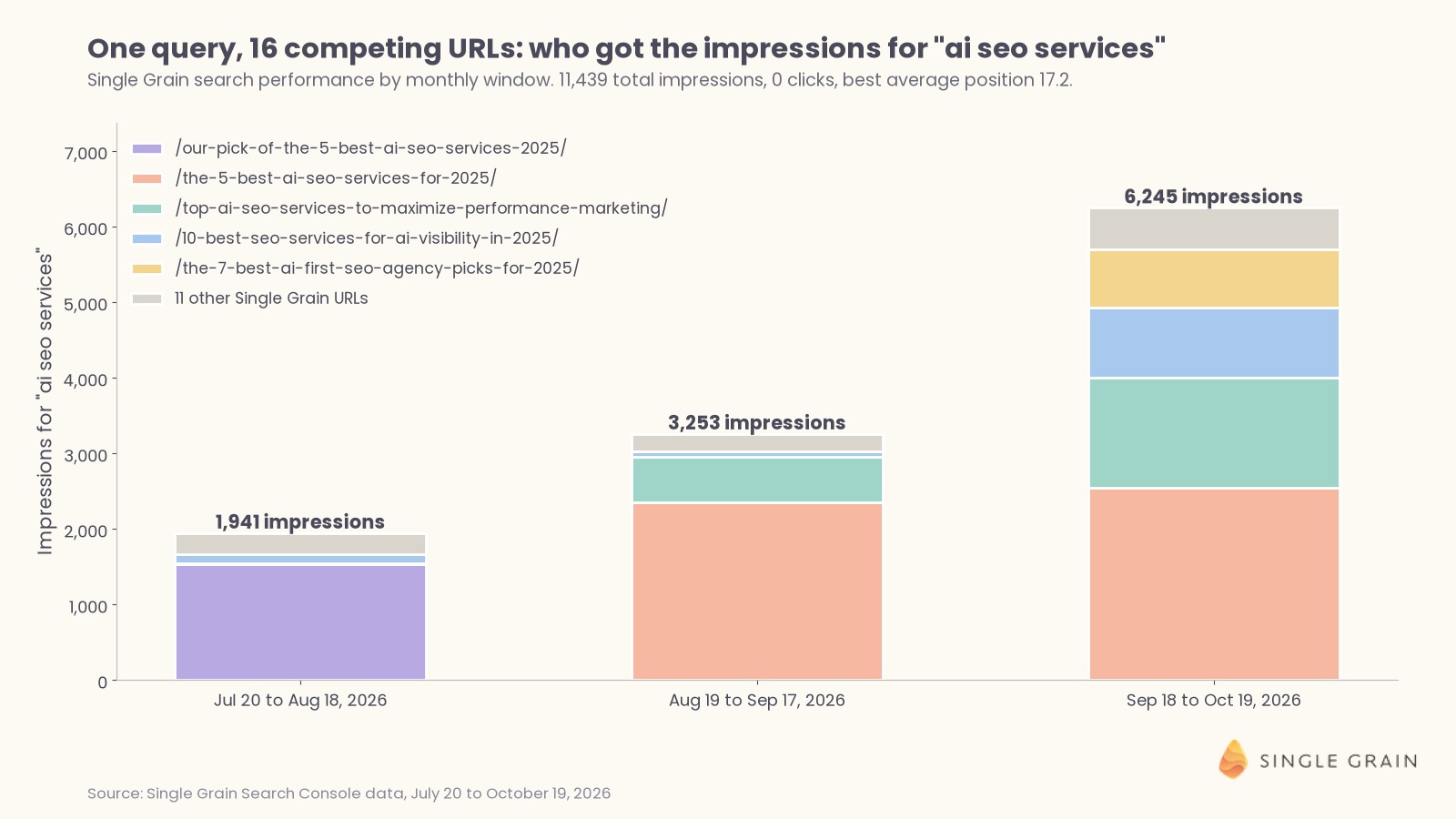
This is cannibalization in its clearest form. Several pages built for the same search intent keep replacing each other, and none of them earns enough trust to reach page one.
Step 3. Compare Positions Over Time
Next, click a single page in the Pages tab to add it as a filter, note its position trend in the chart, and then repeat with the second page. You can also use the Compare option on the date filter to put two periods side by side.
Look for crossing lines. When one page’s position improves right as the other’s drops, Google is likely swapping them, which points to cannibalization. A slow shift in which page ranks can also signal intent drift, where searchers start wanting a different kind of answer.
Step 4. Use Regex Filters for Query Families
One keyword at a time is slow work. Search Console’s query filter accepts regular expressions (regex) when you choose Custom (regex), so you can group a whole family of related searches into one view.
These patterns are useful starting points.
cannibali[sz](e|ation|ing)
^(how|what|why|when|does|is) .*cannibali
keyword cannibali[sz]ation (tool|checker|audit)
The first pattern catches American and British spellings. The second isolates question-style searches, and the third groups tool-related searches, which often belong on a different page than your beginner’s guide.
Step 5. Reverse the View at the Page Level
Now flip the view. Remove the query filter, add a Page filter for one URL you suspect, and open the Queries tab to list every search where it appears.
Repeat this for the competing page and compare the two query lists. Heavy overlap in the top queries confirms cannibalization, while two mostly different lists usually mean both pages earn their place.
| Pro-Tip |
|---|
| Export both query lists from Search Console and paste them into one sheet. A quick lookup formula shows which queries appear for both pages, and that shared list becomes the starting point for your fix. |
Search Console is the most reliable source, though a few other checks can speed up the work.
Other Ways to Spot Competing Pages
Search Console only shows pages that already earn impressions. These methods help you catch overlap before it shows up there, or check a large site faster.
1. Run a Site: Search
Type site:yourdomain.com “your keyword” into Google. The results show which of your indexed pages Google associates with the phrase, and it’s a quick sanity check before you write something new.
Treat it as a rough signal. The site: operator doesn’t show rankings or traffic, so use it to find candidates and Search Console to confirm them.
2. Use a Keyword Cannibalization Checker
Most major SEO platforms include a keyword cannibalization checker or a position-tracking report flagging keywords where more than one of your URLs ranks. These tools are handy on big sites because they scan thousands of keywords at once.
They also have blind spots. Rank trackers sample positions on a schedule and often flag pairs with different intent, so review every flag by hand before you act on it.
3. Build a Keyword-to-URL Spreadsheet
For a full audit, export Search Console data with both the query and page dimensions, either through the export button or the Search Console application programming interface (API). Put it in a spreadsheet with columns for query, page, clicks, impressions and position.
Then build a pivot table with queries as rows and count the distinct pages per query. Sort by impressions, keep queries where two or more pages each hold a sizable share, and you have a ranked list of cannibalization candidates.
Once you’ve confirmed a conflict, it’s time to decide what to do about it.
How to Fix Keyword Cannibalization
Every fix starts with the same move. You choose one page to own the keyword, and then you send search engines and readers a consistent signal pointing to it.
Choose a Winning Page
Compare the competing pages on intent fit, rankings, clicks, conversions and backlinks. The winner is usually the page with the strongest mix, though a page with fewer clicks can still win if it matches intent better or converts at a higher rate.
Also consider the URL itself. A clean, evergreen slug without a year or campaign name will age better than one tied to a moment in time.
Merge and 301 Redirect the Weaker Page
A merge is the most common fix when both pages serve the same intent and the weaker page still has some value. You move its best content into the winner and permanently redirect the old URL.
Follow these five steps in order.
- Update the winning page. Pull in any unique sections, examples or data from the weaker page, and refresh anything outdated.
- Set up a 301 redirect. Point the old URL to the winner with a server-side permanent redirect or your content management system (CMS) redirect plugin.
- Update internal links. Change every internal link pointing to the old URL so it points straight to the winner.
- Fix redirect chains. If the old URL already had redirects pointing to it, update them so every path lands on the winner in one hop.
- Update your sitemap. Remove the old URL from your sitemap and confirm the winner is listed.
Pick the redirect type carefully. A 301 tells search engines the move is permanent, and Google treats permanent redirects as a signal the target should become the canonical page. A 302 is temporary, so Google may keep showing the old URL, which defeats the purpose of a merge.
Redirect chains, such as page A to page B to page C, slow down crawling and add points of failure. Sitemaps are a weaker signal than redirects, though keeping your sitemap limited to canonical URLs keeps your signals consistent.
For a deeper look at when a merge beats a rewrite, my team’s breakdown of when to merge, rewrite or delete old content walks through more edge cases.
Add a Canonical Tag to a Near-Duplicate Page
Sometimes you need both pages live. A printer-friendly version, a filtered product listing or a syndicated copy may serve users even though it duplicates another page.
In those cases, add a rel=”canonical” tag on the duplicate pointing to the preferred page. Canonical tags are a strong signal, though Google can still pick a different page when the content doesn’t match closely, so save them for true duplicates.
De-Optimize and Retarget the Weaker Page
When both pages deserve to exist but drifted toward the same keyword, retarget the weaker one. Give it a new primary keyword with a different intent, then rewrite its title tag, H1, intro and subheadings around that new focus.
Remove or reframe the sections duplicating the winner, and link from the retargeted page to the winner using the shared keyword as anchor text. Each page now has its own job.
Noindex Thin or Utility Pages
A noindex tag keeps a page out of search results while leaving it available to visitors. It works well for internal search results, thin tag archives and campaign pages you don’t want ranking.
Use it carefully. Noindex removes the URL from search entirely, so skip it for anything with backlinks or useful content, and Google recommends canonical tags over noindex for choosing between duplicates. A noindexed page can also still influence AI answers in some cases.
Clean Up Internal Links and Anchor Text
Internal links are one of the strongest signals you control. If ten posts link to page A with the anchor “keyword cannibalization” and five link to page B with the same anchor, you’re telling Google both pages own the term.
Point your keyword-rich anchors at the winner and use different, descriptive anchors for the other page. The internal linking best practices my team follows apply here, along with a few adjustments for AI crawlers and retrieval models.
| Pay Attention |
|---|
| Internal link changes alone can resolve mild cannibalization. Try it first when both pages have value and the overlap is small, then check the Pages tab again after a few weeks. |
Which Fix Should You Use?
Three questions sort almost every case. First, ask whether both pages serve the same search intent. If they don’t, retarget the weaker page to its own keyword and leave both live.
Same intent? Then ask whether users need both URLs. Users who need both get a canonical tag on the duplicate, or a noindex tag if it’s a thin utility page. Otherwise, ask whether the weaker page has backlinks, traffic or unique content.
Any one of those means you merge the content and 301 redirect the old URL. With none of them, delete the page and update your internal links.
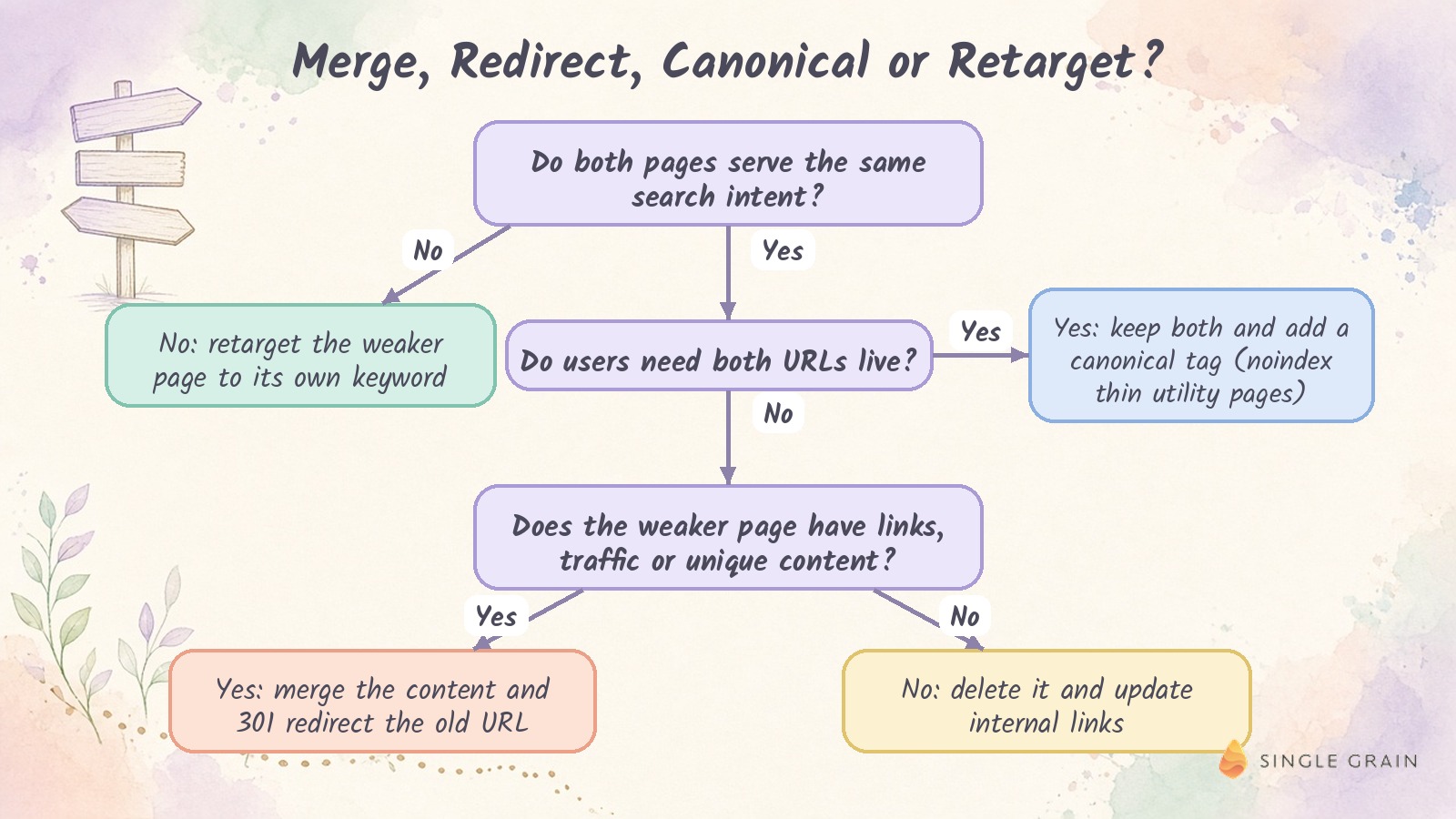
The table below summarizes each fix and what to watch in Search Console afterward.
| Situation | Best fix | What to watch afterward |
|---|---|---|
| Same intent, weaker page has links or unique content | Merge and 301 redirect | The old URL disappears from the Pages tab and the winner gains impressions |
| Same intent, both URLs needed by users | Canonical tag on the duplicate | The duplicate shows as an alternate page with a proper canonical tag in the Page indexing report |
| Different intent, overlapping titles and copy | Retarget the weaker page | Each query shows one main page again |
| Thin utility page such as a tag archive | Noindex | The page shows as excluded by a noindex tag in Page indexing |
| No traffic, no links, nothing to keep | Delete and update links | The URL drops out of reports with no lost traffic |
On a site with hundreds of overlapping posts, this framework works best inside a repeatable process, like the content refresh system for sites with 1,000+ posts my team uses to prioritize updates.
Cleanup is only half the job, so prevention comes next.
How to Avoid Keyword Cannibalization
Prevention costs far less than cleanup. A few habits catch most overlap before a new page ever goes live.
1. Build a Keyword Map
A keyword map is a simple document assigning every target keyword to one owner page. It lists the keyword, its intent, the owner URL and the page’s status, so anyone on your team can check whether a topic is taken.
Start with your existing rankings, then add new targets from your keyword research. Close variations, like a keyword and its “template” or “checklist” version, usually belong on the same page as new sections.
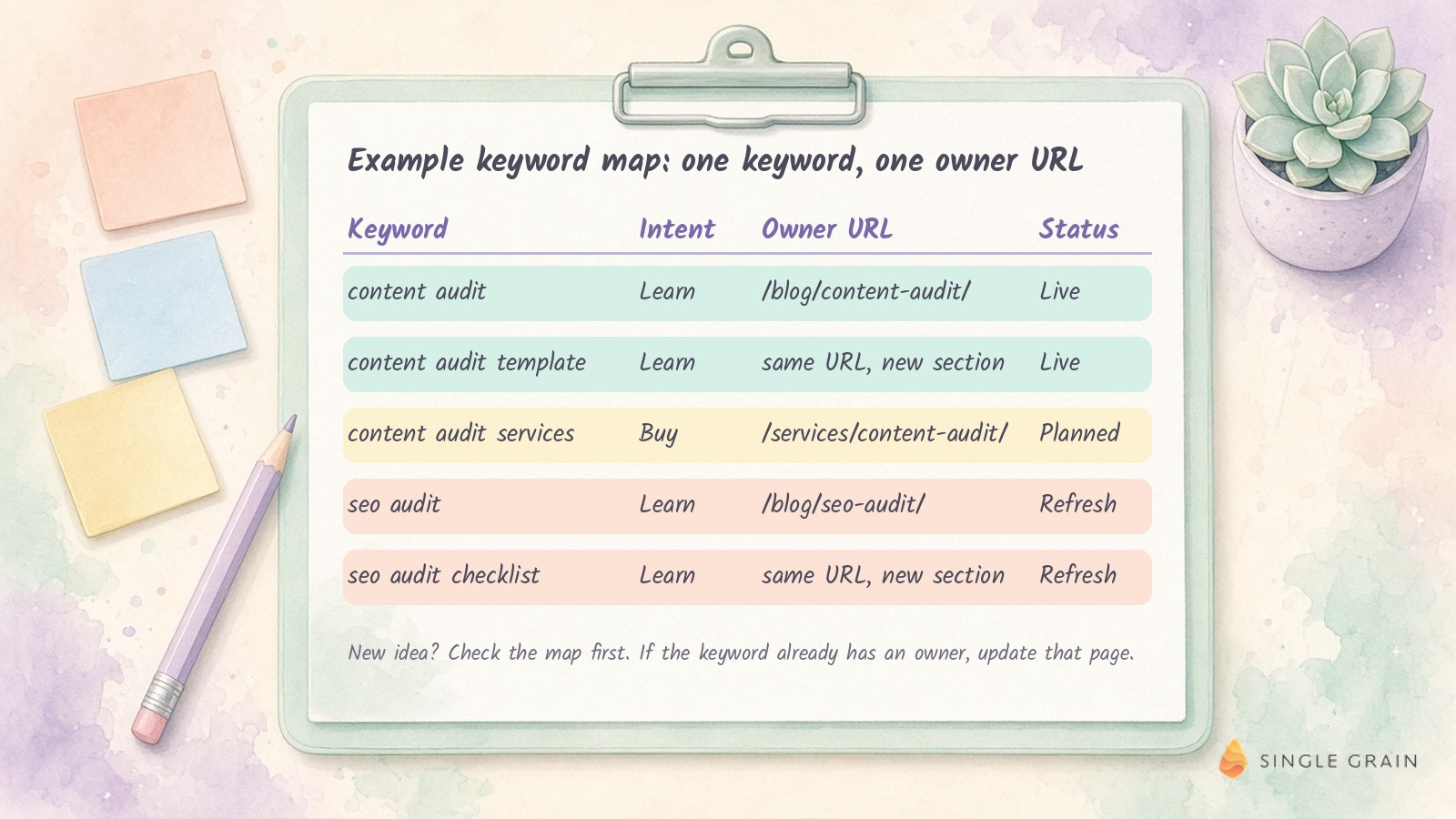
Notice how the services keyword gets its own page while informational variations share one. Intent decides the split.
2. Keep a Living Content Inventory
A content inventory lists every indexable page with its target keyword, publish date, traffic and owner. Run a full content audit once to build it, then update it every quarter.
For larger libraries, an AI-optimized content audit framework helps you flag overlap automatically across thousands of posts.
3. Add a Pre-Publish Checklist
Before any new page goes live, run four quick checks.
- Search the keyword map. Confirm no existing page already owns the keyword or its close variations.
- Run a site: search. Look for older pages covering the same topic under a different title.
- Check Search Console. Filter by the target query and see whether any page already earns impressions for it.
- Decide between new and update. If a page already covers the intent, update it instead of publishing a competitor.
Teams using AI tools to draft content at scale need this review most. High-volume teams can detect topic saturation before rankings drop, and they should also stop content agents from killing posts that already rank.
4. Organize Content Into Topic Clusters and Hub Pages
Topic clusters give every page a defined role. A hub page covers the broad topic, and supporting pages each go deep on one subtopic, with internal links tying the group together.
This structure makes ownership obvious, which is why building topical authority and avoiding cannibalization go hand in hand. You can learn the basics of using topic clusters to improve SEO, how to develop strong pillar content, and how AI search changes hub and pillar page strategy.
Once your structure is in place, the last step is measuring whether your fixes worked.
How to Measure the Results of Your Fix
Write down every change you make, including the query, the winning page, the fix and the date. Without a log, it’s hard to connect later ranking changes to the work.
Then return to the same Search Console views. Filter by the query, open the Pages tab and confirm one page now collects most of the impressions, then compare positions and clicks against the period before the fix.
Give it time. Google has to recrawl the redirected or retargeted pages before rankings settle, so judge results over several weeks and check the Page indexing report to confirm redirects and canonical tags were picked up.
If two pages are still trading places after that, revisit the decision framework. The weaker page may need a deeper retarget or a full merge.
Turn Competing Pages Into One Strong Result
Keyword cannibalization is fixable once you can see it. Find the conflicts in Search Console, choose one winner per keyword, apply the right fix, and protect your work with a keyword map and a pre-publish check.
If you’d like experienced help auditing overlap across a large site, my team at Single Grain can step in. Explore Single Grain’s SEO services or see how my team plans and refreshes content through its content marketing services.
Keyword Cannibalization FAQs
-
What is keyword cannibalization in simple words?
Keyword cannibalization means two or more pages on your own site compete for the same search. Search engines split attention between them, so none of the pages ranks as well as one focused page would.
-
How do I fix keyword cannibalization?
Choose one page to own the keyword, then merge and 301 redirect the weaker page, add a canonical tag to a near-duplicate, or retarget the weaker page to a different keyword. Update your internal links so they all point to the winner. The merge, rewrite or delete framework helps with edge cases.
-
What is an example of keyword cannibalization?
A common example is a blog with two posts on nearly the same topic, such as a guide to luxury ads and a post on the benefits of luxury ads. Both pages appear for the same query at similar positions, and neither reaches the top three.
-
Is keyword cannibalization always bad?
No. If two of your pages serve different intents, or they hold the top two positions for a query, the overlap can work in your favor. It becomes a problem when similar pages with the same intent trade places and hold each other back.
-
Can Google Search Console show keyword cannibalization?
Yes. Filter the Performance report by a query, open the Pages tab, and look for two or more pages with meaningful impressions. Comparing their positions over time shows whether Google is swapping them.
-
Does a 301 redirect fix keyword cannibalization?
A 301 redirect fixes it when the weaker page serves the same intent and you no longer need it live. Merge any useful content into the winning page first, then redirect, update internal links and remove the old URL from your sitemap.


