

What Is Meta-ExternalAgent, and Should Your Site Block It?


If Meta-ExternalAgent keeps showing up in your server logs, you are looking at the crawler Meta uses for jobs like training foundation AI models. Should you let it in or shut the door?
Your decision lives in two places you already control, your robots.txt file and your CDN rules. Below, you’ll find what each Meta crawler does, what the new terms actually say, and a simple way to decide what to block without breaking your link previews or your visibility in Meta AI.
TL;DR
- Meta-ExternalAgent is Meta’s AI training and indexing crawler. It honors robots.txt, so you can block it with two lines.
- Meta runs five documented crawlers, and they do different jobs. A blanket block breaks Facebook link previews and removes a path to Meta AI citations.
- Meta’s new commercial terms add a broad crawling clause. Meta originally set Oct 30, 2026, and its terms page now shows Nov 20, 2026 as the effective date.
- The safest default for most brands is selective. Block Meta-ExternalAgent if training is your concern, and keep FacebookExternalHit and Meta-WebIndexer open.
TABLE OF CONTENTS:
- What Is Meta-ExternalAgent?
- Meta’s Crawlers Compared: Meta-ExternalAgent, Meta-WebIndexer, FacebookExternalHit and More
- What Meta’s New Meta Commercial Terms Say About Crawling
- Should You Block Meta-ExternalAgent? A Quick Decision Guide
- How to Block or Allow Meta’s Crawlers in robots.txt
- What Blocking Costs You: Link Previews, Meta AI Answers and Ad Landing Pages
- How to Check Whether Meta Is Crawling Your Site
- Set Your Meta Crawler Policy Before the New Terms Take Effect
What Is Meta-ExternalAgent?
Meta-ExternalAgent is a web crawler Meta describes as crawling the web “for use cases such as training foundation AI models or improving products by indexing content directly.”
In your logs it appears as meta-externalagent/1.1, sometimes followed by a link back to Meta’s crawler documentation. Meta’s own robots.txt examples include it by name, which tells you Meta expects site owners to control it there.
Your content is the raw material for AI answers, and the crawlers you allow decide where it travels. If you have no AI bot policy yet, start with the broader AI crawler policy framework, then come back here for the Meta specifics.
Meta’s Crawlers Compared: Meta-ExternalAgent, Meta-WebIndexer, FacebookExternalHit and More
Meta lists five user agents on its developer page. Each one does a different job, so a blanket block treats a training crawler and a link preview bot as the same thing.
- FacebookExternalHit fetches pages people share on Facebook, Instagram or Messenger to build the title, description and thumbnail you see in the post.
- Meta-WebIndexer crawls the web to improve Meta AI search results. Meta says allowing it helps Meta cite and link your content in Meta AI responses.
- Meta-ExternalAds looks through the web for uses such as improving advertising and other business products and services.
- Meta-ExternalAgent crawls for AI model training and for improving products by indexing content directly.
- Meta-ExternalFetcher fetches individual links when a user asks, including for agentic AI tasks, and Meta warns it may bypass robots.txt.
Here is how Meta presents those agents on its own documentation page.
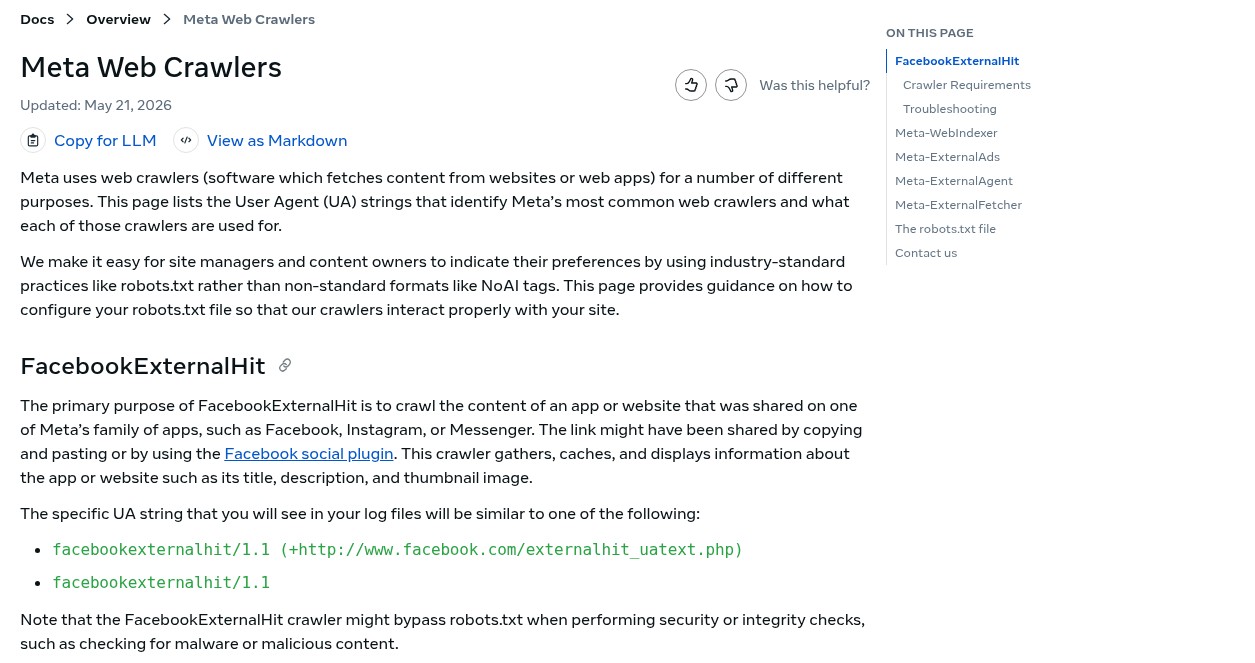
Two of these crawlers deserve a closer look before you write any rules.
Why FacebookExternalHit Controls Your Link Previews
FacebookExternalHit is the bot that turns a pasted URL into a clickable card. Meta says your Open Graph tags need to sit within the first 1 MB of the page, and the page must load within a few seconds or the preview fails.
Meta also notes this crawler might bypass robots.txt for security or integrity checks, such as scanning for malware. A block rarely stops it fully, and it mostly hurts how your links look when people share them.
What Meta-WebIndexer Does for Meta AI Answers
Meta-WebIndexer is the visibility side of the ledger. If you want Meta AI to cite and link your pages, this is the crawler to keep open, the same way you would treat other answer-engine bots in your technical SEO for LLM scrapers.
With the cast of crawlers clear, the next question is what Meta’s contract now says about crawling your site.
What Meta’s New Meta Commercial Terms Say About Crawling
Meta’s updated commercial terms were first set to take effect on Oct 30, 2026. When I checked on Oct 22, both Meta’s terms preview and its business help page listed Nov 20, 2026 instead. I couldn’t find a Meta announcement explaining the new date, so confirm it before you plan around it.
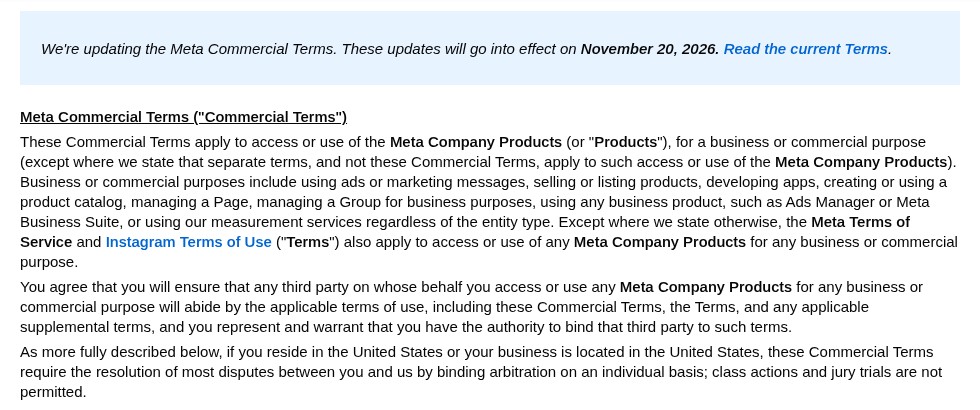
Inside the preview, a new clause lets Meta use “web scrapers, bots, robots, spiders, crawlers, and user agents” on domains “associated with your products or services.” Meta can then use what it collects to “provide, develop, improve, research, and maintain advertising and business products.”
What Changed After the Backlash
The first draft also said Meta could use crawled content to “train” its products. Meta removed that word after Nieman Lab’s reporting, and a spokesperson told The Verge that “content owners can use robots.txt to signal their preferences.”
The terms themselves still do not mention robots.txt. Matt Topic, a media and intellectual property attorney at Loevy & Loevy, told Nieman Lab he thinks “develop” is broad enough to include “train.” Meta also has not said which user agent does this crawling, although Meta-ExternalAds has the closest matching description.
The AI Features Clause in the Same Update
The same update adds an “AI Features” section. The preview text says you are “solely responsible for and assume any and all risks associated with such AI features and any resulting Content.” PPC Land reported agencies pulling live ads after Meta’s tools added sitelinks, translations and AI images on their own.
If you run ads on Meta, review which Advantage+ AI tools are switched on in each campaign.
Contract language aside, robots.txt is still the lever Meta says it respects. Here’s how to decide what to do with it.
Should You Block Meta-ExternalAgent? A Quick Decision Guide
Your answer depends on whether your content is the product or the marketing. Find the description closest to your site.
- Block Meta-ExternalAgent if your content is what you sell. Research, publishing, courses and paid data lose leverage when they flow into model training for free.
- Allow it if reach matters more than control. Brands whose pages exist to win buyers may care more about presence in AI tools than about training use.
- Keep FacebookExternalHit open either way. A block here mainly breaks the previews on links your team and customers share.
- Keep Meta-WebIndexer open if you want Meta AI citations. This is the crawler Meta ties to citing and linking your content.
Most of the brands I talk to land in the middle. They want the citations without donating the archive.
| Pro-Tip |
|---|
| Treat Meta’s crawlers as separate decisions. Blocking Meta-ExternalAgent while allowing Meta-WebIndexer and FacebookExternalHit keeps your previews and Meta AI citations working while you opt out of training use. |
Once you know your stance, writing the rules takes about five minutes.
How to Block or Allow Meta’s Crawlers in robots.txt
Add a group for each Meta user agent you want to control. This example blocks Meta-ExternalAgent everywhere, keeps Meta-ExternalAds out of a private folder, and leaves the preview and indexing bots open.
User-agent: meta-externalagent
Disallow: /

User-agent: meta-externalads
Disallow: /private/

User-agent: meta-webindexer
Allow: /

User-agent: facebookexternalhit
Allow: /
Meta says its crawlers may cache robots.txt for up to 24 hours, so give changes a day before you judge them. Remember too that Meta-ExternalFetcher and FacebookExternalHit can bypass robots.txt in the cases Meta describes.
If you need hard enforcement, add a rule at your CDN or web application firewall that matches the user agent string. Meta recommends allowlisting by IP address for FacebookExternalHit because user agents can be spoofed, a point the crawler policy guide covers for every bot.
| What You Should Do |
|---|
| Before you ship the new rules, test one directory first. Watch your logs and your link previews for a week, then roll the change out sitewide. |
Rules are only half the job. You also need to know what each block costs.
What Blocking Costs You: Link Previews, Meta AI Answers and Ad Landing Pages
A wide block can quietly hurt channels you rely on. Here is the tradeoff for each crawler.
- Link previews. Without FacebookExternalHit, shared links can lose their title, description and image.
- Meta AI answers. When you remove Meta-WebIndexer, you take away the path Meta says it uses to cite and link your pages.
- Ads and catalog data. Meta does not document what blocking Meta-ExternalAds does to ad delivery, so test it on a single folder before you touch landing pages.
Access shapes AI visibility more than most teams expect. For example, after my team fixed crawl and indexation problems for SmartRent, the site picked up more than 100 new citations across major AI platforms within a month, as our SmartRent case study shows.
Before you change anything, find out which of these bots actually visit you.
How to Check Whether Meta Is Crawling Your Site
Your server logs are the source of truth. Search them for each Meta user agent and count requests by day, a method laid out in diagnosing AI visibility issues with server logs.
grep -i "meta-externalagent" access.log | wc -lRun the same search for meta-webindexer, meta-externalads, meta-externalfetcher and facebookexternalhit. If a blocked agent keeps requesting pages a few days after your change, escalate to a CDN rule. For preview problems, Meta’s Sharing Debugger can force a fresh crawl of any URL.
Set Your Meta Crawler Policy Before the New Terms Take Effect
Meta-ExternalAgent is easy to control once you see it as one of five separate bots. Decide on training use, protect your previews, keep the citation path open, and verify the result in your logs.
Want a second set of eyes on your crawler rules and AI visibility? My team at Single Grain handles this through our technical SEO agency work and our Search Everywhere Optimization services. Reach out, and my team will map which bots should reach your content and which shouldn’t.
Frequently Asked Questions About Meta-ExternalAgent
-
What is Meta-ExternalAgent?
Meta-ExternalAgent is a Meta web crawler used for purposes such as training foundation AI models and improving products by indexing content directly. Its user agent string is meta-externalagent/1.1, and Meta documents it on its Meta Web Crawlers developer page.
-
Does Meta-ExternalAgent respect robots.txt?
Meta includes Meta-ExternalAgent in its robots.txt examples, so a Disallow rule for that user agent is the documented way to block it. Meta warns that Meta-ExternalFetcher and FacebookExternalHit can bypass robots.txt in some cases.
-
Will blocking Meta-ExternalAgent break Facebook link previews?
No. Link previews come from FacebookExternalHit, a separate crawler. Keep FacebookExternalHit allowed and your previews keep working. The AI crawler policy framework explains how to treat each bot separately.
-
What is the difference between Meta-ExternalAgent and Meta-WebIndexer?
Meta-ExternalAgent supports AI training and product indexing. Meta-WebIndexer improves Meta AI search results, and Meta says allowing it helps Meta cite and link your content in Meta AI answers.
-
When do the new Meta commercial terms take effect?
Meta first set Oct 30, 2026. As of Oct 22, 2026, Meta’s terms preview and business help page list Nov 20, 2026, so check the date on Meta’s terms page before you plan around it.
-
Should brands block Meta’s AI crawler?
It depends on whether your content is the product. Many brands block Meta-ExternalAgent but keep Meta-WebIndexer and FacebookExternalHit open. If you want help weighing the tradeoff, our technical SEO agency team can review your setup.


