

AI Voice Agents After GPT-Live-1.1: Build on OpenAI or Buy a Platform?


AI voice agents just got a lot harder to tell apart from a real person, and I’m honestly pumped about it. OpenAI started rolling out GPT-Live-1.1 with thirteen new voices and much better accents in French, German, Hindi, Japanese, Korean, and Mexican Spanish. Its API already prices GPT-Live-1 voice sessions at $0.05 a minute, billed by the second.
If you run marketing, this raises a fun question: “Should my team buy a voice agent platform, or build our own on OpenAI?”
A lot of the advice out there comes from vendors pitching their own tools. Great if you already know what you want. Less great if you’re the one signing off on the budget.
In this guide, I’ll break it down the way I would with my own team. You’ll see what GPT-Live-1.1 actually changes, what a call and a booked meeting really cost, when building beats buying, and the guardrails I’d set before a single customer hears the agent.
TL;DR
- GPT-Live-1.1 makes AI voice agents sound more human. OpenAI’s newest voice model adds thirteen new voices, better non-English accents, more natural delegation, and better steerability in ChatGPT, Codex, and dots.
- The API runs GPT-Live-1 today. Voice sessions cost $0.05 a minute, billed by the second, and GPT-Live-1.1 is listed as coming soon for developers.
- Build for control, buy for speed. A build on OpenAI keeps your CRM, pricing logic, and qualification rules in your own stack, while a platform usually gets a first call live faster with less engineering.
- Judge it on cost per booked meeting. Add up voice minutes, backend and tool usage, and phone and setup costs, divide by meetings booked, and protect your attribution before the first live call.
TABLE OF CONTENTS:
- What Are AI Voice Agents?
- What's Live in the OpenAI Voice API Today?
- Should You Build AI Voice Agents on OpenAI or Buy a Platform?
- How Much Do AI Voice Agents Cost Per Booked Meeting?
- Which Calls Should an AI Voice Agent Take First?
- How to Launch AI Voice Agents Without Hurting Your Brand or Attribution
- What People Are Saying About GPT-Live-1.1
- Build or Buy, Then Prove It in Pipeline
What Are AI Voice Agents?
AI voice agents are software that holds a spoken conversation and finishes a job, like answering a product question, qualifying a lead, or booking a meeting. The good ones feel like a sharp coordinator who never takes a lunch break.
OpenAI’s GPT-Live models are built for this kind of back and forth. Per the GPT-Live-1.1 system card, they’re full-duplex, so they listen and respond continuously, follow pauses and interruptions, and decide in the moment whether to reply or keep listening.
What Changed With GPT-Live-1.1?
So what’s actually new? In its rollout announcement, OpenAI says GPT-Live-1.1 brings thirteen new voices to ChatGPT, Codex, and dots, plus considerably better performance in French, German, Hindi, Mexican Spanish, Korean, Japanese, and many other non-English languages.
Delegation is more natural, steerability improved, and OpenAI promises less “checking” while the model works.
Two models share the update. GPT-Live-1.1 is the default voice model for Plus and higher tiers, and GPT-Live-1.1 Quip, the successor to GPT-Live-1 mini, is the default for everyone else.
All of this lives inside ChatGPT for now. If you want an agent answering your own phone lines, the API is where the real decisions happen.
What’s Live in the OpenAI Voice API Today?
Your customers won’t call ChatGPT, so the OpenAI API changelog matters more to a marketing leader than the consumer update. Here’s what developers can use right now.
- GPT-Live-1 is generally available. Voice sessions cost $0.05 per minute, billed per second, and backend model and tool usage is charged separately.
- Prompt-to-voice is open to all API customers. You describe a voice in plain text and reuse it across GPT-Live sessions. The voice itself costs nothing to create, and speech runs on regular session billing.
- Nine new natural voices arrived. They cover German, French, Hindi, Japanese, and Korean.
- Native Decisions integration is live. GPT-Live can call the Decisions API directly to make low-latency decisions while the caller is still speaking, which skips a round trip through your app.
GPT-Live-1.1 itself is still marked “coming soon” for the API. My advice is to build on GPT-Live-1 now and treat the upgrade as a model swap you’ll test, like any new version.
How a GPT-Live Voice Agent Splits the Work
OpenAI’s voice agents guide describes a clean split. The live model handles listening and speaking, a separate backend handles reasoning and tools, and your application keeps control of permissions and business records. You choose which delegation mode connects them.
- Client delegation. You connect your own agent or workflow, with the backend model and provider you choose, and your application runs the work.
- Responses delegation. You pick an OpenAI-hosted Responses model for reasoning and tool use, GPT-Live manages those calls, and your app still runs custom functions.
Either way, OpenAI recommends keeping speaking behavior in the live model’s prompt and business rules in the backend prompt. I love this rule, because your pricing logic and qualification criteria stay out of the part of the system tuned for small talk.
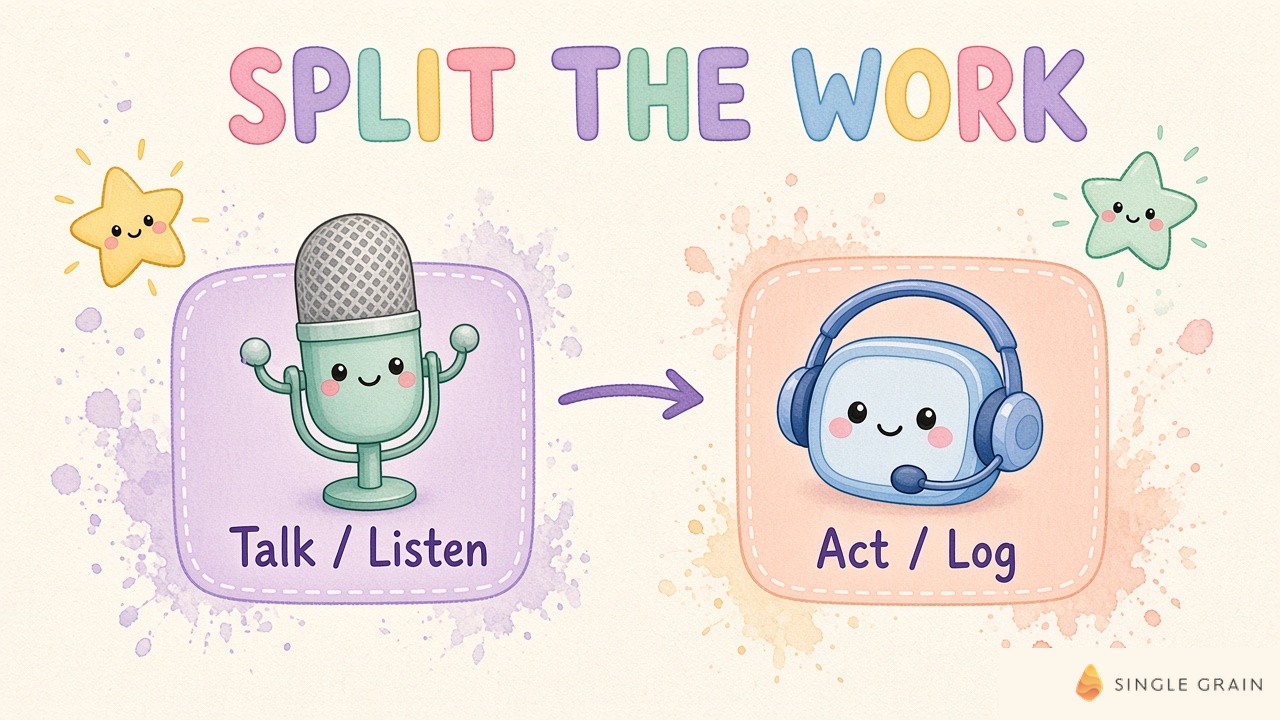
This split is also why the build-or-buy question got so interesting. If OpenAI handles the voice and your stack handles the thinking, some of what a platform bundles becomes something your own team could own.
Should You Build AI Voice Agents on OpenAI or Buy a Platform?
My short answer? It depends on who owns the work after launch. A build gives your team full control of the backend, the data, and the voice. Meanwhile, a platform usually gives you a working phone agent faster, with phone numbers, dashboards, and integrations bundled in.
Here’s how I’d compare the two options with my own team.
| Factor | Build on OpenAI’s API | Buy a platform |
|---|---|---|
| CRM data and business rules | Live in your own backend and prompts | Live partly in the vendor’s tools, so check what you can export |
| Time to first live call | Longer, since your team wires up phone, backend, and testing | Usually faster, with templates and built-in phone numbers |
| Skills you need | Engineers comfortable with real-time audio, APIs, and evals | Ops or marketing staff who can configure call flows |
| Voices and languages | GPT-Live voices plus custom prompt-to-voice voices | Whatever voices and models the vendor supports |
| Cost model | $0.05 per voice minute plus backend, phone, and build costs | Per-minute or plan pricing, so ask what each tier includes |
| Exit options | You own prompts, logs, and evals | Depends on the contract and export options |
Neither column wins on every row. The right pick depends on which rows matter most to your business, so here’s how I’d read the table.
When Building on OpenAI Makes Sense
A build pays off when the voice agent touches things you can’t afford to hand to someone else. I’d lean this way in these cases.
- Your qualification rules are your edge. Complex routing, pricing exceptions, and regulated disclosures, common in financial services and complex e-commerce, are easier to govern in your own backend.
- You already run a text agent. OpenAI’s guide says you can keep your existing text workflow, business logic, and tools, then add GPT-Live as the voice on top.
- You sell in several languages. GPT-Live-1.1 leans hard into non-English accents, and prompt-to-voice lets you design a brand voice for each market.
- You have engineers to spare. Someone has to own latency, testing, and upgrades every time OpenAI ships a new model version.
I’d weigh this last point more heavily than any feature list. Keep in mind, a forward deployed marketer can close the gap between marketing and engineering when your team has budget and few spare engineers.
When an AI Voice Agent Platform Is the Faster Call
For some teams, a platform a smart fit. A platform makes sense in these situations.
- You need a pilot live this quarter. Prebuilt phone numbers, call flows, and dashboards cut setup time.
- Your call flow is standard. Reschedules, after-hours intake, and event follow-up rarely need custom reasoning.
- Nobody in-house wants to own real-time audio. Latency, interruptions, and audio quality are hard problems, and a vendor absorbs them for you.
Before you sign, make sure you can take your prompts, logs, and evals with you when you leave a vendor. These are the assets you’ll want if you ever switch, including a switch to your own build later.
| Pro-Tip |
|---|
| Run both paths on the same test set. Record ten real inbound calls with consent, define the right outcome for each, and replay them through a platform trial and a quick GPT-Live prototype. Whichever path books more correct outcomes at a cost you can live with wins round one. |
Speaking of cost, let’s talk money. Per-minute prices look tiny until you divide them by what actually lands on a rep’s calendar.
How Much Do AI Voice Agents Cost Per Booked Meeting?
Most pricing pages quote cost per minute, which is a useful starting point. I take the math one step further, to the number your CFO actually cares about, the cost of a booked meeting.
How AI Voice Agent Pricing Works on OpenAI
On OpenAI’s API, GPT-Live-1 voice sessions cost $0.05 per minute, billed per second. Backend model and tool usage is charged separately, and creating a prompt-generated voice is free. Phone carrier costs and your team’s build time are separate line items too.
Platforms price their own way, with per-minute rates or plans. Ask every vendor which of these costs the price already covers, so you compare like with like.
The Cost Per Booked Meeting Formula
Here’s the formula I’d put in front of a CFO, whichever path you pick.
Cost per booked meeting = (voice minutes × $0.05 + backend model and tool costs + phone costs + build and testing time) ÷ booked meetings
For a platform, swap the first three inputs for the vendor’s invoice and keep the rest. Pull each input in this order.
- Voice minutes. Multiply average call length by monthly call volume from your current phone or chat data.
- Backend and tool costs. Check your OpenAI usage after a test week, since reasoning and tool calls vary by call flow.
- Phone and setup costs. Add your carrier, numbers, and the hours your team spends building, testing, and maintaining the agent.
- Booked meetings. Count only meetings your CRM ties back to an agent call, using the same rules as every other channel.
Then line it up against what a booked meeting costs today from paid media, SDRs, or web forms. If your revenue attribution already joins GA4 and CRM data, the voice agent slots in as one more channel with one more cost line.
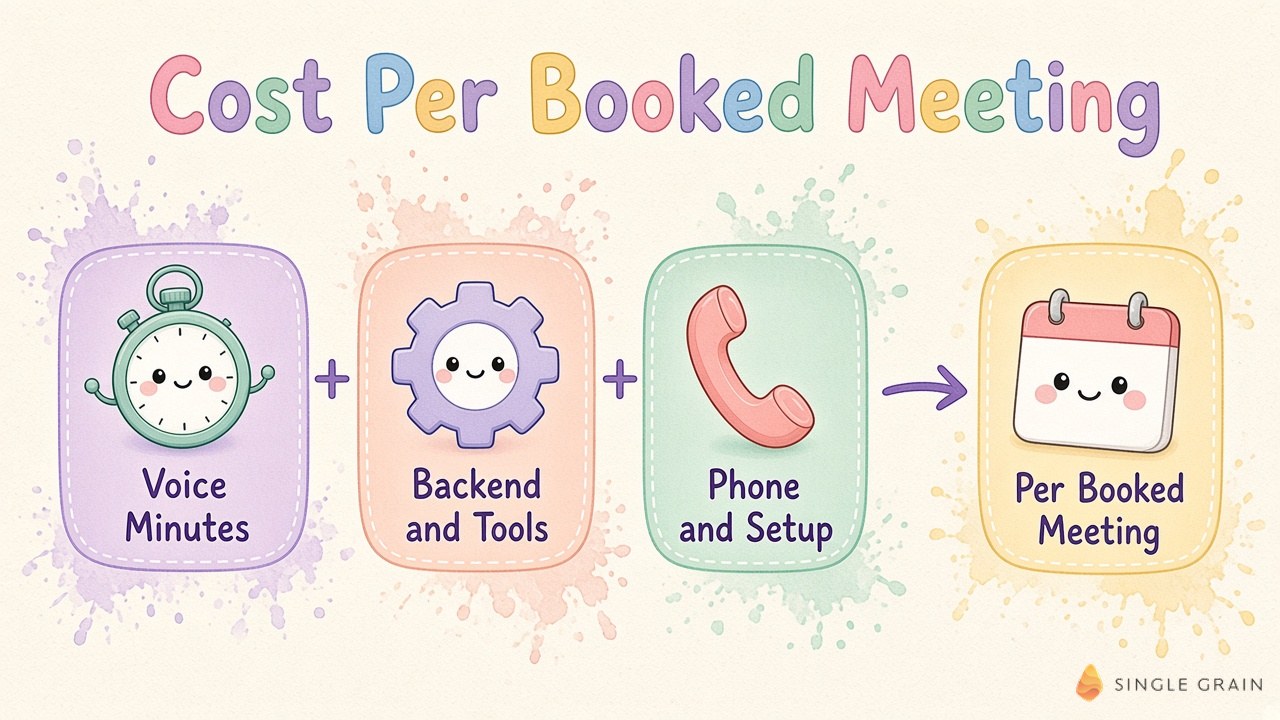
Once the math checks out, the next question is where to point the agent first. My hint is to start smaller than you think.
Which Calls Should an AI Voice Agent Take First?
Start with one call flow with a clear, countable outcome. Good first candidates include these.
- After-hours demo requests. Buyers who raise a hand at night get an answer and a calendar link right away.
- Inbound lead qualification. The agent asks your qualifying questions and routes good fits to a rep.
- Event follow-up. Attendees get a quick call to book a meeting while the event is fresh.
- Rescheduled meetings. No-shows and conflicts get rebooked without a rep chasing them.
For inbound leads, speed-to-lead agents can call every new lead within sixty seconds and hand off to a human. When my team ran an AI SDR, it amplified every weak assumption in the list and the offer, and a voice agent will do the same. Clear AI lead qualification criteria come first, and conversation comes second.
Picking the flow is the easy part. To launch it without confusing callers or scrambling your reporting, you need a few guardrails.
How to Launch AI Voice Agents Without Hurting Your Brand or Attribution
Here are the guardrails I’d set before a single customer hears the agent. Each one is cheap to add before launch and painful to bolt on later.
1. Tell Callers They’re Talking to AI
OpenAI’s custom voices guide asks you to tell listeners the speech is AI-generated, use adult voices only, and never impersonate anyone. Put the disclosure in the first line of every call. Rules for phone calls also vary by country and call type, so loop in your legal team before any outbound campaign.
2. Keep the Voice Consistent
Prompt-to-voice lets you describe tone, accent, pitch, and pace, with an optional script hint of up to two thousand characters. Each successful request saves a new voice, and each organization can create up to one hundred. Pick one, save its ID, and reuse it so your brand sounds the same on every call.
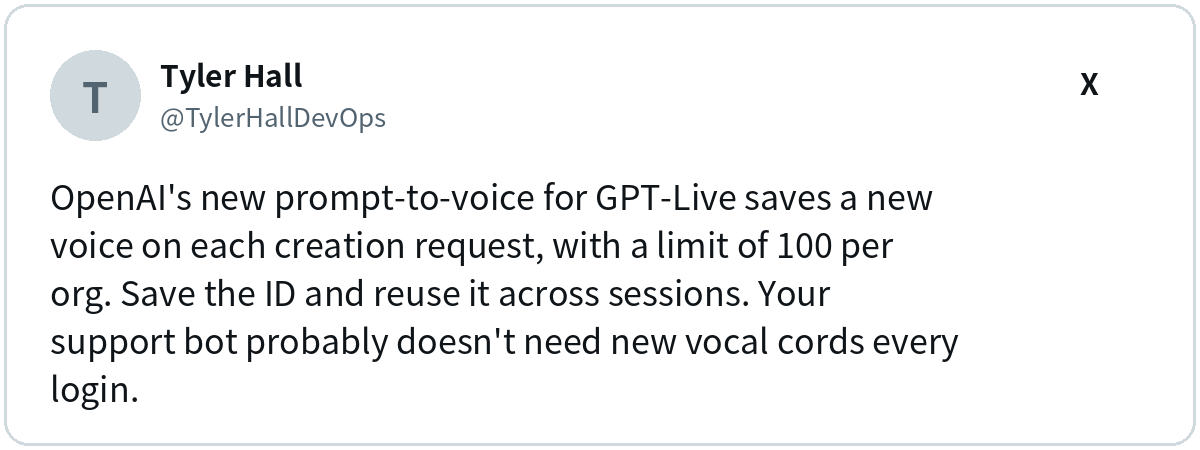
Keep a short reference recording of how the agent should sound, too, and listen again after every model update. You’ll see why in the reactions further down.
3. Read the System Card Safety Notes
OpenAI’s system card says the GPT-Live-1.1 models perform at parity with their predecessors on voice evaluations built from production prompts, with no statistically significant regressions.
On harder synthetic prompts, GPT-Live-1.1 shows statistically significant regressions on sexual, mental health, emotional reliance, and gore categories compared with GPT-Live-1. OpenAI says more research is needed, plans to improve these categories in future releases, and notes these evaluations don’t account for system-level safeguards.
My takeaway is simple. Write your own guardrails and test them, whatever model sits underneath.
4. Plan the Human Handoff
Decide upfront when the agent steps aside. Angry callers, pricing exceptions, and legal questions belong in exception queues routed to a person, with a clear owner on the other end. Agree on an SLA and a kill switch before the first live call, so anyone on the team can shut it off fast.
5. Protect Attribution, UTMs, and CRM Records
A voice agent is only as useful as the record it leaves behind. Log intent, outcome, and lead source on every call, and keep UTM and meeting intent intact when the agent books time on a rep’s calendar. It also helps to expire stale CRM facts so the agent never repeats an old price out loud.
6. Test in Crawl, Walk, and Run Stages
OpenAI’s voice agents guide suggests adding complexity in stages, in this order.
- Crawl. Use synthetic speech on controlled, single-turn requests.
- Walk. Replay real human recordings to test how voices, microphones, pauses, and acoustic conditions affect behavior.
- Run. Use an independent simulated caller across multi-turn conversations with interruptions and changing requirements.
Measure task outcomes and latency separately. For latency, OpenAI recommends comparing the median and 95th percentile across similar calls, and it suggests pairing automated scores with human listening.
| Pay Attention |
|---|
| A launch note tells you what OpenAI improved. Your own test set tells you whether it improved for your callers, your product names, and your accents. Rerun it every time you change the prompt, the voice, or the model. |
Guardrails cover the call itself. There’s one more place your voice agent decision gets shaped, and it happens long before anyone dials.
What People Are Saying About GPT-Live-1.1
Reactions split between excitement about more natural, multilingual conversation and frustration about voices that suddenly sounded different. On the OpenAI forum, one developer said the current models “seem to bleed one accent into another” and greeted the promise of less “checking” with “Praise be!”
Justin Uberti, Head of Realtime AI at OpenAI, summed up the release from the inside.
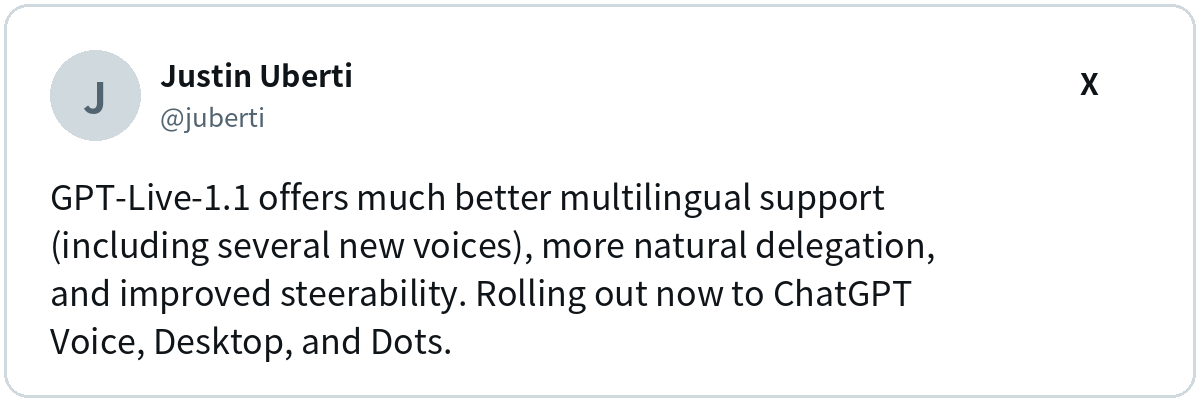
For companies selling across regions, the multilingual piece is the real headline. Better accents in French, German, Hindi, and Mexican Spanish make a voice agent viable in markets where English-only bots used to feel clumsy.
The loudest complaints came from people attached to a specific voice. Several forum users said a familiar voice now sounded lower or entirely different, and Shaun Ralston, a developer and OpenAI Devs Codex Ambassador, flagged a similar issue on X.
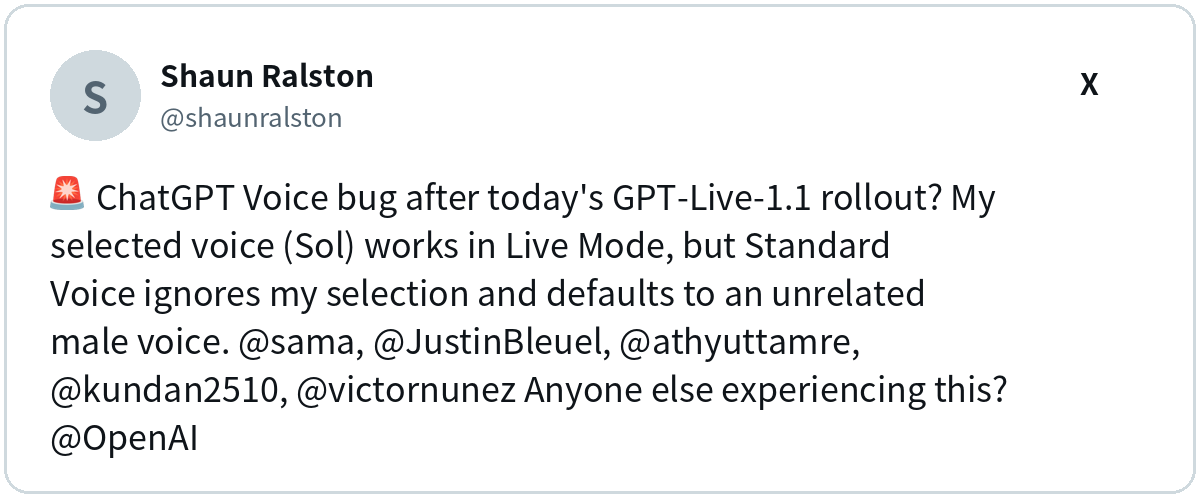
Here’s my take. If people get this attached to a ChatGPT voice, your customers will notice when your brand’s voice changes too. Pin your voice ID and treat every model update like a product release.
Build or Buy, Then Prove It in Pipeline
GPT-Live-1.1 raises the bar for how natural AI voice agents should sound, and the API already gives your team enough to start. Build on OpenAI when control and custom logic matter most, buy a platform when speed matters more, and judge either one on cost per booked meeting.
My team at Single Grain helps marketing leaders turn more conversations into pipeline. Conversion rate optimization tightens the pages, forms, and flows where buyers raise their hand, and my team’s AI transformation services help you find where AI fits in your marketing and get it running.
Reach out to my team, and let’s turn more of your inbound calls into booked meetings!
Frequently Asked Questions About AI Voice Agents
-
How much do AI voice agents cost?
On OpenAI’s API, GPT-Live-1 voice sessions cost $0.05 per minute, billed per second, with backend model and tool usage charged separately. Platforms use per-minute rates or plans. For a fair comparison, add phone and build costs and divide the total by booked meetings.
-
What is an AI voice agent?
An AI voice agent is software that holds a spoken conversation and completes a task, such as answering a product question, qualifying a lead, or booking a meeting. Models like OpenAI’s GPT-Live listen and respond continuously, so callers can pause or interrupt naturally.
-
What is the best AI voice agent platform?
The best fit depends on your call flow, languages, and how much control you need over CRM data and business rules. Test any platform and a GPT-Live prototype on the same set of real recorded calls, then compare correct outcomes and cost per booked meeting.
-
Do I have to tell callers they're talking to an AI voice agent?
OpenAI’s responsible use guidance for custom voices asks you to tell listeners the speech is AI-generated, use adult voices, and never impersonate anyone. Rules for phone calls also vary by country and call type, so check with your legal team before launching outbound calls.
-
Is GPT-Live-1.1 available in the OpenAI API?
Not yet. OpenAI lists GPT-Live-1.1 as coming soon to the API, while GPT-Live-1 is generally available for developers today. Build on GPT-Live-1 now and test the upgrade like any model swap.


