Complete AI Operating System for Business: Get the Most Out of Your Bot Fleet


My AI operating system for business runs on about forty bots and exactly one human approver, and that approver is me! Every weekday morning, these bots hand me receipts for what they did, and I decide what moves. You might be thinking, “Is a structured AI operating system for my business really worth investing my time in?”
In my opinion, YES! A scaling company without an operating model for its AI agents ends up with a pile of clever bots and one exhausted operator.
My setup rests on a chief of staff bot, team bots in Slack, a 1-3-1 rule for big changes, and a check on every bot twice each weekday. Additionally, my recruiting, answer engine optimization (AEO), search engine optimization (SEO) content, and sales-call workflows run on top of it, with safety rails and a daily review keeping the whole system from drifting.
Below, I’ll take you through the fleet bot by bot, show you the rules that keep it safe, and give you a starter prompt to build your own version.
TL;DR
- An AI operating system is the set of rules your bots run on. It decides who hands out work, what needs a human yes, and how each bot proves it did the job.
- One human sits on top of roughly forty bots. A chief-of-staff bot assigns work to team bots in Slack, and receipts roll up into one morning board.
- Big changes follow the 1-3-1 rule. Every major change arrives with three options, one recommended pick, and a risk level, and nothing important ships without a yes.
- Safety rails and twice-a-weekday checks build trust. Each bot gets a clear label at 8:31 a.m. and 3:51 p.m., so you step in only on the calls that need you.
TABLE OF CONTENTS:
- What Is an AI Operating System for Business?
- How My Bot Fleet Is Organized
- The 1-3-1 Rule for Big Changes
- How I Check Every Bot Twice a Weekday
- Inside 3 Team Workflows That Run Every Day
- 6 Safety Rails That Keep the Fleet From Breaking
- My Daily Review: What Needs Me Today
- How to Build Your Own AI Operating Model
- Run Your Company on a System
What Is an AI Operating System for Business?
An AI operating system for business is the shared set of roles, rules, and daily rhythms your AI agents follow. It works like the operating cadence you already run for people, with a manager, clear owners, a meeting rhythm, and a sign-off path. The bonus is the computers remember every rule you give them.
It also sits one level above any single tool. I run mine on Grok Bot, but the same model works whether your team picks OpenAI Dots, Grok Bot or Meta Muse or another agent platform.
AI Operating System vs. AI Operating Model
People use these terms loosely, so here’s how I separate them.
- AI operating model: The plan on paper. It lists which jobs bots own, which jobs people keep, and where approvals sit.
- AI operating system: The running version of the plan. It has bots, schedules, checks, and receipts you can inspect every day.
Plenty of teams stop at the slide deck. Mine grew the other way, from a handful of personal bots into a system once my team could use them. Anthropic’s engineering team makes a related point in its guide to building effective agents, which recommends starting with the simplest pattern that works and adding complexity only when it pays off.
How My Bot Fleet Is Organized
Here’s the shape of it. I’m the one human at the top, and a chief-of-staff bot sits right under me to hand out the work.

Everything else in the fleet reports up through this bot.
The Chief of Staff Bot
My chief of staff decides what runs next, what needs a follow-up, and what should sit out. It’s the bot I talk to most, because it turns my priorities into assignments for everyone else. It also tops the list of Grok Bot use cases I run every week.
Team Bots in Slack
Bots for yourself are where you start. The bigger lift comes once a bot works well enough for your team to use it too. Mine live in Slack, where anyone on my team can talk to them.
- Team Talent. It reviews candidates for open roles.
- Team Juicebox. It sources people for those roles.
- Team AEO/SEO. It drafts search content.
- Team GEO Audit. It runs generative engine optimization (GEO) checks on how Single Grain shows up in AI answers next to competitors.
- Team SEO/AEO Measurement. It tracks what each published post does.
- Outreach, X, and M&A. Each one handles its own lane of work.
Each bot owns a narrow job, and a narrow job is easy to check.
Receipts and the Morning Board
Every bot posts proof of each job it finishes. Those receipts roll into a morning board, one page I read each day, and the loop repeats. With about forty bots and one approver, I’m the bottleneck, so the whole design exists to save my attention for the few calls only I can make.
One human can drown fast without a firm rule for big decisions.
The 1-3-1 Rule for Big Changes
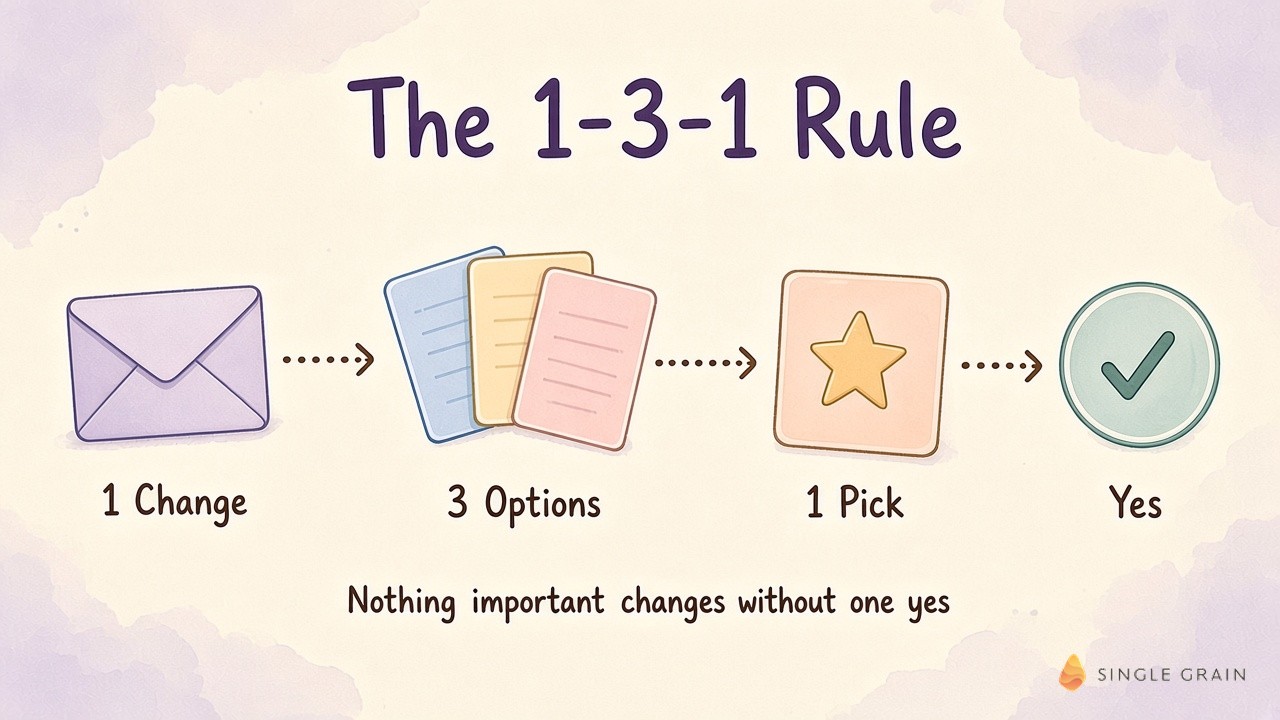
Big changes are where bots and people both burn my time. So every bot follows the 1-3-1 rule. When a bot proposes a change I need to see, its message covers four parts.
- The change itself.
- Three options.
- Its one recommended pick.
- The risk level.
I reply yes or no, and the change goes live only after a yes. One change, three options, one pick. It strips out most of the back-and-forth and cuts the mental load of running the fleet.
I ask my people to work this way too. Nobody drops a problem on my desk without options and a recommendation.
| Pro-Tip |
|---|
| Paste the 1-3-1 format into every bot’s instructions as a hard rule. Ask for the risk level in plain words (low, medium, or high) so you can approve low-risk picks in seconds. |
Decisions are only half the load, though. The other half is knowing whether each bot actually did its job.
How I Check Every Bot Twice a Weekday
Most people babysit their bots for one reason. They don’t trust them yet. I built a check so trust can compound the way it does with a new hire who keeps hitting targets.
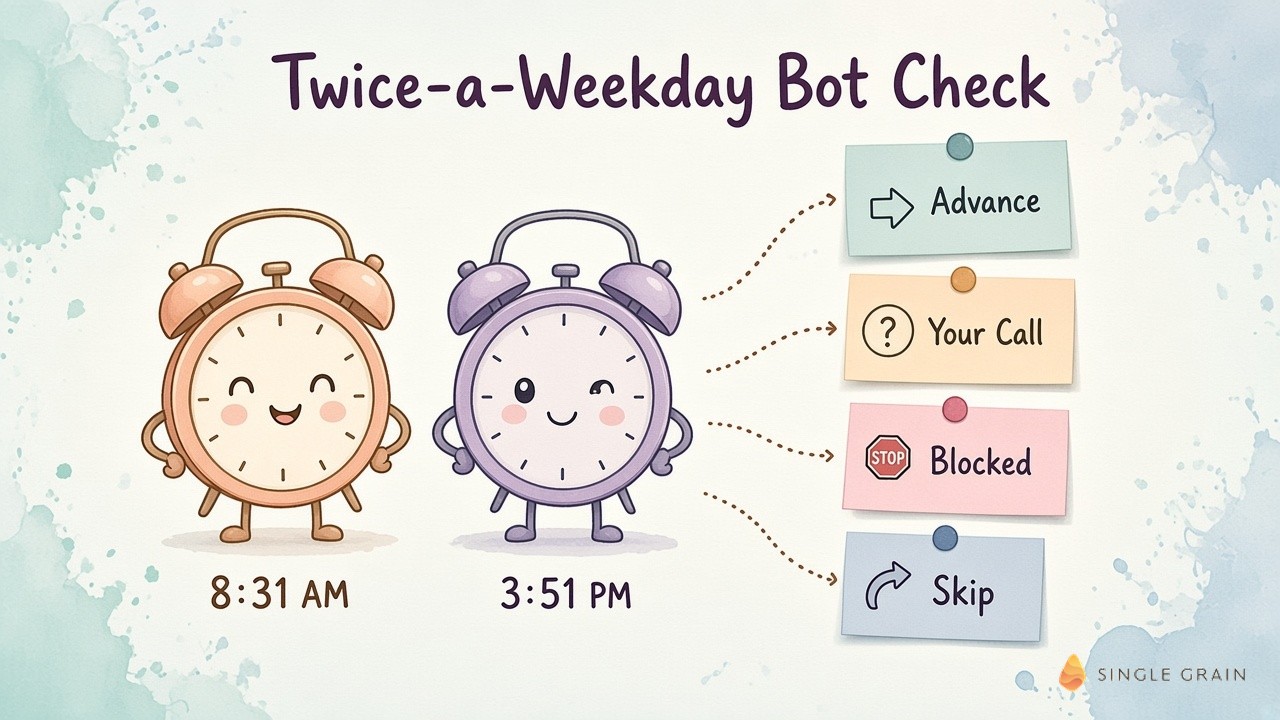
At 8:31 a.m. there’s a morning check, and at 3:51 p.m. there’s an afternoon sweep. Each pass asks four questions about every bot.
- Did the work happen versus the daily target?
- Was it safe?
- Did it learn from my feedback?
- Did the weekly number move?
After the check, each bot gets a label.
- Advance. The bot moves on, and I do nothing.
- Your call. I decide, and the bot hands me its pick.
- Blocked. The bot names the blocker and when it’ll check again.
- Skip. The task gets dropped.
One newer rule tightens the loop. If a bot’s weekly number falls behind pace for two days, it sends me one blocker, one fix, and a yes line I can approve. Daily batches inside set caps are pre-approved, so routine work never waits on me.
A daily target is really a definition of done. If you haven’t written one for each bot, start with agent job cards before you hand out any autonomy.
With checks in place, the team workflows can run without me hovering.
Inside 3 Team Workflows That Run Every Day
Three team workflows show how the pieces fit together. Each one ends with a human yes.
1. Recruiting Bots That Shortlist Before Anyone Talks to a Candidate
People are the lifeblood of a company! My recruiting funnel starts when a role opens. Agent recruiters on Juicebox build a daily list of people, and Jev, the classifier my team uses, filters them by title, tenure, and role fit.
From there, the Team Talent bot reviews every interested person and sends seven questions, plus a request for a Loom video on engineering roles. A career evidence check asks whether the story holds up. A shortlist review page then goes to my team, and I send only on my exact yes.
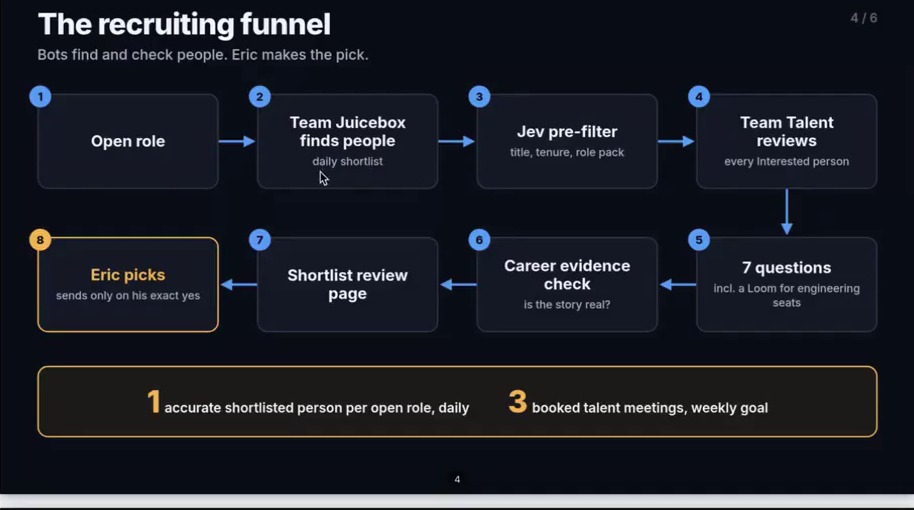
The target for a newly launched bot is one accurate shortlisted person per open role each day and three booked talent meetings a week. Bots with a longer track record carry higher numbers. My hiring managers spend their time talking to strong people, and the screening pairs well with the questions I send every AI-native hire.
2. An AEO/SEO Loop Where What You Publish Shapes the Next Draft
My AEO/SEO content engine is a loop. Every day it pulls search data, ideas from my own content and calls, competitor gaps, and decaying posts. The Team AEO/SEO bot drafts, a GEO audit adds fix tags, and nothing publishes without a PUBLISH line from an editor plus my final approval.
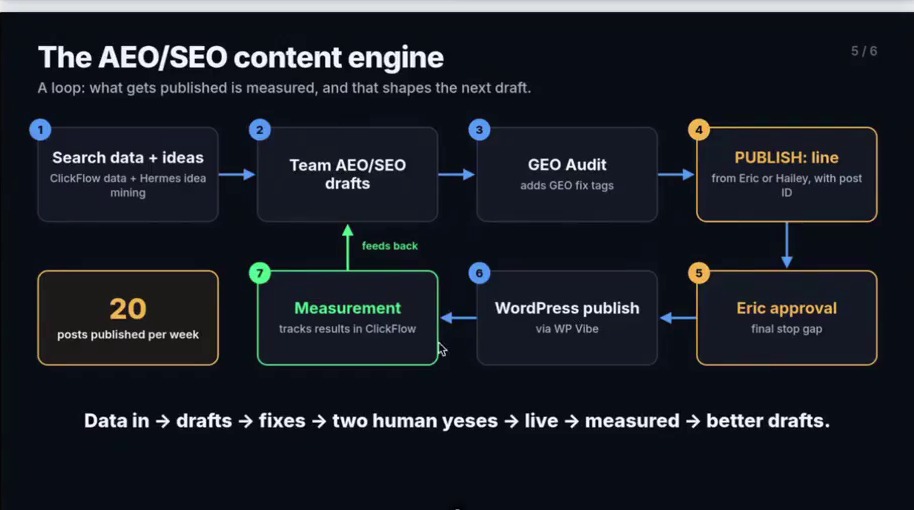
Posts go to WordPress, and a measurement bot tracks results so the next draft gets better. Right now the engine ships twenty posts a week, and the plan is to grow it to forty, then eighty, then 100. My team also runs a humanizer skill that grades AI drafts before an editor reads them, so editors now work more like bot managers.
3. Sales-Call Briefs From Account and Call History
Before a team sales call, a bot reads the account history, the customer relationship management (CRM) system, past calls, and the company website. It builds a meeting brief with the questions to ask and the angles to lead with, based on the prospect’s industry, goals, and the services that fit. After the call, the follow-up lands as a draft for a person to review.
All three workflows lean on the same guardrails.
6 Safety Rails That Keep the Fleet From Breaking
Bots fail in boring ways. Storage fills up, browser tabs pile up, and logins expire. One video file alone can eat four gigabytes, so my fleet runs on six simple rules.
- Memory gate. No new browser work starts unless at least 2,048 megabytes of random access memory (RAM) are free.
- Idle-tab sweep. Open tabs get cleared three times every weekday.
- LinkedIn login backup. The session stays backed up and checked, so outreach doesn’t stall.
- Cloud agents for heavy jobs. File-only work runs in the cloud to keep the main machine free.
- Exact yes from me. No outreach or posts go out without it.
- Bot Improver. A dedicated bot checks the rules daily and reports what got better.
Rules like these grow more important with every bot you add. When my team builds this for clients, permissions, governance, and application programming interface (API) key security come first. The National Institute of Standards and Technology (NIST) AI Risk Management Framework is a solid outside reference if your legal or security team needs convincing, and my team’s playbook on kill switches for marketing agents covers the shutdown side.
Now for the part of the system built just for me.
My Daily Review: What Needs Me Today
My own daily review runs in ChatGPT with Dots. Every morning it reads Gmail, Slack, my calendar, Codex chats, and automation handoffs. It pulls out open commitments, like unanswered requests, pending approvals, and blocked work, each linked to its source, then tells me what moves and who owns the follow-up.
It already paid for itself. It flagged a contract I wasn’t even on, which reused a template from another deal. I would have missed it, and a mistake like this can cost a client’s trust on day one.
Content and Sales Calls Get the Same Treatment
Two more tabs sit next to the review. For content, a recording and transcript come in from Riverside, the bot picks moments and drafts hooks, I approve two keyframes, and the piece moves to edit, review, and publish. On the sales side, the brief from the workflow above shows up before the meeting.
| Action Step |
|---|
| This week, list every place work reaches you: inbox, Slack, calendar, and approvals. Ask your agent for one daily page showing open commitments, each linked to its source, plus who owns the follow-up. |
Once your own day runs this way, building the team version gets much easier.
How to Build Your Own AI Operating Model
At the end of the video, I told viewers to send it to their own agent and ask it to build what I have. It’s still the fastest start, as long as you give the agent a plan. Work through it in this order.
- Start with bots for yourself. Pick two or three jobs you repeat daily and get them working for you first.
- Name one chief of staff. Give a single bot the job of handing out work and reporting back.
- Write a daily target for every bot. Without a target, you have no way to check the work.
- Add the 1-3-1 rule and the twice-a-weekday check. Trust grows as bots hit their numbers.
- Set safety rails before you scale. Storage, logins, and send rights break first.
- Move proven bots into Slack. Let your team use them, and turn their feedback into new rules.
| Starter prompt for a chief-of-staff bot |
|---|
| You are my chief of staff. Each weekday at 8:31 a.m. and 3:51 p.m., check every bot against its daily target, safety, my latest feedback, and its weekly number. Label each one Advance, Your Call, Blocked, or Skip. For any big change, send me the change, three options, your one pick, and the risk level, then wait for my yes. |
Expect the first version to be rough. Mine changes every week, and each change makes the next week smoother.
Run Your Company on a System
An AI operating system for business rests on three questions: Who hands out the work, who checks it, and how does proof come back each morning? Answer these, and forty bots can run with one person approving… without getting overwhelmed!
If you want help designing this for your marketing team, my team at Single Grain sets up agent workflows, approvals, and guardrails through AI transformation services.
Frequently Asked Questions About an AI Operating System for Business
-
What is an AI operating system for business?
It’s the shared set of roles, rules, and daily rhythms your AI agents follow. Mine has one human approver, a chief-of-staff bot that hands out work, team bots in Slack, a 1-3-1 rule for big changes, and a twice-a-weekday check on every bot.
-
What is the difference between an AI operating model and an AI operating system?
An AI operating model is the plan: which jobs bots own, which jobs people keep, and where approvals sit. The AI operating system is the running version, with bots, schedules, checks, and receipts you can inspect every day.
-
How many AI agents can one person manage?
I run about forty bots with one human approver. It works because a chief-of-staff bot routes the work, every bot has a daily target, and only big changes reach me as one change, three options, and a pick.
-
What is the 1-3-1 rule for AI agents?
When a bot proposes a big change, it sends the change, three options, its one recommended pick, and the risk level. Nothing important goes live until a person says yes.
-
How do you keep AI agents safe in a business?
Set rails before you scale: storage limits for browser work, regular tab cleanup, backed-up logins, cloud agents for heavy files, and an exact human yes for outreach or posts. My team also plans kill switches for marketing agents from day one.

