

This Humanizer Skill Grades My Team’s AI Drafts Before Anyone Reads Them


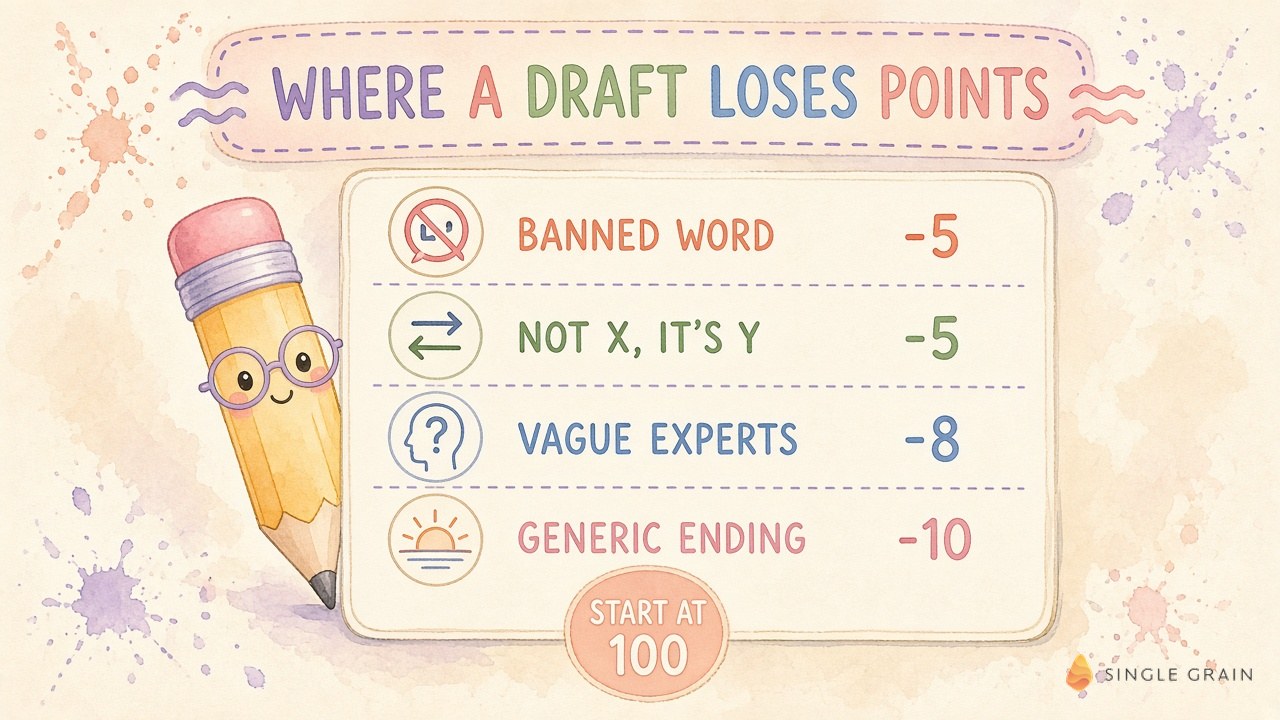
My humanizer skill starts every AI draft at 100 and subtracts points for each sign of machine writing it finds. One “delve” costs 5 points, and a closing line like “the future looks bright” costs 10.
I shared the file on X and told people to steal it. Yes, that means you can take it too. Please steal it, I’m not gatekeeping!
Why did I create this skill? An editor’s hour is too expensive to spend deleting the same annoying AI-generated slop from every paragraph, so I make the agent run a score and rewrite loop on its own work until it clears 90.
Keep reading for every penalty value, the exact prompt I paste into my agent, and the setup for Claude Code.
TL;DR
- A humanizer skill is a scoring file your agent reads. It grades a draft from 0 to 100 on how human it sounds, then the agent rewrites the weak lines before you see anything.
- Mine checks twenty-four AI writing patterns. They come from Wikipedia’s “Signs of AI writing” guide, and each one has a fixed penalty from 2 to 10 points, plus 5 points for every banned word.
- Ninety is the bar. A draft under 90 goes back for another pass, and the agent shows you the final score with every line it changed.
- Setup takes one prompt. Give Claude Code or any agent the file and my prompt, then read the score report first.
TABLE OF CONTENTS:
- What Is a Humanizer Skill?
- Where These AI Writing Patterns Come From
- How the Humanizer Skill Calculates an AI Content Score
- The AI Writing Pattern I Hate Most
- How to Set Up a Claude Code Humanizer in 3 Steps
- How My Team Uses the Humanizer Skill at Single Grain
- Where an AI Content Score Falls Short
- Ship AI Drafts Your Readers Trust
What Is a Humanizer Skill?
A humanizer skill is a set of written instructions an AI agent loads before it writes for you. Mine is a single Markdown file called humanizer.md, and it lives in the content ops folder of my open-source ai-marketing-skills repo on GitHub under an MIT license.
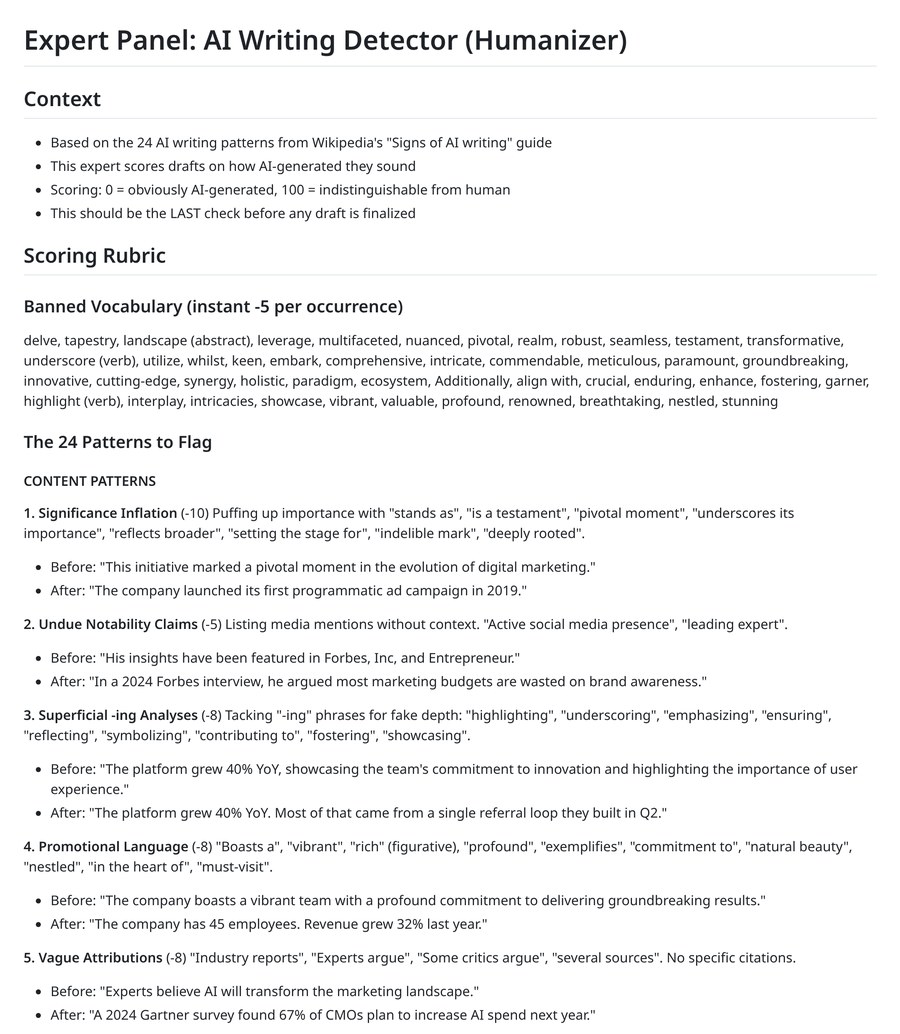
The file tells the agent to score drafts “on how AI-generated they sound,” where 0 means obviously machine-made and 100 means “indistinguishable from human.” It also says the humanizer “should be the LAST check before any draft is finalized.” I love this part because it puts the cleanup on the agent before the draft lands in anyone’s inbox.
A humanizer tool works differently. My team’s free AI text humanizer rewrites any text you paste into it, which is handy for a one-off email. The skill sits inside your agent’s workflow and grades every draft it produces, so the habit sticks. For the editing side of the job, my team’s walkthrough on how to make content sound authentically human covers voice and storytelling.
This is the screenshot I posted with the file, so you can see how plain it looks:
Where These AI Writing Patterns Come From
I didn’t invent these patterns. Wikipedia editors keep a public field guide called Signs of AI writing, built from examples they caught in articles and drafts. My rubric turns that guide into twenty-four patterns with point values.
What the Signs of AI Writing Page Covers
The Wikipedia page groups its tells by type. It flags puffed-up claims about legacy, vague credit to unnamed experts, overused words, odd formatting and chatbot habits like “I hope this helps.” It even tracks how the overused words shift between model generations, with “delve” fading after 2024.
My humanizer sorts the twenty-four patterns into five groups.
- Six content patterns cover what a draft claims. Examples include inflated significance and “experts argue” with no name attached.
- Six language and grammar patterns cover word choice. They also flag sentence shape, including banned-word clusters and lists of three forced into every sentence.
- Six style patterns cover formatting. Em dashes and emoji on headings both lose points.
- Three communication patterns catch chatbot habits. Think “Great question!” or a knowledge-cutoff disclaimer.
- Three filler and hedging patterns catch padding. “In order to” and stacked hedges are the usual suspects.
The groups make a score report easier to read, because each deduction points back to one of them. So how do those deductions add up?
How the Humanizer Skill Calculates an AI Content Score
Every draft starts at 100. The agent subtracts points for each pattern it finds, and repeats of one pattern stack up to twice the base penalty. A draft that uses the same tell five times loses double points for it, and the deduction stops there.
Banned Words and Their Point Cost
Each banned word is an “instant -5 per occurrence.” This is the full list, copied word for word from the file.
delve, tapestry, landscape (abstract), leverage, multifaceted, nuanced, pivotal, realm, robust, seamless, testament, transformative, underscore (verb), utilize, whilst, keen, embark, comprehensive, intricate, commendable, meticulous, paramount, groundbreaking, innovative, cutting-edge, synergy, holistic, paradigm, ecosystem, Additionally, align with, crucial, enduring, enhance, fostering, garner, highlight (verb), interplay, intricacies, showcase, vibrant, valuable, profound, renowned, breathtaking, nestled, stunning
Some of those surprise people. “Valuable” and “enhance” look harmless on their own, yet Wikipedia’s word list cites studies tying both to chatbot output. A second rule, AI vocabulary clustering, takes another 10 points when several banned words land in one paragraph.
The 24 Patterns and Their Penalties
This table lists every pattern with its penalty as written in the rubric.
| # | Pattern | Penalty |
|---|---|---|
| 1 | Significance inflation | -10 |
| 2 | Undue notability claims | -5 |
| 3 | Superficial -ing analyses | -8 |
| 4 | Promotional language | -8 |
| 5 | Vague attributions | -8 |
| 6 | Formulaic “challenges and future” sections | -10 |
| 7 | AI vocabulary clustering | -10 |
| 8 | Copula avoidance (“serves as” for “is”) | -5 |
| 9 | Negative parallelisms | -5 |
| 10 | Rule of three overuse | -8 |
| 11 | Elegant variation (synonym cycling) | -5 |
| 12 | False ranges | -5 |
| 13 | Em dash overuse | -5 |
| 14 | Overuse of boldface | -3 |
| 15 | Inline-header vertical lists | -5 |
| 16 | Title case in headings | -3 |
| 17 | Emoji decoration | -5 |
| 18 | Curly quotation marks | -2 |
| 19 | Collaborative artifacts | -10 |
| 20 | Knowledge-cutoff disclaimers | -10 |
| 21 | Sycophantic tone | -8 |
| 22 | Filler phrases | -5 each |
| 23 | Excessive hedging | -8 |
| 24 | Generic positive conclusions | -10 |
The heaviest hits, 10 points each, go to tells a reader notices right away, like a fake sense of importance or a leftover “I hope this helps.” An extra em dash costs half as much. I agree with that weighting, because one puffed-up claim makes me doubt every fact around it.
Before and After Examples From the Rubric
Most patterns ship with a rewrite. These four pairs come straight from the file, and each “after” swaps a vague claim for a fact.
- Significance inflation costs 10 points. Before: “This initiative marked a pivotal moment in the evolution of digital marketing.” After: “The company launched its first programmatic ad campaign in 2019.”
- Superficial -ing analyses cost 8 points. Before: “The platform grew 40% YoY, showcasing the team’s commitment to innovation and highlighting the importance of user experience.” After: “The platform grew 40% YoY. Most of that came from a single referral loop they built in Q2.”
- Vague attributions cost 8 points. Before: “Experts believe AI will transform the marketing landscape.” After: “A 2024 Gartner survey found 67% of CMOs plan to increase AI spend next year.”
- Generic positive conclusions cost 10 points. Before: “The future looks bright for AI in marketing. Exciting times lie ahead.” After: “They plan to double their AI budget next quarter. We’ll see if it pays off.”
Read the “after” lines again and you’ll spot the pattern behind the whole rubric. Specific nouns and numbers beat adjectives every time.
One of those rows bugs me more than the rest, and it deserves its own section.
The AI Writing Pattern I Hate Most
As I wrote on X, the one AI writing pattern I absolutely LOATHE is when a sentence tells you what something isn’t before it gets around to what it is. “It’s not X, it’s Y”. The rubric calls this a negative parallelism and docks 5 points per use, up to the 10-point cap.
The rubric’s own example is perfect:
- Before: “It’s not just about the content; it’s about building a lasting relationship with your audience.”
- After: “Good content gets replies. That’s how you build an audience.”
The first version makes you picture a wrong idea, throw it away, then picture the right one. Three steps where one would do. Wikipedia’s guide adds that the move feels like the writer is correcting a misconception nobody had.
My editors at Single Grain treat this pattern as a hard ban in titles and body copy, even though the rubric only charges 5 points. If the drafts on your team are full of these, start here.
| Pro-Tip |
|---|
| Search your last five drafts for “not just,” “isn’t about” and a comma followed by “not.” Rewrite each hit as a plain statement of what the subject is, then count how many words you saved. |
Once you can spot the pattern yourself, the next move is getting your agent to catch it for you.
How to Set Up a Claude Code Humanizer in 3 Steps
“Will this work with the agent I already use?” If it can read a file, yes. I built it for Claude Code, Anthropic’s coding agent, and these three steps work the same way elsewhere.
1. Give Your Agent the File
To start fast, hand the agent the humanizer.md link or a downloaded copy. For the full setup, the repo README says to clone it and copy the complete skill folder when a skill bundles scripts or reference files, which the content ops folder does.
git clone https://github.com/ericosiu/ai-marketing-skills.git
cp -R ai-marketing-skills/content-ops .claude/skills/content-ops
The full folder adds an expert panel skill on top of the humanizer. It scores a draft with seven to ten experts, weights the humanizer at 1.5x in the average, and loops for up to three rounds. You trigger it with phrases like “score this” or “expert panel this.”
2. Paste the Scoring Prompt
This is the exact prompt from my post. Save it in your agent’s memory or project instructions so it runs on every request, the same way my team stores reusable AI prompts in a shared file.
| Starter prompt for your agent |
|---|
| Read this file. Whenever you write something for me, like a post or an email, score your own draft with it first. Under 90, rewrite the parts that lost points and score it again. Show me the final score and every line you changed. |
The last sentence of the prompt does the heavy lifting. A score with no changelog asks you to trust the agent, and a list of changed lines lets you check its work in seconds.
3. Read the Score Report Before the Draft
The rubric sorts every result into one of four bands.
- 90 to 100 reads as clean. The file calls this “Human-sounding.”
- 70 to 89 has minor tells. A few quick fixes get it over the line.
- 50 to 69 shows obvious patterns. Plan on a significant rewrite.
- Anything under 50 needs a full rewrite. In the file’s words, it “Reads like ChatGPT output.”
Look at which patterns cost the most before you open the draft. If the same deduction shows up on every piece, fix your brief or your examples instead of patching drafts one by one.
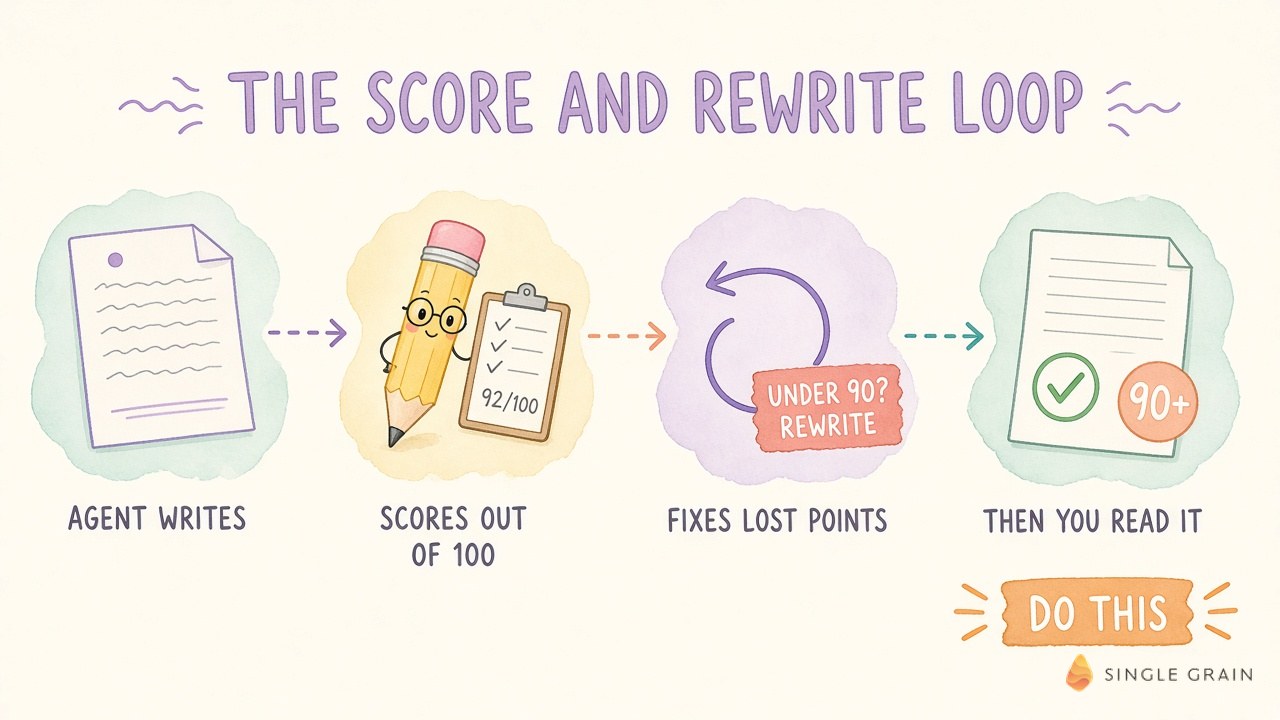
This loop is the whole system. Inside my agency, the same idea sits in front of my editors.
How My Team Uses the Humanizer Skill at Single Grain
At Single Grain, a draft passes an automated quality gate before an editor touches it. In my list of Grok Bot use cases, the content gate scores each draft for duplicate pages, invented stats, weak evidence and AI tells before it moves. A separate Copy Humanizer rewrites drafts so they sound like a person wrote them and shows every change.
A written rubric like this one gives jobs like these a shared definition of “sounds like AI,” so an editor can point at a pattern number instead of arguing about taste.
The payoff shows up in where my editors spend their time. Once the agent handles word-level cleanup, review hours go to fact checks and the offer. Those decide whether a post earns rankings and consult requests. Google’s guidance calls mass AI text without manual oversight “little to no effort,” which I unpacked in my answer to whether AI content is bad for SEO.
Review has become the bottleneck for AI content, and a self-scoring agent shrinks the pile before it reaches a person.
A score this useful still has blind spots, and you should know them before you trust it.
Where an AI Content Score Falls Short
Wikipedia’s own page calls its list “descriptive” and says it “consists of observations.” It also cites a 2025 study where people spotted AI text no better than chance, and it says detection tools have “non-trivial error rates.”
A score of 95 tells you a draft avoids known tells. Whether the facts are true and the offer is right is still your editor’s call.
The word list also ages. The guide shows how each model generation favors different words, and my file dates from March 2026. When your agent’s model changes, re-test your AI skills after the model update and add the new tells you catch.
| Pay Attention |
|---|
| Some style rules may clash with your house style. My rubric charges 3 points for Title Case headings, and plenty of blogs use Title Case on purpose, including this one. Write down which rules you keep and give that note to the agent, so it stops chasing points you don’t care about. |
Ship AI Drafts Your Readers Trust
Give your agent the humanizer skill and paste the prompt. Then read the score before the draft. You’ll get back the time you used to spend deleting “delve,” and your editors can spend it on what wins readers.
Want help building content that sounds like you and still ranks? My team runs AI-assisted content marketing, and a forward deployed marketer can plug this kind of quality gate into your workflow. Talk to Single Grain about your content program.
Frequently Asked Questions About the Humanizer Skill
-
What is a humanizer skill?
A humanizer skill is a file of instructions an AI agent reads before it writes. Mine scores each draft from 0 to 100 on how human it sounds, using twenty-four AI writing patterns, and tells the agent to rewrite any draft under 90 before you see it.
-
Which signs of AI writing does the humanizer skill check?
It checks the patterns from Wikipedia’s Signs of AI writing guide, grouped into content, language and grammar, style, communication, and filler and hedging. Examples include inflated significance, vague expert claims, negative parallelisms, em dash overuse and banned words like “delve” and “leverage.”
-
How do I use the humanizer skill with Claude Code?
Give Claude Code the humanizer.md file from my ai-marketing-skills repo on GitHub, or copy the full content ops folder into .claude/skills. Then paste the prompt from my post so the agent scores every draft first, rewrites anything under 90 and shows you every line it changed.
-
What AI content score should a draft hit?
Aim for 90 or higher. In the rubric, 90 to 100 is human-sounding, 70 to 89 has minor tells, 50 to 69 needs a significant rewrite and anything under 50 needs a full rewrite.
-
Is the humanizer skill free?
Yes. The file is open source under an MIT license in my ai-marketing-skills repo on GitHub. For a quick one-off rewrite without an agent, you can also try the free AI text humanizer from Single Grain.
-
Does a high humanizer score mean a draft is accurate?
No. The score only measures known AI writing patterns. It does not check facts, sources or claims, so a person still needs to review every draft before it goes live.


