Inbox Triage Agents for Marketing Ops (Route, Label, Escalate)


On Eric’s September 20 Leveling Up screen walkthrough, a marketing-ops inbox holds prospects reaching out, a customer message, a sponsorship inquiry, a cold pitch, and an internal newsletter. The operator’s first job is deciding which kind of work each thread represents. Until that decision is made, everything competes for the same attention.
In the same walkthrough, sponsorship budgets and audience fit become routing inputs, while a CRM-connected pipeline view surfaces high-risk opportunities or threads idle seven-plus days. Those artifacts point to the shared-inbox failure: messages arrive together, but their next jobs belong to different owners.
TABLE OF CONTENTS:
- Quick Overview
- Why a shared inbox without route/label/escalate still burns the team
- Worked scene: classify the inbox mix before a human opens a thread
- Worked scene: route sponsorship and CRM-risk threads to the right queue
- Inbox triage contract checklist (route, label, escalate, owners)
- Single Brain installs the system; Single Grain runs it when you need the team
Quick Overview
Put a classifier ahead of the tools that act on your marketing inbox. Require a typed label, a destination, and an escalation reason for each thread. Reserve heavier model work for jobs that need interpretation beyond classification. Measure whether messages reach the correct queue with useful evidence, rather than how much text the agent produces.
- Label prospects, customers, sponsorships, cold pitches, and internal newsletters explicitly.
- Connect every label to an agent job or an accountable human queue.
- Use stated budget, audience fit, and CRM risk as routing evidence.
- Fix ownership and exception handling before buying a stronger model.
Why a shared inbox without route/label/escalate still burns the team
A shared inbox distributes access. It does not establish responsibility. When folders contain inconsistent labels and nobody owns exceptions, teammates reopen the same thread, make different judgments, and forward it again. Automating a summary leaves that operating problem intact.
Eric’s recommendation that a better model still needs a better workflow changes the purchase decision. Before upgrading the LLM, define the labels, permitted destinations, escalation conditions, and owner for unresolved messages. If the team cannot agree on those rules, pause the automation purchase.
This page’s scope is deliberately different from Single Grain’s speed-to-lead agents. That job concerns responding to incoming leads. Inbox triage covers the mixed queue before specialized work starts, including customer messages, sponsorships, unsolicited pitches, and internal traffic. It also stops short of designing post-qualification next-step packets.
Start with the smallest workflow that resolves that mixed queue. Anthropic’s guidance on building effective agents favors simple, composable patterns and describes routing as classifying inputs into specialized downstream tasks. That supports a bounded classifier, rather than an autonomous assistant with broad inbox and CRM permissions.
Worked scene: classify the inbox mix before a human opens a thread
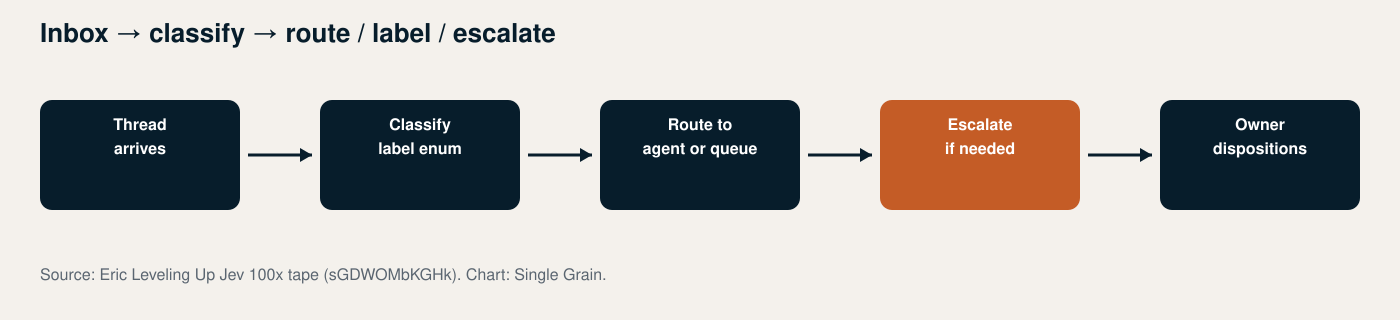
In Eric’s Jev walkthrough, he moves through the inbox mix: prospects, a customer, sponsorship, a cold pitch, and an internal newsletter. He frames Jev as a classifier between harnesses, identifying the work before sending it onward. The actionable sequence is message, classification, destination. The video title’s “100x” language should not become an inbox-performance forecast.
Translate that sequence into a typed enum: prospect, customer, sponsorship, cold_pitch, internal_newsletter, and needs_review. The final value is an implementation safeguard for ambiguous threads, not another category attributed to the tape. Require a label before the thread reaches the normal review queue; free-form folder names cannot reliably drive downstream actions.
Give the classifier the subject, relevant thread history, sender identity, existing labels, and permitted account context. Return the label, supporting evidence, destination, and any exception reason. Avoid sending every attachment and the entire mailbox to a frontier model. Eric’s classifier-first framing changes where compute belongs: inexpensive sorting first, deeper interpretation only for the selected job.
Then make routing real. Prospect messages go to the prospect intake queue, customer messages to the account queue, newsletters to an internal reading queue, and pitches to the sponsorship screen or low-priority review queue. A label with no destination leaves the operator doing the same work manually.
Preserve thread identity so subsequent replies update the existing routing record. Reclassify when new evidence changes the job, rather than creating duplicate tasks every time someone replies. Single Grain’s reliable marketing bot framework is useful context for turning that bounded job into a testable workflow.
Worked scene: route sponsorship and CRM-risk threads to the right queue
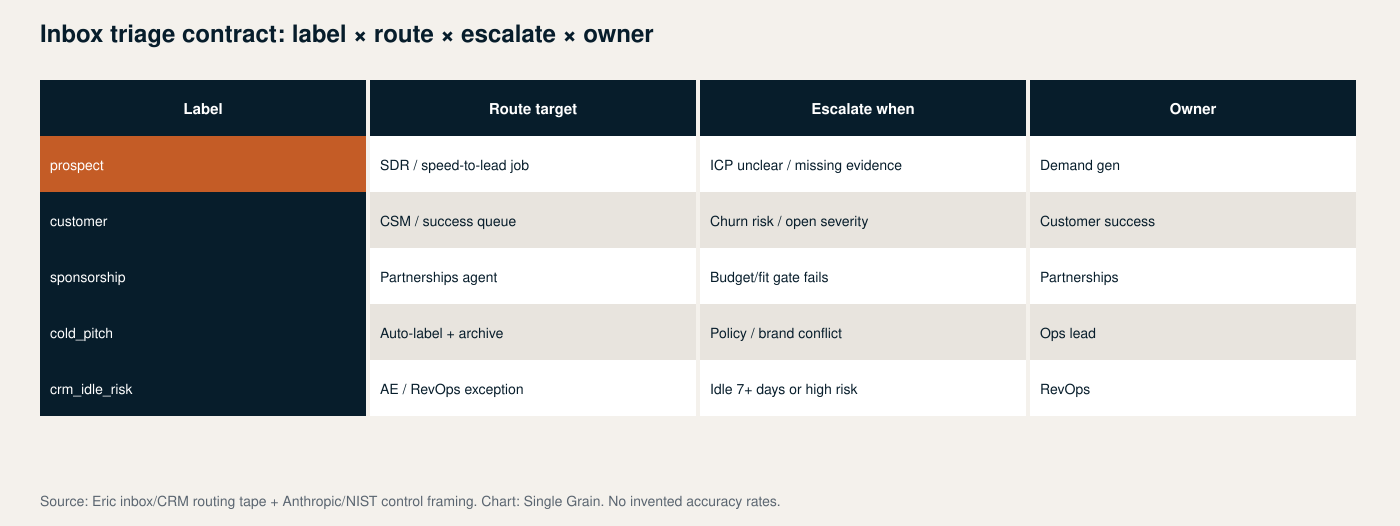
Eric’s sponsorship example asks which inbound pitches deserve a reply based on stated budget and audience fit. His CRM-adjacent example surfaces pipeline marked high risk or idle seven-plus days. Both appear in the same primary walkthrough, but they require different destinations and evidence.
For sponsorships, extract the stated budget and the audience description. Compare them with criteria supplied by the partnerships owner. A thread clearing both gates reaches the sponsorship queue with those source details attached. A cold pitch that clearly fails fit receives a low-priority label so the team can skip it during its main review.
Missing budget is not a failed budget gate. Route incomplete or conflicting information to a needs-information queue instead of inventing a number or rejecting a potentially relevant sponsor. Keep the original message accessible so the owner can inspect the actual wording.
For CRM-linked threads, match the sender and conversation to the correct account or opportunity before using pipeline signals. Escalate high-risk or idle threads to RevOps or the assigned AE queue. Do not leave them inside marketing’s general inbox simply because marketing received the email.
The seven-plus-day condition is a tape example, not a Single Grain SLA. Define which CRM activity resets the idle clock, and keep high-risk status as an independent trigger. A recent email should not erase a risk flag automatically.
Inbox triage contract checklist (route, label, escalate, owners)
Write the contract before connecting production tools. Use Single Grain’s marketing-agent ownership framework to assign responsibility across marketing ops, partnerships, account management, and RevOps. Name the Marketing Ops lead as the human ship gate: that person approves production routing rules and any outbound-send capability; the triage job itself does not send replies.
- Inputs: permitted mailbox scope, thread history, identity fields, and CRM access.
- Labels: a fixed enum, ambiguity rules, and precedence when multiple categories apply.
- Routes: one primary destination per thread, plus a fallback owner when assignment fails.
- Escalations: budget and fit evidence, CRM risk, idle-clock definition, and identity conflicts.
- Audit record: thread ID, evidence, chosen label, route, rule version, and later corrections.
- Recovery: reversible labels, duplicate protection, and a way to stop routing without losing messages.
Build an evaluation set from historical threads with agreed destinations. Compare predicted labels and routes against those decisions, tracking owner corrections and unresolved exceptions separately. The NIST AI Risk Management Framework supplies accountability and measurement framing, not a universal acceptable inbox-error rate.
Do not automate when thread volume is manageable, ownership remains disputed, or CRM identity matching is unreliable. Start with manual labels and a routing log. A stronger model is the wrong purchase when the missing input is an agreed destination.
Single Brain installs the system; Single Grain runs it when you need the team
Single Brain is the AI implementation OS for agents, evaluation, and kill switches. For inbox triage, the installation should stay job-specific: classifier inputs, typed labels, routing rules, sponsorship gates, CRM escalation logic, and a replayable evaluation set.
The operating work continues after installation. Someone must review corrections, maintain destination ownership, update sponsorship criteria, and catch broken CRM mappings. Kill switches should disable the affected action without interrupting mailbox access.
Hire Single Grain to install and run that system when you need the operating team without staffing it yourself. Bring your inbox categories, current queues, and representative threads. Talk with Single Grain about scoping the route, label, and escalate job before expanding agent permissions.

