How Much Should You Spend on AI per Employee?


AI spend for employees is a hot topic. For example, eyes are on Accenture right now. Some staff had reportedly run up Claude bills as high as $1,000 a month each (alarming, I know). Because of this, the company now funds $29 a month of Claude use per employee, and any AI spend above that goes to a project budget. This leads to the question that a lot of leaders are asking right now: How much should you spend on AI per employee?
As a leader myself who has seen an eye-popping receipt or two (okay… maybe a few more than just one or two haha!), I believe a cap is smart, BUT I also think capping every employee the same way is a MISTAKE. Set a sensible default for the whole company, then let the people who prove value spend more.
Below, I’ll break down what Accenture actually did, what typical companies spend, and how to write an AI usage policy that controls cost without slowing down your best people.
TL;DR
- Accenture now funds $29 a month per person for Claude. Sources reported some employees had spent as much as $1,000 a month, and extra use now goes to a project budget.
- Most companies spend far less. The Ramp AI Index put the median firm paying for AI at $15.70 per employee per month in September 2026.
- Many people pay for top models to do basic work. The right model for each task cuts cost without cutting output.
- The best policy has two lanes. A default budget for everyone, plus an exception path for people who show revenue or savings.
TABLE OF CONTENTS:
- What Accenture's $29 AI Spend Cap Actually Says
- How Much Companies Spend on AI per Employee
- Why AI Spend Caps Make Sense
- When to Make Exceptions to Your AI Budget
- How to Write an AI Usage Policy for Spend
- How AI Spend Fits Your Bigger AI Strategy
- How to Track AI Spend Every Month
- Spend Smart on AI and Fund Your Best People
What Accenture’s $29 AI Spend Cap Actually Says
According to an internal announcement, Accenture now pays $29 a month per person for Claude use. Any spend above that has to be charged to a work breakdown structure, the firm’s budget code for a project or team.
Why this change?
Some employees had been spending up to $1,000 a month, and some reported their access being reviewed or removed. Accenture later pushed back on the “cap” framing. A spokesperson told Forbes that reports of a firm limit on access were incorrect and that the figure described one part of the funding approach, as Tech News Vision summarized.
So the clearest reading is a central budget of $29 per person, with a path to spend more when a project pays for it. That’s a policy plenty of companies can learn from, whatever you call it.
To judge whether $29 is high or low, you need a baseline.
How Much Companies Spend on AI per Employee
The best public baseline I know is the Ramp AI Index, which tracks real card and bill pay transactions from more than 85,000 US businesses. In September 2026, the median firm paying for AI spent $15.70 per employee per month. The top 10% spent $813.43, and the top 1% spent $9,567.53.
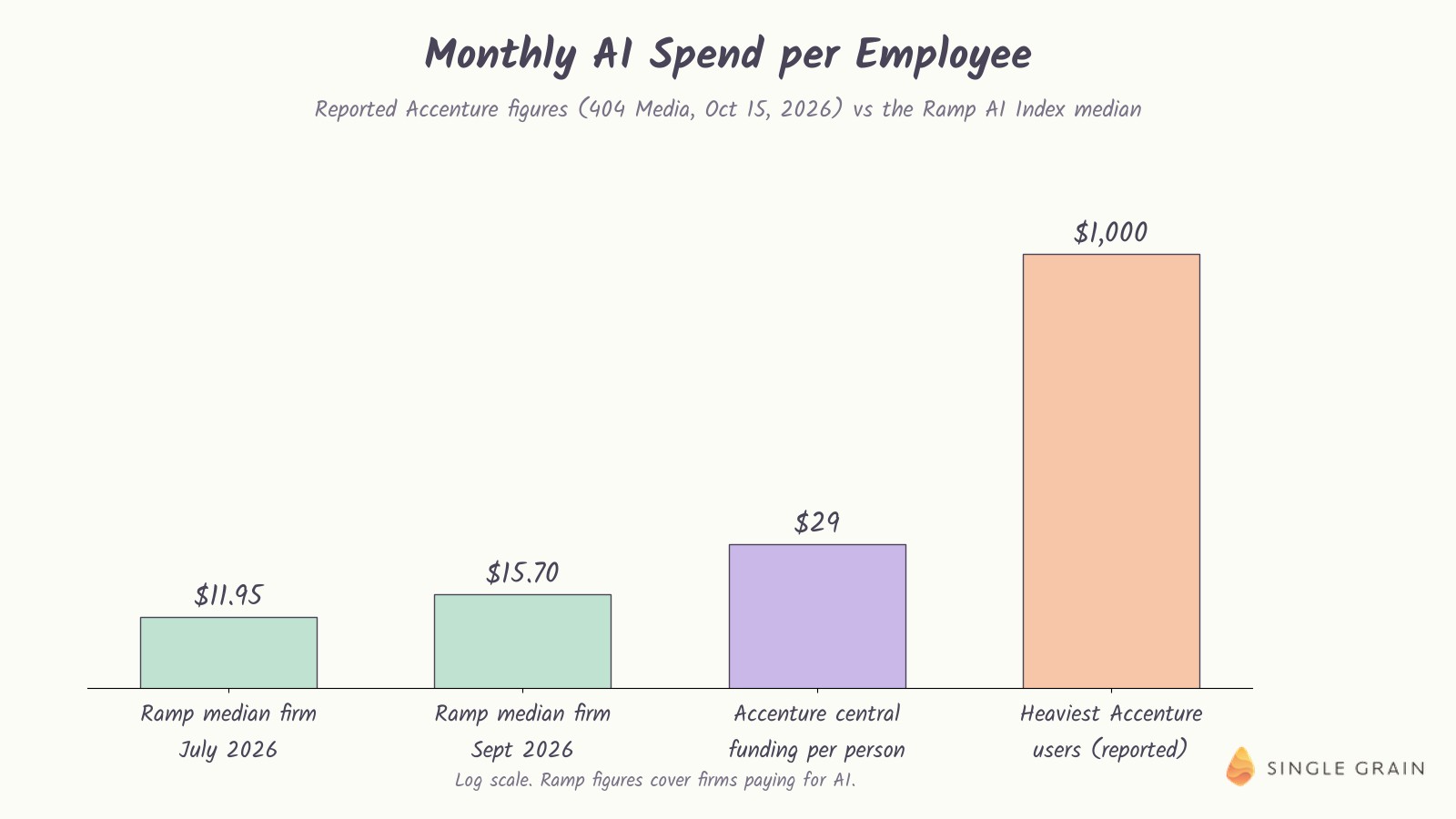
Accenture’s $29 sits at roughly two to three times the typical company. That’s a generous default, and it still leaves room to fund the heavy users through projects.

The gap between the median and the top 1% is the real story. A small group of companies, and a small group of people inside every company, use AI at a completely different intensity. Your AI budget should account for both groups.
So why cap at all? Neil, my co host on our Marketing School channel, made the case on the show. Here’s the quick breakdown.
Why AI Spend Caps Make Sense
Neil’s point was blunt. Most people pay for the most advanced models to do the most basic work. Engineers he trusts have told him the older, cheaper models often do just as well for routine tasks. Guess what? I FULLY AGREE WITH HIM!
That’s waste you can fix with policy. If a model costs ten times more and the output for a simple task is the same, the default should be the cheaper model. Open-source options can also handle a lot of everyday work for free, as long as someone sets them up well.
There’s a scale argument too. At a company with tens of thousands of employees, most people will use AI casually. Without a default budget, a few heavy habits can turn into a line item finance can’t explain.
| Pro-Tip |
|---|
| Set the default model in your company’s AI tools to a mid-tier option for chat and drafting, and make the top model an opt-in choice. Most people never change the default. |
Defaults shape behavior more than any memo, so start there. Still, a flat cap has a real cost, and that’s where I disagree with a one-size-fits-all approach.
When to Make Exceptions to Your AI Budget
The people getting the most value from AI are often the ones spending the most. On the show, I said there needs to be a process, since you can’t let everyone do whatever they want. But your best people should be able to go past the default when they can show revenue or savings.
Neil agreed, and he guessed only about 0.2% of people at a big company use AI in a truly smart way. Those people should be allowed to spend more. Accenture’s own setup leaves room for this through project budgets.
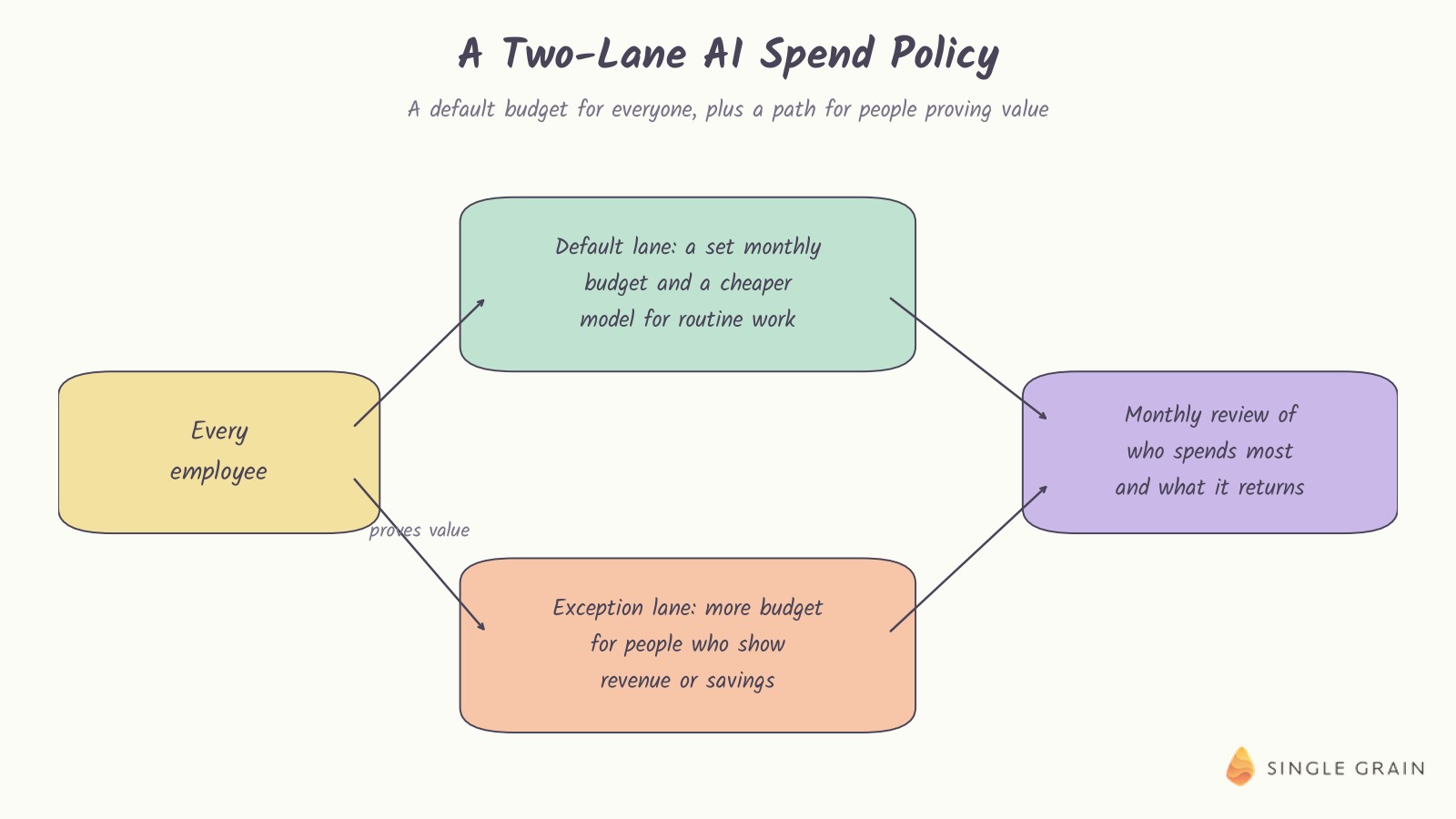
The exception lane needs clear criteria. I’d look for one of three things, like a measurable revenue result, hours saved on a recurring job, or a client deliverable that depends on the higher tier. My team’s AI hiring plan uses similar thinking when deciding where AI-heavy roles pay off.
Now let’s put it into a policy you can actually ship.
How to Write an AI Usage Policy for Spend
An AI usage policy doesn’t have to be long. A good one fits on a page and covers four decisions.
- Set a default monthly budget per person. Somewhere between the Ramp median and Accenture’s $29 is a reasonable start for most teams.
- Pick a default model for routine work. Make the top model an opt-in tier for tasks that need it.
- Create an exception path with clear proof. Ask for a short note on the result, the savings, or the client need, and approve it for a set period.
- Review the top spenders every month. Look at who spends most and what it returns, then talk with those people directly.
Tools like Ramp let you connect accounts and see who spends what, which makes the monthly review fast. On the show, I made the point that you then just need to have conversations with the people at the top of the list.
| What You Should Do |
|---|
| Pull last month’s AI spend by person this week. Sort it from highest to lowest, and schedule ten-minute chats with the top five spenders to learn what they’re getting for it. |
Those chats usually reveal your best use cases, plus a few habits worth breaking.
How AI Spend Fits Your Bigger AI Strategy
Spend is one input in a larger picture. Adoption is climbing fast, and my team tracked the latest numbers in our roundup of AI agent adoption statistics. As agents take on more work, token costs will rise, and the companies that manage them well will keep more of the gains.
Before you scale spend, it’s worth simplifying the work itself. My post on simplifying before you automate shows how cutting steps can matter more than picking a bigger model. When a task repeats every week, turning it into an AI skill often makes a cheaper model perform like an expensive one.
How to Track AI Spend Every Month
A policy only works if someone looks at the numbers. Start by pulling every AI charge from your card and bill pay tools into one view, grouped by team, person, and tool. Many companies find subscriptions they forgot about on the first pass.
Review the Top Spenders First
Sort the list by spend and start at the top. For each heavy user, ask what they produced with the extra spend, such as campaigns shipped, hours saved, or revenue influenced. Good answers make the case for an exception. Weak answers usually mean the person needs help picking cheaper models for routine work.
Compare Against a Benchmark
Check your median spend per employee against a public benchmark like the Ramp AI Index each quarter. If you’re far above the median, look for duplicate tools and expensive models doing basic tasks. When you’re far below it, your team may be under-using AI in ways that cost you more in lost time.
Spend Smart on AI and Fund Your Best People
AI spend per employee is easy to measure and easy to get wrong. Set a default budget, match the model to the task, and give your best people a clear path to spend more when they prove value. Review the top spenders monthly, and your AI budget will track results instead of habits.
If you’d like help building an AI program that pays for itself, my team at Single Grain offers AI transformation services for growth-stage companies. Reach out to Single Grain and we’ll look at where your AI budget is going.
Frequently Asked Questions About AI Spend Per Employee
-
How much does Accenture spend on AI per employee?
According to reporting on an internal announcement, Accenture pays $29 a month per person for Claude use, effective October 1. Spending above that goes to a project budget.
-
What is the average AI spend per employee?
The Ramp AI Index put the median firm paying for AI at $15.70 per employee per month in September 2026. The top 10% spent $813.43.
-
Should companies cap AI spend per employee?
A default budget makes sense because many people pay for top models to do basic work. Pair it with an exception path so your strongest users aren’t held back.
-
When should someone get more AI budget?
When they can show revenue, savings, or time saved that clearly beats the extra cost.
-
What should an AI usage policy cover for spend?
Keep it to one page that covers the default budget, which models to use for which tasks, how to request an exception, and how spend gets reviewed.

