AI Agent Memory: How to Fix Repetitive AI Mistakes with Hard Rules


Have you told your AI bot to make the same correction multiple times? Maybe you even told it to learn from that correction, but it just seemed to forget it time and time again? If this sounds like you, then this AI agent memory guide is for you!
AI agent memory decides whether a bot learns from a correction or repeats the same mistake every day. Recently, I created an AEO/SEO bot that handles my company’s content writing. My team logged countless corrections to this bot in a matter of weeks. Some corrections seemed to stick, while others were routinely forgotten.
So we had to get smart. Now, each repeated correction turns into a hard RULE file that the bot reads before it drafts the content. This file now holds 99+ rules and we’ve noticed that our AI agent’s memory has improved drastically. Now, my content editors can spend way less time on routine corrections and more time publishing high-quality SEO content!
In this article, I’ll explain what AI agent memory means for your business, the five-step correction loop my team uses to turn corrections into rules, and an easy way for you to get started.
TL;DR
- AI agents repeat mistakes when feedback lives in chat. A correction typed into one conversation disappears when the next job starts.
- Every correction should become a written rule. My team turned 190 corrections into 99 rules, each with an ID, a why, and a tag.
- Results decide which rules stay. Posts get checked at 24 and 72 hours, and a weekly review confirms, adds, or retires rules.
- The number to watch is repeat feedback. The goal is zero corrections your team has already given before.
TABLE OF CONTENTS:
What Is AI Agent Memory?
AI agent memory is any way an agent carries knowledge from one task to the next.
Unfortunately, most chat tools forget everything when a conversation ends, so a correction you gave yesterday has no effect today. Memory fixes this by storing what matters somewhere the agent reads before it starts.
Types of AI Agent Memory
There are a few forms of memory. Microsoft’s AI agents course on memory separates working, short-term, and long-term memory, plus specialized types like persona and episodic memory.
Some tools keep a running memory of past conversations. Coding agents like Claude Code read a project file at the start of every session, which Anthropic documents in its guide to managing Claude’s memory. The approach I trust most for marketing work is the simplest one, which is a plain rules file every bot reads before every job.
A rules file beats hidden memory for one big reason. Everyone on the team can read it, edit it, and see why each rule exists. This makes it easy to audit and easy to fix when something drifts.
So what goes into the file, and how does it stay current? Here’s the loop.
How My Team Turns Every Correction Into a Rule
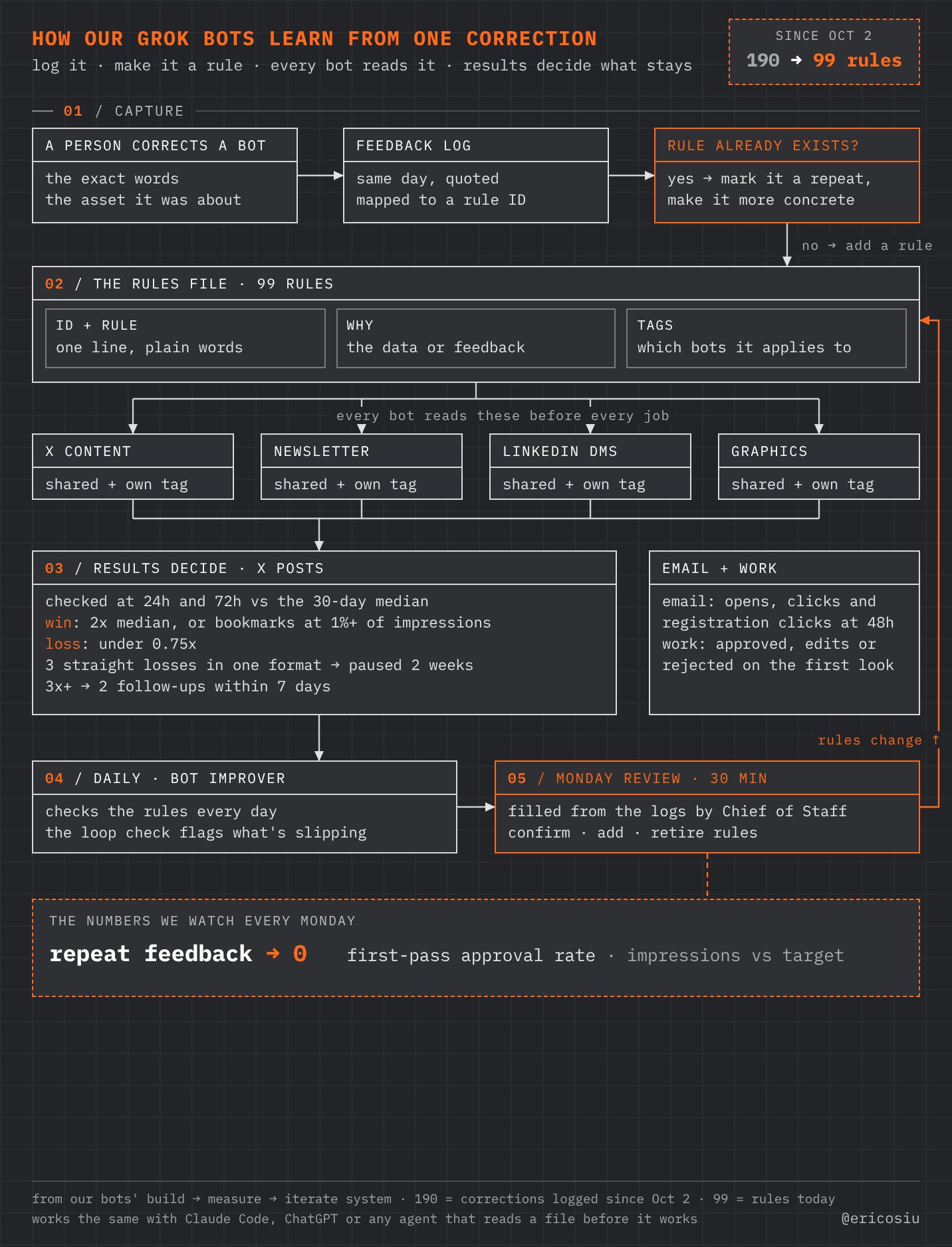
This graphic shows the full loop. I’ll walk through each stage below.
Step 1: Log Every Correction the Same Day
When a person corrects a bot, the correction goes into a feedback log that day. The log captures the exact words, quoted, the asset the feedback was about, and the rule it maps to. Same-day logging matters, because details fade fast and vague notes make vague rules.
If a rule already covers the mistake, the correction gets marked as a repeat. Then the existing rule gets rewritten to be more concrete, since a repeat means the old wording wasn’t clear enough.
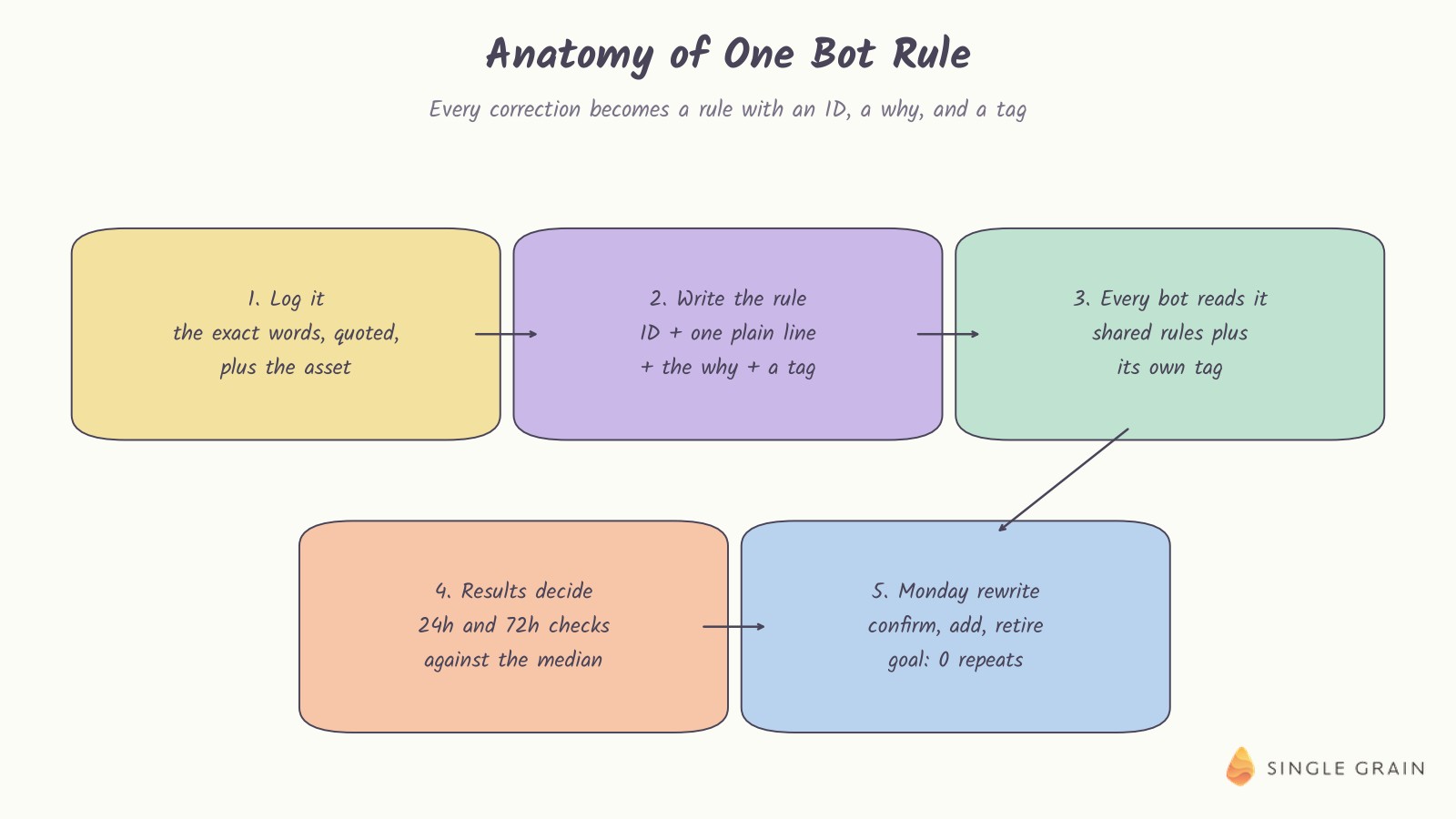
Step 2: Give Every Rule an ID, a Why, and a Tag
Each rule has three parts. There’s the rule itself in one plain line, the data or feedback behind it, and a tag for which bots it applies to, like X posts, the newsletter, LinkedIn, or graphics.
Every bot reads the shared rules plus its own tag before it starts work. A graphics bot doesn’t need newsletter rules, and keeping the file tagged keeps each bot’s instructions focused.
Step 3: Let Results Decide Which Rules Stay
Rules should earn their place. For X posts, my team checks each one at 24 and 72 hours against the 30-day median. A post at twice the median, or with bookmarks at 1% of impressions, counts as a win. Under 0.75 times the median counts as a loss.
Three straight losses in one format pause that format for two weeks. Posts at three times the median or more get two follow-ups within seven days. Email gets judged on opens, clicks, and registration clicks at 48 hours, and other work gets judged on whether it was approved on the first look.
Step 4: Run a Daily Check
Our Bot Improver checks the rules every day. Its daily loop check flags anything slipping, like a weekly article with no approved draft by Wednesday. I explain where the Bot Improver sits in my AI operating system video.

A daily check catches problems while they’re still small. Without it, a broken routine can run for a week before anyone notices.
Step 5: Rewrite the Rules Every Monday
Every Monday, our Chief of Staff bot fills a 30-minute review from the logs. Then the team confirms, adds, or retires rules together. Rules that stopped helping get cut, which keeps the file from bloating.
Those five steps keep the loop honest. The next question is how you know it’s working.
The One Number That Shows Your Agents Are Learning
The number my team watches every Monday is repeat feedback, meaning corrections we’ve already given before. The target is zero. If the same note shows up twice, the rule behind it is unclear, missing, or not being read.
We also watch first-pass approval rate and impressions against target, since those show whether the rules are making the work better. Repeat feedback is the headline number, though, because it measures memory directly.
| Pro-Tip |
|---|
| Add a “repeat” checkbox to your feedback log. Counting repeats each week takes ten seconds and tells you more about your agents than any model benchmark. |
That one checkbox is how you’ll spot a weak rule before it costs you another week of edits.
Why AI Agents Repeat Mistakes Without This Loop
Most teams correct their AI inside a chat thread. The fix works for that one reply, and then it’s gone. Next week, someone else on the team hits the same mistake, types the same correction, and wonders why the tool never improves.
Anthropic’s guide on building effective agents recommends simple, composable patterns over complex frameworks, and memory is a great example. A shared, readable file solves most of the problem without any special infrastructure.
My team learned this while building our bot fleet, which I wrote about in the five-step framework for reliable marketing bots. Reliability came from written rules and regular reviews far more than from switching models. When a model does change, it’s worth retesting your AI skills after the update, since old rules can behave differently.
How to Start Your Own Correction-to-Rule Loop
You can start this today with a doc and ten minutes. Think of the last three things you corrected your AI on, and turn each one into a rule.
Write the rule in one plain line, add a sentence on why it matters, and tag which tasks it applies to. Then paste the file at the top of your next prompt, or save it as a project file if your tool supports one. My team’s guide to reusable AI prompts shows the fields we include.
| Starter prompt for turning corrections into rules |
|---|
| Read the rules file below before you start. If my feedback on your work matches an existing rule, tell me which rule ID it matches and suggest a clearer wording. If it’s new, draft a new rule with an ID, a one-line rule, a why, and a tag for which tasks it applies to. |
This prompt turns every correction into a proposed rule, which saves you the writing. You still decide what goes into the file.
Once the file has a dozen rules, schedule a short weekly review and start counting repeats. If a task keeps coming back to the same feedback, it may be time to turn it into a proper AI skill.
Common Mistakes When Building AI Agent Memory
The most common mistake is writing vague rules. “Write better intros” gives an agent nothing to act on. “Put the main keyword in the first sentence” does. If a rule can’t be checked, rewrite it until it can.
The second mistake is skipping the why. A rule without a reason gets applied in the wrong places, or ignored when it seems to conflict with another rule. One sentence on why the rule exists helps the agent, and the next person on your team, use it well.
The third is letting the rule file grow forever. More rules aren’t automatically better, and old rules can contradict new ones. That’s why the Monday rewrite matters. Merge duplicates, retire rules that no longer help, and keep the file short enough that every agent can read it before every job.
Make Every Correction Count
AI agent memory doesn’t need to be complicated. Log every correction the same day, turn it into a rule with an ID, a why, and a tag, let results decide what stays, and review the file every Monday. Watch repeat feedback, and push it toward zero.
If you’d like help building AI agents your team can trust, my team at Single Grain offers AI transformation services for growth-stage marketing teams. Talk to Single Grain and we’ll help you set up a correction loop that sticks.
Frequently Asked Questions About AI Agent Memory
-
What is AI agent memory?
AI agent memory is the stored context an agent reads before each job, such as rules, preferences, and past corrections, so it doesn’t start from zero every time.
-
Why do AI agents keep repeating the same mistakes?
Corrections typed into one chat usually disappear when the next job starts. Unless feedback becomes a written rule the agent reads every time, the same mistake comes back.
-
How do you turn corrections into rules?
Log every correction the same day and give it an ID, a reason, and a tag. My team turned 190 corrections into 99 rules this way.
-
How do you know which rules to keep?
Let results decide. My team checks posts at 24 and 72 hours, and a weekly review confirms, adds, or retires rules.
-
What metric shows an AI agent is learning?
Track repeat feedback, which is any correction your team has already given before. The goal is zero.

