How to Use a Free AI Visibility Report as a Lead Magnet


A prospect downloads your free report, skims a score, but never books the call. Has this ever happened to you? Because it certainly has happened to me! For example, an AI visibility report can attract a buyer and still leave sales without a useful conversation. However, what I’ve discovered is the opening screen of the report usually decides which way it goes.
I’ve been testing this funnel at my agency, Single Grain, and the preview deserves more attention than another chart.
In a Marketing School discussion, I described telling my team to call out the gaps in the report. I wanted a buyer to understand why a conversation would help. My take is simple enough to test: make the problem easy to inspect before asking for more of the buyer’s time.
Is your free report giving a prospect a useful reason to book a call? Keep reading to see how to turn an AI visibility finding into a credible sales handoff, with my team’s report showing what belongs in the preview, what evidence to retain, and how to judge the leads it produces.
TL;DR
- Show an inspectable gap. Put the buyer question and supporting answer beside the report’s headline result.
- Give the score a boundary. Explain which answers you sampled so a visitor can judge the finding.
- Make the sales handoff specific. Carry the report’s question into the booking request and follow-up.
- Evaluate the whole funnel. Compare qualified conversations and opportunities alongside report requests.
TABLE OF CONTENTS:
- What an AI Visibility Report Needs to Show
- My Single Grain Demo Started With My Own Domain
- Why I Asked My Team for a Shorter Report
- Build the Preview Around a Buyer Question
- Make the Email Unlock Worthwhile
- Carry the Finding Into the Sales Handoff
- Measure Qualified Conversations and Report Quality
- Keep the Recommendation Within the Evidence
- Give the Buyer a Reason to Continue
What an AI Visibility Report Needs to Show
An AI visibility report records whether a brand appears in answers to selected buyer questions. For a business or marketing leader evaluating a free report, the useful part is the connection between an answer and a commercial concern. A missing mention matters more when the question describes a service the company actually sells.
I would put the sampled question close to the headline score. Beside it, show the answer excerpt and the date of collection. Let the visitor see how the report reached its conclusion before offering a recommendation.
A report needs a clearly stated scope. An answer from one assistant cannot stand in for every AI product, and a small prompt sample cannot establish market-wide share. Label the sampled platforms and keep brand mentions separate from linked citations.
For the collection work behind this summary, an AI visibility audit can provide more detail. Here, I’m concentrating on the moment a marketing leader decides whether the report deserves a conversation. My own demo makes this distinction easier to see.
My Single Grain Demo Started With My Own Domain
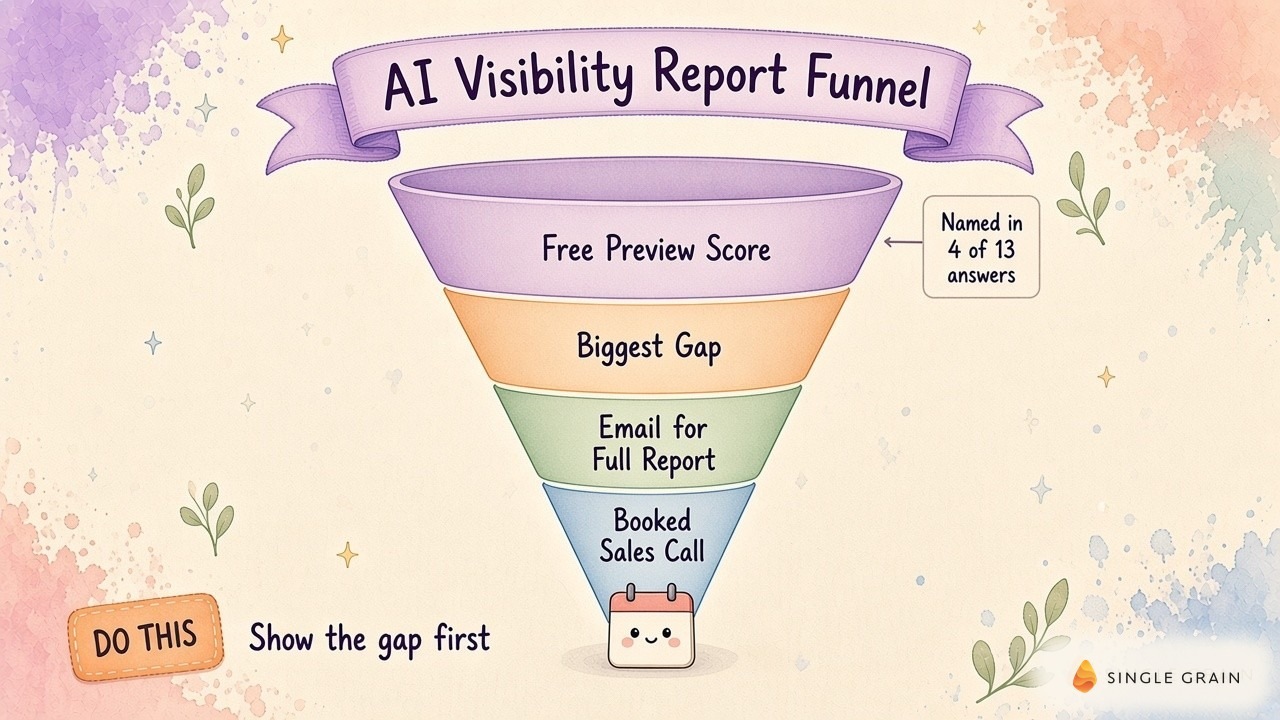
In my Leveling Up demonstration, I entered singlegrain.com into the free report tool. As Single Grain’s CEO, I was looking at my own agency’s result on screen. The report displayed four mentions across thirteen sampled AI answers, shown as 31%.
It also surfaced a gap around revenue marketing agencies for B2B SaaS companies. This gave me a category to investigate. I could move from a general visibility score to a specific question about how the agency appeared in a service category.
The 31% reflects only the questions in this sample, so I treat it as a starting point for investigation.
How the Report Preview and Email Unlock Work
In a separate walkthrough of the report preview, I showed the grayed-out report and entered an email to access the fuller version. You can inspect the idea through my team’s free AI visibility report.
The preview gives a visitor a basis for deciding whether to continue. The next design question is how much detail helps the visitor make this decision.
Why I Asked My Team for a Shorter Report
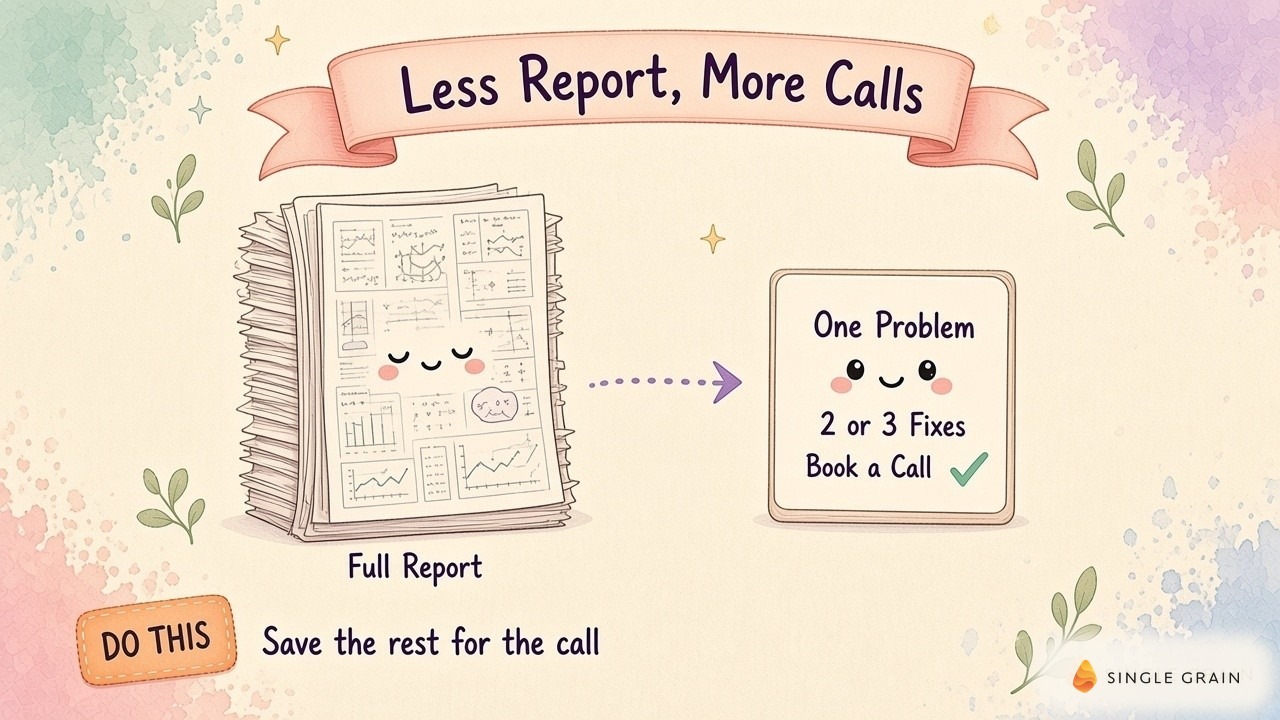
During the Marketing School discussion linked above, I described an instruction I had given my team earlier: call out the gaps and explain the benefit of another conversation. My edit was to make the full report’s issues easier for a buyer to recognize.
For me, this is an editing decision. A summary should preserve enough evidence for a buyer to challenge the finding. Technical detail can sit behind the summary, ready for anyone who wants to inspect the sample or discuss a possible fix.
Test a Shorter AI Visibility Report Summary
A shorter report won’t automatically close more deals. Treat the shorter summary as a version to test with your own audience.
Nielsen Norman Group’s research on scanning web content gives a useful design reason to make the finding visible early. Readers use several scanning patterns, so clear placement helps them locate relevant information.
I want the summary to earn attention through useful evidence. Choosing the right question is where this work starts.
Build the Preview Around a Buyer Question
Start with a question connected to the service you want to discuss on the call. A marketing leader needs to recognize the commercial relevance without decoding an analyst’s methodology. The question from my demo gives you a real example of this connection.
Choose a Question With Commercial Relevance
Use customer language from a source you can review, such as an approved sales transcript or a service inquiry. Keep the exact wording in your working file. If you rewrite the question for testing, retain the original beside it so the commercial intent stays visible.
For the category in my demo, I would check whether the agency wants more revenue marketing work from B2B SaaS companies before making the gap prominent. An absent mention in an irrelevant category creates a weak sales conversation. The chosen question should connect to work your agency can actually deliver.
Retain the Answer Behind the Score
I would keep a spreadsheet with a separate row for each collected answer. Columns can hold the prompt, platform, collection date, answer text, brand mention, and linked source.
Define a brand mention before scoring the answer. A company named in prose and a company linked as a source are different observations. Store each separately so the report can explain its result without changing definitions halfway through.
If repeated answers disagree, retain both. Record the collection conditions you can observe, including account state or location when relevant. A repeatable process helps you investigate disagreement instead of presenting a fluctuating result as settled.
Write a Finding the Buyer Can Inspect
Put the sampled category in the finding, then explain what appeared in the collected answers. Link to the retained evidence where possible. Avoid estimating lost revenue from missing mentions unless you have a defensible method and the buyer’s commercial data.
| Pro-Tip |
|---|
| Read the report’s opening sentence without its score. If you still can’t identify the buyer question being investigated, revise the summary before adding another chart. |
The preview can stay brief while its evidence remains available. This gives you a clearer basis for deciding where the email request belongs.
Make the Email Unlock Worthwhile
The email unlock in my walkthrough offered access to the fuller report. If you use this structure, tell the visitor what additional material the email will deliver. Keep the promise specific enough for someone to recognize fulfillment.
I would offer the underlying question breakdown and a short explanation of the highest-priority gap. A visitor should be able to use the report even if a sales conversation never happens. Holding back essential evidence makes it harder to trust the recommendation.
Separate the report request from the invitation to book. A person may want to circulate the findings internally before discussing a project. Give this buyer a shareable summary with its scope intact so a colleague can understand the result.
My team’s guidance on using a product as a lead magnet covers the broader product decision. For this funnel, the immediate concern is whether the delivered report matches the preview’s promise. Once it does, the follow-up can address the same finding.
Carry the Finding Into the Sales Handoff
A sales handoff should preserve the reason the buyer requested the report. I would give the assigned salesperson access to the sampled question and the summary the visitor received. This prevents the first conversation from opening with a request to repeat information already collected.
Connect the Paid Campaign to the Report
In my campaign walkthrough, I described Media OS, my team’s paid media bot, assembling a Meta campaign with HubSpot connected. I said the campaign was driving prospects toward AI visibility and citation maps.
Pairing the campaign with the report gives sales context from the first touch. Decide which report details sales needs before creating new CRM fields.
Record Buyer Fit and Intent in the CRM
I would retain the report version and acquisition source alongside the original finding. Let sales record whether the company fits the service and whether the contact wants help addressing the issue. An email submission alone leaves both questions open.
A follow-up can ask whether the sampled category reflects the buyer’s current priority. If it does, the call can review the evidence and agree on the next investigation. My team’s AI lead magnets for agencies discusses the wider agency funnel, but this handoff needs its own careful review.
Once the handoff preserves the finding, you can evaluate where the funnel helps and where buyers lose interest.
Measure Qualified Conversations and Report Quality
Follow each report version through delivery, booked calls, attended conversations, and sales qualification. Keep the definitions consistent across versions. Otherwise, a change in how sales labels a lead can look like a change in report performance.
I would compare visitors from similar acquisition sources before crediting a shorter preview. A paid campaign and an existing customer referral bring different expectations. Review the buyer’s service fit alongside their response to the report.
Change One Funnel Element at a Time
In the discussion of report iteration, the conversation included a useful caution: fast edits still need usage before anyone can judge improvement. I would keep a change log and avoid changing the preview, acquisition campaign, and booking flow together. This leaves a better chance of identifying the source of a difference.
Track AI Visibility Report Failures
Also review report failures. A missing answer, an incorrect brand match, or an inaccessible evidence link can undermine a qualified buyer’s confidence. Track these issues alongside sales outcomes so a cleaner presentation doesn’t hide a collection problem.
General lead magnet tips can help refine the offer, but your report needs evidence from its own funnel. A low response rate may justify revisiting the sampled question before rewriting the booking button.
This review should also set boundaries around what the agency promises after the call.
Keep the Recommendation Within the Evidence
A missing mention can justify an investigation into relevant content and cited sources. It cannot, by itself, identify the cause of the omission. Explain what you would examine before recommending an expensive implementation.
For Google specifically, Google’s guidance on AI features says established SEO practices remain relevant and no additional requirements apply for appearing in AI Overviews or AI Mode. Keep this platform boundary visible. Other assistants may select brands differently.
I would use the call to review the report’s scope and identify which finding deserves deeper work. A buyer may already have useful content you haven’t inspected. Leave room to revise the recommendation when new evidence arrives.
Give the Buyer a Reason to Continue
My team’s report gave me a concrete category to discuss, and my instruction to simplify it focused on making this issue visible. A useful lead magnet gives the buyer enough context to decide whether help would be valuable.
If you’d like help investigating your brand’s visibility and planning the work, explore Single Grain’s SEO services or contact Single Grain to discuss your goals.
Frequently Asked Questions About AI Visibility Reports
-
What is an AI visibility report?
An AI visibility report shows how often AI assistants like ChatGPT, Claude, Gemini, and Perplexity name your brand when buyers ask about your category, plus your biggest gap.
-
Why do shorter lead magnet reports close better?
In Neil Patel’s team’s tests, close rates typically dropped as reports added more charts and data. A short report with one problem gives the buyer a reason to book a call.
-
What should a free AI visibility report include?
One glaring problem, the top two or three fixes, and a clear call to get the rest. Save the full breakdown for the conversation.
-
Is an AI visibility report a good lead magnet for enterprise buyers?
It can be. My team’s free report booked a call with a company doing roughly $927 million in revenue, because the gap it showed was personal and easy to see.
-
How do I get my own AI visibility report?
You can request Single Grain’s free AI visibility report to see how AI tools describe your brand.