Lead Enrichment Explained: Scale It Without Wasting Credits


Lead enrichment is how a bare email address on a form turns into a lead your sales team can actually act on. It fills in the company, role, size, and context your reps need to decide who to call first. Without it, your team either works blind or burns hours researching every new name by hand.
The catch is cost. Most teams pay enrichment credits for every lead that comes in, including the ones that will never buy. My team found a better order of operations: classify every lead with a cheap AI model first, then pay to enrich only the ones that pass.
Are you wondering whether you’re paying to enrich leads you’d never call? This guide will help you find out. Below, I’ll cover the basics for business leaders, then the scaling strategies that keep enrichment costs under control as volume grows.
TABLE OF CONTENTS:
- TL;DR
- What Is Lead Enrichment?
- What Data Does Lead Enrichment Add?
- How Lead Enrichment Works
- Why Lead Enrichment Matters for Growing Teams
- Where Lead Enrichment Costs Get Out of Hand
- Lead Enrichment Strategies That Scale
- How AI Changes Lead Enrichment
- How to Choose Lead Enrichment Tools
- Spend Credits Only Where They Count
TL;DR
- Lead enrichment adds missing details to a lead record. Think company size, industry, job title, tech stack, and buying signals, pulled from outside data sources.
- It helps sales prioritize. Enriched leads can be scored, routed, and personalized faster than raw form fills.
- Credits add up fast at scale. Paying to enrich every lead, including poor fits, is where most budgets leak.
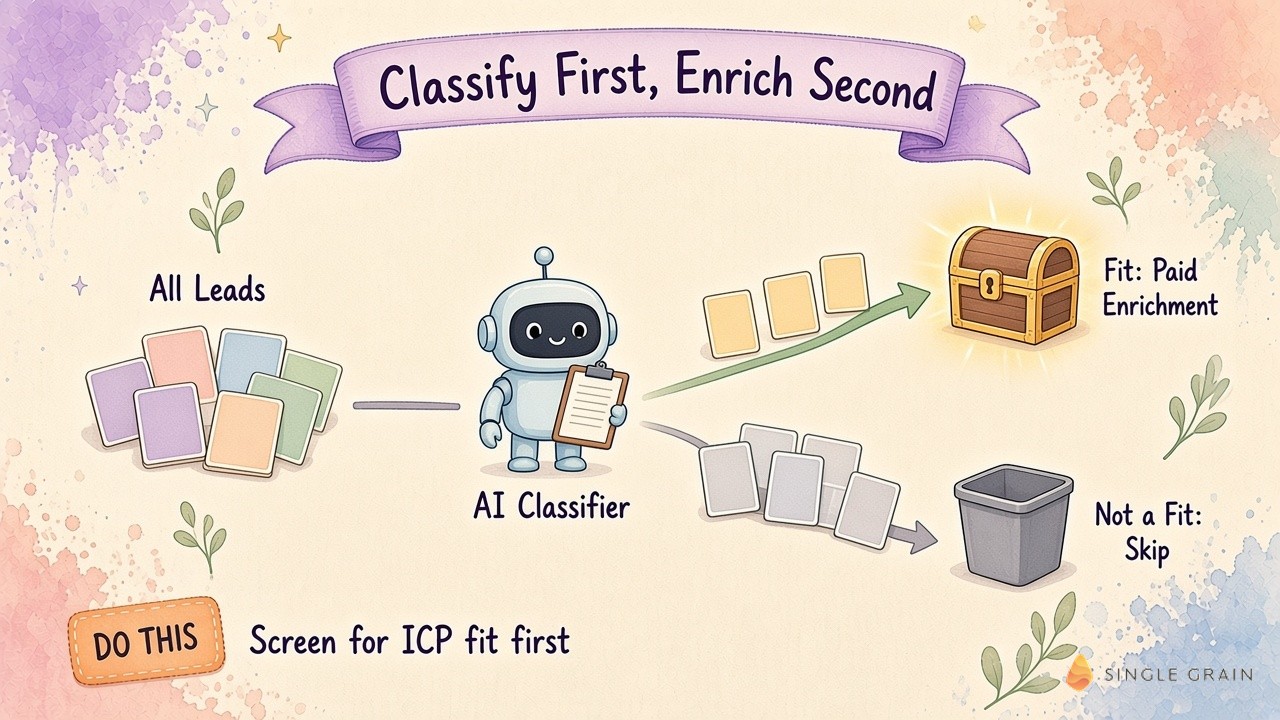
- Classify first, enrich second. A cheap AI model can screen for ideal customer profile fit at a fraction of a penny per decision, so you only spend credits on leads worth calling.
What Is Lead Enrichment?
Lead enrichment is the process of adding information to a lead record that the lead didn’t give you directly. Someone fills out a form with a name and work email, and enrichment tools fill in the rest from public and licensed data sources.
The goal is simple. A sales rep should be able to look at a lead and know within seconds whether it fits your ideal customer profile (ICP), who the person is, and what to say first.
What Is Lead Enrichment vs. Data Enrichment?
The two terms overlap. Data enrichment is the broader practice of improving any record in your database, including customers, accounts, and contacts. Lead enrichment is the slice focused on new prospects, usually at the moment they enter your funnel.
What Data Does Lead Enrichment Add?
Most enrichment falls into four groups:
- Firmographic data. Company name, industry, employee count, revenue range, and headquarters location.
- Contact data. Job title, seniority, department, verified email, and sometimes a direct phone line.
- Technographic data. The software a company uses, such as its CRM, marketing automation platform, or analytics tools.
- Intent and activity signals. Hints that a company is researching a problem you solve, such as hiring for a related role or visiting your pricing page.
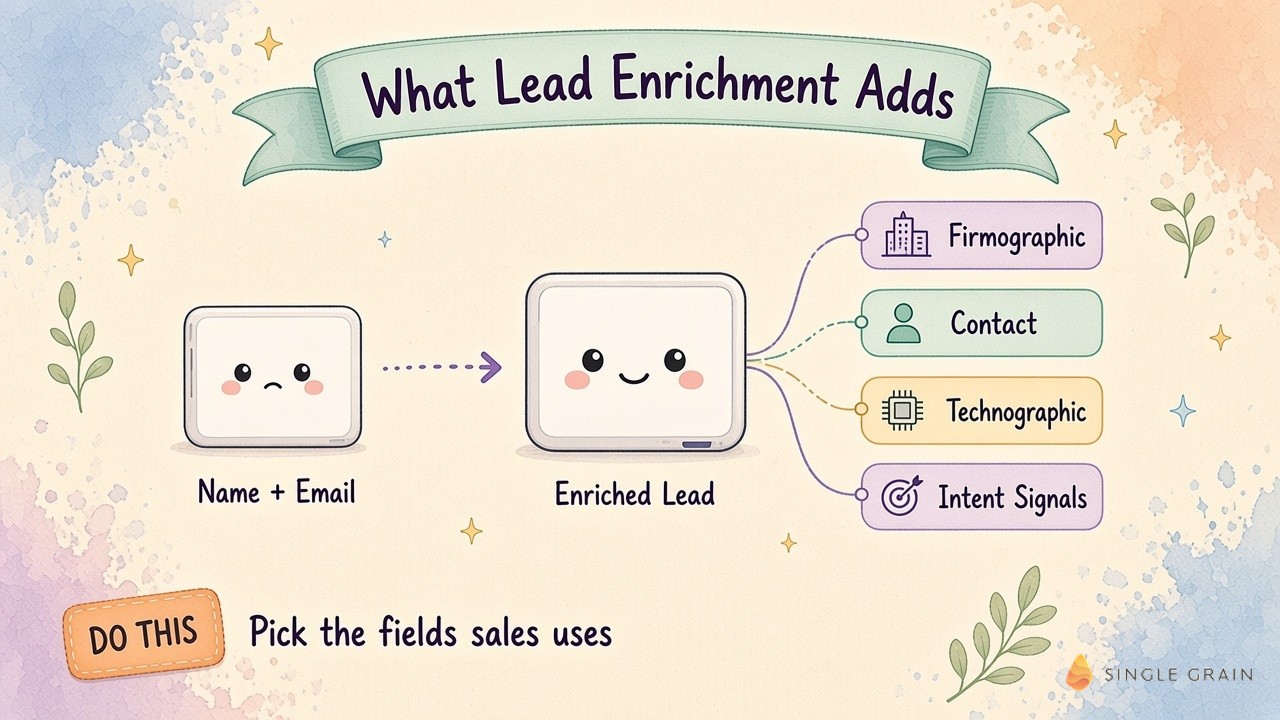
Not every team needs all four. A company selling to enterprise IT teams might care most about technographics, while a services firm might care most about seniority and company size.
How Lead Enrichment Works
Enrichment usually runs in one of two modes, and most growing teams use both.
- Real-time enrichment fires the moment a lead submits a form. The tool looks up the email domain and person, then writes the results to your CRM within seconds. It’s what makes short forms and instant routing possible.
- Batch enrichment runs on a list all at once, such as an event attendee list, an old database, or a set of target accounts. It’s useful for cleanup projects and for scoring a backlog before a campaign.
In both modes, the tool matches the lead against its data sources, returns the fields it finds, and flags the ones it can’t verify. Your CRM or workflow tool then decides where the enriched lead goes next.
Why Lead Enrichment Matters for Growing Teams
Enrichment pays off in three places.
Speed to lead. Reps can respond to the best leads first instead of working the queue in order. A fast, relevant reply to a strong lead beats a slow reply to every lead.
Shorter forms. When enrichment fills in company details, you can ask for less on the form. Fewer fields usually mean less friction for the visitor.
Better scoring and routing. Lead scoring models need data to work. Enriched fields feed the score, which decides who gets a call, who gets nurture emails, and who gets routed to a specific rep. My team covers this in depth in our guide to lead scoring that predicts revenue.
Where Lead Enrichment Costs Get Out of Hand
Enrichment tools usually charge per record or per credit. That works fine at low volume. Once you’re bringing in thousands of leads a month, the bill grows with every form fill, webinar signup, and content download.
The problem is that many of those leads will never buy. Students, job seekers, competitors, and tiny companies far outside your ICP all cost the same to enrich as your dream account. If a large share of your leads are poor fits, a large share of your enrichment budget is going to waste.
Lead Enrichment Strategies That Scale
Here are the strategies I’d use to scale enrichment without scaling waste. The first is the one my team leans on most.
1. Classify Leads Before You Enrich Them
Put a cheap AI classifier in front of your expensive data credits. The classifier screens each lead for ICP fit using what you already have, like the email domain, job title, and company name. Only the leads that pass go on to paid enrichment.
The economics have changed fast. My usage dashboard for Jev, the classifier I run with GrokBot, showed 784,518,975 tokens across 467,459 requests for a total of $30.91. Each decision cost a fraction of a penny.

I had GrokBot and Jev scan my X followers, roughly 46,000 people. It found 581 chief marketing officers at publicly traded companies. I didn’t know that list existed, and I only needed to enrich the people on it. I shared the full breakdown on X.
| Pro Tip |
|---|
| Write your ICP rules in plain language before you build the classifier. If your team can’t agree on what a good lead looks like, the model can’t either. |
Once the classifier is in place, the rest of your enrichment stack gets cheaper and cleaner.
2. Use Waterfall Enrichment
No single data provider covers everyone. A waterfall approach asks one provider first, then moves to the next only if the first comes back empty. You pay for coverage only where you need it.
3. Enrich at the Right Moment
You don’t need deep data on every lead the moment it arrives. Enrich basic fields at signup, then add deeper data when a lead hits a high-intent action, like a demo request or a pricing page visit.
4. Refresh Records on a Schedule
People change jobs and companies change size. Re-enrich your best accounts on a regular cadence so your sales team isn’t working stale titles and dead emails.
5. Keep Privacy Rules in Front of Every Workflow
Enrichment involves personal data, so it falls under privacy laws in many places. Check how rules like the EU’s General Data Protection Regulation (GDPR) and the California Consumer Privacy Act (CCPA) apply to your data sources before you scale.
How AI Changes Lead Enrichment
So much of business comes down to classifying:
- Is this recruit a good fit?
- Does this prospect match our ICP?
- Is this content good enough to post?
You couldn’t run those decisions at scale before. Now each one costs a fraction of a penny.
That shift changes the job of enrichment. Instead of paying to learn every data point about every lead, you use AI to decide who’s worth learning about. My team ran this approach against a sales development queue and wrote up the results in our comparison of Jev vs. an SDR queue for AI lead qualification.
AI also helps after enrichment. It can summarize a lead’s company in two lines, suggest a first message, and flag leads that look like a fit but need a human check.
How to Choose Lead Enrichment Tools
Tools range from all-in-one data platforms to workflow builders that chain several providers together. When you compare them, focus on four questions:
- How good is the coverage for your market? Test a sample of your real leads and check the match rate.
- How fresh is the data? Ask how often records are updated.
- Does it connect to your CRM? Enriched data is only useful if it lands where your reps work.
- How does pricing scale? Model the cost at double and triple your current lead volume.
For a vendor shortlist, see our roundup of ABM data enrichment companies.
Spend Credits Only Where They Count
As you can see, lead enrichment turns raw leads into records your sales team can act on. The strategies that scale are simple: classify first, enrich in a waterfall, enrich at the right moment, refresh on a schedule, and respect privacy rules. Put a cheap AI model in front of your expensive data, and your credits go to the leads worth calling.
If you’d like help building an AI-first lead pipeline, my team at Single Grain offers lead generation services and AI transformation services. Contact Single Grain and we’ll map where your enrichment budget is going today.
Frequently Asked Questions About Lead Enrichment
-
What is lead enrichment?
Lead enrichment is adding missing details to a lead record, such as company size, industry, job title, and tech stack, using outside data sources.
-
What is the difference between lead enrichment and data enrichment?
Data enrichment improves any record in your database. Lead enrichment focuses on new prospects, usually when they first enter your funnel.
-
How can I reduce lead enrichment costs?
Screen leads for ideal customer profile fit with a cheap AI classifier first, then pay to enrich only the leads that pass. Waterfall enrichment and timing enrichment to high-intent actions also help.
-
Is lead enrichment legal?
It can be, but it involves personal data, so laws like GDPR and CCPA may apply. Review your data sources and consent practices before you scale.
-
Does lead enrichment work for small teams?
Yes. Smaller teams often benefit most, because enrichment saves reps from researching every lead by hand.