AI Overview CTR: How to Test a Site Opt-Out Without Losing Leads


AI Overview CTR (click-through rate) can leave you guessing whether an AI opt-out wins back organic clicks or costs you leads. A small case study just raised the stakes. Cyrus Shepard, an SEO consultant and former head of SEO at Moz, opted one site out of Google’s AI features, and clicks from AI answers vanished as expected. His regular organic clicks dropped too, and this part honestly surprised me.
If you lead search engine optimization (SEO) or marketing, this lands right on a decision you may be weighing. An AI opt-out could push searchers back to your blue links. It could also cost you citations, clicks, and qualified leads. Easy call if your content is the product, much harder when your pipeline runs on organic search.
One distinction gets blurred in many opt-out debates, so I’ll draw it now:
- A searcher can hide AI Overviews for a single search with Google’s Web filter, and other people still see AI Overviews as usual.
- A site owner can keep content out of AI Overviews for every searcher, through a Search Console setting or page-level code.
This guide covers the second kind.
Pulling your content out of AI answers is a heavy lever, and it deserves hard evidence first. How can you tell whether removing your pages from AI answers helps or hurts your business? Below, I’ll walk through what AI Overviews do to CTR, which webmaster controls exist and what each one costs, how to measure the impact, and a small test you can safely reverse.
TL;DR
- AI Overviews tend to pull clicks away from classic results. Pew Research Center and Ahrefs both found lower click rates when an AI summary appears, although a citation can still help your brand.
- Searcher controls and site-owner controls are separate levers. The Web filter hides AI Overviews for one person and one search, while Search Console settings and robots directives change what every searcher sees.
- Every webmaster control carries a cost. Snippet directives can shrink your classic listing, noindex removes the page from Search, and Google-Extended has no effect on AI Overviews.
- Test on a small, reversible slice first. Search Console blends AI Overview clicks into Web data, so compare query-level numbers on a page subset against a holdout group.
TABLE OF CONTENTS:
- What Is AI Overview CTR?
- What AI Overviews Do to Organic CTR
- Searcher Controls vs. Site-Owner Controls
- Webmaster Controls for AI Overviews and Their Costs
- The Citation and Visibility Tradeoff
- How to Measure AI Overview CTR Impact
- How to Run a Small, Reversible Opt-Out Test
- A Decision Framework for Site Opt-Outs
- Start Small With Your Opt-Out Decision
What Is AI Overview CTR?
AI Overview CTR describes how often searchers click through to your site when Google shows an AI Overview for a query. In practice, the phrase covers two different numbers. Keep them apart, because each one points to a different decision.
- Citation CTR. Clicks on your link inside the AI Overview, divided by the times Google showed this link. Google doesn’t report this number directly, so any figure you see is an estimate.
- Organic CTR beside an AI Overview. Clicks on your classic blue-link listing when an AI Overview sits above it. Most third-party click studies measure this version.
Cyrus’s recent test offers a rare look at the first number.
Results From One Opt-Out Test
Cyrus estimated citation CTR at about 0.9% for AI Overviews and AI Mode combined. He got there by comparing overall site clicks and impressions before, during, and after the opt-out, then backing out the known AI impressions. AI impressions made up about 8% of his total impressions. During the test, AI Overviews still appeared on the results pages, and his site simply wasn’t cited in them.
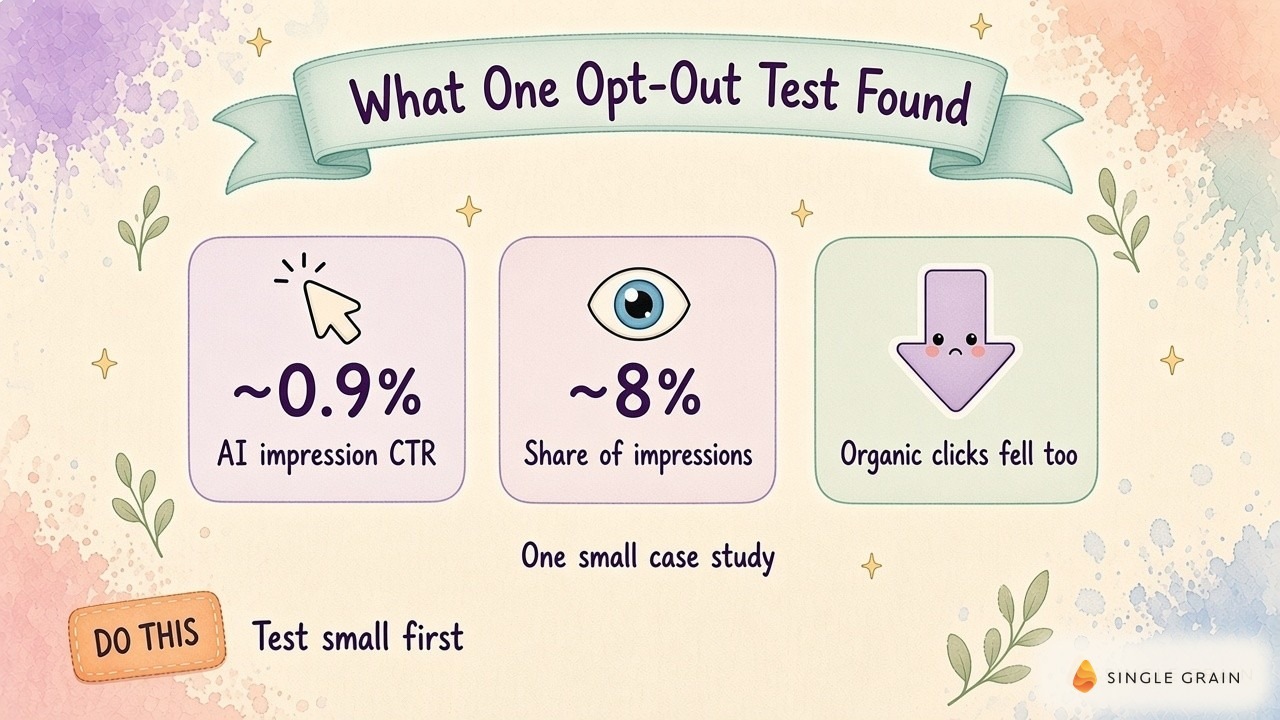
One site makes a small sample, so larger studies help fill in the bigger picture.
What AI Overviews Do to Organic CTR
Independent research points the same way, with wide ranges. In browsing data from nine hundred U.S. adults, Pew Research Center found users clicked a traditional result on 8% of visits to pages with an AI summary, compared with 15% on pages without one. They clicked a link inside the summary itself on just 1% of those visits. Pew’s analysis used March 2025 browsing data.
Ahrefs measured a steeper effect in its updated click study. With December 2025 desktop Search Console data, it estimated AI Overviews cut position-one CTR by 58% against a modeled baseline. The gap narrowed lower on the page, to 19.4% at position ten.
Why Results Differ Across Studies
Each study measures a different slice of search. Ahrefs looked at desktop informational keywords. Pew tracked real browsing on all kinds of queries and found AI summaries showed up on 60% of searches starting with question words like “who,” “what,” or “why.”
France offered a cleaner before-and-after. AI Overviews launched there on July 22, 2026, and an Ahrefs study of French domains found heavily exposed sites lost 23.1% of their CTR within nine days. The median across all tracked domains was a 5.7% drop. Your own exposure depends on how many of your queries trigger an AI Overview, so your own data is a better guide than any industry average.
How a Citation Can Still Help Your Brand
Cyrus framed his result as a possible “Search SERP Halo Effect.” In his words, “the more places you can get your brand to appear, the more likely a user will click at least one of them.” Greg Sterling, co-founder of Near Media, added in the comments his firm’s research shows AI Overviews “create a kind of brand lift or awareness that translates into subsequent searches and clicks, not consistently but many times.”
Google makes a related claim in its guide to AI features and your website. It says clicks from results pages with AI Overviews are higher quality, meaning visitors tend to spend more time on the site. Your analytics can show whether this holds for your own traffic.
| Pay Attention |
|---|
| A low citation CTR doesn’t make AI impressions worthless. In the one public opt-out test, removing them coincided with fewer clicks on the site’s regular listings. |
So the honest read is mixed. AI Overviews usually shrink classic CTR, while a citation inside them may protect some of what’s left. Organic CTR in AI-driven search still drives pipeline, which is why the tradeoff deserves a test.
Searcher Controls vs. Site-Owner Controls
Opt-out conversations often mix up two separate sets of controls. One set belongs to the searcher. The other belongs to you.
- Searcher controls. Google’s Search Help page on AI Overviews says the feature can’t be turned off. A searcher can select the Web filter after a search to see text links only, and switching off “AI in Search” in Labs only opts someone out of Labs experiments. None of these choices changes what other people see or your site’s eligibility.
- Site-owner controls. These include a setting in Search Console and robots directives on your pages. They decide whether your content can appear in AI Overviews for everyone, and they’re the only levers your SEO program can pull.
When someone proposes an opt-out, ask which kind they mean. A searcher filter tells you about user preference. A site-owner control changes your traffic, so it needs a business case and a test plan.
Here’s what each site-owner control does and what it costs you.
Webmaster Controls for AI Overviews and Their Costs
Google offers several controls, and they differ in scope and side effects. This table gives the quick view before the details.
| Control | Where it lives | Effect on AI Overviews | Cost to classic results |
|---|---|---|---|
| Search generative AI control | Search Console settings, per property | Excludes your links and content from AI Overviews, AI Mode, and Discover AI features | Google says it isn’t a ranking signal elsewhere in Search |
| nosnippet | Robots meta tag or X-Robots-Tag header | Blocks the page as a direct input | Removes the text snippet from classic results too |
| data-nosnippet | HTML attribute on span, div, or section elements | Keeps marked text out of snippets | Only marked text is withheld |
| max-snippet | Robots meta tag or X-Robots-Tag header | Limits how much text can be used as direct input | Shortens classic snippets |
| noindex | Robots meta tag or X-Robots-Tag header | Removes the page from all of Search | The page disappears from organic results |
| Google-Extended | robots.txt token | No effect on AI Overviews | None in Search |
Each row deserves a closer look, starting with the newest control.
The Search Generative AI Control in Search Console
Google announced this toggle in its post on new controls for website owners and finished rolling it out to all sites worldwide on August 31, 2026. It lives under Settings in Search Console. If you exclude your site, Google removes your links and content from AI Overviews, AI Mode, and generative AI features in Discover, and you won’t receive traffic or impressions from them.
Two details shape how you’d test it. Per Google’s help page for the control, a URL-prefix property such as a single folder can override its parent’s setting, so you can limit the change to one section. Changes generally take effect within a few days, although caching can stretch this out. Google also warns content from other sites will still appear in those features and may look similar to yours.
nosnippet
The nosnippet rule stops Google from showing a text snippet or video preview for the page. Google’s robots meta tag specification says it applies to web search, Discover, AI Overviews, and AI Mode, and it keeps the content from serving as direct input for AI Overviews. The cost is steep. Your classic listing loses its description, which can drag down CTR on the listings you wanted to protect.
data-nosnippet and max-snippet
Both controls trim what Google can show without removing the page. The data-nosnippet attribute marks specific span, div, or section elements as off-limits for snippets, and Google lists it among the preview controls for AI features. Use it for a premium paragraph, a pricing table, or a proprietary data set.
The max-snippet rule caps the number of characters Google can use as a text snippet. Google’s specification says the cap also limits how much content can serve as direct input for AI Overviews and AI Mode. Shorter snippets can make your classic listing less clickable, so test the cap on a few pages before rolling it out.
noindex
The noindex rule removes the page from Google Search entirely. Because a page has to be indexed to appear as a supporting link in AI Overviews, noindex takes it out of AI answers as well. I’d only use it for pages you’d remove from Search anyway, since it can’t isolate the value of an AI citation.
Google-Extended
Google-Extended is a robots.txt token for Gemini model training and for grounding in Gemini Apps and Vertex AI. Google’s crawler documentation says it doesn’t affect a site’s inclusion in Google Search. A block here won’t remove you from AI Overviews, so it’s the wrong lever for an AI Overview CTR question.
| Pro-Tip |
|---|
| Whatever control you pick, check the rendered HTML in URL Inspection and confirm Googlebot can still crawl the page. Directives only work when Google can read them. |
Picking the right control is half the job. The other half is knowing what you give up.
The Citation and Visibility Tradeoff
An AI Overview citation does two jobs. It can send a click directly, and it puts your brand in front of a searcher who might click your organic listing, search your brand later, or remember you during a vendor review. An opt-out gives up both jobs for every query where you used to be cited.
Exclusion also leaves the answer in place. Google still shows the AI Overview, built from other sources, and those sources may sound a lot like you. If your category’s answers are full of competitor citations, stepping out hands them more of the visible real estate. My team’s post on AI Overview statistics for buying searches shows how often these answers now appear on commercial queries.
When Your Content Is the Product
The tradeoff tips the other way when your content is the product. A paid research firm or a data publisher may lose more from a full summary than it gains from a citation. In those cases, a narrow block on the premium sections can make sense.
| What You Should Do |
|---|
| List the queries where your pages are cited today, then tag each one as a lead driver, a brand-awareness query, or low value. An opt-out decision belongs at the query level. |
Before you trade any of this away, you need numbers you can trust.
How to Measure AI Overview CTR Impact
Search Console gives you useful pieces of the AI Overview CTR picture, and you have to assemble them carefully.
The Limits of Search Console Data
Clicks and impressions from AI Overviews and AI Mode count inside the Web search type of the Performance report. Search Console has no search appearance filter for them, so you can’t pull AI Overview clicks out of the Web total.
The generative AI performance report helps a little. It shows impressions for links to your site in AI Overviews and AI Mode, broken down by page, country, device, and date. It doesn’t show clicks, CTR, or queries, and its impressions are already included in your Web totals, so never add the two reports together.
Query-Level Before-and-After Comparisons
Page-level averages hide the effect, so work at the query level. Export queries for your test pages, tag the question-style and informational queries most likely to trigger AI Overviews, and compare windows of equal length with the same days of the week. Track average position alongside CTR, because a ranking shift can mimic or mask an AI Overview effect.
Pair the Search Console data with your analytics and customer relationship management (CRM) records. Clicks alone won’t tell you whether an opt-out costs revenue. Count qualified leads from organic landing pages in each window, and keep paid campaigns separate.
Track Citations Outside Search Console
Search Console only covers Google. For a wider view of where your brand shows up, run a monthly check of your most important buyer questions. My team’s free AI visibility report runs buyer questions through ChatGPT, Google AI Overviews, and Google AI Mode and shows which brands get recommended, which gives you a quick citation baseline before and after a test. An ongoing program can follow the method for measuring AI share of voice in more depth.
Once you can see the numbers, you’re ready to change one of them on purpose.
How to Run a Small, Reversible Opt-Out Test
A sitewide switch is the riskiest way to learn. A narrow test on comparable pages gives you real evidence and an easy way back.
Five Steps for a Folder-Level Test
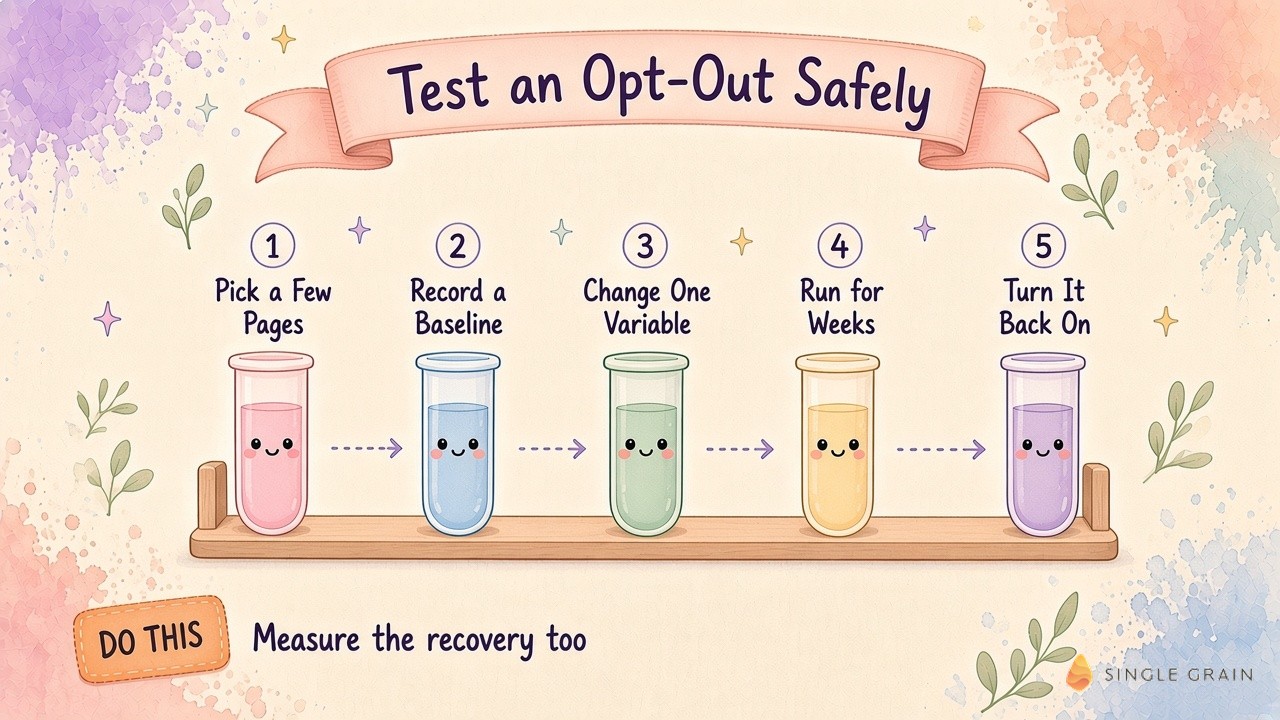
Here are the five steps I’d follow, in order.
- Pick a limited set of pages. Choose one folder or page group with steady AI Overview impressions in the generative AI performance report, plus a holdout group of similar pages you won’t touch.
- Record a baseline. Capture at least four weeks of query-level clicks, impressions, CTR, position, and qualified leads for both groups.
- Change one variable. Use the Search generative AI control on a URL-prefix property for the test folder, which leaves classic snippets alone. Avoid content updates, redesigns, or campaigns on those pages during the test.
- Run it long enough. Keep the exclusion in place for several weeks, and confirm in the generative AI performance report the AI impressions dropped.
- Turn it back on and measure again. Restore the original setting and track the recovery period with the same filters.
Recovery Lag and Rollback Rules
Plan for a slow recovery. Shortly after his own test, Cyrus posted on Substack his AI impressions dropped almost instantly after he opted out, while AI visibility was taking much longer to return after he opted back in. Build this lag into your timeline and your rollback criteria.
| Action Step |
|---|
| Write your rollback rule before launch, such as “restore the setting if qualified organic leads in the test group fall below the holdout trend for two straight weeks.” |
A clear rule keeps the test honest when the early numbers get noisy.
A Decision Framework for Site Opt-Outs
Let your test results drive the call. I use three outcomes, each tied to a signal you can point to in your data.
- Stay included. Choose this when the test group loses clicks or qualified leads against the holdout, or when the results are flat. With a flat result, the opt-out removed your citations without adding clicks or leads.
- Restrict a narrow slice. Choose this when your content is the product, or when a specific section’s value comes from people reading it on your site. Use data-nosnippet or a folder-level exclusion, and keep the rest of the site included.
- Expand the exclusion. Consider this only when the test group’s qualified leads hold or improve across the opt-out and recovery periods, and the business case goes beyond traffic, such as licensing or contract terms.
If you stay included, put your effort into earning better citations. The AI Overview query capture playbook helps you decide which prompts deserve an owned citation brief. If your pages rarely earn citations, review the common reasons AI Overview optimization fails, along with the broader shift toward zero-click search.
Start Small With Your Opt-Out Decision
AI Overview CTR looks low on paper, and the broader studies show AI Overviews pulling clicks from classic results. Even so, the one public opt-out test suggests a citation may help your regular listings, and broad controls like nosnippet or noindex can remove more than you intended. Separate searcher controls from site-owner controls, pick the narrowest webmaster lever, and let a reversible test on a small page set make the call.
If you want help measuring how AI search affects your organic pipeline, Single Grain’s SEO services cover classic rankings plus visibility on AI search platforms like ChatGPT and Gemini. Contact Single Grain to talk through your search program.
Frequently Asked Questions About AI Overview CTR
-
What is a good AI Overview CTR?
There’s no reliable benchmark yet, because Google doesn’t report clicks for AI Overviews separately. One small case study estimated about 0.9% CTR for AI Overview and AI Mode impressions, so use your own before-and-after data as the baseline.
-
Can I see AI Overview clicks in Google Search Console?
Not separately. AI Overview and AI Mode clicks count inside the Web search type of the Performance report, and the generative AI performance report shows impressions only. Learn more in our post on why CTR still matters in AI-driven search.
-
How do I remove my site from AI Overviews?
Use the Search generative AI control under Settings in Search Console to exclude a property, or apply nosnippet to specific pages. Each choice has a cost, so test it on a small set of pages first.
-
Does Google-Extended block AI Overviews?
No. Google-Extended manages Gemini training and grounding in Gemini Apps and Vertex AI. Google says it doesn’t affect a site’s inclusion in Google Search, including AI Overviews.
-
Does opting out of AI Overviews increase organic clicks?
Not in the one public test so far. When Cyrus Shepard opted a site out, its regular organic clicks dropped too, which points to a possible halo effect from AI citations.
-
Can searchers turn off AI Overviews?
Google says AI Overviews can’t be turned off. A searcher can choose the Web filter after a search to see text links only, which doesn’t change what anyone else sees.