

Essential WordPress SEO Plugins: The Marketer’s Toolkit


Plenty of webmasters today are building their sites on the WordPress platform – and with good reason! Not only is WordPress free to install on your own hosting account, it’s easy to manipulate, leads to faster indexing in the search engines and offers an unprecedented number of design options for even the greenest of site owners.
Unfortunately, the out-of-the-box WordPress installation isn’t that great when it comes to search engine optimization. Although there are some tweaks you can make to improve this situation from within the WordPress Dashboard (such as updating your permalinks and ensuring that search engine visibility is turned on), you’re going to want to install some SEO plugins to help with these issues as well.
We have created a list of the best WordPress SEO plugins that are highly regarded within the SEO community. Although we can’t guarantee they’ll skyrocket your website to the first page of Google SERPs, they’ll definitely help your search engine optimization efforts.

Yoast SEO
What It Does: This all-inclusive plugin allows you to easily edit SEO settings and it guides you through the best practices for SEO. The wizard will walk you through any technical aspects as well as help you to optimize for better keywords, title tags, meta descriptions and much more.
Skill Level: Beginner-Advanced
Free or Paid: Both, though we find the free one sufficient.
The Yoast SEO plugin has long since been regarded as one of the best WordPress SEO plugins. It isn’t that hard for a beginner to set up plus it offers a simple design that helps save the advanced marketer some time.
It includes a readability analysis, which will tell you if there is an error with a red light, making it easy to fix any issues. Look how simple this is:
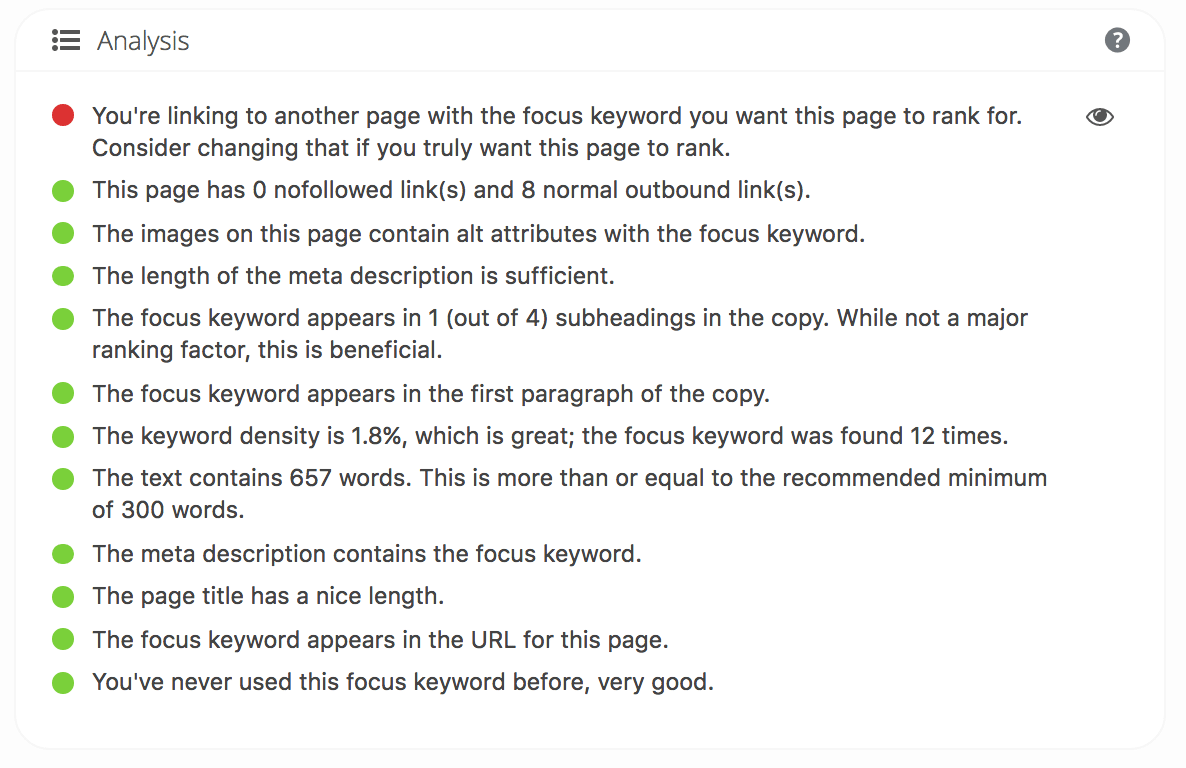
Learning how to optimize a website for search engines takes years to learn, and even then it is always changing. Nowadays, it’s a lot more than just putting some keywords in the title tag. Yoast will help you along the way and the wizard will give you advice in plain English, not complicated technical jargon.
This is how it looks when you’re working on it:
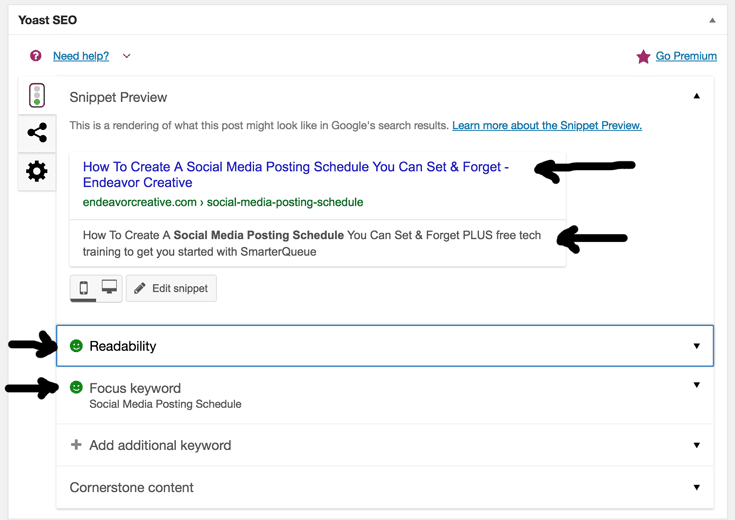
It gives you a preview of what your title and meta description look like in Google as well as giving you feedback on what Google with probably pick up as your main keyword.
Features:
- Canonical URLs
- Open graph tags for every URL
- Internal and outbound link analysis
- Overall analysis for the keywords, including previously used keyphrases
- Snippet preview
- Advice specific to your title, meta and URL
Dive Deeper:
- 10 SEO Approaches to Bring Traffic to a WordPress Site
- 9 Effective SEO Techniques to Drive Organic Traffic in 2023
- Overlooked SEO: Optimizing Images and Video For Search
SEO Image Optimizer
What It Does: Increases search traffic from Google Images by automating SEO for your images.
Skill Level: Beginner-Advanced
Free or Paid: Both, though we find the free one sufficient.
Did you know that Google Images is the second-most-used search engine? So if you haven’t optimized for images, particularly if you are an e-commerce store, you are really missing out on a lot of search traffic!
The SEO Image Optimizer plugin is essential because it is a great option for minimizing the amount of work needed to actively manage your on-page search engine optimization. We all know that using keyword-rich alt text for the images on our sites is good standard practice, but taking the time to develop this text and code it into your image files can be frustrating. Wouldn’t it be nice if there was a plugin for this?
Fortunately, there is!
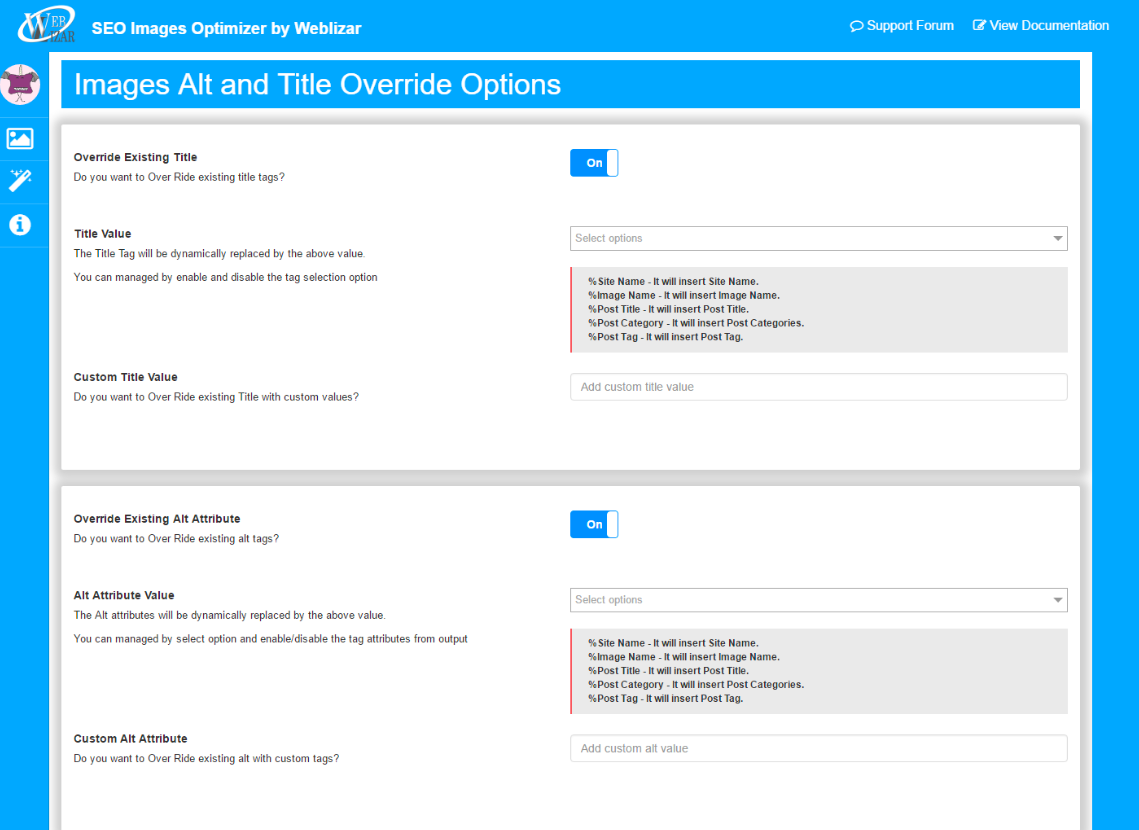
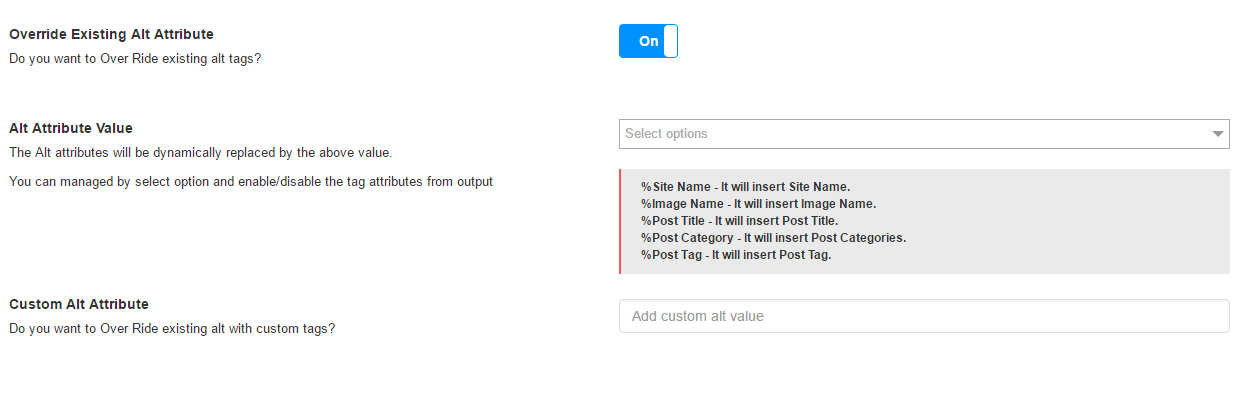
The SEO Image Optimizer plugin eliminates this extra effort by setting your alt text and image title tags automatically based on criteria specified in the plugin.
For example, using the following settings, you can set the plugin to automatically create alt text for your images by using the file name and the name of the post that the image is attached to. You can also set the title tag to pull information from a number of different parameters, including the post title (as pictured below), the image file name, the post category or the post name:
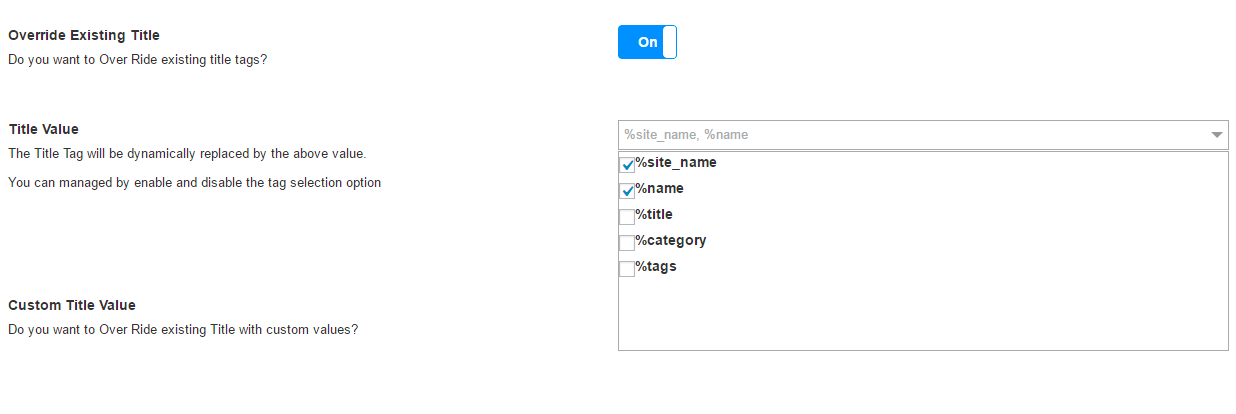
Don’t worry though – you can choose in your settings if you would rather keep some of your old titles or alts. Even better, you can customize any generated tags:
Features:
- Generates title/alt tags that are SEO friendly
- Compresses images
- User-friendly design
- Translation ready (multilingual)
- Upload resized images
Social Snap
What It Does: Helps you drive more traffic and increase engagement by leveraging the power of social media.
Skill Level: Beginner-Advanced
Free or Paid: Paid plans start at $39 per year
If you’re wondering why a plugin devoted to social sharing is in an article on WordPress SEO plugins, keep in mind that one of Google’s ranking factors is “Legitimacy of Social Media Accounts”.
In response to the following question from Search Engine Land years ago:
“If an article is retweeted or referenced much in Twitter, do you count that as a signal outside of finding any non-nofollowed links that may naturally result from it?”
Google responded:
“Yes, we do use it as a signal. It is used as a signal in our organic and news rankings. We also use it to enhance our news universal by marking how many people shared an article.”
Although there are hundreds of different plugins out there that are designed to encourage the sharing of your web content on social networking sites, Social Snap really takes the cake in terms of functionality and effectiveness.
The easiest way to get your readers to share your content on social networking sites is to use a plugin that actively encourages it.
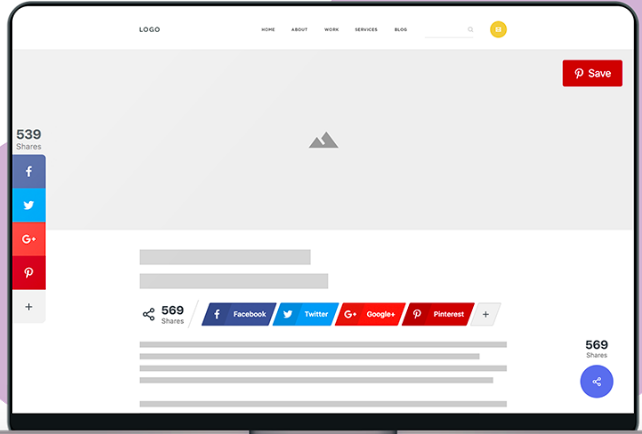
Social Snap allows you to put over 30 different social media icons on your site, and you can customize the shape, animation, color and placement – plus it counts the number of shares and likes you get:
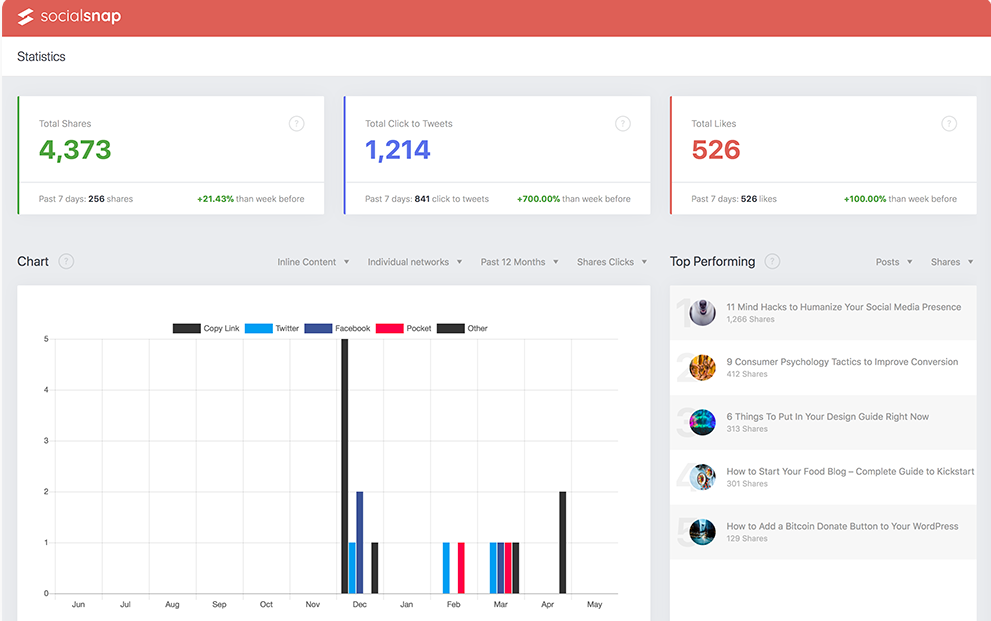
It also offers analytics, which is essential for any marketer, and some incredible features like automatically posting blogs to Linkedin, Facebook and Twitter. It will also repost old posts automatically if you so choose.
Here is an inside look at Social Snap’s analytics (if you’re wondering what you should do with social media analytics, check out this article):
It’s super easy to set up and doesn’t slow down your site the way that some social media plugins do. They don’t offer a demo, but they do offer a 100% refund within the first 30 days.
Features:
- Customize social buttons/bars
- Counts shares
- Analytics information
- Auto posting to Linkedin, Twitter and Facebook
- Minimum share count rule
- Top performing post widget
- Boosts old posts
- Social content locker
Dive Deeper:
- 7 Dead Simple Social Media Marketing Tactics That Still Work Today
- How to Boost Your Social Media Marketing Efforts with Content Marketing Tools
- The Beginner’s Guide to Crafting a Highly Effective Social Media Strategy in 2023
W3 Total Cache
What It Does: Improves the site speed of your website (remember that site speed is a Google ranking factor!).
Skill Level: Intermediate-Advanced
Free or Paid: Free
The W3 Total Cache is an essential SEO WordPress plugin because page speed is another important ranking factor. Google has made no secret about the fact that it prefers faster pages that enhance the user experience and it can estimate your site speed fairly accurately based on your page’s HTML code.
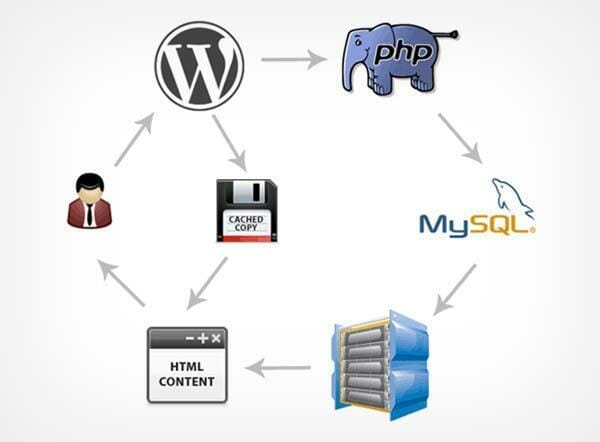
Unfortunately, WordPress blogs can be notoriously slow, considering all of the extra plugins and theme files needed to make it run effectively. This is why installing a caching plugin – which serves up stored versions of a site’s pages instead of dynamically generating them each time a repeat visitor returns – is so important.
When a person visits your website, the site’s pages have to be dynamically generated. That means it has to go through four steps to generate the page. When you use a plugin like W3 Total Cache, any returning user will just be served a cached version. That means the site only needs to go through a two-step process to serve the user a page. Therefore, the site speed becomes much faster.
And though there are plenty of different caching plugin options out here, W3 Total Cache is the industry leader in terms of the different features and functionalities offered.
Since the number of settings available may actually be overwhelming to beginning webmasters, the W3 Total Cache recommends setting the plugin to the following options (although more advanced site owners should certainly feel free to experiment with the additional options the plugin provides):
“In most cases, ‘disk enhanced’ mode for page cache, ‘disk’ mode for minify and ‘disk’ mode for database caching are ‘good’ settings.”
Features:
- Improvements in search engine result page rankings
- At least 10x improvement in overall site performance
- Improved conversion rates and site performance
- Instant repeat page views: browser caching
- Optimized progressive render (pages start rendering quickly and can be interacted with more quickly)
- Reduced page load time (increased visitor time on site)
- Improved web server performance
- Up to 80% bandwidth savings via minify and HTTP compression of HTML, CSS, JavaScript and feeds
Broken Link Checker
What It Does: Generates a list of all the broken links on your site. From there, you are able to redirect, delete or fix links.
Skill Level: Beginner-Advanced
Free or Paid: Free
Have you ever been driving somewhere and take a wrong turn only to find yourself on a deadend street? Broken links are like that.
They’re annoying and they make for a poor user experience. Unfortunately, as website owners continue to update their sites, broken links are inevitable. In fact, it is so annoying that most SEOers will even use this inevitability as a tool to get more links.
Fortunately, there is a solution. Broken Link Checker is one of the best kept secrets. This tool will scan your site (which may take some time – even a matter of days) and then provide a list of all the broken links and their error codes:
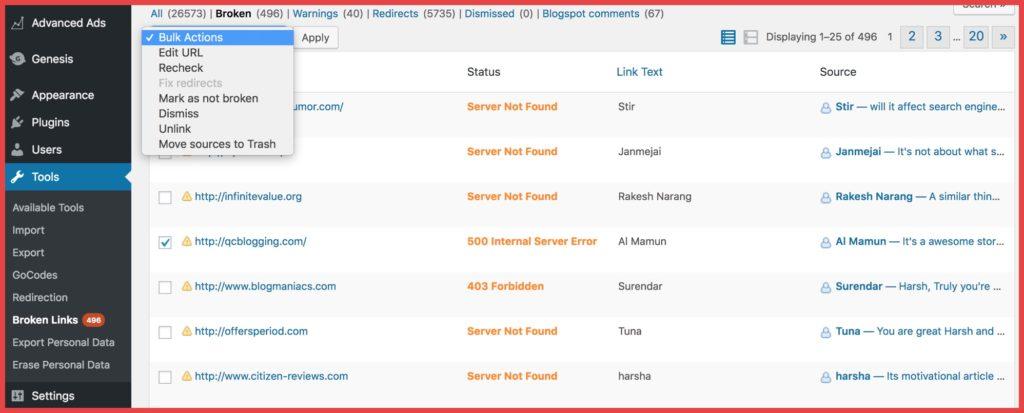
Once you find that you have broken links, you can do a couple of things. Broken Link Checker will allow you to redirect, update or delete them depending on your situation.
From there you can select the redirected links from the list that you want to change and then fix them all with just one click. Here’s how you can do that:
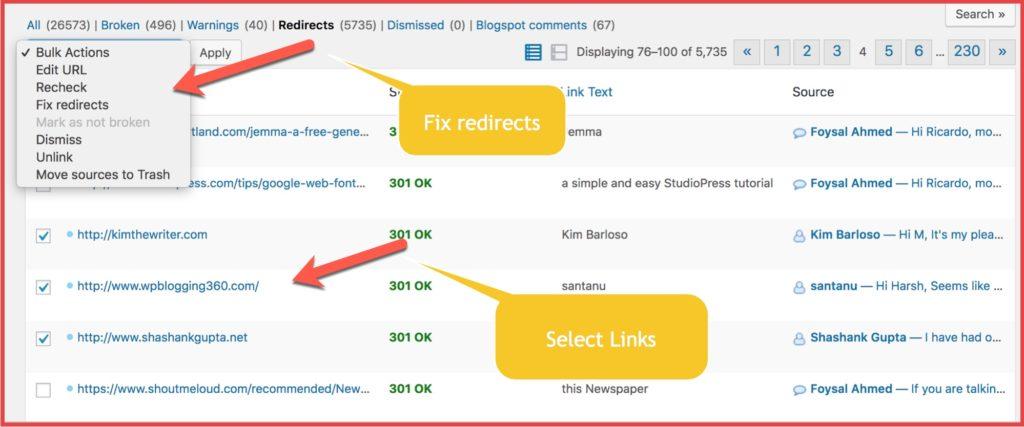
Take advantage of this tool. Broken links create a poor user experience and will annoy readers enough to force them to look for another result and, at the same time, decrease dwell time on your site.
Google follows your broken links, but this tool will automatically tell search engines not to follow those broken links. If there is a functioning link accidentally labeled as broken, you will be able to manually mark it as a functioning link.
If nothing else, if you are annoyed by people emailing you about broken links on your site, this should solve your inbox problem!
Features:
- Generates list of broken links
- Notifies you via email
- Offers bulk redirections and deletions
- Offers unlinking
- Prevents search engines from following broken links
Dive Deeper:
- The Easy Guide to Broken Link Building for SEO
- What Is A/B SEO Testing?
- The Ultimate Guide to Link Building with Content for SEO
Google XML Sitemap
What It Does: Provides a sitemap so that Google has a better crawling experience.
Skill Level: Beginner-Advanced
Free or Paid: Free
Have you ever tried to get through a maze or labyrinth? It’s nearly impossible to figure out where to turn and which paths leads where. It sure would be helpful to have a map!
What about your website? How does Google crawl that maze? The answer is to use an XML sitemap. That sounds super technical, but it actually isn’t if you use the Google XML Sitemap Plugin.
Having a sitemap is good for SEO, even if your site is well organized, because a sitemap is essentially a map of your website that contains a list of your URLs.
If your internal linking is so-so or if your overall site structure is not very clear, then search engines won’t be able to understand your structure and it will be much more difficult to rank any of your pages.
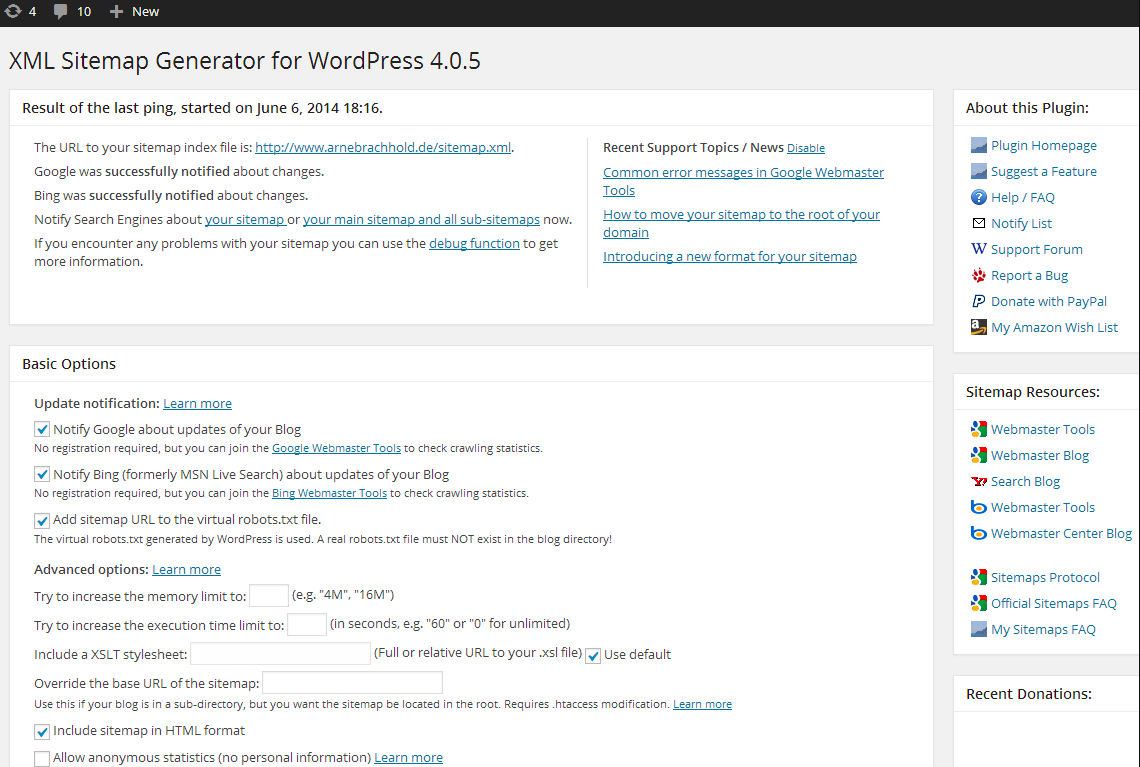
This plugin is a great way to help out Google and it won’t slow down your site or negatively affect it in any way. It has some great features, including automatically notifying Google when you post a new page and generating the sitemap.xml.
It is also perfect for non-tech people, because the default values for the configuration options are fine for the majority of sites:
Features:
- Sitemap generation
- Multi-language translations
- Custom URL support
- Improve crawl times
- Prioritize content
- Create a separate sitemap to improve image indexation
- Monitor search engine performance
Dive Deeper:
- 17 Best Free (or Freemium) SEO Tools to Improve Your Ranking
- 12 Quick Fixes to Make Your Mobile Traffic Convert
- Top 10 Mobile Optimization Best Practices For E-commerce Sites
WPtouch Mobile Plugin
What It Does: Automatically adds a mobile theme for visitors to your WordPress website.
Skill Level: Beginner-Advanced
Free or Paid: Free with paid options
If you haven’t optimized your website for mobile yet, you’re missing out on a lot of great traffic because you’ll be driving your site visitors away with your hard-to-read or maneuver site.
In fact, you are missing out on 52.2% of the traffic available:
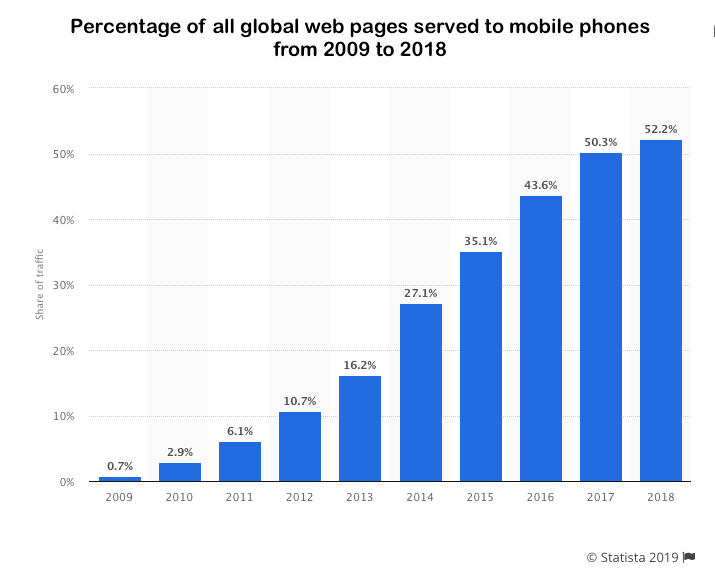
Not only are you missing out on half of all Internet traffic, but your mobile version is a direct ranking factor in Google, so this should be at the top of any marketer’s to-do list. Thankfully, this plugin can help.
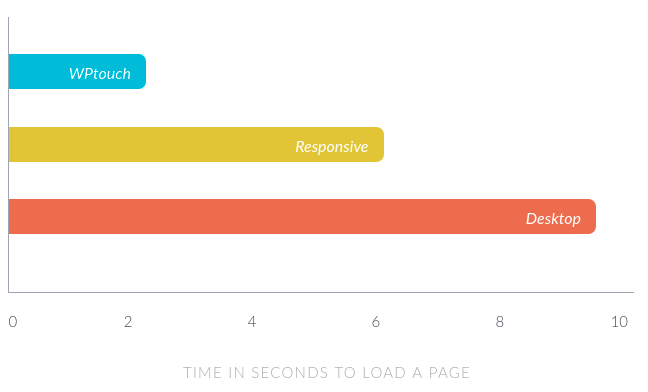
WPtouch provides a much faster response time than a responsive design or desktop:
It is easy enough to set up and will also satisfy the advanced SEOer, as it is highly customizable. From choosing the homepage of your mobile site to customizing the theme, it is ideal for targeting mobile-specific users.
Features:
- Faster response time
- Customizable theme
- Choose the device to show your site to (iOS, Android)
- Seamless integration
- Improves SEO rankings
- Easy installation
Conclusion
When it comes to optimizing your WordPress site for search engine optimization, there are hundreds of plugins that can provide a better experience for users and search engine spiders alike.
However, if your time is limited and you’d rather not sift through page after page of the WordPress plugin directory, consider adding these recommended plugins right away. They may not skyrocket your site to a #1 ranking right away, but they will go a long way towards correcting some of the SEO deficiencies that are native to the WordPress platform.



