

Design Principles for Accessibility: Creating Inclusive Experiences


Design principles for accessibility are now more essential than just creating responsive experiences and quick page loading. However, reality tells a different story. According to the WebAIM Million report, a staggering 94.8% of homepages had WCAG 2.0 failures detected in March 2025. This isn’t just a compliance issue—it’s a massive missed opportunity for businesses to connect with the 1.3 billion people worldwide who experience some form of disability. The gap between policy and practice remains substantial. As of 2024, 72% of organizations have a digital accessibility policy, according to PixelPlex.
For marketing professionals, accessible design isn’t merely about checking boxes—it’s about creating experiences that genuinely welcome everyone. Accessibility principles improve usability for all users, driving better engagement and higher conversion rates. However, many struggle to translate these commitments into practical implementations that serve real users and drive measurable results.
Here are some design principles for accessibility that everyone should know.
TABLE OF CONTENTS:
Key Takeaways
- Inclusive design encompasses creating digital experiences that are accessible to everyone.
- Accessibility principles offer more than compliance; they deliver many business benefits such as expanded reach, improved user experience, better SEO, and more conversions.
- Accessible design strategies include visual, content, and technical considerations.
- Many businesses and organizations, ranging from government agencies to e-learning platforms, have achieved success by implementing accessible design.
- The most common challenges of accessible design include balancing aesthetics and functionality, technical issues, and structuring your organization around inclusivity.
- Some of the most prominent accessible design trends include AI use, emerging compliance requirements, and integrating inclusive principles into your current framework.
Fundamental Accessibility Design Principles
Building truly accessible digital experiences begins with understanding the core principles of inclusive design. These provide both philosophical foundations and practical guidelines for creating products that appeal to all users, while promoting equality.
Universal Design Framework
Universal Design establishes that products should be usable by all people without adaptation or specialized design. This approach benefits not just users with disabilities but also improves experiences for everyone, from parents juggling a child while browsing on a mobile device to seniors with changing abilities.
“Universal Design is not a special requirement for the few but a quality requirement for the many. When we design for disability, we all benefit.” — Microsoft Design Team
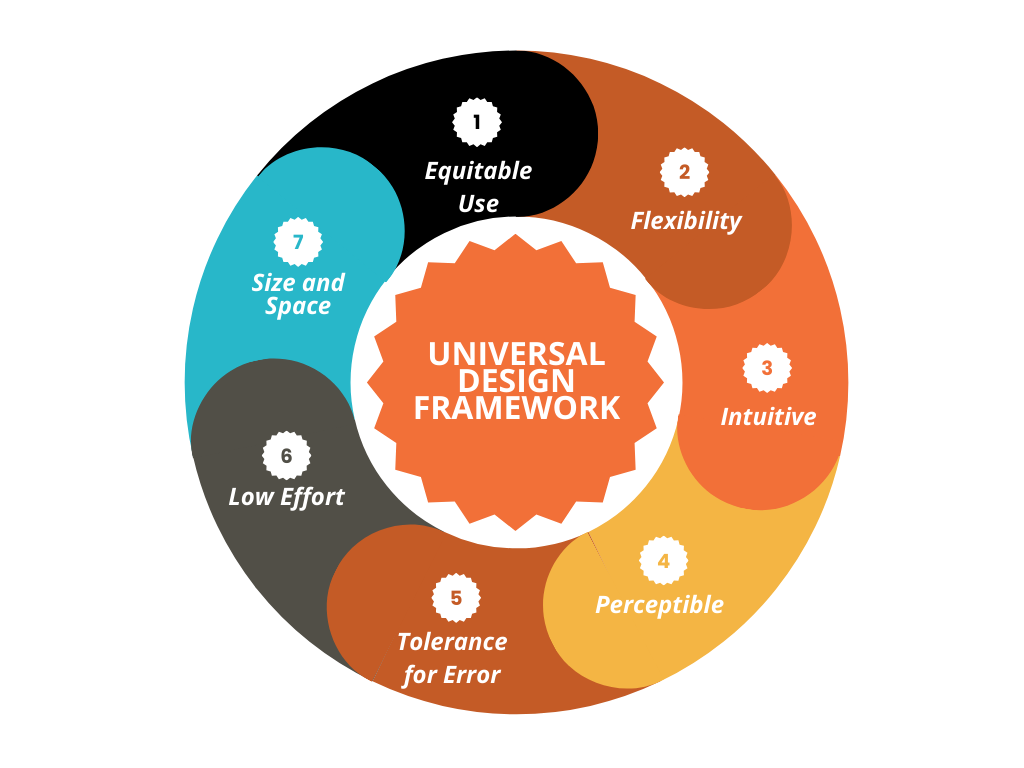
The seven principles of Universal Design provide a comprehensive framework:
- Equitable use: Designs are helpful for people with diverse abilities.
- Flexibility: Accommodates a wide range of individual preferences.
- Intuitive and straightforward: Easy to understand regardless of experience or cognitive skills.
- Perceptible information: Communicates necessary information effectively.
- Tolerance for error: Minimizes hazards and adverse consequences.
- Low physical effort: Can be used efficiently and comfortably.
- Size and space for use: Provides appropriate space regardless of the user’s body size, posture, or mobility.
These principles serve as both a philosophical foundation and a practical checklist for creating experiences that work for the broadest possible audience.
WCAG Guidelines and Standards
The Web Content Accessibility Guidelines (WCAG) provide specific, technical criteria for digital accessibility. While Universal Design offers broad principles, WCAG delivers concrete success criteria organized around four key principles:
| WCAG Principle | Definition | Key Requirements |
|---|---|---|
| Perceivable | Information must be presentable in ways all users can perceive | Alternative text, captions, color contrast ratios |
| Operable | Interface components must be navigable and usable | Keyboard accessibility, sufficient time, seizure prevention |
| Understandable | Information and operation must be comprehensible | Readable text, predictable behavior, input assistance |
| Robust | Content must be interpretable by various user agents | Compatible with assistive technologies, valid markup |
The upcoming WCAG 3.0 framework is shifting from technical requirements toward more outcome-based evaluations. For example, WCAG 2.0 separated conformance levels into three categories (A, AA, and AAA) based on how many of the criteria the page applied. In 3.0, the WCAG gives a rating range (Bronze to Gold), focusing on intuitive design and flexibility. In other words, this pinpoints how well designs meet user needs, aligning with the finding that 50% of WCAG-compliant sites still fail usability tests with users who are disabled.
The Business Case for Accessible Design
Accessibility principles aren’t just about compliance; they deliver several benefits that directly impact your bottom line. Among these are expanding your reach, improving SEO, and fostering inclusion.
Expanded Market Reach
The disability market represents a significant audience segment with substantial spending power. When you make your digital products accessible, you open doors to millions of potential customers who might otherwise be excluded from your experience.
56% of images aren’t accessible to people with visual impairments due to missing or inadequate alt text, according to AudioEye. This single oversight excludes a massive potential audience from fully experiencing your content and potentially converting.
Here are other reasons why accessible design can expand your reach:
- You’ll prove you understand user needs
- Your website will be more flexible and intuitive for a wide range of users
- Users can easily perceive your information
- Improved navigation
- Minimize effort on the user’s end
Improved User Experience for Everyone
Accessibility improvements often lead to better experiences for all users, not just those with disabilities. Include features like:
- Clear headings and structure help everyone scan content more efficiently
- Keyboard navigation benefits power users and those with temporary mobility limitations
- Captions and transcripts help users in noisy environments or those who prefer reading to listening
- Simple, clear language improves comprehension for everyone, including non-native speakers
- Contrasting colors so the text and background stand apart from each other
- Add focus indicators to improve navigation
- Legible fonts that are easy to read
- Captions on videos so audiences can watch your content without sound
The principles that drive accessible design are the same ones that create intuitive, user-friendly experiences, making accessibility a catalyst for overall UX improvement.
SEO and Conversion Benefits
Many accessibility practices directly align with search engine optimization best practices. Properly structured content, with semantic HTML, descriptive link text, and organized headings, helps search engines better understand your content, improving rankings while also making your site more accessible. In addition, design principles like easy-to-read fonts and contrast ratio are crucial for users to absorb your information and convert into customers.
Practical Strategies
Moving from accessibility theory to practice requires implementing certain principles into your website. Designers should apply these principles to design, interface, and content. Here are key strategies for marketing professionals to consider.
Accessible Content Design Essentials
Accessible content begins with these fundamental practices:
- Alternative text for images: Provide descriptive alt text that conveys the purpose of the images.
- Video captions and transcripts: Enable understanding for deaf or hard-of-hearing users while improving content searchability.
- Descriptive link text: Avoid generic “click here” links in favor of descriptive text that makes sense out of context.
- Clear headings and structure: Use proper heading hierarchy (H1, H2, H3) to create a logical document outline.
- Readable content: Write in plain language with defined terms for technical concepts.
Design and Interface Considerations
Visual design plays a crucial role in accessibility, and must be presentable to all users. Apply these key considerations:
- Color contrast: Maintain WCAG-compliant contrast ratios (4.5:1 for standard text).
- Don’t rely on color alone: Use additional indicators like icons, patterns, or text.
- Scalable text: Ensure layouts work when users increase font size up to 200%.
- Focus indicators: Make keyboard focus visible and distinct.
- Touch targets: Create buttons and interactive elements large enough for users with motor limitations.
These design considerations are also fundamental to effective e-commerce website design, where intuitive navigation directly impacts conversion rates.
Technical Implementation and Testing
Beneath the visible surface, technical implementation ensures accessibility features work correctly:
- Semantic HTML: Use appropriate elements that convey meaning (buttons for actions, links for navigation).
- ARIA attributes: Implement when HTML semantics aren’t sufficient.
- Keyboard navigation: Ensure all functionality works without a mouse.
- Form labels and error messages: Associate labels with inputs and provide clear error identification.
- Regular testing: Combine automated tools with manual testing by users with disabilities.
This technical foundation is critical for creating truly accessible experiences and avoiding common technical SEO issues that can impact both accessibility and search performance.
Real-World Success Stories
Theory becomes actionable when we examine how organizations have successfully implemented accessibility principles in practice.
Government Accessibility Transformation
The USWDS (U.S. Web Design System) faced the challenge of ensuring digital accessibility across multiple government digital products while maintaining speed, consistency, and technical accuracy in compliance with WCAG guidelines.
Their solution involved implementing robust design systems that standardized accessibility practices, including features such as high-contrast modes, customizable themes, and scalable design tokens to support diverse disability communities.
The results were impressive: measurable improvements in WCAG compliance, reduced user-reported accessibility barriers, and increased consistency in using accessible components across platforms, according to UXDesign.cc.
“Standardized design systems are key to achieving measurable improvements in digital accessibility for government platforms. The systemic approach ensures consistency, reduces development time, and improves compliance across large ecosystems.”
Educational Platform Transformation
Mindsmith, an e-learning platform, struggled with low course completion rates due to inaccessible media, complex navigation, and a lack of alternative content formats for users with disabilities.
Their comprehensive approach involved redesigning the platform by integrating high-contrast themes, scalable fonts, descriptive alt text, closed captioning, transcripts, full keyboard navigation, and simplified navigation to meet diverse accessibility needs.
This holistic implementation led to a 20% increase in course completion rates among users with accessibility challenges and elevated overall user satisfaction scores across their entire user base, demonstrating that accessibility improvements often benefit all users.
Public Infrastructure Innovation
Physical accessibility challenges often require innovative solutions as well. When Toronto’s financial district faced safety hazards for visually impaired pedestrians due to a curbless parking lot design, Tactile Solution Canada implemented tactile indicators, including guidance bars and truncated domes.
This solution achieved a drop to zero in pedestrian incidents within six months and enhanced safety perceptions, which also led to a significant increase in monthly parking pass sales. This demonstrates how accessibility improvements can deliver both safety and business benefits.
Common Challenges and Practical Solutions
Despite growing awareness of accessibility principles, challenges persist. Let’s explore common obstacles and practical approaches to overcome them.
Balancing Aesthetics and Functionality
One of the most persistent myths about accessibility is that it requires sacrificing visual appeal and creativity. In reality, the most successful implementations find ways to maintain brand aesthetics while embracing accessibility.
The Museum of Modern Art (MoMA) demonstrates this balance through:
- Transparent tactile overlays on artwork labels that preserve minimalist design
- Directional lighting that enhances visibility without creating glare for light-sensitive visitors
- AR wayfinding activated via discreet floor markers that maintain the clean visual environment
Thoughtful brand color selection also plays a crucial role in balancing visual identity with accessibility requirements like sufficient contrast ratios.
Technical Challenges
Common technical barriers include:
| Challenge | Prevalence | Solution |
|---|---|---|
| Insufficient Color Contrast | 83% of homepage elements | Use tools like ColorSafe to generate compliant palettes while maintaining brand aesthetics |
| Keyboard Trap Issues | 41% of SaaS platforms | Implement escape key handlers and visible focus indicators |
| Cognitive Overload | 68% of task abandonment | Apply progressive disclosure techniques, revealing fields sequentially |
Getting Your Staff Involved
Perhaps the most significant challenge is encouraging your staff to consistently implement these policies.
Effective strategies include:
- Executive sponsorship: Creating a secure leadership commitment to allocate resources effectively.
- Cross-functional teams: Involve design, development, content, and marketing.
- Clear standards: Establish specific guidelines tailored to your organization.
- Training programs: Enhance knowledge and understanding across all relevant teams.
- Accessibility champions: Identify advocates in each department.
Organizations that successfully implement accessibility principles typically integrate them into their workflow, rather than treating them as an add-on or a compliance requirement.
Future of Accessible Design
Accessible design continues to evolve, with emerging technologies and approaches creating new opportunities for inclusion.
AI-Powered Accessibility Innovations
Artificial intelligence is revolutionizing accessibility through tools that can:
- Generate automated alt text: Contextually describe images based on content and purpose.
- Provide real-time captioning: Create accurate transcripts for video and audio content.
- Simplify interfaces: Adapt presentations based on individual user needs.
- Enhance navigation: Create personalized wayfinding for physical spaces.
These technologies help bridge the implementation gap by automating complex accessibility tasks while allowing for human oversight to ensure quality and context.
Emerging Standards and Regulations
The regulatory landscape continues to evolve, with 2025 seeing 14 countries adopt the European Accessibility Act’s digital requirements, which mandate accessible e-commerce platforms and mobile apps. The U.S. Department of Justice now treats inaccessible websites as Title III violations under the ADA, with 4,605 lawsuits filed in 2023.
These developments signal a shift from viewing accessibility as optional to recognizing it as a fundamental requirement for digital presence.
Integrating Accessibility Into Design Systems
The most sustainable approach to accessibility is embedding it directly into design systems that standardize components and patterns across digital products.
This systematic approach ensures that:
- Accessibility is built-in rather than bolted-on.
- Teams can implement accessible solutions consistently.
- New products and features inherit accessibility by default.
- Ongoing maintenance becomes more manageable.
This shift from project-based fixes to system-level solutions represents the future of sustainable and scalable accessible design.
Apply These Design Principles for Accessibility
Design principles for accessibility aren’t just about compliance—they’re about creating experiences that welcome everyone and drive better business results. That said, the gap between inclusive design and implementation represents both a challenge and an opportunity for marketing professionals. The most successful organizations don’t view accessibility as a constraint on creativity but as a catalyst for specialized design, pushing teams to find innovative solutions that work better for everyone.
Ready to transform your digital experiences through accessible design principles? Work with the leading digital marketing agency that understands how to balance accessibility requirements with compelling, conversion-focused experiences.



