Offline Conversion Tracking: Track In-Person Appointments


Tired of Google Ads counting no-show bookings as wins while you wonder if offline conversion tracking can fix it? Before you defend that report to finance, look at what happens after the booking.
So, what exactly is offline conversion tracking? Simply put, offline conversion tracking connects a later business event, like an attended visit, back to the ad interaction behind it.
It seeks to answer these questions: Did the customer show up, did the visit reach Google Ads, or did it vanish somewhere between the booking desk and the import? If you plan to use the report to justify more spend, you’ll want this answer first.
This guide starts at the booking desk and works back toward the ad. Along the way, you’ll check the customer match, the status update, and an import you can inspect before you change a bidding goal.
TL;DR
- Define attendance before building the import. Give a confirmed booking and a completed visit separate milestones.
- Preserve the match through every handoff. Keep click identifiers and permitted customer data attached to the appointment.
- Check the upload before changing bidding. Inspect rejected events, duplicate handling, and conversion times.
- Compare visits using consistent dates. Let appointments happen before judging campaign quality.
TABLE OF CONTENTS:
- What Offline Conversion Tracking Adds to Appointment Reports
- A Single Grain Campaign Behind This Approach
- Google Ads Offline Conversions: Choose the Matching Method
- Build an Appointment Record You Can Audit
- Validate the Import Before Changing Bidding
- Choose an Appointment Goal for Bidding
- Read Appointment Performance Without Losing the Customer Journey
- Make Attendance Usable in Google Ads
What Offline Conversion Tracking Adds to Appointment Reports
Attendance data is the starting point. Ask the booking-system owner who updates the field after a visit and where its timestamp lives. You need both answers before a connector has a dependable event to export.
Booking Confirmation vs. Attended Visit
Offline conversion tracking connects a later business event with an earlier ad interaction. For this workflow, the booking system supplies the attended visit and Google Ads receives an eligible import. The confirmation page records the booking; the attendance status supplies evidence of the visit.
Attendance Rules and the Import Workflow
The integration needs a written definition of a completed appointment. Include how staff record a reschedule and which status qualifies for export. An unused field leaves reporting gaps even when the upload succeeds.
The form collects identifiers, the CRM retains the contact relationship, and the import carries the eligible event into Google Ads. Keep this workflow separate from Google’s modeled store-visit reporting. A real agency example shows why a recorded outcome matters before you judge the campaign.
A Single Grain Campaign Behind This Approach
This example involves agency leads, but it gives you a way to examine a handoff between acquisition and sales. Apply the same inspection to appointment records while keeping the results of each workflow separate.
A Paid Media Campaign Connected to HubSpot
At Single Grain, my team built a Meta campaign with HubSpot connected and an offer of an AI visibility report and citation maps.
My team judged the campaign by its connection to a sales outcome: sales-qualified leads arriving from the funnel, tracked in HubSpot. For an attended-appointment import, you need the same connection to a verified visit.

For your booking funnel, name the visit milestone you want to inspect. Keep its source appointment available when an ad total looks surprising. Trace a reported visit back through the CRM relationship before accepting the campaign total.
Carry the Booking ID Through Phone Handoffs
A booking ID that travels through a phone handoff lets a later visit refer to the same appointment. Single Grain’s guide to inbound call tracking for Google Ads covers measurement for phone bookings. A staff member’s remembered source can add context, but it can’t recreate a missing click identifier.
Every handoff points to the same requirement for the import. Keep enough of the original record to check what happened after the lead arrived.
Google Ads Offline Conversions: Choose the Matching Method
Which matching method can your booking platform actually support? Google’s offline conversion setup guide recommends enhanced conversions for leads for a new implementation. Check the events available through your platform’s supported connection before choosing the route.
Ask the developer to name the source field and destination for an attended event. An integration page with a CRM logo leaves this question open. Pin down the event mapping before spending time on the upload.
Preserve the GCLID Through the Booking Form
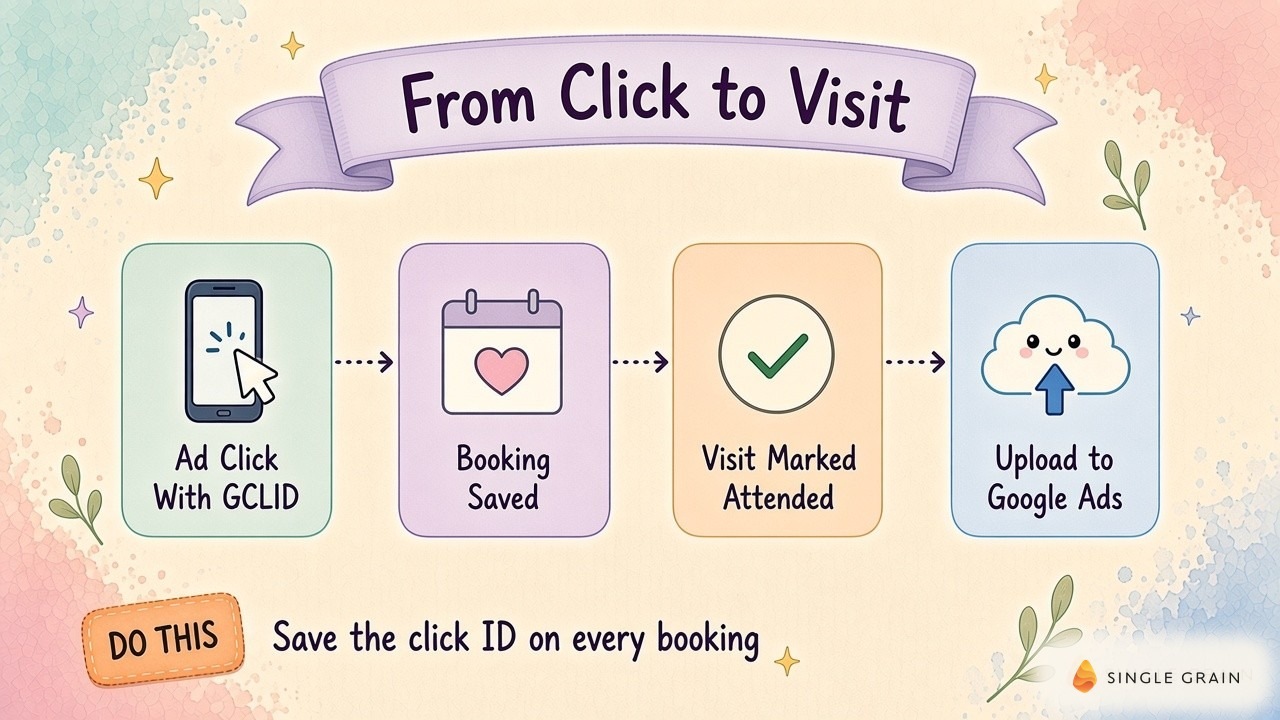
The GCLID has to survive exactly as captured. Google’s setup guide calls for auto-tagging for this method and specifies case sensitivity. Reject spreadsheet transformations which alter capitalization, and inspect redirects or a separate booking domain for dropped parameters.
Follow a complete booking journey with your developer. Check the landing page, submit the form, then open the saved CRM record and inspect its appointment relationship. Trace the identifier across each handoff; a populated hidden field on the landing page only proves collection worked at the start.
Match Customer Data With Enhanced Conversions for Leads
Google’s enhanced conversions for leads documentation describes matching imported hashed customer data with information collected by the website tag and signed-in Google accounts. Check the website collection alongside the later import. An email column alone leaves the rest of this setup unverified.
Retain existing GCLIDs in uploaded events where possible, as Google advises. Follow your selected connector’s normalization and hashing instructions. Check where each transformation happens so the same field doesn’t get transformed twice.
Have the appropriate privacy owner review the fields before enabling the export. Keep clinical notes, treatment details, and other sensitive appointment content out of advertising uploads. Reserve the export for permitted information required by the chosen measurement method.
The match fields need a stable appointment relationship. Otherwise, a reschedule can leave you chasing a contact with no clear visit attached.
Build an Appointment Record You Can Audit
An auditable record treats the appointment as the unit of work. Keep its ID, linked contact, location, scheduled time, and current status in the source system. Store the matching fields supported by your integration alongside this relationship.
Separate the scheduled time from the actual event time. When a visit moves, the attended event should carry the time attendance happened. Reserve another field for upload time so a delayed export doesn’t look like a delayed visit.
Keep an export log with the appointment ID, conversion action, event time, and import result. It gives the marketing manager a direct route from a conversion total to the appointment behind it.
Separate Booked, Attended, and Sold Milestones
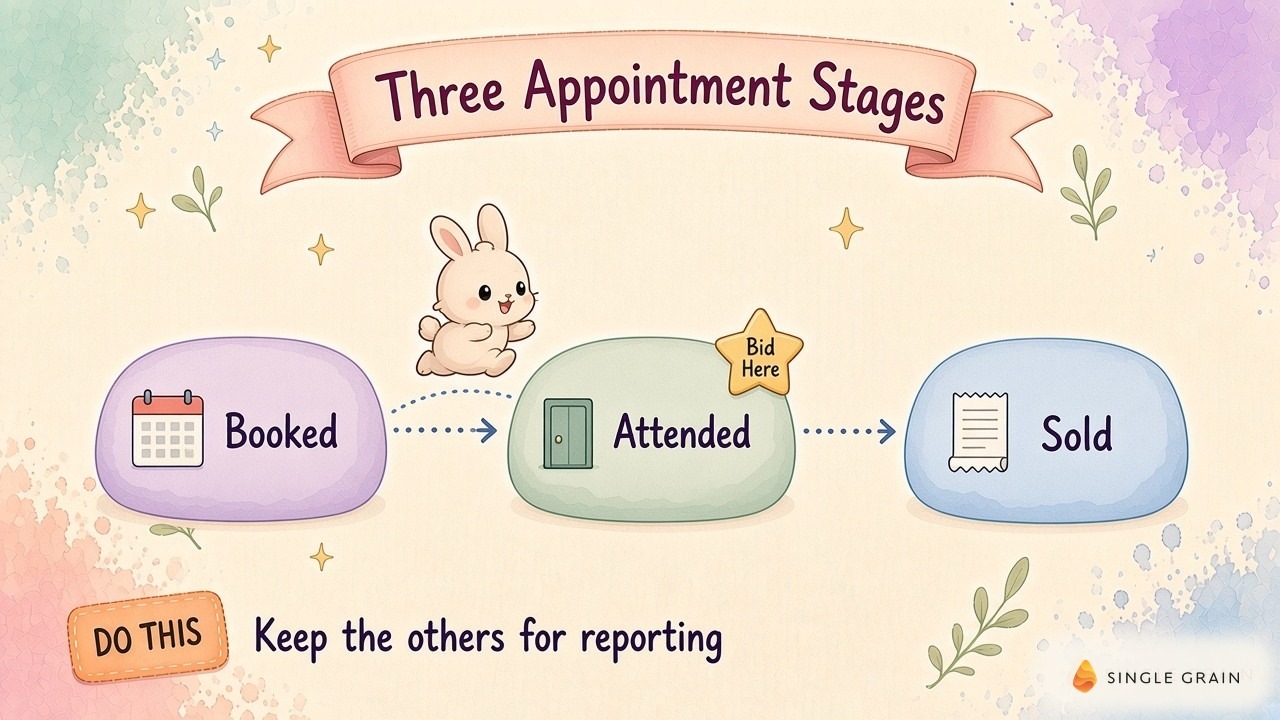
Give booked, attended, and sold their own milestones. Booked means confirmed; attended requires a documented visit. Sold needs the purchase event your business recognizes, while cancellations and no-shows remain available for diagnosis.
Before writing duplicate rules, check how your booking platform handles a reschedule. It may edit an existing appointment or create a replacement. Preserve the relationship between replaced and replacement records, and distinguish a returning customer’s separate visits.
| Pro-Tip |
|---|
| Ask the booking-system owner to open a completed visit and show its status and timestamp. Then inspect a rescheduled record alongside it. Compare the records against the proposed export rule before approving the mapping. |
You can settle a lot of import arguments with the source record open. Next, follow the eligible event into the account and inspect what Google Ads accepted.
Validate the Import Before Changing Bidding
The bidding change can wait while you validate the import. Create clearly named conversion actions for the milestones you plan to report. Map each source event to its destination and name the owner of each mapping.
Use Single Grain’s Google Ads conversion tracking setup guide for the account-side review. Keep the source mapping beside the account settings as you check them. A familiar action name can still conceal the wrong event.
For an inherited upload script, check the supported route before reusing it. Google’s enhanced-conversions documentation includes a notice about moving uploads to the Data Manager API. Confirm the current supported Data Manager connection or integration for your account.
Check Offline Data Diagnostics After Each Import
Open Google’s offline data diagnostics after an import. Inspect rejected events and their reasons, then route missing or malformed fields back to the source owner. Keep the rejected records available for correction; a completed job alone doesn’t tell you which events were usable.
Check timezones and the selected method’s conversion windows against Google’s offline import troubleshooting documentation. Preserve the actual event time during a retry. Changing a timestamp to force acceptance leaves a false appointment history.
Handle Replays and Upload Schedules
Ask the developer to document how the connector recognizes an exported appointment event. Check how it handles a replay and how a correction reaches Google Ads. A contact email alone can’t distinguish separate visits by the same customer.
Pick an upload schedule operations can maintain. Monitor the delay between a completed visit and its export, including time spent waiting for staff to update attendance. Only then can you judge whether the information arrives soon enough for your campaign decisions.
Choose an Appointment Goal for Bidding
Would you trust this attendance report with more budget? Check coverage by location and appointment type before switching the goal. A branch with missing status updates can look less productive even when customers arrive.
Attendance can help when bookings include cancellations and no-shows. A completed sale sits closer to revenue, but may arrive later and less often. Choose a stage with enough reliable, timely information to support the bidding decision.
Google’s primary and secondary conversion guidance explains how actions participate in bidding, including secondary actions used in custom goals. Inspect campaign goals alongside each action’s label. The label alone won’t settle how the campaign uses the event.
Check Conversion Values Separately From Counts
Values deserve their own check, separate from event counts. If booked, attended, and sold all participate in a value goal, inspect whether their values overlap. Document estimated values and reconcile realized sales values with finance before relying on the total.
Repair incomplete branch records before moving budget on the strength of an attendance comparison. Keep location identifiers consistent in the reports you use to investigate each branch. Otherwise, the same location can become difficult to trace across acquisition and booking data.
For location planning beyond paid search, Single Grain’s guides to enterprise local SEO and local SEO for multi-location brands in AI search cover discovery. Keep this broader acquisition picture available when reviewing branch performance. The appointment report still needs its own date checks before you compare campaigns.
Read Appointment Performance Without Losing the Customer Journey
A good report review starts with dates. Align campaign spend with the corresponding attributed attended conversions when calculating cost per attended appointment. Keep the operational attendance rate for booked appointments separate, since it includes bookings across sources.
Google’s troubleshooting guide explains conversion-time columns for comparison with event-based records. Use the corresponding dates when reconciling the booking system with Google Ads. Keep upload dates in the export-health report, where they help explain processing delays.
Give each booking cohort time to reach its appointment dates. A recent booking can still have its visit ahead of it. Compare cohorts with a similar opportunity to attend, then inspect cancellations and missing statuses separately.
Compare Imported Visits With Sales Conversations
It also pays to ask new customers how they found you. A prospect might name Google or an AI assistant even when an earlier video, podcast, or referral first introduced them to the brand.
Keep source conversations alongside attribution reports. An eligible imported visit connects an outcome to an ad interaction, while earlier influence and incremental demand still need investigation. Single Grain’s guide to revenue attribution with GA4 and your CRM covers reconciliation across these records.
When Cost per Attended Visit Rises
When cost per attended visit rises, inspect the booking cohort and location coverage before changing the ads. Resolve missing statuses and date mismatches so the campaign manager has a specific explanation to test. Single Grain’s advanced ROAS strategies with Smart Bidding covers subsequent bidding decisions.
Finish the review with the disputed appointment record still available. It gives the next campaign decision a source you can return to when the numbers change.
Make Attendance Usable in Google Ads
Attendance becomes usable once a visit status has an owner and a record you can trace. Preserve its match data, validate the import, and review campaign goals before promoting attendance into bidding. Follow an attributed visit back to its source appointment before using the report to justify more spend.
Need help connecting appointment outcomes to campaign decisions? Single Grain’s paid advertising team can help review your measurement and campaign strategy. Contact Single Grain to discuss your setup.
Frequently Asked Questions About Offline Conversion Tracking
-
How can I track offline conversions in Google Ads?
Capture the GCLID and contact details when people book, store them with the appointment, then upload conversions to Google Ads through imports, Data Manager, or a CRM integration.
-
When should I use offline conversions?
Whenever the valuable outcome happens away from your website, such as appointments, in-home estimates, test drives, or sales after a meeting.
-
What's the difference between GCLID import and enhanced conversions for leads?
GCLID import matches using the click ID. Enhanced conversions for leads uses hashed customer data like email to improve matching. Many teams use both.
-
Which appointment stage should I bid on?
Often the attended stage, since it removes no-shows without waiting too long for a sale. Keep booked and sold as secondary for reporting.
-
How often should I upload offline conversions?
Frequently, ideally daily, so bidding uses fresh data.